![[Visual] Data connect homepage stock image](http://images.ctfassets.net/gwbpo1m641r7/5U9V0n65sv32f3jWWgZcc7/2b4990d3fc560a6b38f7bd137a078c46/AdobeStock_283571591.jpeg?w=1280&q=85&fit=scale&fm=avif)
How much of your day is actually spent on analysis? As every function becomes more data-driven—from assessing marketing campaign performance to prioritizing product roadmaps—the requests to build reports and prepare data pile up fast.
Suddenly, your team is seen as a bottleneck. The queue never shrinks, leaving little time for your own work and leading to stalled progress, missed opportunities, and burnout.
Contentsquare’s AI, Sense, changes the equation. It helps data teams shift from reactive to proactive, so you can win back time, scale your team’s impact, and focus on the valuable work that only human analysts can do.
Read on to learn five ways to use Sense to save time, uncover insights faster, and become a true strategic enabler.
Key insights
AI-powered analytics helps analysts support more teams without adding headcount or sacrificing data quality.
The role of the data teams is evolving. You’re spending less and less time on pulling data and building reports, and more time on validating findings, adding context, and guiding business decisions.
Help teams self-serve with confidence by sharing starter prompts, use cases, and best practices. Check out the rest of this Sense guide for practical, role-specific examples.
1. Win back time with self-service analytics
The problem: a constant stream of “Can you just pull this for me?” requests turns the data team into an internal help desk. Analysts lose time to repetitive work, while other teams wait for answers.
How Sense helps: Sense lets marketers, product managers, and UX teams ask questions about digital behavior in natural language and get instant answers—no technical expertise (or data analyst resources) required.
Teams can ask questions like:
Why did checkout drop-offs increase this week?
How do mobile users behave differently on the homepage?
Which content drives the most engaged sessions?
Sense automatically routes the question to the right Contentsquare capability, like Journey Analysis, Funnels, Heatmaps, Session Replay, Error Analysis, or Acquisition. It then returns data-backed answers and visualizations.
The results: teams can self-serve with fast, accurate data. With fewer requests, analyst backlog is cleared, enabling you to focus on more proactive, strategic, and higher-impact initiatives.
![[Blog] Predictive personalization - Chat with Sense IMAGE](http://images.ctfassets.net/gwbpo1m641r7/3wip4WxYJoS5FmgPfgPdWh/1fb05bc1303bf598e89f38a6b504a451/Journey_analysis_-_Exitanalysis.png?w=1280&q=85&fit=scale&fm=avif)
2. Run complex analyses faster
The problem: analysts are under pressure to deliver actionable insights ASAP. But in-depth analyses can take hours or days, requiring you to jump between multiple capabilities to find connections, form hypotheses, and recommend solutions.
How Sense helps: use Sense Analyst to build and execute complex, structured analysis plans.
Sense Analyst runs multiple analyses simultaneously in seconds. It automatically configures dates, filters, segments, and Contentsquare capabilities to choose the right analysis for your query.
Useful prompts include:
What journeys do converting users take vs. users who bounce? Identify the biggest differences in navigation, engagement, and frustration signals across both mobile and desktop. Explain which behaviors are associated with conversion and suggest opportunities for testing.
Analyze all user sessions from the past 90 days and identify distinct behavioral user personas. Group by common paths, engagement patterns, and conversion likelihood. Suggest five top personas to focus on over the next 30 days.
Compare checkout drop-off rates this week vs. last week. Identify the top friction points in my checkout journey and quantify their impact. Recommend 5 next steps to improve conversion, prioritized by potential revenue uplift.
Sense Analyst delivers a high-level summary, visual evidence, behavioral insights, and recommended next steps, so you can quickly go from question to action. Analysts can then review the evidence, including Session Replay clips, and add the context stakeholders need.
The results: analyses that used to take half a day or more become instant. Teams get clear, data-backed recommendations for what to do next to drive results—accelerating speed to insight (and impact).
Pro tip: once you’re happy with your prompts, save them as templates for future use. Templates can be reused across projects and shared with your team for faster, more efficient workflows.
3. Power advanced analyses with connected data
The problem: behavioral data often sits separately from the business data used to measure revenue, retention, and customer value. This makes it difficult to connect what users do with the outcomes that matter most.
How Sense helps: Data Connect automatically exports behavioral data to your warehouse of choice and combines it with data from other sources to power custom analyses and models.
With Data Connect, Contentsquare data—like sessions, pageviews, events, errors, and frustration signals—lands clean, pre-defined, and ready-to-use, without the need for custom APIs or manual transformation.
Once it’s in your warehouse, combine behavioral insights with other business data like:
Transaction and customer data from your CRM
Business data from your enterprise resource planning (ERP) software
Support tickets from your service desk
Then, use this connected data to fuel advanced use cases, like:
Building churn prediction and prevention models enriched with frustration signals
Creating executive dashboards in Tableau, Looker, or Power BI
Querying Contentsquare data via SQL alongside any other data source
The results: teams have one source of truth for all data, breaking down silos, creating a shared language across the organization and connecting behavior to outcomes to show you not just what happened, but why.
![[Visual] Snowflake Data Connect](http://images.ctfassets.net/gwbpo1m641r7/XD0HMUel17YEIotdFwjZe/d42434755152cda578511d50e1babfc4/Key_feature_-_8.png?w=1280&q=85&fit=scale&fm=avif)
Data Connect turns complex data from multiple sources into unified, actionable insights that provide direction for the overall development of our digital platforms. We no longer need to take a shot in the dark and can make smarter, more informed decisions.
4. Bring Contentsquare data into your existing workflow
The problem: switching between tabs and tools is a productivity killer, and navigating dashboards, segments, and reports slows down analysis.
How Sense helps: use the MCP server to bring Contentsquare data into the environments your organization works in every day.
Connect your preferred AI tool—like Claude, Dust, Microsoft Copilot, ChatGPT, VS Code, or Cursor—with a one-time setup that takes less than an hour. Any team member can ask questions about user behavior in natural language and get immediate answers, all from the platform they’re already using.
For example:
Data analysts pull Contentsquare metrics into their existing AI-powered analysis workflows
Engineers troubleshoot JavaScript errors in VS Code or Cursor without leaving their environment
Product managers query post-release behavior from their AI assistant to troubleshoot adoption blockers
The results: behavioral data is brought directly into where people work, reducing barriers to adoption. AI tools can also combine data from multiple MCP-enabled sources to provide connected insights.
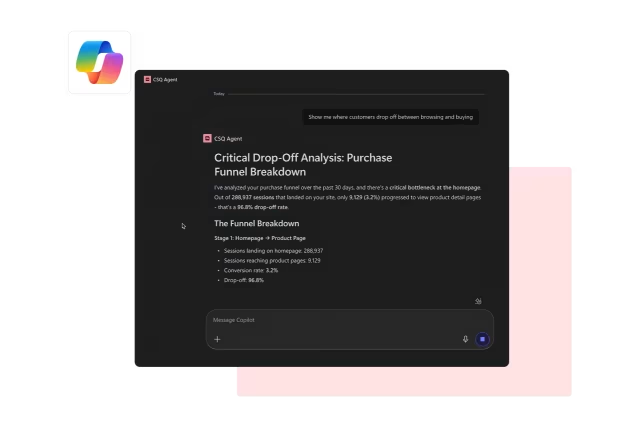
With MCP, you can pull your experience data directly into wherever you're already working, whether that's Claude, Jira, or another tool, without switching context. Criteo is already using it to combine experience data with customer feedback for smarter prioritization. That's the real promise: not just data access, but better decisions, faster.
5. Automate monitoring at scale
The problem: your team is stretched thin managing analysis across multiple stakeholders and projects. This leads to finding problems too late, alert fatigue, and difficulty separating the signal from the noise—making it hard to identify what matters and what to prioritize.
How Sense helps: proactively spot risks and opportunities in Sense Newsroom—no report-building necessary.
Newsroom automatically surfaces must-know information using AI-generated insight cards, organized into five categories for at-a-glance insights:
Critical: a significant change or issue that requires urgent attention
Opportunity: a positive signal that teams can expand on to improve engagement, conversion, or revenue
Win: positive results from a recent change, campaign, or optimization
Risk: a negative trend or anomaly worth investigating further before the impact grows
Info: a non-urgent finding that helps teams understand the broader picture
Open any card to get more information, explore the insight further, and ask follow-up questions in Sense Analyst.
Pair this with scheduled Sense Analyst prompts to create a fully automated monitoring layer that enables you to stay ahead of issues and focus your time where you can have the greatest impact.
The results: spot issues before they affect outcomes at scale, prioritize what needs urgent attention based on estimated business impact, and act quickly to recover revenue. Instead of manual, repetitive reporting, analysts spend time where it matters: designing the monitoring system, interpreting what it finds, and guiding next steps.
![[Visual] Sense Analyst](http://images.ctfassets.net/gwbpo1m641r7/1xaTTHn63RUdNDhunyhRr3/0b7eab44c91ebc175769ccf6b0246a0b/Sense_Analyst.png?w=622&q=85&fit=scale&fm=avif)
Pro tip: Sense helps you stay on top of technical performance monitoring, too. Newsroom proactively surfaces anomalies in metrics like error rates and page load times before users report them, so you can ship fixes faster and reduce end-user frustration.
From bottleneck to business advantage
Sense wins back time for your data team, extending your capacity and impact without adding headcount. Everyone across the organization can self-serve on data, make informed decisions, and innovate faster.
The repetitive, low-stakes tasks that used to fill your backlog are automatically handled. And as the questions that reach your team become more complex, strategic, and valuable, Sense speeds up in-depth analyses, helping you quickly move from “what happened” to “what to do next.”
All of this frees you to do what you do best: solve the problems that matter most to your business.
FAQs about Sense for data teams
Sense is Contentsquare’s built-in AI layer. It lets you ask questions about user behavior and digital experiences in natural language, then surfaces, analyzes, and summarizes relevant data across Contentsquare capabilities.

![[Visual] stock woman with 2 computer screens](http://images.ctfassets.net/gwbpo1m641r7/6vPvGMnUXFrEYOQUzrQhiW/43c9f93a0d1772ff652e6e427ce1af2c/AdobeStock_899206281.png?w=624&q=85&fit=scale&fm=avif)
![[Visual] AI analytics home - stock](http://images.ctfassets.net/gwbpo1m641r7/64i3HakmQ9aHWYWEEqpFUM/f1d5d2a41b5c7d7a523a34b58bd50ece/AdobeStock_634961399.png?w=624&q=85&fit=scale&fm=avif)