![[Visual] Content feedback - stock image](http://images.ctfassets.net/gwbpo1m641r7/3VIxae9gYdfHTaMYr25eph/96af0a02a3248b25f83d10b360591acc/Magic_Oil_-_Photo_4.jpg?w=1280&q=85&fit=scale&fm=avif)
Your conversion rate slips overnight, and everyone in the standup wants to know why. The answer sits buried across dashboards and reports, so you wait a day for a specialist to pull it, and by the time it lands, the launch review has already ended.
Pairing Contentsquare with Dust AI agents fixes that: you ask questions in plain language inside the tools your team already uses and get an answer you can act on right away.
This guide shows digital, product, UX, marketing, and data teams how to query Contentsquare data with Dust, with real use cases and examples to follow.
Key insights
You ask in plain words and get something you can share: an AI agent turns your behavioral question into a written brief or report, so you skip the dashboard and hand your team an answer they can act on
You close the gap between spotting a problem and fixing it: the integration surfaces what users do, the agent acts on it, and the result of each fix feeds your next decision, so the work keeps moving in a loop
You prioritize by cost, not by guesswork: because each friction point carries a revenue figure, your team can rank problems by what they actually cost and start with the fix that matters most
Some answers arrive without you asking: an agent can run on a set schedule and email a summary, or push findings into your connected tools, so the right people see them before anyone thinks to look
What is the Contentsquare MCP connector for Dust?
The Contentsquare MCP connector for Dust lets Dust AI agents pull behavioral data through the Model Context Protocol, so your team can ask a question in plain language and get an answer—no dashboard required. It launched publicly in 2026 and is available to customers of both platforms.
Two things make that possible:
The Model Context Protocol (MCP) is an open standard. Think of it as a universal adapter that lets any compatible AI agent connect to an outside data source, with no custom code for each pairing.
Dust is an enterprise platform for building, deploying, and managing AI agents. It connects to the tools your team already uses, like Slack, Notion, Google Drive, GitHub, and Salesforce.
Put simply, the connector gives your Dust agents a live line into behavioral analytics. Instead of a person exporting numbers and reading them, the agent reads the data and sends back an answer.
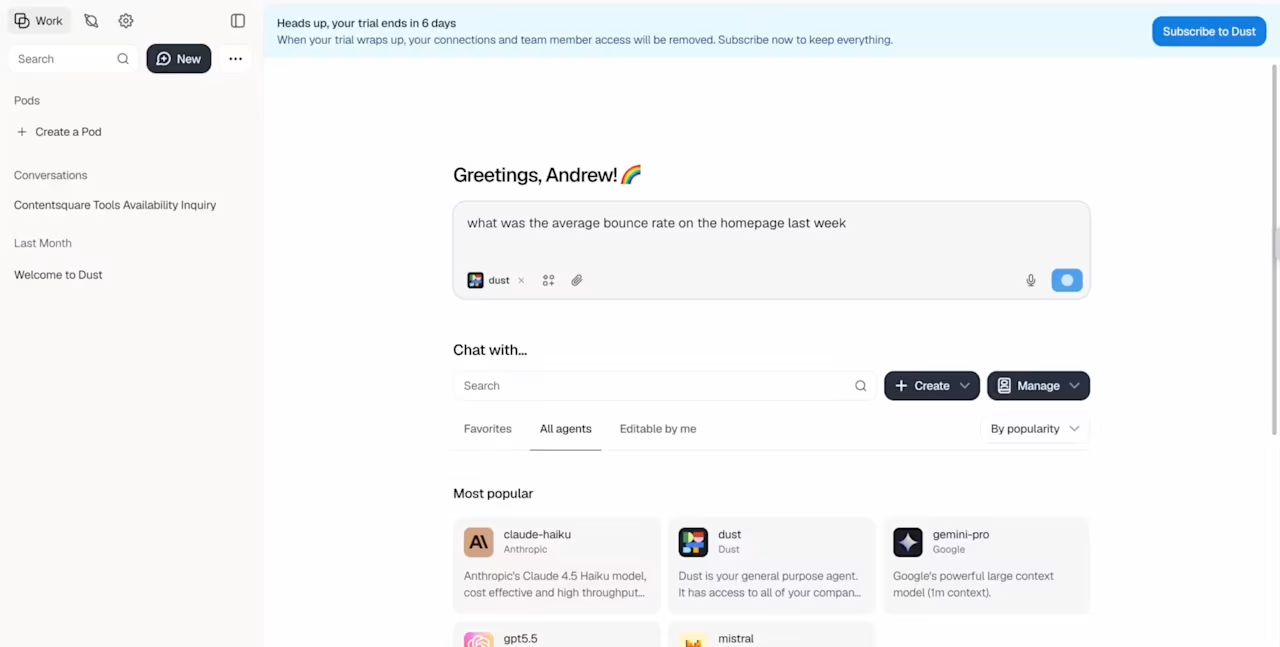
Ask Dust questions about your data and get instant answers
How the connector works inside Dust
The flow is simple. A team member opens a Dust agent that's set up with the connector and asks a behavioral question. For example: "Where are users dropping off in our checkout this week, and which devices are most affected?"
The agent calls the Contentsquare tools through MCP, pulls the live data, and turns it into a written answer.
From there, that answer becomes the starting point for whatever comes next. It might be a short analysis, a structured brief, an emailed digest, or an input to another connected system. No one has to open the Contentsquare platform to get it.
Set-up is a one-time job for your IT or data team. After that, there's no login and no training for the people asking questions. They just type what they want to know.
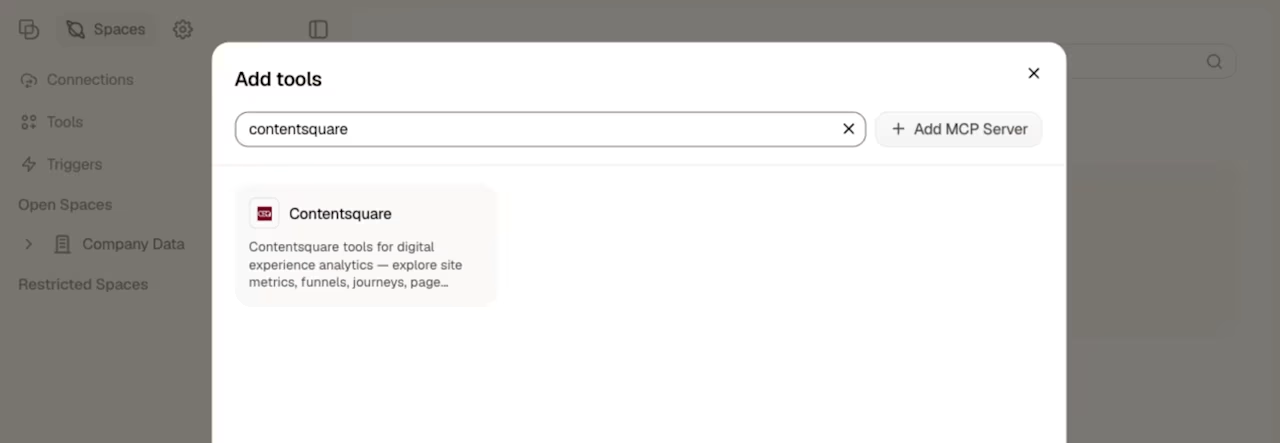
The connector runs on the same technology behind Sense, Contentsquare's AI that answers questions about user behavior in plain language. That's what lets an everyday question return a precise, data-backed answer.
Why Dust and Contentsquare work better together
On their own, each platform solves half the problem. Together, they close the gap between understanding user behavior and getting that understanding to the people who can act on it.
Here's what each side brings:
Contentsquare captures the behavior: it records how real users move, click, and hesitate, then puts a revenue figure on the friction it finds
Dust acts on it: it makes that behavioral data queryable in plain language, then drafts reports, routes findings, updates knowledge bases, or triggers workflows, all with permissions built in
That pairing creates a repeatable loop:
Users interact with your product. Contentsquare captures behavioral signals, such as funnel exits, errors, and journey paths
The connector surfaces the data. It makes those signals queryable in plain language, and returns current metrics and ranked friction points.
The Dust agent acts on the insight. It writes a report, drafts a brief, sends a digest, or updates a knowledge base.
The fix ships and the loop restarts. Contentsquare captures how users respond, so your next decision runs on real data.
Pro tip: Contentsquare’s Impact Quantification tool is the piece that puts a revenue figure on each friction point. That way, the loop prioritizes the fixes that matter most.
What are some use cases and examples of Contentsquare's MCP for Dust?
Each example below follows the same shape: a question asked in plain language, and an output your team can act on. Use cases 1 to 4 need only Dust and Contentsquare. Use cases 5 and 6 add value when you connect tools like Slack or Jira.
1. Funnel drop-off analysis brief
When conversion slips, you need to know exactly where users are leaving and what it's costing. A Dust agent can query your funnel data and create a prioritized brief instead of a raw dashboard view.
Contentsquare’s Funnel Analysis tracks how users move through a set sequence of steps and highlights where they drop off. Impact Quantification then attaches a revenue figure to each drop-off, so the agent ranks problems by cost, not just volume.
Sample prompt: "Analyze our onboarding funnel, steps 1 through 5, in Contentsquare. Identify the two biggest drop-off points, and for each include the drop-off rate, device breakdown, and estimated revenue impact. Format it as a brief I can share."
Data in (via MCP): step-by-step conversion rates, drop-off volume per step, device breakdown, and revenue impact per step
Dust output: a written, prioritized brief with the two worst steps, their rates, and impact figures, ready for sprint planning
For example, imagine a product manager with a planning session in an hour and no clear read on which onboarding step is broken. She sends the prompt, and about a minute later the brief flags email verification as the worst step, worse on mobile than desktop. She walks in with a specific ask, and no one had to open a dashboard.
2. See exactly which segments aren’t converting
Conversion can look healthy in aggregate, then fall apart once you split it by device, traffic source, or new vs. returning users. A Dust agent can compare those segments and write up the gaps in plain English.
Contentsquare’s Segments divides your audience into groups so you can compare their behavior side by side. Page Comparator then lines up how the same pages perform across those groups, and the agent flags the biggest gaps.
Sample prompt: "Compare conversion on our product detail page between mobile and desktop over the last 30 days. Include bounce rate, time on page, and scroll rate, then summarize the biggest gaps."
Data in (via MCP): conversion rate by device, bounce rate by traffic source, engagement and scroll depth by segment, and page load times
Dust output: a stakeholder-ready summary with the key differences called out and the largest gaps flagged for action
This matters because device gaps are widening. As revealed in The 2026 Digital Experience Benchmark Report and Interactive Explorer, our latest annual survey of the digital customer experience, desktop now drives 47% of total time spent on the web despite being just 30% of visits, and it converts 74% higher than mobile web. A quick segment summary keeps those differences from being buried in mountains of data.
3. Journey path report for a specific user segment
Understanding how one group of users moves through your site takes real time in any analytics tool. A Dust agent can pull that journey for a defined segment and return a documented report.
Contentsquare’s Journey Analysis maps the paths users take through your site, page by page, and shows where converters and non-converters split. This makes it easy to see which pages show up right before people leave.
Sample prompt: "Map the paths of mobile users who visited the pricing page but didn't convert in the last 14 days. Show the most common pages before they exit and where their journey diverges from users who did convert, and format it as a research brief."
Data in (via MCP): common paths for the segment, top entry and exit pages, the pages that appear most before a drop-off, and a comparison with converting journeys
Dust output: a structured journey report a product or research team can use the same day
For example, a researcher prepping usability sessions could ask for the pricing page journey of non-converting mobile users. The report might show that many of them jump to the FAQ page after leaving pricing, suggesting that the pricing page isn't answering their questions. That observation shapes the next design test, and the data was already sitting in Contentsquare.
4. Scheduled behavioral digest by email
Not every insight needs a person to ask for it. A Dust agent can run on a schedule, query Contentsquare data, and email a plain-English summary, no third-party tool required.
This is the autonomous side of the connector, and it draws on the same heritage as Sense Analyst, Contentsquare's AI agent that builds and runs analysis on a set schedule. The digest lands in an inbox before anyone thinks to look.
Sample prompt: "Every Monday at 8 am, query last week's checkout funnel from Contentsquare. Summarize the top three drop-off points, flag any metric that changed significantly versus the prior week, and email it to the product team."
Data in (via MCP): funnel drop-off by step, week-over-week metric changes, top pages by exit rate, device-level conversion, and session highlights
Dust output: a scheduled email digest with the top drop-off steps, device breakdowns, and week-over-week changes flagged.
Picture a product lead reading that summary on her phone before Monday’s stand-up. She already knows Step 3 slipped on mobile last week, so she walks in with the right question, rather than a request to go pull numbers.
5. Error spike triage and routing
When conversion suddenly drops, you need context fast: which errors caused it, on which pages, how many sessions were affected, and at what cost. A Dust agent connected to Contentsquare can surface that fast, then route it onward when Slack or Jira is connected.
Contentsquare’s Error Analysis capability automatically detects JavaScript errors and API failures, then links them to their impact on behavior and conversion. That connection turns a vague ‘something's broken’ into a prioritized, actionable list.
Sample prompt: "Check Contentsquare Error Analysis for the last 24 hours. Find any JavaScript errors with a conversion impact above 2%, rank them by revenue impact, and write a triage brief. If Slack is connected, post it to #engineering-alerts."
Data in (via MCP): JavaScript error rates by page, affected session counts, conversion impact per error, and device and browser breakdown
Dust output: a triage summary in Dust, ranked by conversion impact, and auto-routed to Slack or Jira when those tools are connected
This kind of monitoring matters more every year. Our recent benchmarks report found that API errors rose 16% year over year, as experiences became more modular and integration-driven.
For example, a customer success manager who spots a cluster of ‘broken checkout' tickets could ask the agent to check the last 24 hours. The reply might surface a browser-specific error on the address step, ready to forward to the engineer who owns it, all in the same afternoon.
6. Post-release behavioral change report
After a release, the real question isn't whether the feature has successfully been shipped. It's whether user behavior actually changed. A Dust agent can compare Contentsquare data before and after a given date and write up what moved.
The agent pulls funnel conversion, page metrics, and error rates for a window on each side of the release, then flags regressions and improvements. Journey Analysis shows how the paths users take through your site shifted after the release, so the report captures behavioral change, not just topline numbers. When Jira or GitHub is connected, it can pull the release notes automatically and line up code changes with behavioral shifts.
Sample prompt: "Pull Contentsquare data for the two weeks before and after our release on the 14th. Summarize changes in funnel conversion, page engagement, and error rates for the affected pages, and flag any significant regressions."
Data in (via MCP): funnel conversion before and after the release date, page metrics for affected pages, segment breakdowns, and error rates during the release window
Dust output: a written before-and-after report with regressions and improvements called out explicitly
Imagine a team that shipped a checkout update on Tuesday and, by Thursday, wants to know if it worked. Instead of waiting days for an analyst, a product manager asks the agent and gets a report in under a minute. It might show desktop completion up slightly, with a small dip and a rising errors on one mobile step.
The release cycle closes with evidence, while the team still remembers the details.
Turn behavioral data into action inside your agents
The point of connecting Contentsquare to Dust isn't the integration itself. It's that behavioral and customer experience intelligence becomes accessible to more people, faster, in the tools they already work in.
A product manager, a researcher, or a marketer can ask a question and get an answer that used to require a specialist and a stack of dashboards. That's how you keep momentum on the fixes that grow your business. And it's how your team, not the tooling, stays the hero of the story.
FAQs on Contentsquare's MCP server with Dust
The connector works with any MCP-compatible AI agent, including Dust, Claude, ChatGPT, Microsoft Copilot, Cursor, and VS Code. Dust is our focus here, but the same Contentsquare data is available across all of them.
![[Visual] Contentsquare's Content Team](http://images.ctfassets.net/gwbpo1m641r7/3IVEUbRzFIoC9mf5EJ2qHY/f25ccd2131dfd63f5c63b5b92cc4ba20/Copy_of_Copy_of_BLOG-icp-8117438.jpeg?w=946&q=85&fit=scale&fm=avif)
We’re an international team of content experts and writers with a passion for all things customer experience (CX). From best practices to the hottest trends in digital, we’ve got it covered. Explore our guides to learn everything you need to know to create experiences that your customers will love. Happy reading!
![[Blog] [Visual] Contentsquare's MCP](http://images.ctfassets.net/gwbpo1m641r7/5LCFhK68ROZ4LLkDAeaIKB/75eee8adbcc634dbdccf086807afc279/AdobeStock_361859073.jpeg?w=624&q=85&fit=scale&fm=avif)
![[Stock] 3 tips for your experimentation strategy](http://images.ctfassets.net/gwbpo1m641r7/7rzAn0l1w7lrnyGqqbPQsX/fc7b3d311b738d81ead59cb6144fa3f2/Copy_of_Why_you_need_to_host_an_anxiety_party__1_.png?w=624&q=85&fit=scale&fm=avif)