
Ever wonder why visitors bounce from your checkout page, or why that new feature nobody's using seemed like such a sure thing? A website feedback widget cuts through the guesswork. It's the fastest way for marketing, product, and UX teams to hear directly from people while they're actually on your site—not days later in a survey they've already forgotten about.
This guide walks you through picking the right widget for what you're trying to learn, then shows you how to turn those raw responses into changes that actually move the needle.
Key insights
Match the widget to one clear goal: the best feedback tools answer a focused question instead of trying to capture everything at once.
Ask at the right moment: feedback is more useful when it follows the experience you want to understand.
Keep questions short: focused questions are easier to answer and more likely to produce useful responses.
Close the loop: connect what people say with what they do, then route the insight to the team that can act on it.
What is a website feedback widget?
A website feedback widget is a small tool embedded on your page that lets visitors share their thoughts without leaving what they're doing. It can appear as a prompt or sit quietly until someone clicks it. The format captures context that's hard to get any other way: why someone hesitated, what confused them, or what made them choose you. Because it asks in the moment, responses provide reliable product feedback that reflects the actual experience rather than a hazy memory from days later.
📖For the full rundown of formats and use cases, see our complete guide to website feedback
![[Visual] Feedback widget](http://images.ctfassets.net/gwbpo1m641r7/5jr4CTsauawIcy5FxzmqcT/752f0588983de225c36d2ff9d1d0f2e0/Feedback_Widget.png?w=621&q=85&fit=scale&fm=avif)
An example of a Contentsquare feedback widget
Types of website feedback widgets to choose from
Not every widget does the same job. Some wait quietly for a visitor to speak up, while others ask a direct question at the right moment. The best fit depends on how visible you want the prompt to be and where it lands in the visitor's flow.
Here's how the four most common formats compare.
Widget type | How it works | Best for |
|---|---|---|
Feedback button | An always-on control at the screen edge that visitors click to speak up | Ongoing, unprompted feedback on any page |
Feedback tab and bubble | A subtle strip or floating icon that expands on click | An ever-present option that never blocks content |
Website survey widget | An on-page prompt that asks one or more set questions | Answers about a specific page or step |
In-app survey widget | A focused prompt inside a product or logged-in flow | Feature adoption and friction as it happens |
1. The feedback button
A feedback button is a small, always-on control at the edge of the screen. Visitors tap it whenever they want to flag a problem, submit bug reports, or share praise.
Because it waits for the user, it captures strong opinions without interrupting anyone. You'll often hear this called a customer feedback widget.
2. The feedback tab and bubble
A feedback tab and a bubble do the same job with a different look. The tab is a thin strip anchored to a page edge; the bubble is a small floating icon.
Both stay subtle and expand only when clicked, so they never block the content behind them.
3. The website survey widget
A website survey widget appears on the page and asks one or more set questions. Unlike a passive button, it actively invites a response.
That makes it a strong user feedback widget when you need answers about a specific page or step. You decide who sees it and when.
4. In-app survey widgets
In-app survey widgets live inside a product or logged-in experience rather than a marketing page. They ask focused questions while someone is using a feature, so the context is fresh.
This format fits product and user experience (UX) teams who want to understand adoption and friction in real time.
How to choose the right feedback widget for your website
The best website feedback tool isn't the one with the most features. It's the one that fits your goal.
Start by getting clear on what you want to learn, then work backward to a format. Context matters too. In our most recent Benchmarks Report, engagement fell 10% year over year, with shorter but higher-intent sessions. That smaller window means your online feedback tool has to earn its place.
![[Visual] feedback widget](http://images.ctfassets.net/gwbpo1m641r7/70lRHU8AwXdXkPKAsPxJKE/d618b049808ce2db57fc7fff54b35fef/feedback_widget.png?w=360&q=85&fit=scale&fm=avif)
1. Match the widget to your goal
Your goal shapes the format. If you want steady, ongoing input, a passive button or bubble fits well. If you need answers about one page or step, a targeted survey works better.
So ask yourself: are you listening broadly, or asking something precise?
2. Fit the placement to the moment
Where a widget appears decides whether the feedback is useful. A survey on the checkout page tells you about buying friction, while one on a help article tells you about content gaps.
Put the prompt where the experience you want to understand actually happens.
![[Visual] Feedback_button.png](http://images.ctfassets.net/gwbpo1m641r7/4c4mUXoe1lmbmZGVVUhDLV/456c07c63ca982e2d6ac8a476119ccf6/Feedback_button.png?w=1280&q=85&fit=scale&fm=avif)
A Contentsquare feedback widget sits quietly at the page edge, ready when visitors want to speak up—never blocking content, always available.
3. Keep the effort low for users
Every extra field costs you responses. Choose a format that opens fast, asks little, and never blocks the page behind it. The less effort you ask for, the more honestly people will answer.
How to set up a website feedback widget in 5 steps
A good setup turns scattered opinions into clear direction. These five steps take you from a blank page to feedback your team can actually use.
1. Define what you want to learn
Start with the decision you're trying to make. A clear goal, like "why do people abandon the cart?", keeps every later choice focused.
💡 Pro tip: stuck staring at a blank survey form? Contentsquare's Sense takes your research goal and drafts relevant questions in seconds—no guesswork, no writer's block. You get a solid starting point to tweak and refine, not an empty page mocking you. It's like having a research assistant who actually knows what you're trying to learn.
![[Visual] AI survey > survey goal](http://images.ctfassets.net/gwbpo1m641r7/2YHLhJlL1JQqhMWO0gMYyr/d8003cbda13fd6bf1932a1f98ae7aa8f/VoC_-_Create_a_survey_with_AI.png?w=873&q=85&fit=scale&fm=avif)
2. Pick the widget type and placement
Use your goal to choose a format and location. Match a broad listening goal to a passive button, and a specific question to a targeted survey. Then place it on the exact page or step you want to learn about.
![[Visual] survey type selector](http://images.ctfassets.net/gwbpo1m641r7/1uKxtO2Pd89yg0xwuIzGd3/664de88a54f5ee5dcdc461659c26ccd4/surveytypeselector.png?w=1280&q=85&fit=scale&fm=avif)
Choose how your feedback appears, then preview the experience before publishing it with Contentsquare.
3. Write clear feedback questions
Good website feedback questions are short, specific, and free of jargon. A few rules keep them sharp:
Ask one thing at a time: Bundled questions get muddled answers.
Favor open questions: They surface the reason behind a behavior.
Skip the jargon: Plain wording gets plainer, more useful replies.
Here again, Sense can turn your goal into draft questions in seconds, so your time goes into refining the wording rather than starting cold.
4. Launch and target the right visitors
A widget shown to everyone dilutes your answers. Target the visitors who matter, such as returning users or people on a specific page.
You can also trigger a survey on exit intent, catching visitors as they move to leave so you learn why before they go.
5. Route responses to your team
Feedback that sits in a dashboard changes nothing. Send responses automatically to the tools your team already uses, so the right person sees each comment and nothing gets lost.
![[Visual] slack-2.png](http://images.ctfassets.net/gwbpo1m641r7/aAAmxgrlTeMmG5uaMHn7Y/02eb0b20cb89e6a15e9d39cb48a66cd8/slack-2.png?w=994&q=85&fit=scale&fm=avif)
Route feedback widget responses directly to Slack channels, so the right team sees each comment without switching tools.
How to turn widget feedback into action
Feedback only creates value when it changes what you build and fix. The gap between collecting comments and acting on them is where most teams stall.
1. Spot patterns with AI sentiment analysis
A handful of comments is easy to read. Hundreds? Not so much.
AI sentiment analysis reads open-text answers and tags each one as positive, neutral, or negative, so trends surface fast. Automated tags then group responses by theme, showing you which issues come up most.
This matters because sentiment shapes outcomes. In our benchmark data, conversations that improve in sentiment resolve more than twice as often as those that turn negative (67% versus 28%).
💡 Pro tip: Contentsquare's Sense analyzes sentiment automatically as feedback rolls in from your widgets. No manual tagging, no spreadsheet gymnastics—just instant visibility into what's frustrating people and what's working. It reads every open-text response, assigns a sentiment score, and groups comments by theme in real time. You see the patterns before they become problems, spot which issues appear most often, and track how sentiment shifts across different pages or user segments. That means your team can act while the issue still matters, prioritizing fixes based on actual impact rather than gut feel.

Contentsquare's Sense surfaces sentiment trends and groups feedback by theme, so you know what to fix first
2. Watch the session behind the feedback
A comment like "the page was confusing" rarely tells you what actually went wrong. By connecting a response to its session replay, you can watch exactly what that visitor saw and did before they spoke up.
Seeing the real behavior turns a vague complaint into a specific fix.
💡 Pro tip: To understand the experience behind a feedback widget response, Contentsquare lets you configure Session Replay to capture sessions when feedback events are triggered. Then watch the moments around the response to see what happened and turn vague feedback into a specific fix.
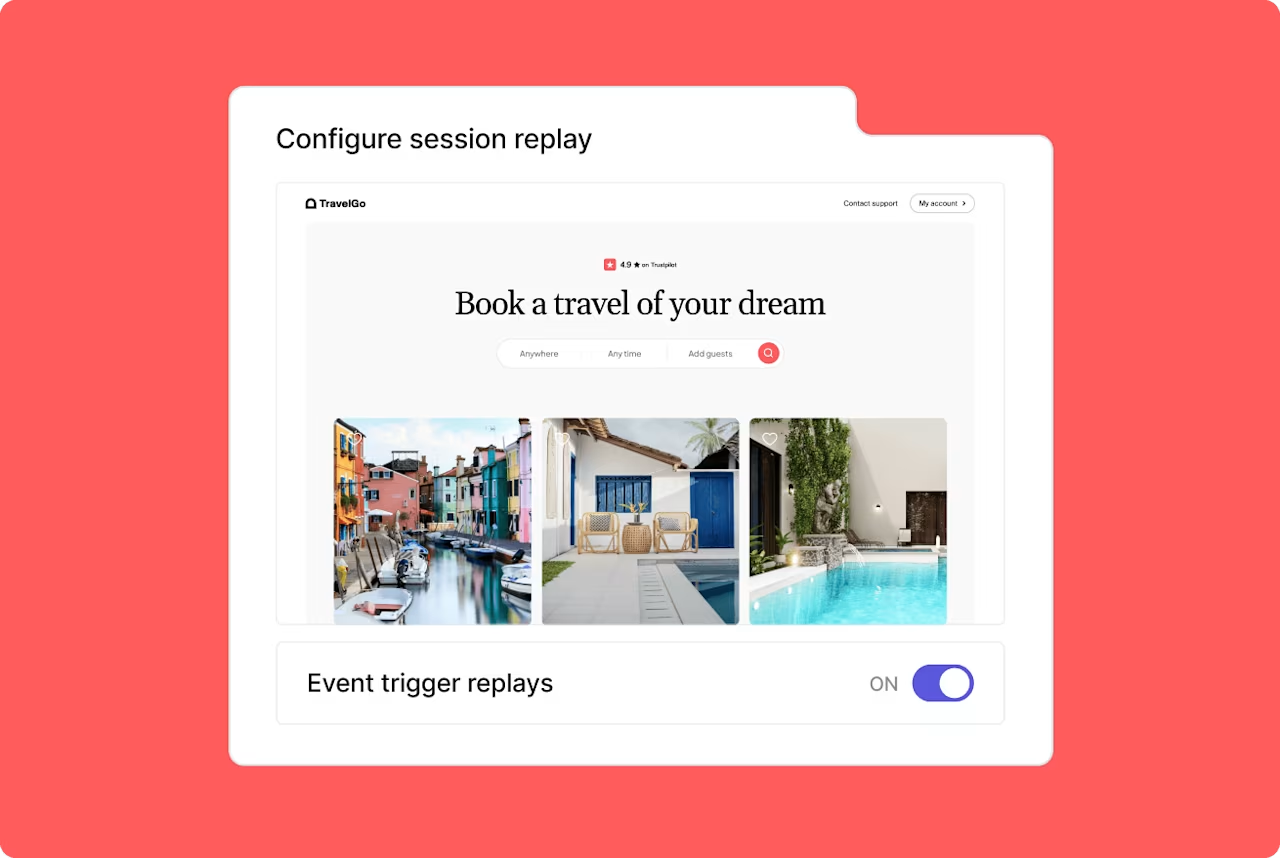
Event-triggered Session Replay captures the user experience behind feedback, giving teams the context they need to investigate what happened and decide what to fix.
3. Measure the business impact of what you find
Not every issue deserves the same attention. Prioritize fixes by measuring how much each problem costs you in conversions and revenue. Focus on the friction points that move the needle, not just the ones that show up most often in feedback.
The payoff is real: cutting rage clicks by 1.5 percentage points per page view corresponds to one more page viewed per session, according to our benchmark data.
💡 Pro tip: Use your feedback widget to surface issues, then connect each response to the relevant behavior, event, or issue in Contentsquare's Impact Quantification. It estimates the potential impact on conversions and revenue, helping you prioritize fixes based on business impact, not just complaint volume. A confusing form field may generate only a handful of comments while affecting far more users than the feedback alone suggests.
![[Visual] impact quantification](http://images.ctfassets.net/gwbpo1m641r7/2wbgSJMhld0021wQhGN6Bj/973be5d1f1f94c08e1339c1b968755dd/impact_quantification.png?w=1280&q=85&fit=scale&fm=avif)
Impact Quantification turns a customer insight into a business case, showing how an experience issue can affect conversions and revenue.
4. Feed insights back into your roadmap
The last step is making feedback routine—not a one-off exercise, but a continuous loop. When the same issue surfaces again and again, it's telling you something. Turn those recurring themes into roadmap items, prioritize them based on impact, and ship the fix. Then circle back: revisit the feedback after each change to confirm the problem's actually solved. If complaints dry up, CSAT scores rise, or sentiment shifts positive, you know you nailed it. If they don't, dig deeper. This closed-loop process turns feedback from a nice-to-have into a strategic driver of product decisions, ensuring every insight gets the attention it deserves.
🛒 Real-world example
Specsavers, a UK eyewear retailer, used Contentsquare to turn customer feedback into measurable growth. By listening to what shoppers said about their online journey—then connecting those insights to session replays and behavior data—the team identified friction points that were costing conversions.
They acted on what mattered most, fixing the experience issues that had the biggest impact on revenue. The result: a 24% increase in online purchase rate.
Put it into practice
A website feedback widget isn't a trophy to display—it's a tool that earns its keep through action. Pick one clear goal. Drop the widget exactly where friction lives. Ask one sharp question. Then tie every response back to what people actually did, not just what they said.
Do that, and feedback stops being noise. It becomes the signal that shows you which fires to fight first, which assumptions to kill, and which small fixes unlock big wins. That's when feedback stops sitting in dashboards and starts shaping better journeys and higher customer satisfaction—one fix at a time.
FAQs about website feedback widgets
A feedback widget lives on the page and waits for someone to interact with it. A pop-up survey interrupts the visit by appearing over the content. Widgets tend to capture stronger opinions because people choose to respond, while pop-ups can reach more visitors but risk annoying them if the timing's off.


![[Visual] Website software - stock](http://images.ctfassets.net/gwbpo1m641r7/2kYw6mr9AELodQ2vTQBsvQ/b327161ce5bf0dc830fcb03d7b58e2c6/AdobeStock_567047837.jpeg?w=624&q=85&fit=scale&fm=avif)