Think of onboarding as a first date. Your user shows up curious, a little guarded, and quietly wondering whether you're worth a second meeting. Spend the evening droning on about yourself and they'll be checking their phone by the appetizers. Make them laugh, listen to what they need, and show them something good right away, and suddenly they're clearing their calendar for a regular slot.
The best user onboarding processes work the same way. They get users to product value fast, and they tailor the experience to what each person came to do, instead of pitching every feature at once. This chapter walks product and UX teams through seven steps for building that kind of onboarding.
Key insights
Start with the job to be done: a user onboarding process works when every step helps users achieve what they came for, so cut anything that doesn't
Shorten time to value: ask for the bare minimum at sign-up and guide users to the one action—like syncing a calendar—that proves your product works
Measure, then diagnose: track activation and drop-off per step, then watch sessions and ask users why they stalled, because onboarding is never finished
A 7-step framework to create a successful user onboarding process
A strong user onboarding process walks users through key product features and functionality without distracting them from your product value. It makes sure users quickly understand how they can use your product to solve their problems or achieve their goals.
Without a customer-centric onboarding process, it takes longer for users to reach their “aha” moment within your product, which negatively impacts customer experience (CX)—and ultimately, product adoption and revenue.
1. Understand your customers’ goals
A large part of understanding your customers is defining their jobs to be done (JTBD). Knowing their JTBD means you can develop products based on your ideal customer’s specific needs, goals, or ‘jobs’, plus their approach when downloading or purchasing a product.
This framework helps you identify what your users are actually trying to achieve when they purchase a product—so you can make it a crucial step in your onboarding process.
By addressing customer needs upfront and giving them the resources and tips they need to succeed within your product—and do their job—it’s more likely users will complete onboarding and incorporate your product into their daily lives.
So, how do you understand your customers’ JTBD to create a more user-centric onboarding process?
Collect user feedback: place unobtrusive feedback widgets strategically throughout the customer journey and user onboarding process to determine how customers use your product, what’s missing, and whether your onboarding process successfully conveys product value
Watch replays of user sessions on your website or digital product to observe user actions, blockers, and conversions. See how they use your product to get their jobs done, and whether it's meeting their needs
Survey your customers with customer experience surveys or product market-fit surveys to see if your product satisfies market demand and user needs. Use their responses to improve your product and onboarding experience

Contentsquare Surveys let you determine if your product helps users do their jobs and more
💡Pro tip: get all your product experience insights in one place to prioritize updates and make communicating with your team easier. Use Contentsquare to home in on key user behavior throughout the onboarding process and then share related insights.
With Journey Analysis, you can visualize user behavior and prioritize onboarding improvements based on patterns in your user experience (UX)—like where they exit or turn back in the process.

Contentsquare helps you uncover the best opportunities to remove obstacles or support a successful onboarding process
2. Design a customer-centric onboarding flow
Designing a customer-centered onboarding flow means using your insights to map out a logical onboarding journey that highlights the benefits of your product. This involves
Creating an intuitive user interface (UI) and UX design that promotes clarity and seamless transitions
A sign-up flow that points your customers to useful product elements
An in-app onboarding flow that guides users through each step of configuring your product
Notifications to let users know when they’ve completed key steps, like verifying their account
Remember: center every step of your onboarding process around getting users to adopt your product. Remove any unnecessary steps that don’t contribute to that end goal—a user onboarding checklist helps you confirm nothing essential is missing.
Here’s how to design a customer-centered onboarding process:
Determine your ideal customer profile (ICP) and create user personas that match your ideal buyer to predict different customer needs
Ask your users, with feedback and survey tools, what type of learning and resources they want and whether your current onboarding process gives them the support they need
Keep onboarding short. Focus on the key points of your unique value proposition that'll help users get started
Make it interactive with visuals, animated features, and checklists to inspire action throughout onboarding and to keep users interested
Measure success. Use web analytics and digital experience insights to track your users' engagement and adoption rates
3. Offer value early
Offer value early on in the onboarding process by showing users what your product can do for them. The key is to start with the basics and gradually build up to more complex concepts.
Displaying product value early on and helping users reach their activation event enables you to reduce customer churn. For example, a software-as-a-service (SaaS) product for scheduling meetings might ask new users to sync their calendars to the tool during onboarding to immediately showcase its value and get users to activate the product.
Here’s how to offer value early on in the onboarding process and help ensure customer activation:
Focus on key features and functionality that are most useful to your target users. Guide users to the features that get their most pressing jobs done, and let them discover others at their own pace
Send behavioral emails to motivate users during onboarding based on certain user actions. For example, email a call to action (CTA) linking to a specific task in your SaaS app
Identify points of friction by watching replays of user onboarding sessions within your website or product. See what blocks users and which steps you could remove

Contentsquare’s Session Replay helps you spot user friction in your onboarding process
4. Make sign-up easy and intuitive
The best onboarding experience makes it easy for users to sign up and instantly reap the benefits of your product. Sign-up forms should ask the bare minimum to get started—for example, name, email, and company name should be all you're asking for in the beginning.
A simple sign-up process gives users a good impression of your onboarding flow and encourages them to commit to your product and initiate onboarding. If your signup is too complex or time-consuming, you’re likely to deter users from registering altogether.
Here’s how to create an intuitive user sign-up experience:
Limit input fields and only collect important user information. Gather any other customer information after signup. You want to get users to activate your product before blocking them with extra tasks
Use popups as your signup forms to show users how quick and easy your signup process is. There’s nothing more off-putting than a long signup form with a lot of text, steps, and pages
Make signup forms and CTAs easy to find: strategically place your signup form and CTAs on key conversion pages like home and landing pages so users don’t have to go looking for them. Then, use Contentsquare Heatmaps to track user activity like clicks and scroll depth to validate whether you've got a clear pathway to signup—and smooth out any distractions if necessary

Contentsquare Heatmaps show you key user activity on your website or product
5. Pick your onboarding elements
Now you understand your users' motivations and their jobs to be done, it's time to select onboarding elements that'll help them learn about your product and use it effectively.
Onboarding elements can be used separately or together to meet your users’ needs. Most user onboarding software supports several of them. Some examples include
Onboarding emails: to welcome your users and guide them through the onboarding process
In-product guided tours: step-by-step guides that help your users learn about your product
Tooltips, pro tips, banners, and callouts: to point out key features and functionality throughout your guided tour
Checklists and progress bars: to keep users on track and show them where they are in their onboarding process
Walkthrough videos: to show your users exactly how to use your product
User manuals and self-service resources: a knowledge base or help center that answers common questions

Contentsquare onboards new users with clear steps, tooltips, and animation
But, how do you choose which elements you need to include in your onboarding process based on user needs?
Collect user insights from customer surveys and session replays to determine your users' level of expertise. Do you need to educate users about your product first, or adopt a ‘learn by doing’ approach?
Run A/B tests on different onboarding elements to see if users prefer visual or text-based instructions. If you’re using Contentsquare, you can integrate it with A/B testing platforms like AB Tasty and Optimizely, then segment tests by user type.
Collect feedback throughout the onboarding journey with Contentsquare Surveys. Let users rate their experience and highlight specific elements, so you know what to improve.
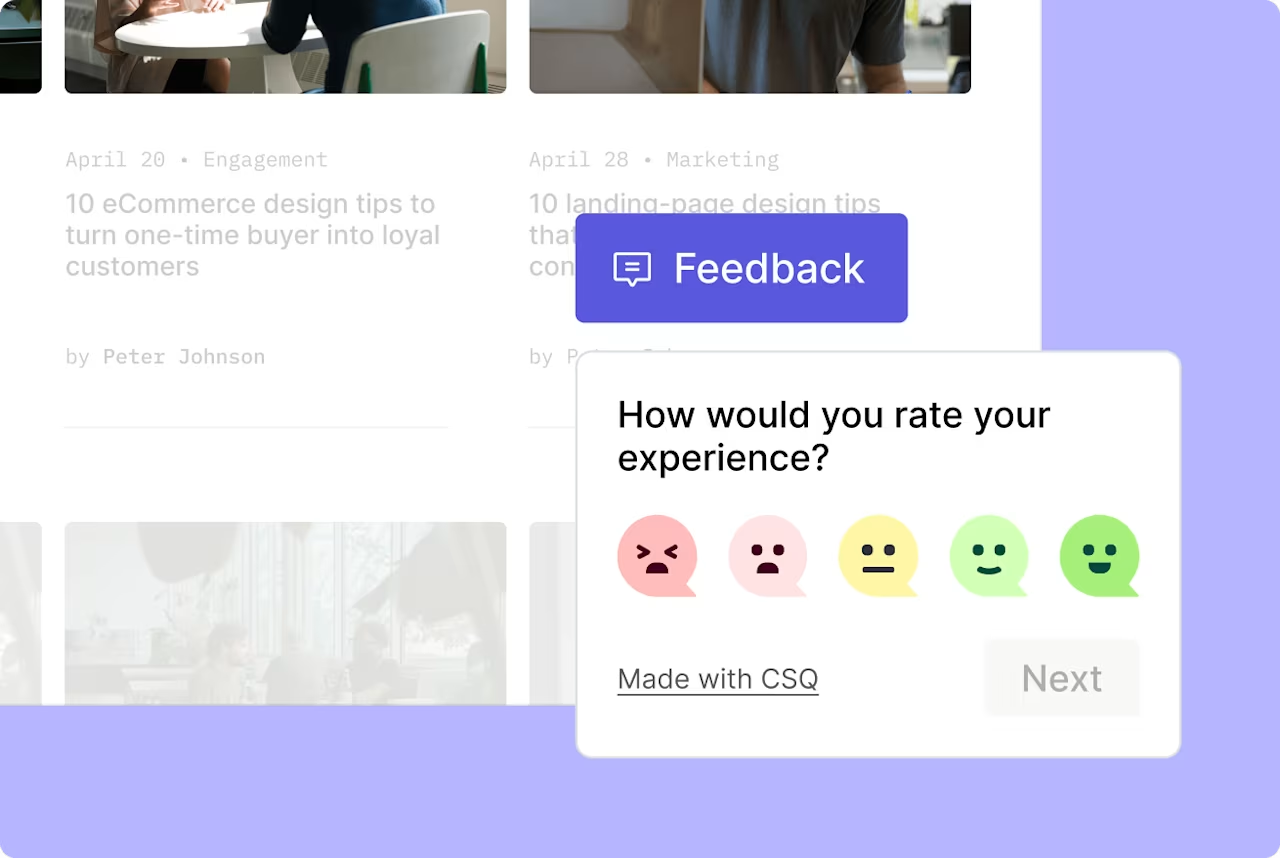
Feedback widgets give you direct insights into the user onboarding experience
6. Personalize onboarding
Personalizing onboarding keeps users engaged and boosts activation and retention rates. It helps show different user types the value of your product and increases its relevance in solving their problems.
Here’s how to personalize your onboarding process for different user personas:
Apply user data to your process. Use tools like Clearbit to collect each user’s industry, role, location, and tech stack, then personalize welcome pages, emails, and your onboarding flow
Segment your users based on user persona, onboarding step, or activity within your product to deliver a more customized experience. Triggering tutorials based on user actions especially helps feature-rich products
Let users self-select their path and onboard at their own pace based on their interests and preferences. Use their selections to inform the tasks, tips, or exercises they need to complete along the way
💡 Pro tip: before you build a separate mobile onboarding flow, check whether you actually need one. Ask Contentsquare's Sense Analyst something like "what share of new mobile users exit from the Register page compared with desktop users?" and it breaks the answer down for each device. If mobile users stall at a step that desktop users breeze through, that step needs its own version. If they don't, you can spend that effort on personalizing by role or goal instead.
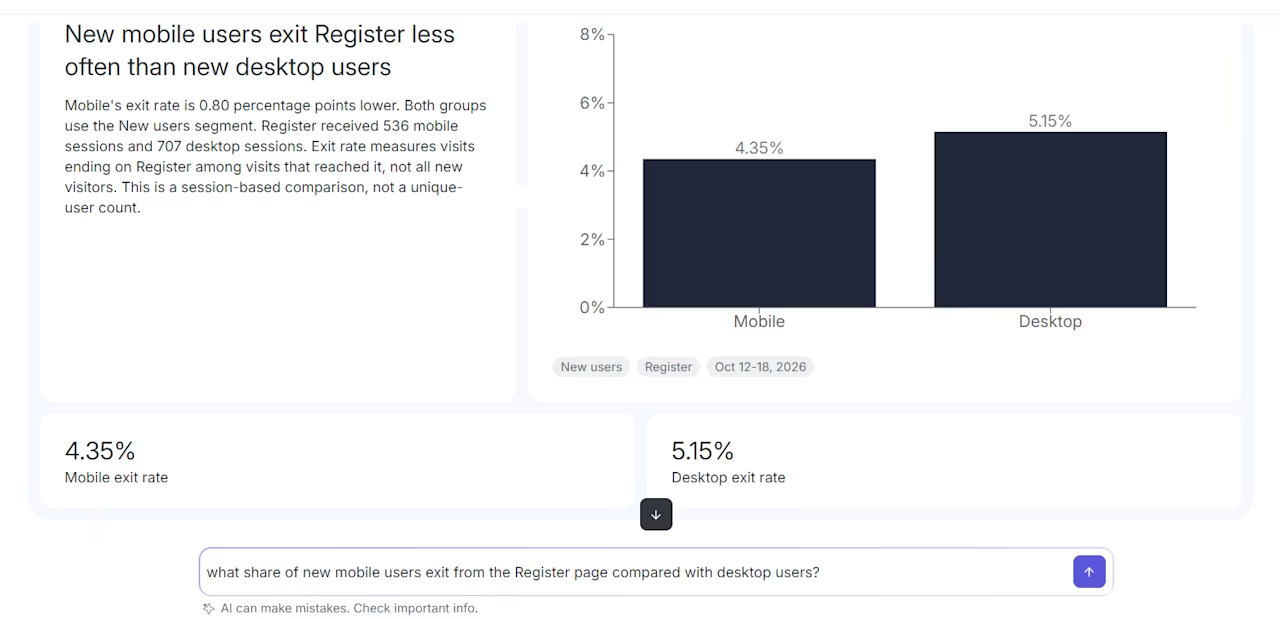
Ask Sense Analyst how mobile and desktop users handle the same onboarding step, and find out whether mobile really needs its own flow
7. Engage in continuous discovery
Even after users have finished onboarding, there's always more they can learn about your product or service—and there’s more you can learn about your onboarding experience.
So keep refining your process and supporting users after onboarding—and as their needs change.
Use a simple loop: find the step where users drop off, watch sessions to see what happened, then ask why with an in-context survey.
Here’s how to engage in continuous discovery and improve your onboarding process:
Keep up with market and user trends to see how your onboarding stacks up against the competition
Use web analytics tools to track user engagement, activation, adoption, and retention rates. Watch for spikes or drops
Find out your Net Promoter Score® (NPS®) and customer satisfaction (CSAT) scores with Net Promoter Score® surveys and customer satisfaction surveys.
Understand when users stop onboarding and ask them why they’re leaving as they’re leaving with exit-intent surveys. Identify blockers to customer activation

Exit-intent surveys tell you why users abandon the onboarding process as they leave
Fuel your user onboarding process with user insights
Designing a seamless onboarding process involves knowing your users, their jobs to be done, and how they learn best—then guiding them based on their needs. For more ways to refine each step, explore these proven user onboarding approaches.
Use these seven steps to build a user-centered onboarding experience, spot what to improve in your current process, and delight users the whole way through. Then, use the right digital experience platform to know what to improve without guesswork.
Frequently asked questions about the user onboarding process
Onboarding new users involves walking a user through your product and supporting them when they first start using your app or service—with educational resources, product guides, knowledge centers, tooltips, etc. Consider your customers' needs and wants at every step of the process, and design your onboarding experience to meet those needs while demonstrating your product’s value.