![[Visual] Stock - Website readability](http://images.ctfassets.net/gwbpo1m641r7/2f21OCXjmoiyIBUDHPmtJJ/b193c152ad80b8f2f90a2f8cdf1eff78/BLOG-PPO-XkKCui44iM0.jpeg?w=946&q=85&fit=scale&fm=avif)
Contentsquare’s August 2026 updates are built around one idea: customer insight is more useful when it reaches people at the moment they make decisions. This month, we’re making analysis more visual, sending insights into Teams and Slack, adding faster mobile privacy controls, bringing Conversation Intelligence into behavioral analysis, and opening new workflows in Dust and Figma.
Together, these releases reduce the distance between a signal, the people who need to act on it, and the tools where that work happens.
Key insights
Sense Analyst now makes visual stories the default, while still allowing users to request a more textual format.
Analyst Settings brings delivery cadence, integrations, project context, and notification preferences into one place.
By-screen masking protects sensitive mobile areas while leaving unaffected screens available for Session Replay.
Conversation Intelligence connects Contact Drivers to real customer conversations, helping teams understand not only what happened, but why.
The Contentsquare MCP server extends behavioral data into Dust and Figma, reducing context switching for AI, product, and design workflows.
Transforming analytics with Sense
See your data in visual stories
Sense Analyst now returns final outputs as inline visual stories instead of plain Markdown text. Depending on the question, it can render charts, metric tiles, comparison layouts, or structured summaries directly in the conversation thread.
Visual stories replace text-based InsightCard outputs as the default format. A fullscreen control is available on every visualization when you need a closer look.
No configuration is required: Analyst chooses the format based on the question. If you prefer a more visual or more textual response, you can ask Analyst to adjust its output.
![[Product screenshot] Visual stories](http://images.ctfassets.net/gwbpo1m641r7/1gBG6wwDhk4vC0hYqe9Kfr/501a55069b9eb1ebefce590be8e136e2/Product_illustration_Visual_stories.png?w=1280&q=85&fit=scale&fm=avif)
Learn more about Sense Analyst
Deliver critical insights in Teams and Slack
Curated Insights from Sense Analyst can now be delivered directly to Microsoft Teams and Slack channels, so teams can receive updates in the tools they already use.
In Microsoft Teams, insights arrive as Adaptive Cards according to your existing daily or weekly project schedule. In Slack, daily or weekly briefings appear as structured messages with up to eight insights and severity indicators.
Each notification includes a deep link to Sense Analyst or the full Newsroom, giving recipients a direct path from an alert to deeper investigation. This makes it easier to share analytical signals with colleagues who do not work in Contentsquare every day.
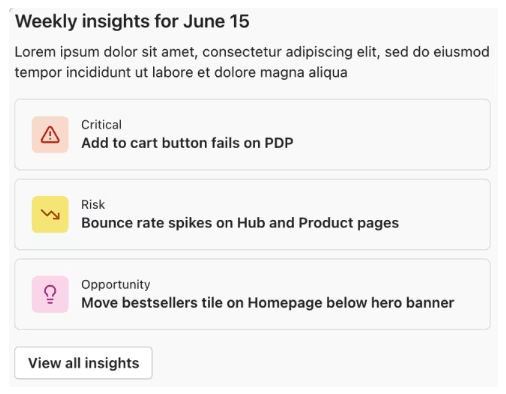
Learn more about sharing insights in Teams and Slack
Manage delivery from one Settings hub
The new Analyst Settings window brings project-level configurations into one place. Open it from the settings icon on the Sense Analyst or Newsroom landing page.
From the hub, you can manage insight-generation cadence, configure Slack and Microsoft Teams integrations, and update Project context. Admins can also turn project-wide email subscriptions on or off, while standard users can manage their own email and Slack notification preferences.
Changes take effect immediately and apply to the next scheduled insight-generation window.
![[Screenshot] Analyst Settings](http://images.ctfassets.net/gwbpo1m641r7/7gi4Y9TvCR0h342oZ2iEwP/36b41d5a4306619568d37d3107a5cf6c/image-20260723-153454.png?w=1280&q=85&fit=scale&fm=avif)
Empowering mobile innovation and privacy
Mask sensitive screens without an app release
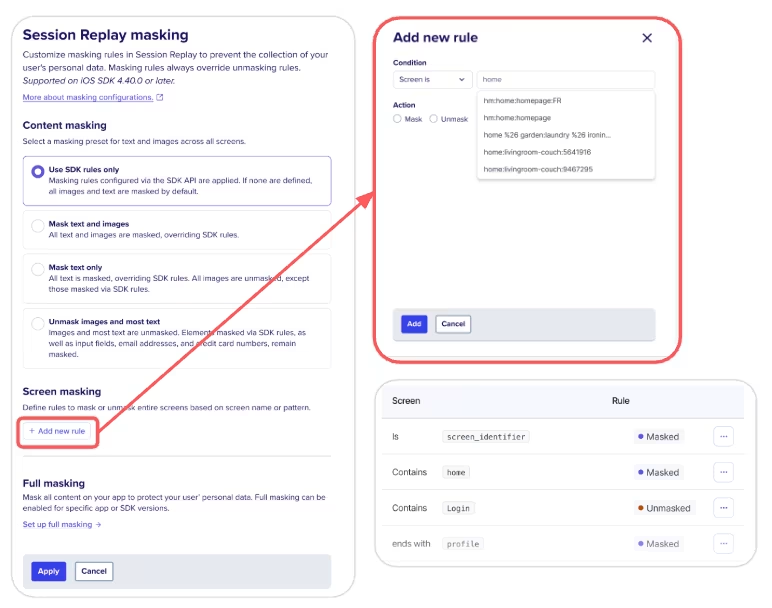
Remote Screen Masking—By Screen lets teams mask specific mobile app screens by name without releasing a new app version. It extends existing remote masking capabilities and gives customers a self-serve way to respond to urgent privacy needs.
Rules support is, contains, starts with, ends with, and regular-expression matches. They are case-insensitive and take effect when the app is restarted or brought to the foreground. You can configure up to 500 screen-masking rules per project, with support for native iOS, native Android, and Flutter.
Because the rules target specific screens, unaffected areas can remain available for Session Replay while sensitive content is protected.
Visualize mobile interactions with heatmaps
Heatmaps for Mobile now supports native iOS, native Android, React Native, and Flutter. The feature provides an aggregated view of how users interact with app screens without requiring teams to define every interaction as a separate event first.
Capture a snapshot with the Contentsquare SDK in-app tool to view tap and scroll-rate data as a thermal overlay on the selected screen. This gives teams a quick way to investigate mobile interaction patterns across supported frameworks.
![[Screenshot] Mobile heatmaps - Tap maps](http://images.ctfassets.net/gwbpo1m641r7/5Gw9tpNPIQnqT0wG4vqwrX/9d55f253855aeedf32ba91e61b7c858a/image-20260629-144442.png?w=1049&q=85&fit=scale&fm=avif)
Learn more about mobile heatmaps
Connect behavioral data to customer conversations
To understand an experience fully, teams need both behavioral evidence and the customer’s own words. Sense Analyst now surfaces Conversation Intelligence data alongside behavioral analysis, so users can investigate a signal without switching between tools.
Clicking a Contact Driver row opens a contextual Conversation Drawer with up to five customer conversation samples, the top FAQs, and leading root causes for that driver. Results are filtered to the active date range. You can open a sample to read the full exchange, then return to the analysis without losing your place.
Connecting the quantitative signal to qualitative evidence helps teams decide more confidently whether—and how—to act.
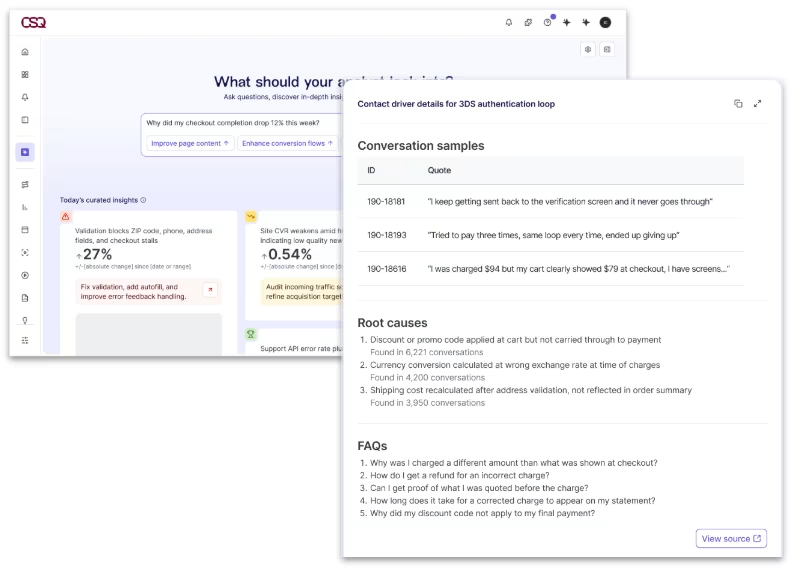
Learn more about conversational intelligence
Bring customer intelligence into everyday tools
The Contentsquare MCP server is now available as a native connector in Dust and Figma. MCP, or Model Context Protocol, enables supported tools and workflows to connect with Contentsquare behavioral data.
In Figma, design and product teams can query customer journey analytics, error rates, page-performance metrics, and revenue data while working on an interface. That gives teams a way to bring evidence into design discussions without leaving their workspace.
In Dust, teams can combine Contentsquare insights with other data systems and AI workflows. Whether you are building an AI assistant or creating a user-focused interface, the connector makes customer data available closer to the work.
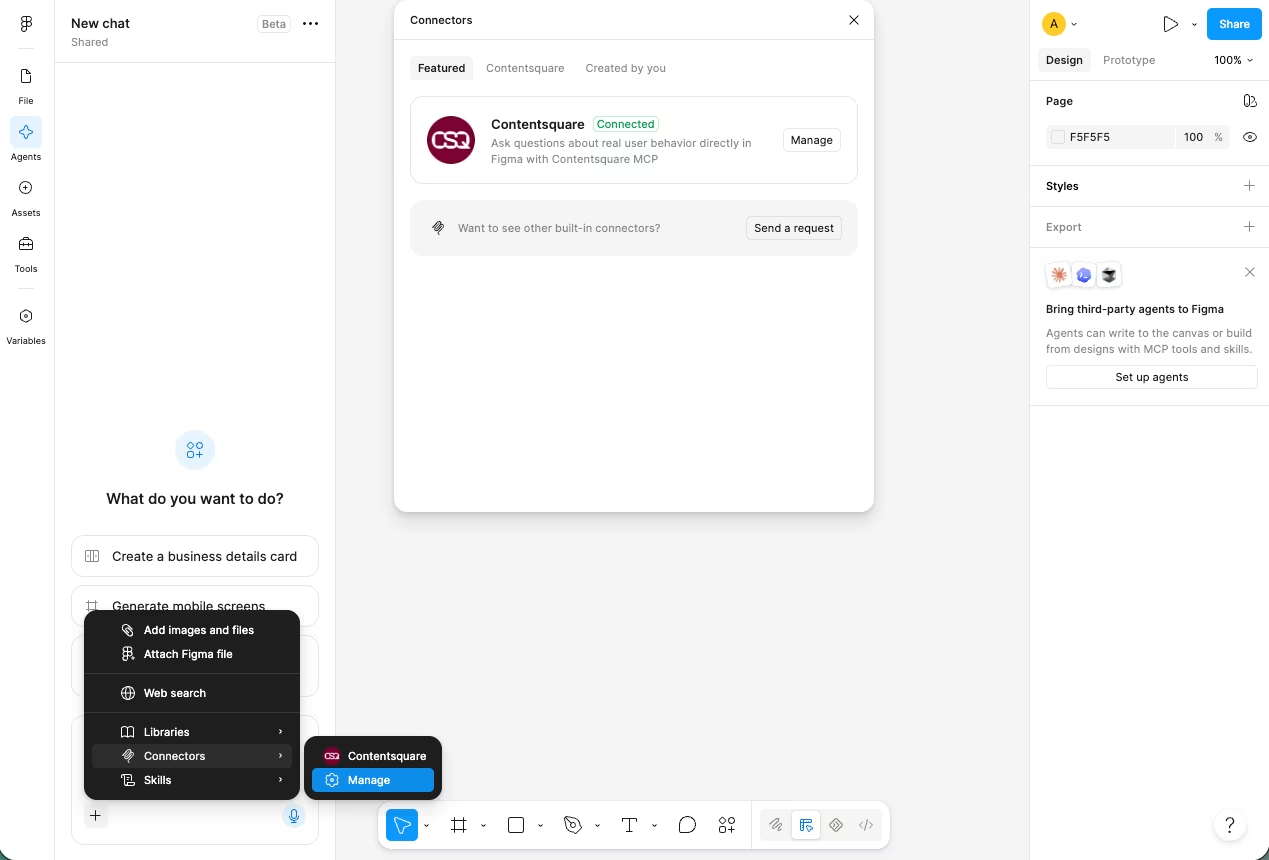
Learn how to set up and use MCP
Start building better experiences with the latest updates
This month’s releases make customer insight more visual, more shareable, more secure, and easier to use across the tools where teams make decisions.
Explore the updates in your Contentsquare workspace and start with the workflow closest to your team: distribute insights, protect mobile data, connect behavioral signals to customer conversations, or bring analytics into design and AI tools.
![[Visual] Contentsquare's Content Team](http://images.ctfassets.net/gwbpo1m641r7/3IVEUbRzFIoC9mf5EJ2qHY/f25ccd2131dfd63f5c63b5b92cc4ba20/Copy_of_Copy_of_BLOG-icp-8117438.jpeg?w=946&q=85&fit=scale&fm=avif)
We’re an international team of content experts and writers with a passion for all things customer experience (CX). From best practices to the hottest trends in digital, we’ve got it covered. Explore our guides to learn everything you need to know to create experiences that your customers will love. Happy reading!
![[Stock] 3 tips for your experimentation strategy](http://images.ctfassets.net/gwbpo1m641r7/7rzAn0l1w7lrnyGqqbPQsX/fc7b3d311b738d81ead59cb6144fa3f2/Copy_of_Why_you_need_to_host_an_anxiety_party__1_.png?w=624&q=85&fit=scale&fm=avif)
![[Asset] Blog — AI-referred traffic Hero](http://images.ctfassets.net/gwbpo1m641r7/2rkGm0XqF2971lPIa2dIXL/699b4b8ff946438773996ca09e304d34/AdobeStock_920265101.png?w=624&q=85&fit=scale&fm=avif)