
Successfully tracking engagement on your website means staying on top of a wide range of qualitative and quantitative metrics and user behavior trends.
Choosing the right website engagement tools helps you monitor customer interactions to improve the overall customer experience. But it can be hard to know where to start building an effective tech stack that gives you deep, actionable insights on engagement.
In this article, we list 12 tools to boost engagement on your website and take you through the key features of the most effective customer engagement tools and software integrations for engagement tracking.
With the right tools, you can understand what's working on your website (and what's not), and make data-informed decisions to improve your user experience (UX).
Key takeaways
Website engagement tools help you understand how users interact with your site through analytics, heatmaps, session recordings, and feedback collection
The best tools combine quantitative data (what users do) with qualitative insights (why they do it) and machine learning for actionable optimization
Organize your tech stack by function: analytics, experimentation, live chat, customer relationship management (CRM), and content management each serve distinct engagement needs
Measuring engagement requires tracking metrics like bounce rate, session duration, pages per session, and conversion rate
Make user-backed website decisions with Contentsquare
Contentsquare reveals how users really engage with your website, so you can improve their experience.
Website engagement tools comparison table
Tool | Best for | Key features | Pricing tier |
|---|---|---|---|
Contentsquare | All-in-one behavior analytics | Heatmaps, session replay, journey analysis, funnels, surveys, conversation intelligence | Free plan; paid for advanced |
Google Analytics | Free traffic and engagement data | Traffic reports, conversion tracking, audience insights | Free; enterprise paid |
AB Tasty | Easy experimentation with AI | A/B testing, personalization, AI insights | Custom pricing |
Optimizely | Enterprise experimentation | A/B testing, feature flags, CMS | Custom pricing |
Omniconvert | Ecommerce CRO | A/B testing, personalization, surveys | From $273/month |
LiveChat | Straightforward live chat | Live chat, ticketing, chatbots | From $20/agent/month |
Intercom | Conversational engagement | Chatbots, product tours, in-app messaging | From $39/seat/month |
Segment | Customer data unification | Data collection, routing, audience building | Free tier; from $120/month |
Customer.io | Behavior-triggered messaging | Email automation, workflows, segmentation | From $100/month |
HubSpot | All-in-one CRM | Contact management, marketing, sales tools | Free CRM; from $20/month |
Contentful | Flexible content management | Headless CMS, API-first, collaboration | Free tier; from $300/month |
Typeform | Engaging surveys and feedback | Interactive forms, conditional logic, integrations | Free tier; from $25/month |
12 best website engagement tools
Analytics and behavior tracking tools
These tools reveal how users interact with your site, from where they click to where they drop off. They form the foundation of any engagement strategy.
1. Contentsquare
Contentsquare is an experience intelligence platform that helps you see how users interact with your website or products, understand what drives or blocks their engagement, and uncover actionable insights to optimize the user experience.
How Contentsquare helps you improve engagement on your site
Contentsquare helps you decode user behavior on your website with advanced capabilities like Heatmaps and Journey Analysis. These capabilities show you exactly how users interact with specific page elements, like buttons, CTAs, or images, revealing what grabs their attention and what doesn't.
It doesn't stop there: Contentsquare's Session Replay lets you see real user journeys, so you can pinpoint friction points, uncover bugs, and understand where users drop off.
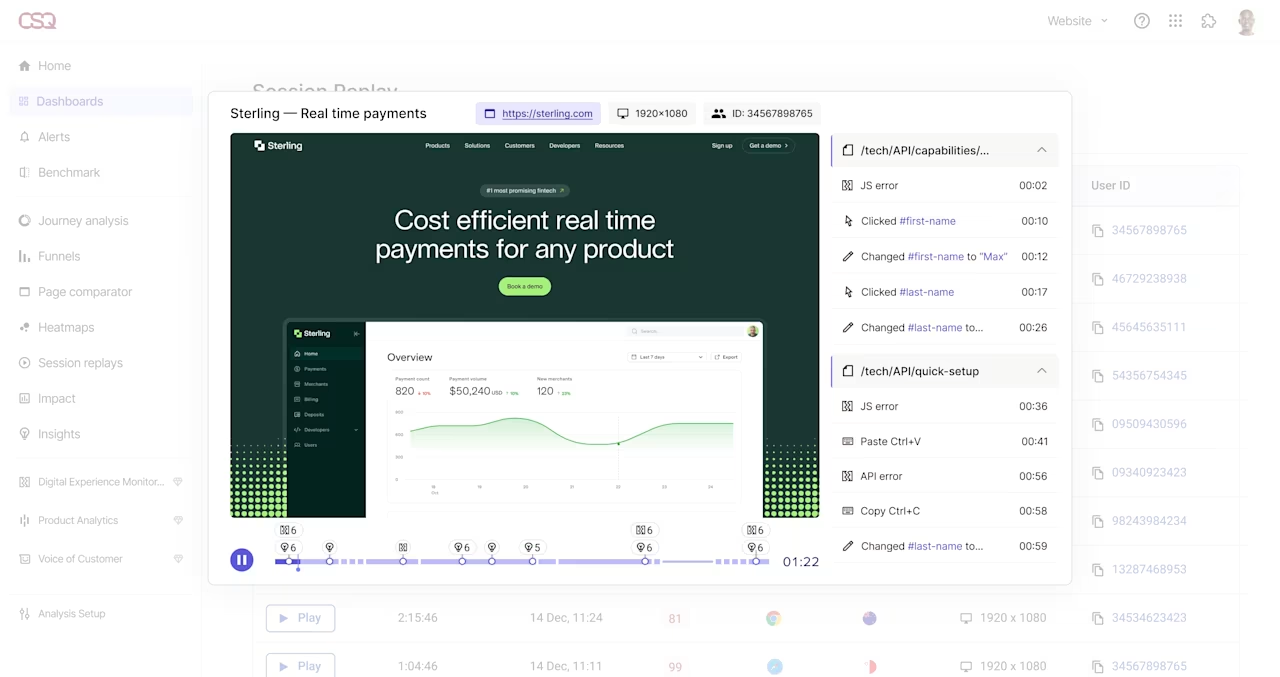
Contentsquare's Session Replay lets you jump directly to where replays show errors, frustration indicators, and more.
Plus, features like conversion analysis provide a visual breakdown of user flows, making it easy to identify which experiences lead to conversions and which need improvement. With Contentsquare, you can
Get granular engagement insights: understand what works (and what doesn't) on your site
Analyze user journeys in one platform: see the full customer journey, from entry to exit, and spot trends across your pages
Monitor site performance in real-time: ensure smooth experiences with tools that track speed, errors, and frustration signals
Gather direct user feedback: combine behavior data with Surveys to make decisions that truly reflect user needs
The best part? It's an all-in-one powerful platform, so there's no need to juggle multiple tools to get the full picture.
Best for: teams who want an all-in-one platform combining behavioral analytics, session recordings, heatmaps, and user feedback.
Pricing: free plan available; paid plans for advanced features.
2. Google Analytics
Google Analytics (GA) is a free website analytics tool that monitors and reports website traffic and helps you identify patterns and trends in user engagement.
How GA helps you monitor and increase user engagement
Google Analytics (GA) tracks key website engagement metrics like bounce rate, pages per visit, average user sessions, and conversion rate. It also provides reports based on engagement and conversion events triggered by users, as well as insight into key pages. This way, you can monitor user trends and triggers and analyze your web page performance.
GA provides your business with
Reliable data
Range of engagement insights
A visual dashboard
Detailed report generation
Pro tip: use Contentsquare's Heatmaps to complement GA's traditional data. Go deeper into where users click, how far they scroll, and where they're engaging the most. Get a clear picture of whether your site's engaging users or not and how they interact.
![[Visual] Heatmaps types](http://images.ctfassets.net/gwbpo1m641r7/44qPX6Nyu2v2i9pGM8JdIE/e1ccfd573959295483bb4b867ca7e57f/Heatmaps___Engagements__3_.png?w=1002&q=85&fit=scale&fm=avif)
Heatmaps show you key engagement areas on your website and call-to-actions (CTAs), so you know what to improve
Best for: teams who need free, reliable traffic and engagement data with robust reporting.
Pricing: free (GA4); paid Analytics 360 for enterprise.
A/B testing and experimentation tools
These tools help you test hypotheses about your website design, copy, and user experience to find what drives the most engagement.
3. AB Tasty
AB Tasty is an experimentation and personalization platform. It lets businesses A/B test website elements, experiment with personalized user experiences, and uncover what resonates best with their audience.
It provides deep insights into what drives engagement, making it easier to optimize your site for conversions.
How AB Tasty helps you refine your website through data-driven experimentation
AB Tasty enables you to test and optimize key aspects of your website, from copy and CTAs to layouts and design, to ensure you're delivering the most engaging user experience. With AB Tasty, you can
Set up experiments easily, defining objectives, and KPIs upfront
Run A/B tests, multivariate tests, and personalized campaigns
Create dynamic website content tailored to user segments
Leverage AI-powered insights to identify winning variants faster
Monitor the impact of experiments in real-time with detailed reporting
Pro tip: Pair AB Tasty's experiments with Contentsquare's experience analytics tools to gain a richer understanding of user behavior.
For example, use Contentsquare's Heatmaps and Session Replay to see how users interact with each test variation and identify the design elements that drive the most engagement.
Combining AB Tasty's testing capabilities with in-depth behavioral insights gives you a clear path to building a site that truly connects with your audience.
![[Visual] AB Testing and session replay](http://images.ctfassets.net/gwbpo1m641r7/3pyi6K866dXK51H98XtJnd/fa1e174cb7560d0cd9e565aca3fb9019/Experience_Analytics_-_AB_Test__1_.png?w=1280&q=85&fit=scale&fm=avif)
Contentsquare helps you analyze AB tests to see critical user actions and learn which page elements engage customers the most
Best for: marketing teams who want easy-to-use experimentation with AI-powered insights.
Pricing: custom pricing based on traffic.
4. Optimizely
Optimizely is a digital experience platform with website testing tools, such as A/B tests and multivariate testing. It provides actionable insights into user preferences and engagement.
How Optimizely helps boost website interaction
Optimizely lets you test your hypotheses about various web design aspects, like navigation bars, color schemes, CTA placement, or search bars, to build websites and products that resonate with your audience. In addition to its visual drag-and-drop editor for non-technical edits, Optimizely lets you
Leverage your audience for key website changes
Conduct website experiments and gather data
Add custom CSS and Javascript to your site
Easily customize your product experience
Pro tip: integrate Optimizely with Contentsquare to get a detailed picture of user preferences and the reason behind those preferences. Combine Optimizely's split tests with Contentsquare's Journey Analysis and Heatmaps to get a granular perspective of user data and prioritize design decisions that engage customers.
![[Visual] Contentsquare-Optimizely-partnership Experimentation cycle](http://images.ctfassets.net/gwbpo1m641r7/756HQEAwnfyi0yH9S3KmTU/bd171c6c7a14cf000644ccc8db425243/Contentsquare-Optimizely-partnership__1_.png?w=1280&q=85&fit=scale&fm=avif)
Use Contentsquare to identify the UX/UI areas where you need to optimize, then use Optimizely to build experiments that guide your future optimization efforts
Best for: enterprise teams needing robust experimentation with developer-friendly customization.
Pricing: custom pricing; free trial available.
5. Omniconvert
Omniconvert is a website experimentation and analytics software that helps teams increase conversions and engagement with A/B testing and conversion rate optimization (CRO) tools.
How Omniconvert helps increase engagement and drives user conversions
Omniconvert lets you run crucial web design and copy experiments that help gauge user needs and preferences, so you can make user-backed website changes that drive engagement. It also
Provides your business with user targeting flexibility
Has a strong customer support team
Gives you tailored tests to design and develop your site
Offers advice on useful analytics and new website flows
Best for: ecommerce teams focused on CRO with personalized support.
Pricing: starts at $273/month; custom enterprise pricing.
Live chat and customer support tools
These tools help you engage visitors in real-time, answer questions, and reduce friction that causes users to leave.
6. LiveChat
LiveChat is an online customer support software that helps customer success teams provide 24/7 care through a knowledge base and communication channels, such as live chat, website, email, WhatsApp, and SMS.
How LiveChat helps you promote engagement with your product
LiveChat helps teams minimize frustration in the customer journey by quickly responding to user questions and providing them with useful follow-up information and resources. By providing users with constant support, you engage them across key touchpoints and interactions.
With LiveChat, your business can
Integrate with popular apps, such as WhatsApp and GA
Provide your users with a smooth product onboarding process
Use live chat and ticket functions to address user issues
Reach and engage users across multiple platforms
Best for: support teams who need straightforward live chat with ticketing.
Pricing: starts at $20/agent/month.
7. Intercom
Intercom is a customer engagement platform that combines live chat, chatbots, and product tours to help you manage customer communication and engage users throughout their journey. It's particularly strong for SaaS and product-led companies who want to guide users through onboarding and feature adoption.
How Intercom helps you engage users
Intercom goes beyond basic chat by letting you create targeted, automated conversations based on user behavior. You can trigger messages when users visit specific pages, show signs of confusion, or reach key milestones. With Intercom, you can
Build custom chatbots to handle common questions automatically
Create product tours that guide users through new features
Segment users and send targeted in-app messages
Track conversation metrics and user satisfaction scores
Integrate with your existing tech stack through 300+ apps
Best for: SaaS and product teams who want conversational engagement with automation.
Pricing: starts at $39/seat/month; custom pricing for larger teams.
Customer data and messaging tools
These platforms help you unify customer data and create personalized communications that drive engagement across channels.
8. Segment
The Segment platform unifies all your customer data points to give you a broad view of your user data. It helps teams create better product experiences by quickly collecting and routing customer data so they can use it to inform website changes.
How Segment helps businesses drive engagement
Segment helps you tie user data points together to give you a complete view of your customer data, including various customer journey touchpoints. This gives you a deeper understanding of their needs and the ability to craft a compelling product experience. With Segment, you can
Easily integrate with popular apps
Select inputs and outputs for customer data points
Onboard new tools quickly
Filter events
Segment audiences and channels with its audience-building feature
Best for: data teams who need to unify customer data across multiple tools.
Pricing: free tier available; paid plans start at $120/month.
Pro tip: Contentsquare customers get customer segmentation and Journey Analysis all in one platform, no extra integrations needed. On top of that, they also get access to powerful capabilities like Session Replay, Heatmaps, and Error Analysis for a complete view of how users engage with your site.
This all-in-one approach helps you pinpoint exactly where users get stuck, what keeps them engaged, and how to create a smoother, more enjoyable journey.
9. Customer.io
Customer.io is a user engagement and analytics tool, similar to Mailchimp, that lets marketing teams build automated email marketing and messaging campaigns to drive customer retention.
How Customer.io helps you engage and retain your users
Customer.io gives you access to real-time customer behavior data you can use to inform and personalize key messaging and push notifications, reduce churn, and better retain and engage users.
With Customer.io, you can
easily create broadcasts, emails, or complex marketing campaigns
promote cross-functional collaboration with its interface
map complex customer journeys spanning multiple channels
Best for: marketing teams who need behavior-triggered email and marketing automation for messaging.
Pricing: starts at $100/month.
10. HubSpot
HubSpot is a comprehensive CRM platform that helps teams manage their contacts and supplies the tools they need to build customer-centered experiences.
How HubSpot helps businesses with website engagement
HubSpot's CRM helps you keep your customer data in one place, making monitoring their journey history and key interactions easy. This allows you to build detailed customer profiles and engage your customers with targeted, personalized messaging on your site that gets results.
HubSpot helps you
Create detailed customer profiles
Streamline contact management
Integrate with popular apps
Segment various contacts and markets
Connect to other HubSpot platforms
Get access to customer engagement insights and analytics
Best for: teams who want an all-in-one CRM with marketing, sales, and service tools.
Pricing: free CRM; paid plans start at $20/month.
Pro tip: build even more comprehensive customer profiles with qualitative information gathered by Contentsquare's Surveys.
Connect the dots between patterns in user behavior and why those behaviors happen. Get a complete picture of your customers, their needs, and how you can better engage them.
Content management and optimization tools
These tools help you create and manage content that keeps users engaged across your digital properties.
11. Contentful
Contentful is a cloud-based content management system (CMS) that lets you easily host, update, and automate content on your website, web app, or mobile app.
Contentful gathers the quality data you need to successfully engage your audience with targeted content. This allows marketing teams and developers to work together, resulting in faster, more straightforward digital product launches.
How Contentful helps you optimize content to boost site engagement
Use Contentful to create multichannel and personalized content strategies based on actionable insights gathered from raw user data. You can also generate reports to help you optimize your engagement strategies over time.
Contentful helps you by
Providing a range of key metrics on content performance
Generating reports on user engagement
Enabling you to target users with personalized content
Allowing multiple teams to collaborate and speed up development
Best for: teams who need a flexible, API-first CMS for omnichannel content.
Pricing: free tier available; paid plans start at $300/month.
12. Typeform
Typeform is an interactive form and survey tool that helps you collect user feedback and insights in a conversational, engaging format. Unlike traditional forms, Typeform presents one question at a time, which increases completion rates and provides a better user experience.
How Typeform helps you understand and engage users
Typeform lets you gather qualitative feedback directly from your users using customizable templates to understand their needs, preferences, and pain points. This feedback complements your behavioral analytics by revealing the 'why' behind user actions.
With Typeform, you can
Create visually appealing surveys that match your brand
Use conditional logic to personalize the survey experience
Embed forms directly on your website or share via link
Integrate with 500+ apps including CRMs and analytics tools
Analyze responses with built-in reporting and export options
Best for: teams who want engaging surveys and feedback collection with high completion rates.
Pricing: free tier available; paid plans start at $25/month.
How to measure website engagement
Choosing the right tools is only half the equation. You also need to know which engagement metrics to track and what they tell you about your site's performance.
Key engagement metrics to track
Bounce rate: the percentage of visitors who leave after viewing only one page. A high bounce rate may indicate that your landing pages aren't meeting user expectations or that your content isn't compelling enough to explore further.
Session duration: how long users spend on your site during a single visit. Longer sessions typically indicate more engaged users, though context matters. A support page with quick answers might have shorter sessions by design.
Pages per session: the average number of pages users view in one visit. More pages usually means users are finding value and exploring your content, though it can also indicate navigation confusion.
Conversion rate: the percentage of visitors who complete a desired action, like signing up, purchasing, or downloading. This is the ultimate measure of whether your engagement and broader marketing efforts drive business results.
Scroll depth: how far down the page users scroll before leaving. This helps you understand if users are seeing your key content and CTAs, or if they're dropping off before reaching important information.
Click-through rate (CTR): the percentage of users who click on specific elements like CTAs, links, or buttons. Low CTRs on important elements may indicate poor placement, unclear copy, or design issues.
How to choose a website engagement tool
With so many options available, selecting the right tools for your tech stack requires careful consideration. Ask yourself these questions before making a decision:
What's your primary goal? Are you trying to understand user behavior, run experiments, improve support, or personalize messaging? Different tools excel at different objectives.
What's your budget? Tools range from free (Google Analytics) to enterprise pricing. Consider both the upfront cost and the value you'll get from the insights.
What's your team's technical skill level? Some tools require developer resources to implement and maintain, while others are designed for non-technical users.
What tools do you already use? Look for tools that integrate with your existing tech stack to avoid data silos and manual workarounds.
Do you need quantitative data, qualitative insights, or both? The most effective engagement strategies combine behavioral data (what users do) with direct feedback (why they do it). Platforms like Contentsquare that offer both in one place can simplify your workflow.
How much traffic does your site get? Some tools price based on pageviews or sessions, so high-traffic sites may need to factor this into their budget.
Boost your user experience with website engagement tools
Your user engagement changes over time, so you need to keep a close eye on your site experience and act quickly to make any necessary changes.
By incorporating the right mix of tools into your tech stack, you'll be able to make data-informed decisions that increase your users' engagement and their product experience on your website.
The most successful teams combine quantitative analytics with qualitative insights to get the complete picture. When you understand both what users do and why they do it, you can create experiences that truly resonate.
Make user-backed website decisions with Contentsquare
Contentsquare reveals how users really engage with your website, so you can improve their experience.
FAQs about website engagement tools
Website engagement is the process of keeping users on your site by providing them with relevant and engaging content. You can do this by publishing interesting blog posts, using social media to connect with your audience, and offering them helpful resources. Keeping your users engaged helps you encourage them to return to your site and continue using it as a valuable resource.
![[Visual] Contentsquare's Content Team](http://images.ctfassets.net/gwbpo1m641r7/3IVEUbRzFIoC9mf5EJ2qHY/f25ccd2131dfd63f5c63b5b92cc4ba20/Copy_of_Copy_of_BLOG-icp-8117438.jpeg?w=946&q=85&fit=scale&fm=avif)

![[visual] Business Meeting at Coffee Shop with Laptop](http://images.ctfassets.net/gwbpo1m641r7/2acLIU3k54ws7qzuo6gTNU/24e09613f74bab495fa1ae7270ed689b/Business_Meeting_at_Coffee_Shop_with_Laptop_and_Drinks.jpeg?w=624&q=85&fit=scale&fm=avif)