Mobile is now the starting point for most digital experiences.
That mobile-first behavior is clear in Contentsquare’s 2026 Digital Experience Benchmarks report. Mobile accounted for 70% of website visits, while desktop represented just 30% of visits but delivered 47% of total time spent.
The split highlights an important customer experience challenge: mobile is often where people discover a brand, while desktop may still support deeper research and consideration.
In short: the mobile market is a pie that you really want a piece of. But to secure yourself a slice, your mobile customer experience needs to be top-notch.
Mobile customer experience is how users interact with—and feel about—your brand on smartphones and tablets, across mobile websites and apps. It’s one part of the wider customer experience, which spans every touchpoint a customer has with your business.
This chapter is for marketing, product, user experience (UX), and ecommerce teams that want to learn how to measure mobile customer experience and get 6 strategies to improve it.
Key insights
Mobile is where your users are: mobile made up 70% of website traffic in our Benchmark data, so mobile customer experience shapes most journeys
First impressions decide retention: average 30-day app retention is under 5% in most industries, which makes onboarding a make-or-break moment
Friction is improving but still needs attention: JavaScript errors, slow page loads, and API errors remain common sources of frustration.
The middle of the journey matters most: tracking only outcomes hides the taps and errors that explain why users convert or leave
How to measure mobile customer experience
You can’t improve mobile customer experience if you can’t see it. Mobile users move fast and leave quickly when something breaks, so track signals that reflect behavior on small screens.
Group your mobile measurement into 3 buckets:
App health and loyalty: Day 7 and Day 30 retention (the share of new users still active after a week or a month), crash rate, and session length
Mobile web performance: page load time and bounce rate (the share of users who leave after viewing a single page)
Frustration signals: rage taps (repeated taps on the same element) and dead taps (taps on elements that don’t respond)
Our chapter on customer experience metrics covers the wider set of key performance indicators (KPIs).
These numbers tell you what is happening. To understand why, pair them with behavioral customer experience analysis and feedback from customer experience surveys. That’s how you improve mobile customer experience with confidence.
On the Contentsquare platform, Mobile App Analytics gives you mobile dashboards for retention and engagement. Its Smart Capture records interactions in your iOS and Android apps with no tagging.
And when a number moves, you can ask the platform's AI, Sense, a plain-language question, like 'why are app users dropping off after onboarding?', and get an answer in seconds.

Talk directly with Contentsquare's AI, Sense and get answers from your own data instantly.
6 strategies to improve your mobile customer experience
Each of these 6 strategies targets a different stage of the mobile journey.
1. Optimize your mobile app onboarding process
According to Statista, the average retention rate (after 30 days) for apps is under 5% in most industries. While a great onboarding experience isn’t going to make up for a shoddy mobile app customer experience, a subpar onboarding experience can be a big cause of churn.
You never get a second chance to make a first impression. A confusing onboarding experience could signal to new users the app will also be confusing to use—and therefore not worth using.
Secondly, if you fail to train new users in how to use your app, they may struggle to navigate their way through it (blaming their struggles on bad app design), and miss out on highly engaging features you should have signposted during onboarding.
But how can you accurately assess how effective your app onboarding process design is, both before and after implementing these tips?
The answer is to use an experience intelligence platform like Contentsquare to understand new users’ behavior during and after onboarding. By showing both key app metrics and the reasons behind them, digital experience analytics (DXA) helps you optimize every stage of mobile app optimization.
2. Make sure there’s no place like your homepage
As the cost of attracting website visits continues to rise, it’s essential to maximize return on investment (ROI) by making every visit as valuable as possible.
Your site or app’s homepage is the first thing new users will see, not to mention the page app users will revisit most, so it’s got to be engaging.
Behavioral analytics will help you out here, giving you an instant view of what elements of your homepage users are engaging with—and not engaging with—where they’re heading next, and much, much more.
And of course, there are certain UX tips you can follow so the most essential, relevant and high-performing homepage elements are on show—and you keep distractions to a minimum.
Want a quick starting point? Run your mobile homepage through our free CRO Analyzer. It’s an AI tool that gives you a conversion rate optimization (CRO) analysis of any landing page.
3. Give your most valuable pages (MVPs) the VIP treatment
According to our 2026 Digital Experience Benchmarks report, one in three visits now starts on a product detail page, and these pages drive around 40% of all page views.
However, nearly two-thirds of product-page landings bounce, making them a critical optimization opportunity rather than a guaranteed sign of purchase intent.
While the entirety of the customer journey is important, you should be particularly careful to optimize your product and category pages for the mobile customer experience.
Our mobile customer experience optimization guide features UX tips for getting more engagement on your product and category pages and tips to boost product detail page (PDP) micro-conversions.
Experience intelligence platforms, which feature tools like zone-based heatmaps, will help you monitor and optimize every page on your website and every screen on your app, from the most to the least important.
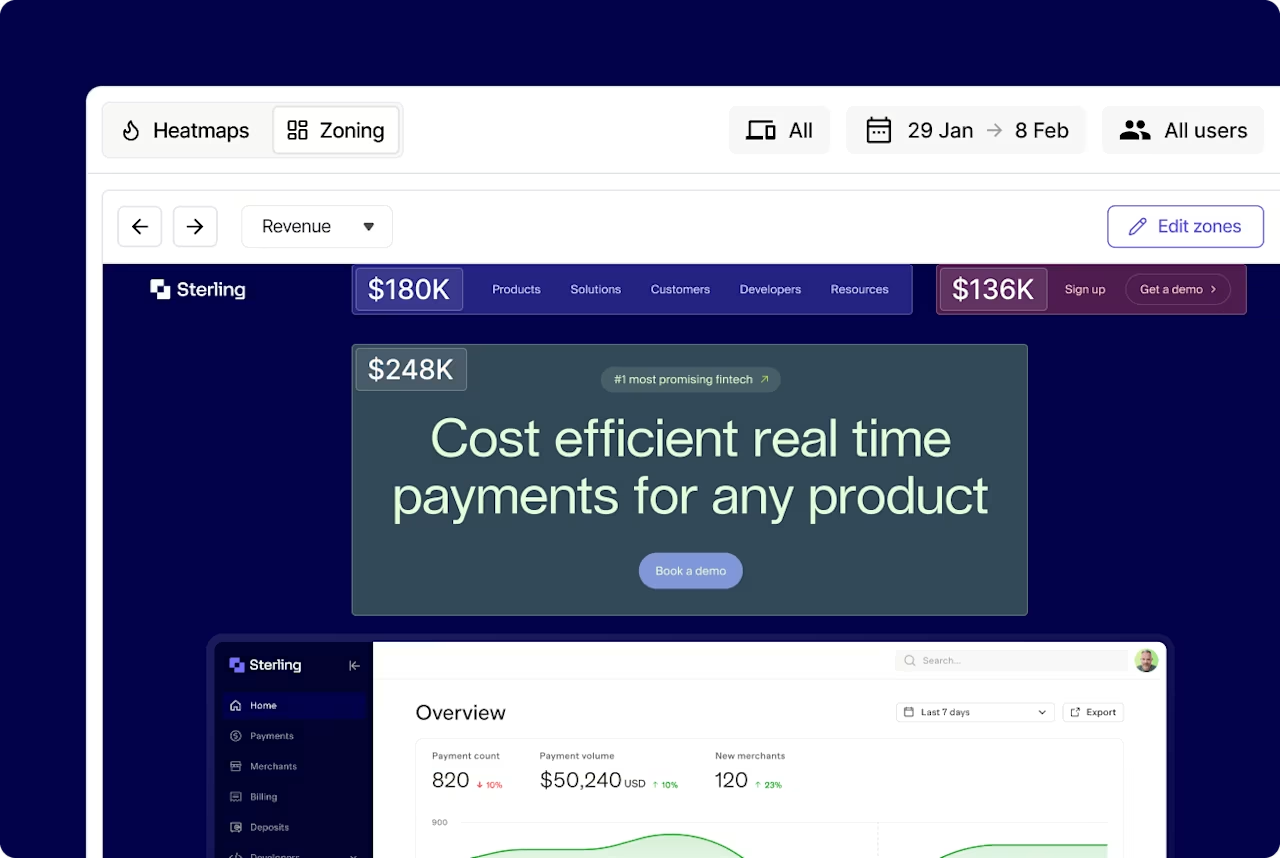
Contentsquare’s zone-based heatmaps.
4. Fix friction to smooth the path to conversion
Friction is commonplace in customer journeys on both mobile and desktop—and it’s seriously damaging to customer satisfaction, retention and conversion rates.
Our 2026 Benchmark report found that overall frustration fell 4.3% year over year, while JavaScript errors, slow page loads, and API errors remained common sources of friction.
Users have high (and rising) expectations around the mobile customer experience, have limited patience for dealing with friction, and aren’t short on options if they decide to leave your site or delete your app.
And if you frustrate them at a crucial point in the journey—such as the checkout—they might abandon your site, app and brand at the drop of a hat.
But how do you fix friction throughout your entire journey?
Generally speaking, there are 2 sources of frustration for mobile web and app users:
Technical issues: a button isn’t working, your app keeps crashing or your website/app isn’t loading fast enough
Subpar page/screen design: a page or screen element is confusing, overwhelming or otherwise alienating customers
On mobile, users who hit an unresponsive button tend to tap it again and again. These rage taps, plus slow loads and app crashes mid-task, are the clearest mobile friction signals.
These issues are common, but they’re not always obvious. Your team might not even be aware of them until they’ve already done their fair share of damage to your KPIs and app store rating.
To deal with these issues in a timely fashion that doesn’t eat up your resources, you need a leg up from digital experience monitoring.
Experience monitoring tools like Contentsquare's Error Analysis use machine learning to detect errors and pain points in your journeys, quantify their level of impact, bring them to your immediate attention, and empower you to investigate the root cause.
Once you’ve spotted an error, Contentsquare's Session Replay lets you watch the taps and gestures that led up to it, so you see the problem exactly as your user did.
That visibility pays off. Orange Belgium tripled web conversions with Contentsquare. For more on the obstacles teams face, read our chapter on customer experience challenges.

Contentsquare lets you watch how users move through your app with session recordings.
5. Analyze every aspect of your customer journeys (not just the outcomes)
The first 4 strategies we’ve run through arguably imply this one. But it bears repeating.
Too many businesses are monitoring incoming traffic and outcomes (be that conversions, bounces, or uninstalls) but neglecting the all-important middle of the customer journey—which is a massive mistake.
Only by understanding what’s happening between the moment a user arrives on your site or opens your app and the moment they bounce, convert, or exit can you take truly informed action to optimize your journeys and drive more positive outcomes.
But that’s no mean feat. Even taken in isolation, customer journeys are often complex and rarely linear, sometimes involving multiple devices and channels. Every user is unique, coming from a particular traffic source, with a particular intention, on a particular device.
This complexity could make the task of understanding where in all those possible customer journeys your site or app is delighting or frustrating your users seem extremely daunting.
With digital experience analytics, your customer journeys become transparent, and the task of optimizing your mobile customer experience from end to end becomes as manageable as it is valuable.
Contentsquare's Journey Analysis, for example, lets your teams can see, at a glance, how users in different segments of your audience make their way through your site or app.
Every team can easily understand the clear, color-coded ‘sunburst’ visualizations of journeys—and make rapid, data-driven decisions that will improve your site and app journeys, satisfy more customers and drive more revenue.

Contentsquare's Journey Analysis visualization.
To get you started, try our free Journey Analyzer, which map 2–4 steps of a mobile journey, like mobile checkout, and flags likely friction and drop-offs. Then see our chapter on customer experience insights to make the most of your data.
6. Personalize experiences and push notifications
Mobile is personal. Users expect the mobile experience to reflect who they are and what they need.
Personalization means adapting content, offers, and journeys to each user’s behavior. For example, you might surface a returning user’s saved items on the homepage.
Push notifications are your most direct line to mobile customer engagement. Used well, they bring users back at the right moment: a back-in-stock alert, a reminder to finish setting up, or a nudge about an abandoned basket.
Used badly, they’re noise—and a fast route to users switching notifications off or deleting your app.
So treat every personalized message as a hypothesis, and measure what it does after users tap. Did a notification lead to a meaningful session, or a quick bounce? Did it lift retention, or just opens?
Mobile App Analytics shows you the impact of push notifications on what users do next in your app. Keep the messages that drive engagement, and cut the rest.
Your mobile customer experience upgrade starts here
Whatever aspect of the mobile customer experience you want to perfect, Contentsquare’s digital experience analytics insights have you covered.
Ready to go further? Explore our chapters on how to improve customer experience, proven customer experience strategies, and building a customer experience roadmap.
FAQs about mobile customer experience
Mobile customer experience is how users interact with and feel about your brand on smartphones and tablets. It covers mobile websites and apps.