![[Visual] Survey retention - stock image](http://images.ctfassets.net/gwbpo1m641r7/3xD9ghYf8jbPKMEwGAJVpi/2c197fc402ee4aec10737501dd1b9291/Indoor_Workspace_with_Women_Using_Laptops_and_Plants.jpg?w=1280&q=85&fit=scale&fm=avif)
You’ve spent years building a content library that brings in referral traffic from organic search and social channels. But your GA4 dashboard shows almost no visitors from LLMs.
And every time you ask ChatGPT, Claude, or Perplexity questions your product should be a natural answer to—like, "What's the best software for [use case]?"—they recommend your competitors instead. Now you're wondering what you should be doing differently to improve your chances of being recommended.
The thing is, humans, Googlebot, and AI crawlers don’t see your website the same way. This means a page can rank in the top three spots on Google and convert visitors, but still not give AI the context it needs to recommend you.
This guide explains:
How AI bots read your web pages
How to audit your site for what they could be missing
What to fix so your pages are easier to reference
Key Insights
Ranking well on Google doesn’t guarantee AI visibility. Some AI crawlers don't run JavaScript, so they only read the HTML your site sends back. A page can rank well in search and still not show up in AI responses.
Prioritize your most valuable pages. Use a tool like Contentsquare's Attribution Analysis to find the pages bringing in meaningful traffic, then use CSQ Live Bot View to compare what bots see vs. what's on the live page.
Fix JavaScript rendering issues at the source. If critical content only loads once JavaScript runs, ask your development team to render it server-side so it's in the HTML crawlers receive.
Sometimes the content is missing because something broke. If a JavaScript or API error stopped your content from loading, Contentsquare's Error Analysis tool gives you AI-powered summaries of what went wrong and who it affected, so you can easily brief your development team.
How AI bots view your web pages vs. Googlebot and humans
Say someone wants to know the best project management software for a 20-person marketing team, so they ask an AI assistant.
AI tools like ChatGPT and Claude search the web and pull data from live pages to answer a question, while separate crawlers collect content ahead of time for indexing, retrieval, or training.
In both cases, pages like yours—pricing pages, product pages, comparison articles, and reviews—help inform the answer. But the way AI systems read those pages is different from how a person and Googlebot do.
Humans see the full webpage—the text, tabs, images, and anything else that loads—so they can click around and find what they need
Googlebot sees something close to what your visitors see because it fetches the HTML and then renders the JavaScript much like a browser does
Some AI crawlers, including GPTBot and ClaudeBot, rely on the HTML a website sends back rather than rendering the page like a browser. That gives them the headings, paragraphs, links, lists, and tables that are already there.
So if a product description, price, or feature list only appears after JavaScript runs, a person and Googlebot can see it while those AI crawlers may miss it. That's why a page can rank well on Google and not have much traffic coming from AI search.
The best way to see exactly what AI bots may be missing is to run a visibility audit.
How to run an AI visibility audit and fix what bots miss in 5 steps
An AI visibility audit helps you identify which parts of your page AI crawlers can access—and which they may miss.
AI referral traffic grew a whopping 632% in 2025, according to Contentsquare's 2026 Digital Experience Benchmark Report, so you need to know whether your pages are reachable before the channel gets any bigger.
Here's how to run a visibility audit in five steps.
1. Start with your highest-priority pages
You don’t need to audit your whole website to find out whether AI bots are missing important content.
Start with the pages AI chatbots are most likely to pull data from when someone is researching products in your category. This includes pricing pages, product pages, key landing pages, product roundups, and comparison content.
Also prioritize pages already bringing in meaningful traffic. Contentsquare's Attribution Analysis helps here—for example, it lets you see which pages attract the most visitors and keep them engaged.
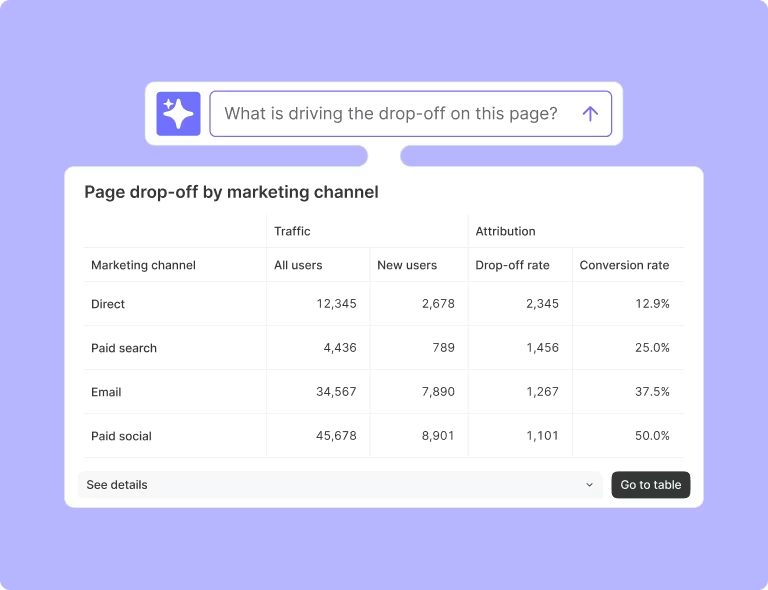
Attribution Analysis helps you know which pages deserve priority in your audit
Once you have your shortlist, check that AI crawlers can actually see your site and access those pages in the first place. Crawlers like GPTBot and ClaudeBot check your robots.txt file and follow the rules you set there. If you block them, or your server rejects their requests, they won’t be able to reach your content.
Did you know? You can find your priority pages faster by asking Sense Chat, Contentsquare's AI, about your acquisition data—for example, "Which landing pages bring in the most engaged traffic?"
2. Compare what humans see with what AI crawlers retrieve
GA4 and similar tools are built to track what people do on your site. Most crawler requests don't run browser JavaScript, including analytics tags like GA4, so those visits often aren't recorded. That means your reports won't show up when important content is missing from the version a bot receives. Some AI agents do use browser-like environments, so this isn't universal.
To identify the gap, compare what humans see on your live page with what a bot sees. Contentsquare’s CSQ Live browser extension lets you do just that directly from the page. Install the plugin and launch it on any page where your Contentsquare tag is installed. Then click 'Switch to' in the CSQ Live ribbon and select Bot View. The page reloads and displays the content that's available before JavaScript adds anything else.
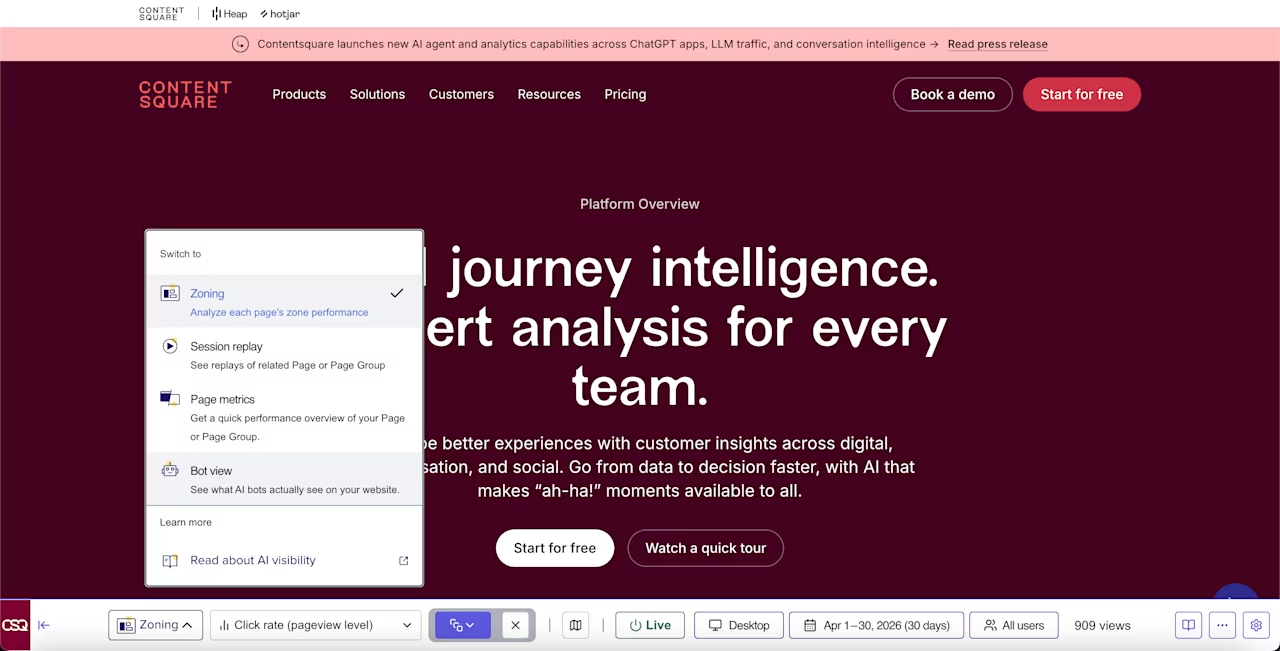
CSQ Live Bot View highlights the gap between what people see and what AI crawlers can access
You can switch between the live page and Bot View to compare what’s there and what’s missing. Anything not in Bot View is invisible to AI crawlers that don't run JavaScript.
So if critical information—like prices and product details—only appears after the page loads, AI tools have less to work with when they judge whether your product is relevant enough to recommend or your content useful enough to cite.
3. Decide which gaps are worth fixing first
Not every difference you find in Bot View needs the same attention. To know which gaps to prioritize, answer these two questions:
Does the missing content change how someone perceives your product?
How much does that page matter to your business?
For example, on a "best [software] alternatives" page, an author bio not showing up in Bot View is lower priority compared to missing pricing details or a comparison table. Those are the details an AI assistant needs to decide what to recommend—and buyers need to decide what to choose.
Pro tip: use Contentsquare's heatmaps and zoning to see whether a missing element is one visitors actually interact with, and how it contributes to conversions and revenue. If your comparison table is one of the most engaged zones on the page but isn't in Bot View, that's a strong case for fixing it first.
![[Visual] top click rate zones](http://images.ctfassets.net/gwbpo1m641r7/5P9a8w8bDB9uf7ctDqNU3i/e00654b1c73a55402b09f35a1aae9bab/A_zone-based_heatmap_showing_top_click_rate_zones_on_a_homepage.png?w=1280&q=85&fit=scale&fm=avif)
A zone-based heatmap showing top click rate zones on a homepage
4. Fix the issues you found
Most LLM visibility gaps fall into one or more of these categories:
JavaScript rendering issues: important content only appears after JavaScript runs, or fails to appear because of a technical error
Page structure issues: a crawler works from the markup, so unclear headings or important details that only appear inside an image make the page harder to interpret
Buried key information: critical details sit behind tabs, accordions, or ‘read more’ toggles that crawlers don’t interact with
Your content team can handle some of these fixes. For example, copywriters and editors can rewrite unclear headings, add missing product details, or move important information out of 'read more' sections so it's visible right away.
Your SEO team can also add structured data to key pages by labeling a product with its description, price, availability, or reviews. That way, crawlers understand what's on the page instead of guessing from the layout.
For JavaScript rendering issues, you'd need help from your development team. For example, if content shows up for visitors but is missing in Bot View, the page may simply load that content in the browser after JavaScript runs. Ask them to render it server-side instead, so all critical information is in the HTML that the AI crawler receives.
Pro tip: if the issue is a JavaScript or API error, capture what’s wrong and why it matters, then create a detailed brief to hand over to engineering.
Contentsquare's Errors capability helps you build that brief faster. Its AI-powered summaries show where the error occurred, what users experienced, and how it affected conversions or revenue in plain language—so you can understand the problem yourself before handing it over. You can also watch the related session replay for more context or create a Jira ticket directly from Contentsquare.
![[Visual] Sense button in Error Analysis](http://images.ctfassets.net/gwbpo1m641r7/2QF7ist2figmeUO1m9itRb/eec730f869dd3f5c1affffcd8ca293ba/Click_the_Sense_button_in_Error_Analysis_to_generate_a_summary_of_the_error__so_you_can_see_what_went_wrong__its_impact__and.png?w=1280&q=85&fit=scale&fm=avif)
Click the Sense button in Errors to generate a summary of the error, so you can see what went wrong, its impact, and the steps users took before it occurred
5. Measure what changed
To check whether your fixes worked, revisit your pages after the changes go live and compare what AI crawlers can access now.
Start by going back to the pages you fixed in CSQ Live Bot View and confirm that the missing content now appears. Then, keep an eye on your AI referral traffic. Bots may take time to revisit your pages, and referral traffic depends on more than crawler access alone, so look for trends over the following weeks rather than a few days.
Contentsquare shows you how much of your traffic comes from AI tools. So instead of one broad AI referral bucket, you can see which platforms (ChatGPT, Claude, Gemini, or Perplexity) are sending visitors to your site and compare how that traffic changes over time.
You can also compare engagement metrics across those AI sources to see whether visitors from one platform behave differently from visitors coming from another.
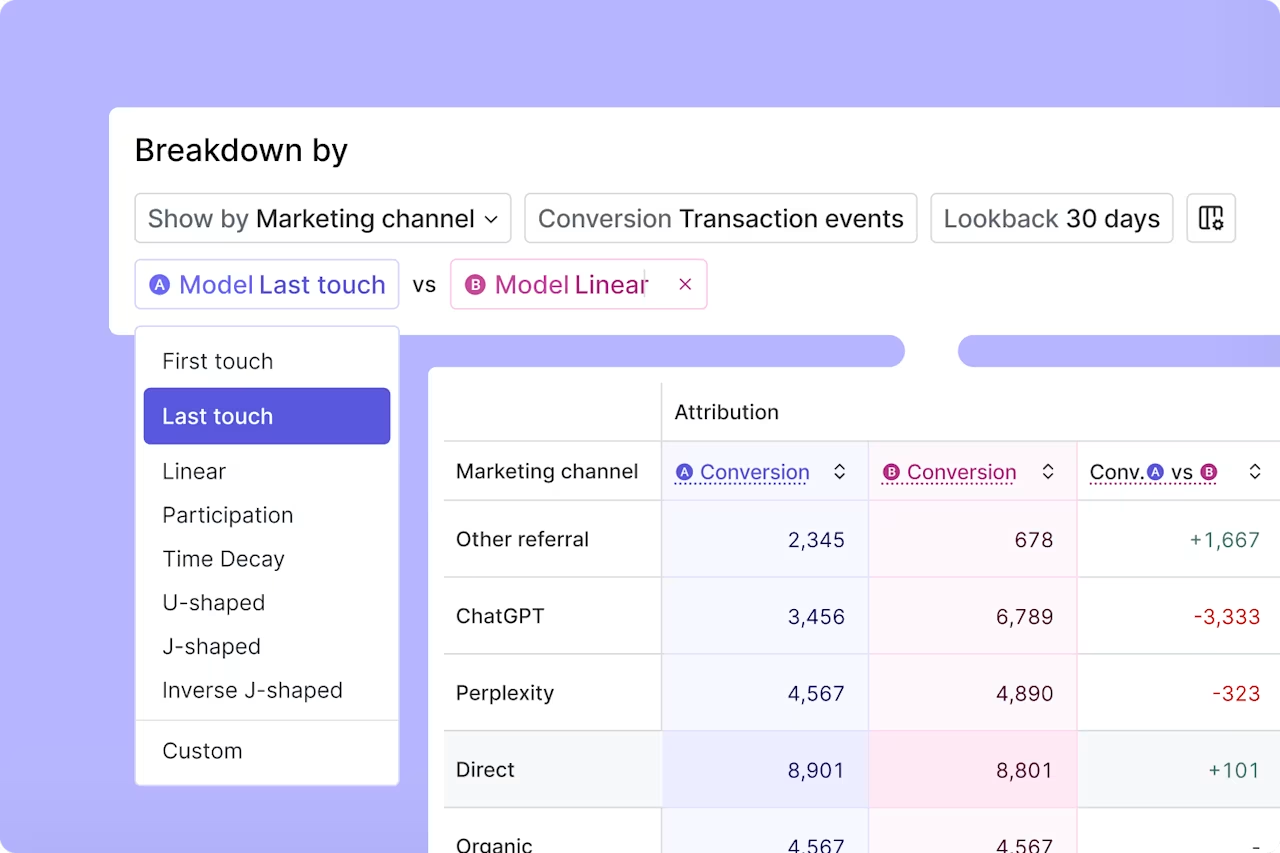
Use Sense Chat inside Attribution Analysis to compare AI referral sources and see which ones are driving the strongest engagement and which have the most room to improve
Boost your site’s visibility in LLM answers
AI visibility isn’t something you audit once and forget about. Your site changes, competitors publish new content, and crawlers revisit pages on their own schedule, so what's reachable today may not be after your next release.
Contentsquare gives you the tools to track and optimize your AI traffic:
Attribution Analysis to find the pages worth auditing and track how AI referral traffic changes over time
CSQ Live Bot View to see what crawlers actually receive on those pages
Zone-based heatmaps to understand which missing elements matter most to visitors
Errors to spot content that isn’t loading because of a technical issue
Run the audit on a recurring schedule so you can catch new gaps early, fix the ones that matter most, and ensure more of your important content is visible to the AI systems your customers are using to ask questions you could be the answer to.
FAQs about how AI bots view your site
Yes, but not the same way a person does. Many AI crawlers read the HTML your site sends back, including headings, paragraphs, links, lists, and tables. Some don’t run JavaScript, so anything added to the page afterwards isn’t part of what they read.

Jessica is a freelance Content Writer at Contentsquare and a content marketing specialist with over five years of experience creating and repurposing helpful, relatable content for leading B2B SaaS brands including Softr, Hotjar, and Vena. Her superpower is turning product, user, and subject matter expert insights into product-led content that builds trust, supports sales, and drives business growth.
![[Visual] Stock desktop with graphs](http://images.ctfassets.net/gwbpo1m641r7/4ibTHSyYMP1ULKnZnw1QM9/85f052087a6902cbd526cf634b033572/AdobeStock_542452796.png?w=624&q=85&fit=scale&fm=avif)