
Your backlog of test ideas keeps growing while each one waits weeks in the developer queue. And when a test finally wins, the lift often fades after launch, because the results showed what happened but not why.
The best website experimentation tools in 2026 help you launch tests faster and learn from every result. This guide covers 10 tools, 6 features to look for, and a 3-step way to explain every result.
Key insights
The best website experimentation tools in 2026 cut the time between spotting a problem and testing a fix
Check the size of the win. A variant that wins on paper isn't worth shipping if the lift is too small to matter.
Understanding why a variant won matters as much as knowing that it won
What is a website experimentation tool?
A website experimentation tool is software that shows different versions of a page to different users and measures which one converts better. This means you ship changes based on evidence instead of opinion.
Why does this matter now? In our recent Benchmarks Report, conversion rates fell 5.1% year over year while the cost of a visit rose 9%.
Testing helps you get more from the traffic you already pay for.
These tools run 5 main types of tests:
A/B testing: compares 1 new version of a page against the original, called the control
A/B/n testing: compares 2 or more new versions against the control at once
Split URL testing: sends users to 2 different web addresses, which suits full redesigns
Multivariate testing: tests combinations of page elements, like headline plus image, so it needs more traffic
Feature flags: act as on/off switches in your code that show a feature to some users only
10 best website experimentation tools to compare
Most A/B testing tools fall into 2 groups, based on where the test runs.
Client-side testing is when the tool changes the page inside the user's browser. This means marketers can test copy and design in a visual editor without a developer.
Server-side testing is when the change happens in your website's code before the page loads. This means developers can test deeper changes, like pricing or new features.
1. Contentsquare
Contentsquare Experimentation lets you find a problem, test a fix, and see why it worked, all in one place. It's no-code A/B and A/B/n testing for marketing and conversion rate optimization (CRO) teams, running on your behavior analytics data.
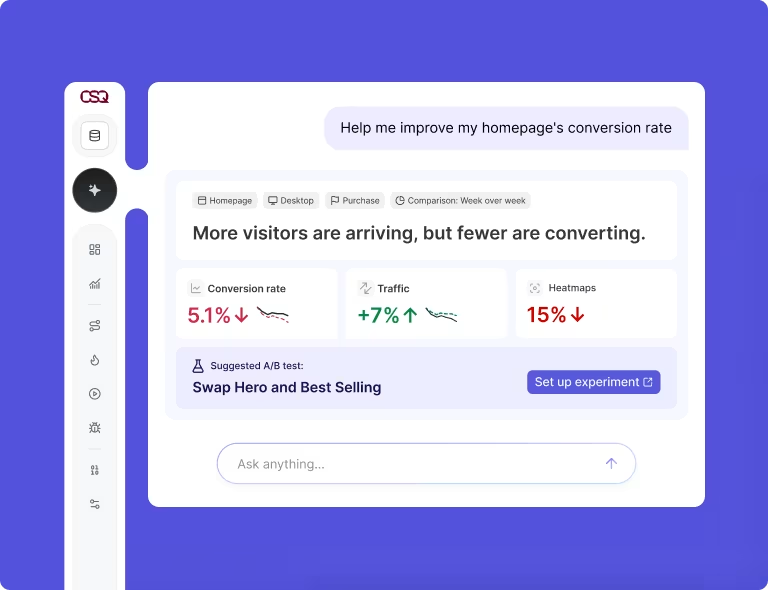
How to use it: Journey Analysis maps the paths users take through your site, so you can spot the step where most of them leave. Impact Quantification then shows what each problem costs in revenue, so you fix the most expensive one first.
Next, Sense Analyst, Contentsquare's AI agent, suggests what to change and builds the test setup. You go from insight to live test in under 15 minutes.
Build your variant in the point-and-click visual editor, where you can edit text, swap images, change styling, or hide elements. For bigger changes, run a URL redirect test that sends users to a different page.
Bayesian statistics is a method that gives the probability your variant beats the control. Contentsquare pairs it with expected loss, or what you'd lose if you ship and you're wrong.
Practical significance is whether a lift is big enough to matter for your business. Contentsquare checks it, so you skip tiny "wins" that won't move revenue.
To see why a variant won, compare versions in Zoning Analysis, a heatmap that colors each page area by clicks and attention. Then open Session Replay from the results view to watch where real users hesitated.
For example, Canyon Bicycles tested a video against a still image in the second spot on its homepage. The team set up separate segments, or groups of users, for each version and compared them with Zoning Analysis.
2. Optimizely
Optimizely suits enterprise teams. Marketers build web tests in a visual editor, while developers use Feature Experimentation for feature flags and A/B tests across sites and apps.
Sequential testing is a method that stays accurate even when you check results mid-test. Optimizely's Stats Engine uses it, and Optimizely integrates with Contentsquare to show how users behave in each variant.
3. VWO
VWO, now part of Wingify, is a testing platform for mid-market CRO and marketing teams. Its A/B testing product is now called Wingify Experimentation, with plans and features unchanged.
You update copy, calls to action (CTAs), images, and forms in a point-and-click editor. SmartStats gives you Bayesian reporting, and built-in heatmaps and session recordings connect to each test result.
4. AB Tasty
AB Tasty, also part of Wingify, suits eCommerce teams. Marketers use its web editor for client-side tests and personalization, which means showing different content to different groups of users.
For developers, Feature Experimentation & Rollouts (formerly Flagship) handles server-side tests. Its feature flags and gradual rollouts let you release a feature to a small group first.
5. Kameleoon
Kameleoon is an experimentation platform for teams where marketers and developers work together. Marketers describe a change in plain language to generate a variant, or build one in the visual editor.
Developers run server-side tests and gradual rollouts. Kameleoon also connects natively with Contentsquare.
6. Adobe Target
Adobe Target is the testing and personalization tool inside Adobe Experience Cloud, so it suits enterprises already on Adobe. It runs A/B and multivariate tests.
Auto-Allocate sends more traffic to the leading version during a test. Auto-Target, a Premium feature, uses machine learning to match each user with their best-performing experience.
7. Convert
Convert is an A/B testing platform for agencies and mid-size growth teams. It runs A/B, split URL, multivariate, and full-stack tests, with Bayesian and frequentist stats.
Frequentist statistics is a method that tells you whether a result is unlikely to be chance. Convert also says its patent pending SmartInsert technology delivers flicker-free tests, so users don't see the original page flash first.
8. Dynamic Yield
Dynamic Yield, a Mastercard company, is a personalization-first platform for retail and ecommerce teams. Its Experience OS combines personalization, product recommendations, testing, and analytics in one system.
This means you can test recommendation widgets alongside standard page changes.
9. GrowthBook
GrowthBook is an open-core platform for data teams, meaning most of its code is open source. It's warehouse-native, so it calculates results directly in your data warehouse, like Snowflake or BigQuery.
You launch tests with feature flags, a visual editor, or URL redirects, in the cloud or on your own servers.
10. Statsig
Statsig is a product experimentation platform for product and engineering teams that ship fast. It has been part of Amplitude since May 2026.
CUPED (Controlled-experiment Using Pre-Experiment Data) is a method that uses each user's past behavior to filter out normal ups and downs. Statsig applies it to every experiment automatically, so your results are more precise.
6 features to look for in a website experimentation tool
The right tool depends on your team, your traffic, and your tech stack. Use these 6 features to narrow your shortlist.
1. A no-code visual editor
A visual editor lets you change text, images, and layout by clicking on the page itself. This means marketers can launch tests without waiting in a developer's queue.
2. Client-side and server-side testing
Most teams need both. Use client-side tests for quick copy and layout changes, and server-side tests for anything tied to your code, like checkout logic.
3. A trustworthy stats engine
The stats engine decides when a test has a winner. Pick the method that fits how your team works:
Bayesian: choose this if you want a plain probability that a variant will win
Frequentist: choose this if you can wait until the test collects its full planned data
Sequential: choose this if your team needs to check results often during a test
Whichever method you pick, check expected loss and practical significance too.
4. Built-in behavior analytics
Test results tell you which variant won. Heatmaps and session recordings show you why, by revealing where users clicked or got stuck.
Say a variant gets more 'Add to cart' clicks but fewer orders. Contentsquare's A/B testing dashboards catch this by comparing your main and secondary key performance indicators (KPIs) for each variant in 1 view.
5. Targeting and segmentation
Targeting lets you choose who sees a test, like returning users on mobile. It matters because our benchmark data shows repeat visitors convert at 2.9%, compared with 1.7% for new visitors.
💡 Takeaway: a change that helps new users might do nothing for loyal ones, so target and report by audience.
6. Integrations and data governance
Data governance is the set of rules for how your company collects and uses data. This means a user's consent choices must apply in every tool you run.
Connect your tool to your analytics and customer data platform (CDP), so every tool reports the same numbers. Contentsquare Experimentation follows your existing Contentsquare consent rules, so users who opt out stay out of tests.
How to combine behavior analytics with your experimentation tool
A test result tells you what happened. Behavior data tells you why, and points to what to test next.
Step 1: find the friction worth testing
Friction is anything that slows users down or makes them leave. Look for pages where users drop off, hesitate, or click things that aren't links.
In Contentsquare, find the biggest drop-off in Journey Analysis. Then rank test ideas by the revenue Impact Quantification puts on each one.
Step 2: turn insight into a clear hypothesis
A hypothesis is a short statement of what you'll change, why it should help, and which metric should move. This means everyone agrees on what success looks like before the test starts.
For example: "Showing shipping costs before checkout will reduce drop-off, because users won't be surprised by extra fees."
Ask Sense Analyst to review a page, and it drafts the hypothesis for you. At Optimum, it cut analysis time from 2-3 hours to minutes per insight.

“Sense Analyst has helped make analytics more accessible to the broader set of users, and I think that's probably the most exciting part. Within a minute or two, Sense Analyst gives me three or four actionable insights that I can dig deeper into.”

Step 3: explain the result and plan the next test
When a test ends, check which page areas gained or lost attention in Zoning Analysis, then watch reactions in Session Replay.
Already using another tool? Contentsquare integrates with Optimizely, AB Tasty, Kameleoon, and Dynamic Yield, so you can analyze tests you already run.
🔥Takeaway: record what you learned after every test, because each result, win or lose, should shape your next hypothesis.
FAQs about website experimentation tools
Choose [A/B testing](https://contentsquare.com/guides/ab-testing/) when you want a clear answer on 1 change, like a new headline. Choose multivariate testing only on high-traffic pages, when you want to learn how several elements work together.

Dana is a copywriting specialist with deep expertise in creating assets like blog posts and landing pages that position organizations as the obvious first choice in their market. She holds a Bachelor of Business Administration in Marketing and has over 10 years of experience helping leading B2B brands drive traffic and increase conversions. Having taught more than 1,000 entrepreneurs the art of persuasive copywriting, Dana brings unique insight into what resonates with audiences and delivers results.

