![[visual] Follow our step-by-step approach to shopping cart UX and discover how to design a shopping cart that users love.](http://images.ctfassets.net/gwbpo1m641r7/1TwB5yoKiAFLKqCx72op0y/6b039b0553ae318340a788400c1d7f03/419069009.jpg?w=1280&q=85&fit=scale&fm=avif)
Getting traffic to a landing page is only half the battle. The real challenge is turning visitors into customers.
When conversion rates fall short, the problem isn't always obvious. Visitors might be getting stuck on a form, missing key information, losing trust, or abandoning the page for reasons your analytics can't fully explain.
Landing page optimization tools help uncover those issues. From behavior analytics and user feedback to A/B testing and performance monitoring, they give teams the insights they need to improve the experience and increase conversions.
This article gives you 12 landing page optimization tools that offer a variety of features to help you build, test, analyze, and tweak your pages for maximum performance.
Key takeaways
The best landing page optimization tools combine analytics, behavior tracking, A/B testing, and user feedback to identify what drives conversions
Effective LPO requires both quantitative data (what's happening) and qualitative insights (why it's happening) working together
Most teams need 2-4 complementary tools rather than one all-in-one solution to cover building, testing, analyzing, and optimizing
Free tools like Google Analytics and Microsoft Clarity can provide significant value before investing in premium solutions
Landing page optimization tools at a glance
Before diving into the details, here's a quick comparison of all 12 tools to help you find the right fit for your needs:
Tool | Best for | Starting price | Key features |
|---|---|---|---|
Contentsquare | Understanding why users convert or leave | Free tier available; paid plans vary | Heatmaps, session replay, surveys, user testing |
Unbounce | Building conversion-ready pages without code | $99/month | Drag-and-drop builder, A/B testing, smart traffic |
VWO | Advanced experiments and personalization | $357/month | A/B testing, multivariate testing, personalization |
Optimizely | Enterprise-grade A/B testing | Custom pricing | Feature flags, experimentation, content management |
Google Analytics | Tracking landing page performance for free | Free | Traffic analysis, conversion tracking, audience insights |
Microsoft Clarity | Free heatmaps and session recordings | Free | Heatmaps, session recordings, rage click detection |
Instapage | Landing pages with built-in personalization | $99/month | Personalization, collaboration tools, AMP pages |
Crazy Egg | Visual analytics for quick wins | $29/month | Heatmaps, scrollmaps, A/B testing |
Ahrefs | Optimizing landing pages for organic search | $129/month | Keyword research, backlink analysis, site audits |
Google PageSpeed Insights | Improving page load performance | Free | Core Web Vitals, performance scoring, recommendations |
Hello Bar | Capturing leads with targeted pop-ups | Free tier available; paid from $29/month | Pop-ups, sticky bars, targeting rules |
Wynter | Getting real user feedback on messaging | $999/month | Message testing, B2B panel, qualitative feedback |
12 best landing page optimization tools
Optimizing your landing pages involves more than just changing the colors and copy of CTA buttons and running a few A/B tests. You need a strong set of tools to measure overall performance, identify user issues, and improve your pages to drive more conversions.
The best LPO tools share a few important qualities:
Provide comprehensive insights: Qualitative and quantitative data both have a role to play in LPO. Quantitative data provides facts and figures that explain the 'what' behind landing page performance, but you need qualitative insights to fill in the gaps about 'why'. Together, they give you a rich portrait of what your users want and need.
Prioritize mobile optimization: LPO tools should optimize landing pages and provide a great user experience on every possible device. More than 50% of website traffic comes from mobile, so making your landing pages responsive is essential.
Enable seamless integrations: The more comprehensive your optimization tool, the easier it is to create and optimize landing pages that get the job done. Ensure your lead-generating landing pages seamlessly connect with your lead-nurturing, sales, and customer management software.
Here's a detailed look at each tool and how you can use it to optimize your landing pages.
1. Contentsquare: understand why users convert or leave
One of the best ways to optimize landing pages is to understand how users navigate them. Contentsquare is an experience intelligence platform that maps out how users interact with the elements on a website, web app, or any digital product—and helps you understand why.
![[Visual] contentsquare](http://images.ctfassets.net/gwbpo1m641r7/3xrTNOvwqIPN8Q4aDxqjLg/0b32a4a1ca35b5141f6477b037a3a4c6/contentsquare.avif?w=1280&q=85&fit=scale&fm=avif)
Integrate Contentsquare's suite of digital experience tools for optimal LPO
Pricing: Free tier available with core features; Growth and Pro plans available for teams needing advanced capabilities.
Best for: Teams who want to understand the "why" behind user behavior, not just the "what". Particularly valuable for marketers and UX teams who need to diagnose conversion issues and validate optimization hypotheses.
How to use Contentsquare for LPO
Signing up with Contentsquare means you'll get access to:
Heatmaps that show you where your users spend the most time, where they click, and how far down they scroll, to determine their interest in landing page elements
Session replays of user visits to watch how people interact with your landing page, so you can see exactly what's going on at specific points in time. You also get advanced filters to see events like u-turns and rage clicks
Surveys to interact with your audience in real time to guide optimization efforts moving forward
Journey Analysis to see where users come from before landing on your page and where they go next, so you can understand whether your landing page is driving users forward or losing them to unexpected exits
Funnel Analysis to track how visitors move from your landing page through to conversion, and pinpoint the exact step where the most users drop off
Speed Analysis to monitor how your landing page load time affects bounce rate and conversion, and flag performance issues before they cost you traffic
Sense, Contentsquare's AI, to automatically surface the biggest friction points and opportunities on your landing page without manually digging through each tool — ask a question in plain language and get a prioritized list of what to fix first
![[visual] Run expert analysis on autopilot with Sense Analyst](http://images.ctfassets.net/gwbpo1m641r7/3dop01rRpadtOr6TYuMUhx/1f4534223c56497068536d1384326fcf/Contentsquare-AI-vs-competitors.png?w=1280&q=85&fit=scale&fm=avif)
Contentsquare's Sense Analyst cuts through the noise on any landing page — ask what's hurting conversions and get a prioritized answer pulled from across your behavioral data.
2. Unbounce: build conversion-ready landing pages
The key to a high-converting landing page is to have a good foundation. With its drag-and-drop visual editor, Unbounce is an easy-to-use landing page builder ideal for small businesses, large-scale corporations, and entrepreneurs alike—no tech-savviness or coding skills needed.
![[Visual] Unbounce](http://images.ctfassets.net/gwbpo1m641r7/6ivplr0OzjYeecSw0Wk1j3/c3b9b88c3bea6cf581d932fa32a01343/image9.png?w=1280&q=85&fit=scale&fm=avif)
Unbounce is a fantastic drag-and-drop landing page builder
Pricing: Plans start at $99/month (Build), scaling to $625/month (Concierge) for high-volume needs.
Best for: Marketing teams who need to launch landing pages quickly without developer support, and businesses running multiple campaigns that require rapid iteration.
How to use Unbounce for LPO
Unbounce boasts tons of built-in features you can use to:
Customize landing pages and create different variants to conduct A/B testing experiments
Generate lead gen forms that engage website users and potential customers
Refine your digital marketing campaigns for maximum efficiency using smart traffic optimization
Factor in mobile optimization to instantly create responsive landing pages for increased growth
Generate sticky bars and pop-ups to spread relevant promotions and campaigns to landing page users
Follow the performance of your landing pages with a built-in analytics system
If you're using Contentsquare
Connect Contentsquare with Unbounce to see how your users really use your landing pages. Optimize your conversion rate using heatmaps, replays, funnel analytics, surveys, and more to:
Understand user behavior and needs: study users as they engage with your Unbounce landing pages to develop a deeper understanding of their needs with qualitative and quantitative data
Make the right changes with reliable insights: gather a constant stream of unbiased, in-the-moment user feedback with unobtrusive widgets, so you can make changes to elevate the experience
3. VWO: run advanced experiments and personalization
VWO (Visual Website Optimizer) is a comprehensive experimentation platform that goes beyond basic A/B testing to offer multivariate testing, personalization, and behavioral insights. It's designed for teams who want to run sophisticated experiments at scale.
Pricing: Plans start at $357/month for the Testing product; full platform pricing varies based on features and traffic.
Best for: Mid-size to enterprise teams with dedicated CRO resources who need advanced testing capabilities and statistical rigor.
How to use VWO for LPO
VWO provides a robust set of features for landing page experimentation:
Run A/B, multivariate, and split URL tests with a visual editor or code-based approach
Use Bayesian statistics for faster, more accurate test results
Create personalized experiences based on user segments and behavior
Analyze test results with built-in heatmaps and session recordings
Deploy server-side experiments for more complex testing scenarios
4. Optimizely: enterprise-grade A/B testing
There's no optimization without experimentation, and that goes for landing pages as well. Showing your audience different versions of your pages and comparing results—also known as A/B testing or split testing—is a key step in improving your landing page experience and performance. Use Optimizely to create, test, and optimize content for your target audience.
![[Visual] Optimizely](http://images.ctfassets.net/gwbpo1m641r7/hEPLhH1fbCIU2kHmo6Rjj/30a6f9a4555c21cb9a7d29bb0ceb0309/Optimizely.avif?w=1280&q=85&fit=scale&fm=avif)
Optimizely is a fantastic tool to make every one of your users' landing page experience the best one
Pricing: Custom pricing based on traffic and features; typically suited for enterprise budgets.
Best for: Enterprise teams with significant traffic volumes who need robust experimentation infrastructure, feature flagging, and advanced personalization capabilities.
How to use Optimizely for LPO
As an A/B testing tool, Optimizely offers a number of features for experience testing, experimentation, and personalization you can leverage to improve your landing page. Here's how:
Design landing page variations quickly and easily with the help of a drag-and-drop visual editor
Run multiple content experiments on the same page without impacting load times
Randomize users or determine specific user groups for the rollout of new landing page elements or features
Deploy changes to your users with just the click of a button
Integrate your results with some of the most powerful tools online, including Google Analytics, Contentsquare, and Adobe Analytics
If you're using Contentsquare
Get deeper insights from your A/B tests to optimize your UX with Contentsquare's Optimizely integration. Optimizely gives teams a no-code solution for setting up and managing A/B and multivariate testing, while Contentsquare's tools help you understand the nuance of users' experiences throughout your experiments.
Combining your Optimizely tests with Contentsquare's Session Replay and Surveys helps you understand how users engage with and react to different versions of your landing page. Here's how to use them together for LPO:
Watch your users interact with different versions of your landing page with replays and really understand their full experience
Hear what users are thinking and feeling with voice of customer feedback as they explore different variations
Get user insights to find opportunities, formulate hypotheses, and inform further A/B and multivariate experiments

A Contentsquare replay
5. Google Analytics: track landing page performance for free
Keeping on top of web analytics is essential in knowing where you start and end in your landing page optimization process. If you want to evaluate how your landing page metrics are performing, Google Analytics (GA) is a great place to start.
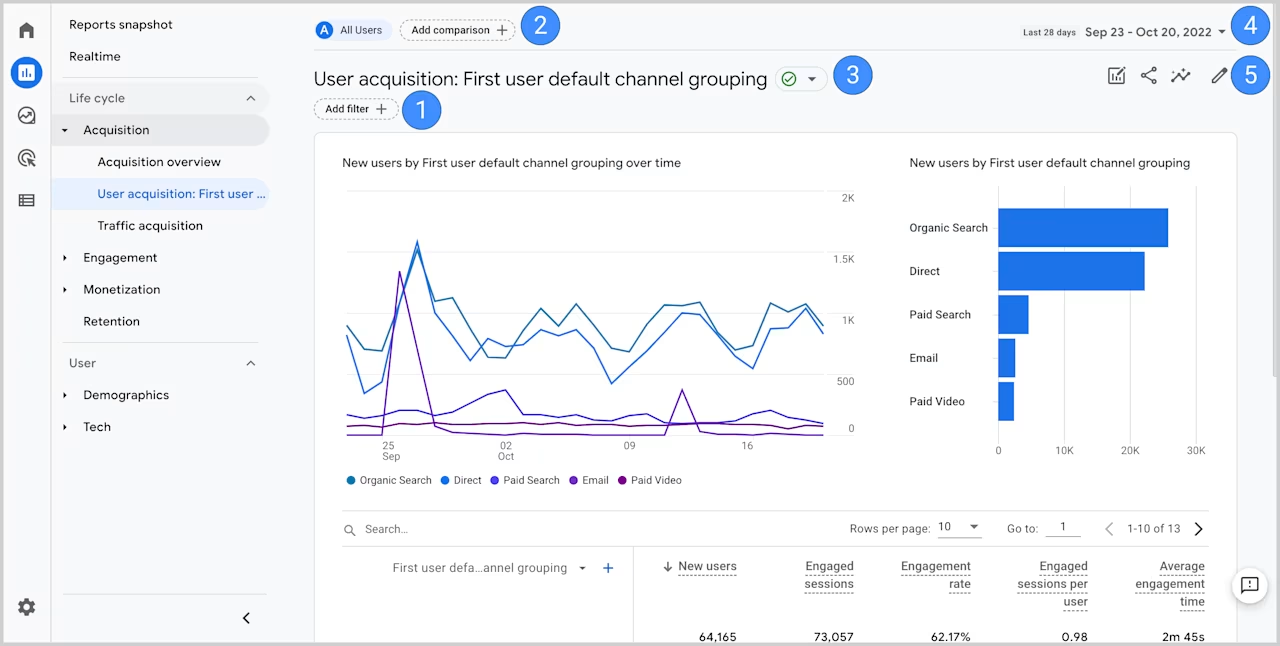
An example of a Google Analytics dashboard
Pricing: Free for most use cases; Google Analytics 360 available for enterprise needs.
Best for: Every team—GA provides the foundational metrics you need to measure landing page performance, regardless of what other tools you use.
How to use Google Analytics for LPO
GA4 has dedicated reports for understanding your landing page performance, where you can:
Access data on key landing page metrics, such as conversion rates, bounce rate, time on page, page speed, new vs. returning users, performance by channel, and behavior by device
Determine a baseline to see if your optimizations have a positive impact
Use Key Performance Indicator (KPI) analysis to measure the effects of your changes
Analyze user behavior based on demographics, acquisition data, behavioral data, and referral sources
Use Google Ads integration to connect campaign performance with on-page behavior
If you're using Contentsquare
Use the Contentsquare-Google Analytics integration to reveal the user behavior behind your numbers. Find out "what" is happening in Google Analytics, and understand "why" in Contentsquare.
This integration enables you to drill through your GA data to see your users' actual experience inside Contentsquare, so you can use those insights to optimize your landing pages. Here's how:
Watch replays of how users are behaving behind a spike or drop-off in GA to spot patterns and get an in-depth understanding of the issue
Use Google Analytics Events to filter heatmaps to see what's getting clicked on or ignored by users who triggered a specific event
Trigger a Contentsquare survey or feedback widget when a specific user action fires a GA event
Google Analytics tells you there is a problem, and Contentsquare helps you understand it. Together, they enhance your quantitative data with qualitative insights and lend support to your LPO strategy for an optimized landing page experience.
![[Visual] Exit-Intent- Survey](http://images.ctfassets.net/gwbpo1m641r7/1UqasWRBnczjIUsx8wDIMB/149e80ca4b764400d3295ddb4c9c254b/Feedback_Widget__1_.png?w=692&q=85&fit=scale&fm=avif)
Gather feedback from users with Contentsquare
6. Microsoft Clarity: free heatmaps and session recordings
Microsoft Clarity is a free behavior analytics tool that provides heatmaps and session replay capabilities without any traffic limits or paywalls. It's an excellent entry point for teams who want to understand user behavior without a budget commitment.
![[Visual] Microsoft Clarity dashboard](http://images.ctfassets.net/gwbpo1m641r7/4xrvipXldYb11S6aJckHDJ/9b5af4cc9dada5af313c06809af3f32c/Microsoft_Clarity_dashboard.png?w=960&q=85&fit=scale&fm=avif)
An example of Microsoft Clarity dashboard
Pricing: Completely free with no traffic limits.
Best for: Budget-conscious teams, startups, and anyone who wants to add behavior analytics without financial commitment. Also useful as a complement to paid tools.
How to use Microsoft Clarity for LPO
Clarity offers several features to help you understand how users interact with your landing pages:
View click, scroll, and area heatmaps to see where users focus their attention
Watch session recordings to observe real customer journeys through your pages
Use built-in filters to find sessions with rage clicks, dead clicks, and excessive scrolling
Analyze metrics like scroll depth and engagement time
Integrate with Google Analytics to connect behavior data with your existing analytics
7. Instapage: landing pages with built-in personalization
Instapage is a landing page builder that emphasizes personalization and collaboration. It's designed for teams who need to create many landing page variants and want to deliver personalized experiences based on ad campaigns or audience segments.
![[Visual] Instapage](http://images.ctfassets.net/gwbpo1m641r7/17kfxcxreylcaRCVBVhEIc/c77ec908e8ae3837196cc9b167f581f6/Instapage.png?w=1128&q=85&fit=scale&fm=avif)
Instapage's landing page builder in action
Pricing: Plans start at $99/month (Create), with custom pricing for enterprise features.
Best for: Advertising teams running multiple campaigns who need to match landing page messaging to specific ads, and organizations where multiple stakeholders collaborate on page creation.
How to use Instapage for LPO
Instapage provides features specifically designed for high-converting landing pages:
Build pages with a drag-and-drop editor and 500+ customizable templates
Create dynamic text replacement to match landing page headlines with ad copy
Use built-in A/B testing to compare page variants
Collaborate with team members using real-time editing and commenting
Generate AMP pages for faster mobile load times
Connect with ad platforms to track campaign-level performance
8. Crazy Egg: visual analytics for quick wins
Crazy Egg combines heatmaps, scroll maps, and A/B testing in a straightforward package designed for quick insights. It's been a staple in the conversion optimization space for years and remains popular for its simplicity.
![[Visual] Crazy Egg](http://images.ctfassets.net/gwbpo1m641r7/2UIRIvWbqcdaiZ14Sy8FFl/38f6d1aa0ea4dda45e6a2c0f15e6687a/Crazy_Egg.png?w=1066&q=85&fit=scale&fm=avif)
Crazy Egg's web analytics
Pricing: Plans start at $29/month (Basic), scaling based on tracked pageviews.
Best for: Small to mid-size teams who want visual analytics without complexity, and marketers who need to quickly identify and act on optimization opportunities.
How to use Crazy Egg for LPO
Crazy Egg offers a focused set of features for understanding and improving landing pages:
View heatmaps showing where users click, including clicks on non-linked elements
Analyze scroll maps to see how far users scroll and where they drop off
Use confetti reports to segment clicks by referral source, search term, or other variables
Run A/B tests directly within the platform
Get automated recommendations for improvements based on your data
9. Ahrefs: optimize landing pages for organic search
People who are searching for keywords connected to your offer need to easily find you online. To ensure that happens, devote some attention to Search Engine Optimization (SEO) by using a tool like Ahrefs.
![[Visual] Ahrefs](http://images.ctfassets.net/gwbpo1m641r7/pkM9SpAO1RHqKqdbTV7jS/b4bd274e4aacfd2b3ab8c568ae8e259e/Ahrefs.avif?w=1280&q=85&fit=scale&fm=avif)
Ahrefs is one of the top tools for SEO management
Pricing: Plans start at $129/month (Lite), scaling to $1,499/month (Enterprise).
Best for: Teams driving organic traffic to landing pages who need to research keywords, analyze competitors, and ensure their pages are optimized for search visibility.
How to use Ahrefs for LPO
Use Ahrefs's features to increase organic search traffic and optimize your landing page SEO:
Use the Keywords Explorer feature to identify thousands of keywords, analyze how difficult it is to rank for them, and work out their traffic potential
Incorporate relevant keywords strategically throughout your landing page in your headings, body text, anchor links, image alt text, metadata, and social proof
Secure good backlinks to your page to boost search engine rankings organically by using the Keyword Difficulty (KD) score and the SERP overview in Ahrefs Keywords Explorer
Audit your landing pages for technical SEO issues that could hurt rankings
Analyze competitor landing pages to identify content gaps and opportunities
💡Pro tip: use Contentsquare Heatmaps to see engagement zones, optimize content, and discover opportunities for SEO.
Analyzing heatmap data is a great way of identifying LPO issues. And with engagement zones, search engine optimization opportunities have become even easier to track.
This feature combines click, move, and scroll heatmaps in one simple view, so you can see which parts of a page get the most engagement. Spot things like:
Elements buried at the bottom of a landing page that still—when seen—get engagement
Images that don't get clicks but wow your users overall
Page sections that distract your users and lead them off track
Use these insights to track users as they interact with your landing page and optimize your content and SEO accordingly.
![[Visual] Heatmaps - Compare side-by-side split test](http://images.ctfassets.net/gwbpo1m641r7/2Ein9swgZpRQoaIyt4o6zy/150e2d37a0ff5ae370e569cca2ac4092/Heatmaps_-_Compare_side-by-side.png?w=1280&q=85&fit=scale&fm=avif)
You can collect heatmap data on any website page on desktop and mobile devices, and visualize it in different ways
10. Google PageSpeed Insights: improve page load performance
Page speed directly impacts both conversions and search rankings. Google PageSpeed Insights analyzes your landing pages and provides specific recommendations to improve load times and Core Web Vitals scores.
![[Visual] Google PageSpeed Insights](http://images.ctfassets.net/gwbpo1m641r7/2w9TrixhnjXrzmMyxhQkp0/2844f30a4a65f776b9c9c2cbf4791865/Google_PageSpeed_Insights.png?w=1280&q=85&fit=scale&fm=avif)
Google PageSpeed Insights in action
Pricing: Completely free.
Best for: Every team—slow pages hurt conversions regardless of how well-optimized your content is. Use this alongside your other LPO tools.
How to use Google PageSpeed Insights for LPO
PageSpeed Insights provides actionable data to improve your landing page performance:
Get separate scores for mobile and desktop performance
Review Core Web Vitals metrics including Largest Contentful Paint (LCP), First Input Delay (FID), and Cumulative Layout Shift (CLS)
Identify specific opportunities to improve load times, such as image optimization or render-blocking resources
See diagnostics that highlight potential issues affecting performance
Compare your scores against real-world user experience data
11. Hello Bar: capture leads with targeted pop-ups
Most landing pages have one main goal—to collect as many leads as possible. A no-code pop-up builder tool like Hello Bar allows you to gather leads, offer discounts, provide lead magnets, and share blog posts or updates about your company from the comfort of the hovering bar at the top or bottom of your page.
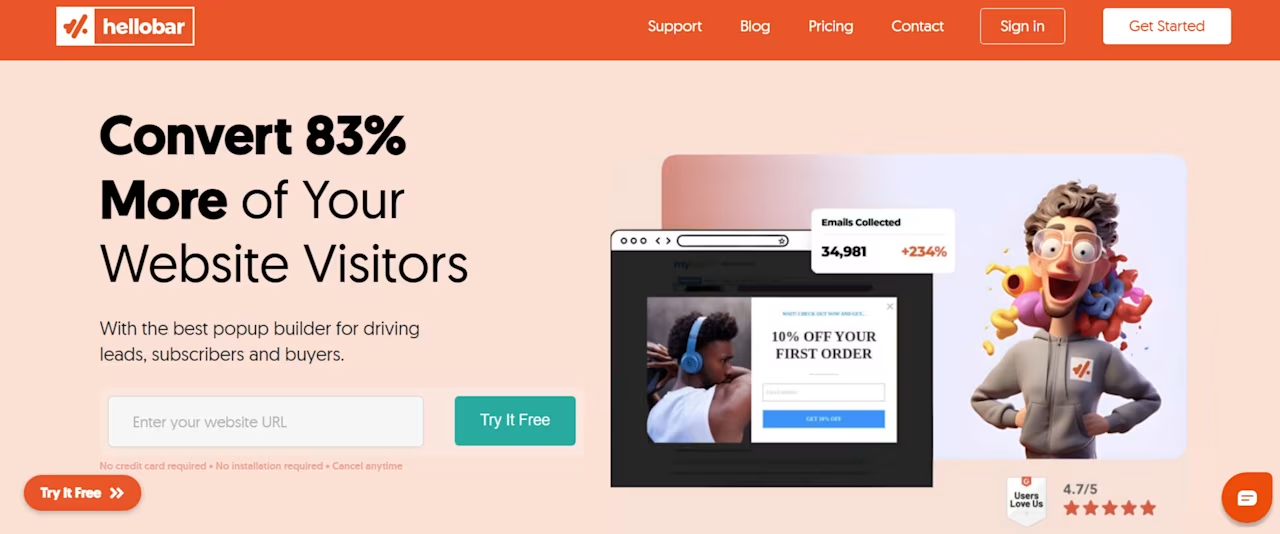
Hello Bar targeting helps you show the right message to the right person at the right time
Pricing: Free tier available with Hello Bar branding; paid plans start at $29/month.
Best for: Teams focused on lead generation who want to add conversion elements to landing pages without coding, and marketers testing different offers and messaging.
How to use Hello Bar for LPO
Hello Bar is designed to convert more users into customers. Here's how to use this tool to enhance your landing pages:
Use the intuitive and user-friendly editor interface that requires no technical knowledge to easily create a banner or floating bar that will appear at the top or bottom of your user's browser
Leverage the bar to provide a lead magnet, get email subscribers, offer a discount, share updates about your company, or recommend your most popular blog posts
Provide a non-intrusive lead generation form that tracks your users as they scroll and experience your landing page
Link your landing page using the bar across your website with an attractive call-to-action
Integrate with popular tools like Mailchimp, Zapier, and Salesforce
💡Pro tip: even if you've used all the techniques and tools above and created an amazing landing page, you still need to track results and iterate to learn more about your audience and improve LPO results over time.
If you don't measure each element's performance on your landing page, you'll never know if it's properly optimized. As you go along changing and improving elements, ensure you track their performance, analyze results, and adapt your LPO strategy.
For example, use Contentsquare Surveys to capture in-the-moment user feedback on your landing page.
![[Visual] Contentsquare Survey responses](http://images.ctfassets.net/gwbpo1m641r7/7iiGJYMdL9W4xmmofxINl5/2fd39dbc284cbcf60eee5a7cb3602e57/Contentsquare_Survey_responses.avif?w=1280&q=85&fit=scale&fm=avif)
An example of Contentsquare Survey responses
12. Wynter: get real user feedback on messaging
Wynter is a message testing platform that helps you understand how your target audience perceives your landing page copy. Instead of guessing whether your messaging resonates, you can get direct feedback from people who match your ideal customer profile.
![[Visual] Wynter](http://images.ctfassets.net/gwbpo1m641r7/4LQGd6sz8Sz7kEHFoy3lHz/449d677e40afbcbc25e5a65cf849a288/Wynter.png?w=1280&q=85&fit=scale&fm=avif)
Wynter's message testing tools
Pricing: Plans start at $999/month; pricing varies based on panel access and testing volume.
Best for: B2B marketing teams who need to validate messaging with specific buyer personas, and companies launching new products or repositioning existing offerings.
How to use Wynter for LPO
Wynter provides qualitative feedback on your landing page messaging:
Test headlines, value propositions, and body copy with your target audience
Get feedback from verified B2B professionals who match your buyer personas
Understand what's clear, confusing, or compelling about your messaging
Identify objections and concerns that your copy should address
Compare different messaging approaches before committing to A/B tests
How to choose the right landing page optimization tool
With so many options available, selecting the right LPO tools comes down to understanding your specific needs and constraints. Here's a framework to guide your decision:
Start with your primary goal:
Building pages: if you need to create landing pages without developer support, prioritize builders like Unbounce or Instapage
Understanding behavior: if you have pages but don't know why they're not converting, start with behavior analytics like Contentsquare or Microsoft Clarity
Running experiments: if you have hypotheses to test, focus on A/B testing tools like VWO or Optimizely
Improving discoverability: if organic traffic is a priority, invest in SEO tools like Ahrefs
Consider your budget:
Free options: Google Analytics, Contentsquare, and Microsoft Clarity provide substantial value at no cost
Mid-range: tools like Unbounce, Crazy Egg, and Hello Bar offer solid capabilities for growing teams
Enterprise: Optimizely, VWO, and Wynter serve teams with larger budgets and more sophisticated needs
Think about integration:
The most effective LPO strategy uses complementary tools that work together. For example, you might use Google Analytics to identify underperforming pages, Contentsquare to understand why users leave, and Unbounce to build and test improved versions.
When you're prioritizing which issues to tackle first, Contentsquare's Impact Quantification capability can help you see which problems cost the most revenue—so you focus your optimization efforts where they'll have the biggest impact.
![[visual] Contentsquare automatically finds high impact optimizations for](http://images.ctfassets.net/gwbpo1m641r7/3AVqp8bjKGWJOHkBIZfkNm/4e33410c569a6e180901aad7b1992fc8/Contentsquare-competitors-impact-analysis.png?w=1280&q=85&fit=scale&fm=avif)
Contentsquare's Impact Quantification in action
Next steps for landing page optimization
The right combination of landing page optimization tools depends on what you're trying to accomplish. Some of these tools allow you to build assets with a codeless drag-and-drop editor and landing page templates, while others focus exclusively on heatmaps, replays, reports, and analytics.
The good news is many of these landing page optimization tools work together to help you create a step-by-step landing page optimization roadmap—from building your landing pages, to tracking the user's experience, and experimenting with new and more effective ways of optimizing them.
Most teams find success with a combination of 2-4 tools: a free analytics foundation, behavior insights to understand the "why", and specialized tools for building, testing, or capturing leads based on their specific needs.
FAQs about landing page optimization tools
Landing page optimization is the process of improving page elements to increase the percentage of users who complete a desired action, such as signing up or purchasing. It involves analyzing how users interact with your page, identifying friction points, and making data-driven changes to improve conversion rates. Effective LPO combines quantitative metrics with qualitative insights to understand both what's happening and why.
![[Visual] Contentsquare's Content Team](http://images.ctfassets.net/gwbpo1m641r7/3IVEUbRzFIoC9mf5EJ2qHY/f25ccd2131dfd63f5c63b5b92cc4ba20/Copy_of_Copy_of_BLOG-icp-8117438.jpeg?w=946&q=85&fit=scale&fm=avif)
![[Asset] DXA revenue growth ebook](http://images.ctfassets.net/gwbpo1m641r7/mvkD58Nvj4RVkTZlSIEPP/619a8378add5a9805d016d8d982d947f/pexels-shkrabaanthony-5244072.jpg?w=624&q=85&fit=scale&fm=avif)
![[Guide] [CRO] Audit Cover](http://images.ctfassets.net/gwbpo1m641r7/6ooUbBasc396LP3hHHyqFh/95b7b3607b65ad1c65b0395c7b84089b/pexels-olia-danilevich-8145340.jpg?w=624&q=85&fit=scale&fm=avif)