
If you work in digital marketing, ecommerce, UX, or product, you likely have a backlog of test ideas stuck in a developer queue. And when a test finally declares a winner, nobody can explain why it won.
Digital experimentation tools help you launch tests faster and understand what drives the results. This guide covers the 5 types of tools, compares 6 popular options, and lists the features to look for before you choose.
Key insights
Evidence beats opinion: testing shows which change actually helps users, so decisions don't depend on who argues loudest
Match the tool to the change: page copy, product features, and email messages each need a different kind of testing tool
A winner isn't always worth shipping: check that the lift is big enough to matter before you roll it out
Behavior data explains the result: test numbers show which version won, and watching users shows why
Why digital experimentation tools matter now
Digital experimentation tools show different versions of a page, feature, or message to different user groups, so you can see what drives more sign-ups or purchases before rolling out changes to everyone.
The original version in a test is called the control. Each new version you compare against the control is called a variant.
In Contentsquare's recent Digital Experience Benchmarks report, conversion rates fell 5.1% year over year, while the cost of a visit rose 9%. Visits are becoming more expensive to acquire and less likely to convert, making testing and optimization essential to get more value from the traffic you already pay for.
Conversion rate optimization (CRO) is the practice of increasing the share of users who complete a desired action, such as making a purchase. Testing helps CRO teams identify which changes actually work, while also making the process safer and more collaborative:
Lower risk: test a redesign with a small group of users before rolling it out to everyone
Fewer debates: use real user data to move decisions beyond the highest-paid person’s opinion (HiPPO)
5 types of digital experimentation tools
Digital experimentation tools don't all do the same job. Testing tools differ by what they change (a page, a feature, or a message) and by who runs them.
1. A/B and split testing tools
A/B testing is a method that compares 2 versions of 1 page element, like a headline or a call-to-action (CTA) button. This means one group of users sees version A, another sees version B, and you keep the winner.
A/B/n testing compares 3 or more versions at once. Split URL testing puts each version at its own web address, which suits full page redesigns.
2. Multivariate testing tools
Multivariate testing is a method that changes several elements at once and tests every combination., helping you see how those elements work together.
Multivariate tests usually fit high-traffic pages, because every combination needs enough users for a reliable result.
3. Feature flag and full-stack platforms
Feature flags are on-off switches in your code that control who sees a new feature. This means engineers can release a feature to some users while everyone else keeps the old version.
Feature flags also allow gradual rollouts, like releasing to 5% of users first, and instant rollback if something breaks.
4. Marketing and messaging experimentation tools
Messaging experimentation tools test emails, push notifications, and in-app messages, like 2 subject lines or 2 send times. Platforms like Blaze include messaging tests, so marketers don't need a separate tool.
5. Behavior analytics tools that feed test ideas
Behavior analytics is the study of how real users move, click, and scroll on your site, and can help you determine what to test and why users reacted the way they did.
A hypothesis is a testable statement about what change will improve a result and why. Strong hypotheses come from watching real user behavior.
On experience intelligence platform Contentsquare, heatmaps show where users click and how far they scroll, so you can spot content they notice or ignore. Session replays let you watch real sessions to see exactly where users hesitate, rage-click, or give up.
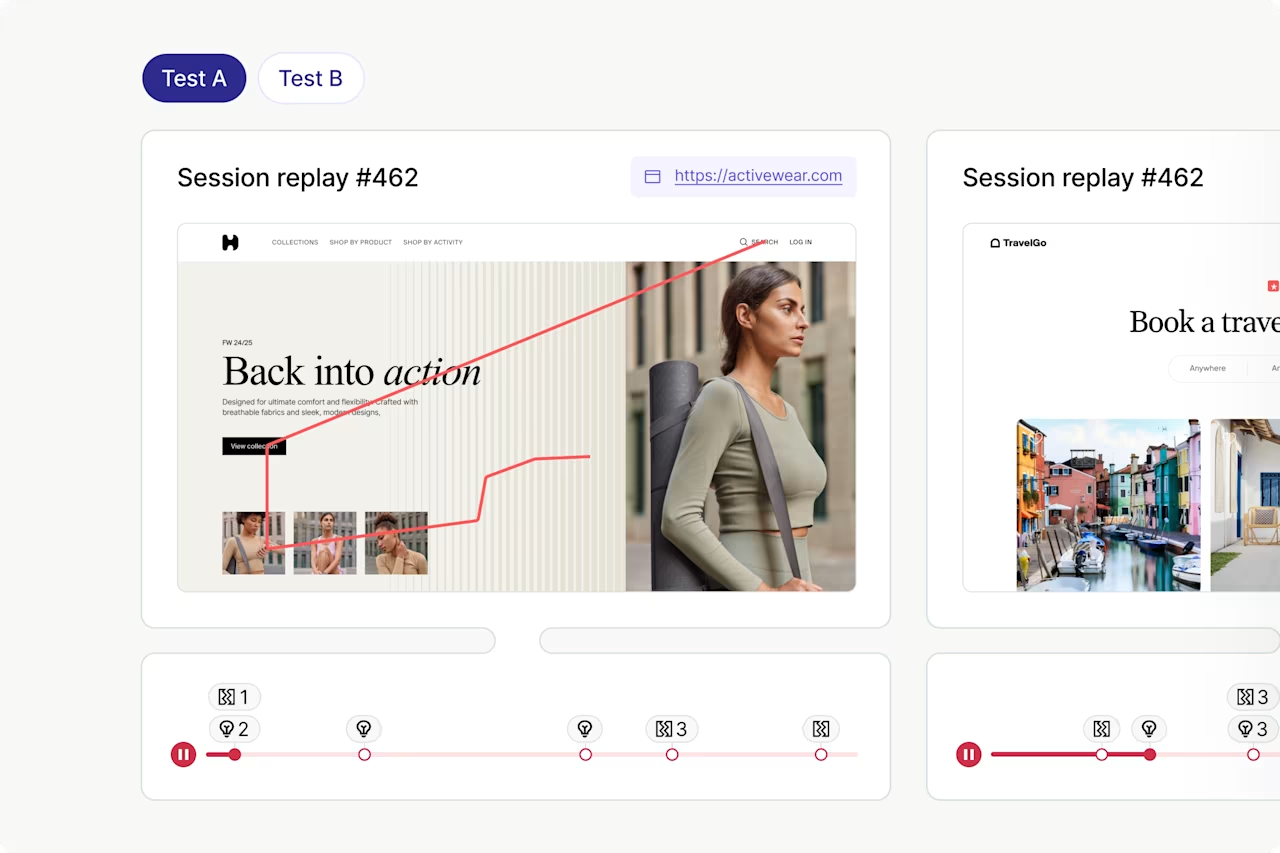
Contentsquare's Session Replays capability lets you watch how users move through your control and variant pages.
6 popular digital experimentation tools to compare
An experimentation platform is software that runs your tests and reports the results. The right platform depends on what you test, your traffic, and who runs the tests.
This list compares 6 popular digital experimentation tools across web, product, and feature testing.
Tool | Best for | Test types | Who runs it |
|---|---|---|---|
Contentsquare | Finding friction, testing fixes, and seeing why a variant won in one place | A/B, A/B/n, URL redirect | Marketers, UX, and product teams |
Optimizely | Web and feature experimentation in one vendor | A/B, multivariate, feature tests | Marketers and developers |
VWO and AB Tasty | No-code visual web testing | A/B, split URL, multivariate | Marketers |
Adobe Target | Testing plus machine learning personalization | A/B, multivariate, Automated Personalization | Marketers |
Amplitude Experiment | Product tests tied to analytics cohorts | A/B, feature flags, bandits | Product teams and engineers |
LaunchDarkly | Safe feature releases with built-in tests | Feature flags, experiments | Engineers |
1. Contentsquare
Many testing programs stall because teams find a problem in one tool, build the test in another, and explain results in a third.
Contentsquare's Experimentation is a no-code A/B and A/B/n beta testing tool built into the Contentsquare platform, so your tests use the same data as your behavior analytics. This means an insight can become a live test in under 15 minutes.
Best for: teams that want to connect behavioral insights, experimentation, and analysis in one platform, without relying on multiple tools or heavy developer support.
Key features:
No-code visual editor: edit page text, swap images, change styles, or hide elements to create A/B and A/B/n tests without developer support
Behavior-led experimentation: use Journey Analysis and Impact Quantification to find friction, estimate its impact, and prioritize the tests most likely to improve results
AI-assisted test setup: Sense Analyst, Contentsquare's AI agent, scans your behavior data, writes a testable hypothesis, and can help build the test setup
Bayesian result analysis: see your variant’s chance of outperforming the control, its expected loss if it underperforms, and whether the difference is large enough to be worth shipping
Built-in safeguards: every test goes through a required QA review before launch, and a kill switch lets you stop a live test immediately if it causes problems
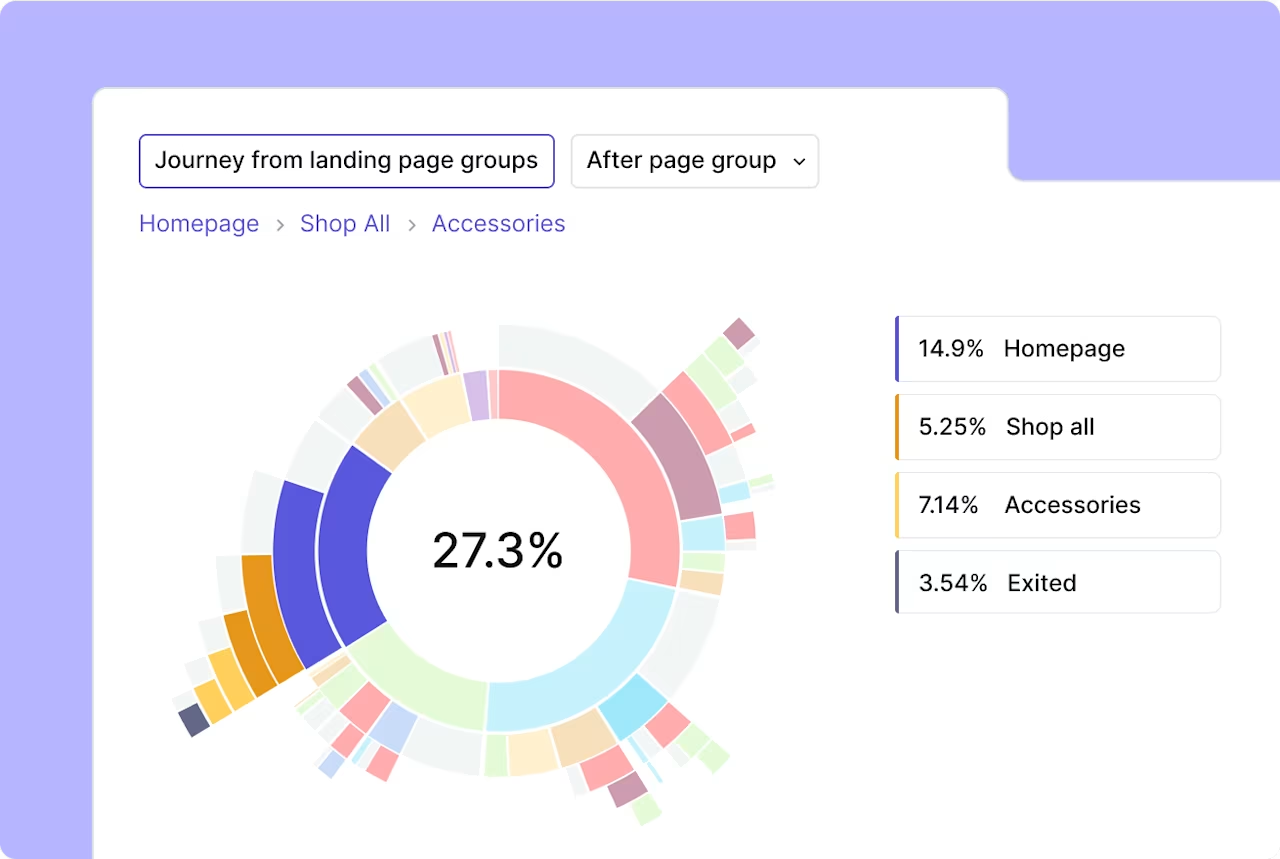
Contentsquare's Journey Analysis capability.
Before you call a winner, Contentsquare Experimentation checks 3 things:
Win chance: how likely the variant is to beat the control
Expected loss: how much you'd lose if the variant turned out worse
Practical difference: whether the lift is big enough to be worth shipping
Knowing which version won is only half the story. Put it into practice with these 3 steps from your test results:
Compare the pages side by side: Zoning Analysis shows engagement for each page area, and its comparison mode shows both versions together
Check the zones you changed: compare click rate, exposure rate, and hover time. Did more users see the new element, or click it?
Watch real sessions: open the session replay links for each variant. A few replays show where users still got stuck
Canyon Bicycles reduced data analysis time by 94% with Contentsquare. After testing a homepage video against a still image, the team used Zoning Analysis to compare user behavior across both versions and quickly identified the better-performing experience.
Keep in mind: if you already use another testing tool, you can run Contentsquare Experimentation alongside it.
2. Optimizely
Optimizely offers web experimentation for marketers and feature experimentation for developers. Optimizely's Stats Engine combines sequential testing with false discovery rate control, so you can read results as data comes in while keeping error rates in check.
Best for: teams that want marketers and developers to run web and feature tests with one vendor.
Key features:
Visual editor: change page text, images, and layouts for A/B/n tests without writing code.
Feature experimentation: test product features in your code with feature flags, APIs, and software development kits (SDKs), which are code libraries, for many programming languages
Multi-armed bandits: shift traffic toward better-performing variants automatically, so more users see the leading variant while the test runs
Mutual exclusivity: keep users out of overlapping experiments, so one test's changes don't skew another test's results
Keep in mind: Full-stack setup in Optimizely uses its SDKs, so it needs developer time. Plan for engineering support if you want to test features inside your product, beyond page changes.
3. VWO and AB Tasty
VWO and AB Tasty began as separate companies and have announced they're joining forces under Wingify.
Best for: marketing teams that want to launch visual web tests without waiting on developers.
Key features:
Test types: run A/B, multivariate, and split URL tests in VWO, using its visual or code editor
Behavior analytics: use VWO heatmaps and session recordings to see how users react to each version
AI help: get test ideas from Wingify Copilot, VWO's AI assistant, or let AB Tasty's Dynamic Allocation send more traffic to top-performing variations
Targeting and feature flags: choose which audiences see a test, and control releases with Wingify feature flags
Keep in mind: full-stack or server-side testing, which runs tests in your code, may need developer involvement during setup. Plan for that if you want to test product features as well as pages.
4. Adobe Target
Adobe Target supports A/B and multivariate testing, plus Automated Personalization, which uses machine learning to tailor content to each user.
Best for: marketing teams that want testing and machine learning personalization in one tool.
Key features:
A/B Test: compare 2 or more versions of a page or experience to see which one gets more conversions
Multivariate Test: test combinations of several page elements to learn how they work together
Automated Personalization: let machine learning choose which content to show each user
Experience Targeting: serve different content to audiences you define with your own rules
Keep in mind: Adobe Target suits teams with dedicated optimization resources. If your team is small, decide who will own setup and ongoing tests before you commit.
5. Amplitude Experiment
Amplitude Experiment ties tests to the cohorts, or user groups, you build in Amplitude's product analytics. Your team can launch experiments right from analytics charts and session replays.
Best for: product teams and engineers who want test results tied to the same data they use for product analytics.
Key features:
Feature flags: release features to chosen users, with client-side or server-side deployment
Guided experiment design: plan a test step-by-step, with automatic data quality checks and duration estimates
Statistical methods: pick sequential testing, T-tests, or multi-armed bandits, and use controlled-experiment using pre-experiment data (CUPED) to cut noise with past data
Holdouts and mutual exclusion groups: keep a group that sees no changes, and stop users from landing in tests that clash
Keep in mind: Amplitude Experiment fits best when your team already tracks product events in Amplitude rather than an external data warehouse. If your data lives elsewhere, plan time to set up event tracking first.
6. LaunchDarkly
LaunchDarkly is a feature management and feature flag platform that separates deploying code from releasing features. This means engineers can ship code anytime, and your team decides when users see the new feature.
Best for: engineering teams that want safe, gradual feature releases with testing built in.
Key features:
Guarded releases: watch a new feature as it rolls out, and roll it back fast if something breaks
Progressive rollouts: release a feature to a small share of users first, then expand step by step
Experimentation and targeting: run A/B/n tests on features, and aim each one at specific audiences and segments
AI model configs: test AI model settings live in your product, so you can compare how different setups perform with real users
Keep in mind: LaunchDarkly experiments are built on feature flags attached to features in your app, so plan for engineering time if your marketing team wants to run its own tests.
4 features to look for in an experimentation platform
Focus on these 4 experimentation platform features, because they decide whether your tests are easy to run and safe to trust.
1. A visual editor for no-code changes
A visual editor is a tool that lets you click a page element and change it without writing code. This helps teams can launch tests without waiting on developers.
2. A statistical engine you can trust
Statistical significance is a measure of how unlikely it is that a result happened by chance.
Most testing platforms use 1 of 2 main statistical approaches:
Frequentist methods: ask how surprising your result would be if the change had no effect.
Bayesian methods: estimate the probability that a variant beats the control.
Significance alone isn't enough to ship a change. Before any test starts, set a minimum lift, which is the smallest improvement worth the work of shipping.
3. Segmentation and targeting
Segmentation is splitting test results by user group, like new and returning users. This means you can see whether a change helps one group more than another.
Targeting decides which users see a test in the first place. In Contentsquare's Digital Experience Benchmarks report, repeat visitors converted at 2.9% versus 1.7% for new visitors, so a change that helps one group could hurt the other.
4. Integrations with your analytics stack
Integrations send test data into your other tools, so you see how a test changes behavior across the whole customer journey.
Contentsquare integrates with A/B testing tools like AB Tasty, Adobe Target, and Dynamic Yield, and has an A/B testing dashboard that automatically create segments for your control and variants, so you can compare key performance indicators (KPIs) in one view.
Find the right digital experimentation tool for your team
The right testing tool helps you launch tests fast and trust what they tell you. It should also explain each result, so your next test starts smarter.
Use these 3 checks to narrow your choice:
Match the tool to the change: think about what you're testing and who runs the tests, like marketers, product teams, or engineers
Check the stats behind a winner: look at win chance, expected loss, and whether the lift is big enough to ship
See why a variant won: pick a tool that pairs test results with behavior data, like heatmaps and session replays
Digital experimentation tools work best when testing and behavior data live together. That way, you don't have to jump between tools to find a problem, fix it, and explain the result.
See how Contentsquare can help you launch tests faster, understand what drives results, and turn more of your ideas into measurable improvements. Book a demo.
FAQs about digital experimentation tools
Digital experimentation tools are varied, with each tool fitting a different team. Marketers and UX teams often use visual web testing tools to change pages without code, while product and engineering teams use feature flag platforms to test new features.


