![[Visual] Stock group in office](http://images.ctfassets.net/gwbpo1m641r7/4qn7ZZ3yGGwvON1mesdH3s/c4d1c9d121d8d67b184011b4bcd2b6bd/Untitled_design__3_.jpg?w=1280&q=85&fit=scale&fm=avif)
You can track almost every component of your marketing campaigns. But with so many tools and platforms on the market, figuring out which ones belong in your stack—and whether they’ll actually work together—is harder than it sounds.
Many teams end up with overlapping tools, disconnected data, and no clear view of performance. Instead of helping teams make smarter decisions, fragmented analytics stacks create reporting gaps, wasted spend, and blind spots across the customer journey.
This guide breaks down the 10 best digital marketing analytics tools, who they’re for, and how to pick the ones to add to your tech stack.
Key insights
What does a marketing analytics tool do? Marketing analytics tools collect data on your marketing activities. For example, an SEO tool tracks keyword rankings for your content marketing team. These tools help you answer questions like ‘Which audience segment is most valuable?’, ‘Which campaigns result in the highest ROI?’, and ‘Which traffic channels are worth the investment?’
How do marketing analytics tools work, and are they easy to use? Modern digital marketing analytics tools use AI to surface insights automatically, which means that today, marketers without a technical background can get answers without waiting for analysts
Why is behavioral analytics important in marketing analytics? The most important layer in marketing analytics is behavioral analytics. Behavioral analytics digs into why users behave the way they do on your site and gives greater context to your numbers on your landing page, for example, which helps you create campaigns that align with your goals.
The 5 different types of marketing analytics tools
There are 5 main types of marketing analytics tools:
Behavioral + experience tools measure how users interact with marketing campaigns like landing pages and provide metrics like scroll depth and click rate. Two behavioral and experience tools we’ll cover include Contentsquare (👋) and Microsoft Clarity.
Traffic and attribution tools measure where users come from and which campaigns and channels drive conversions. We’ll show you how Google Analytics and Mixpanel are top choices for measuring traffic.
Social media marketing tools measure engagement, follower growth, and content performance across social channels. Sprout Social and Buffer are two useful social media marketing tools we’ll cover.
Email marketing tools measure email campaign and newsletter performance based on click-through rates, unsubscribes, and conversions. Email marketing platforms we cover include Mailchimp and Klaviyo.
SEO and LLMO tools measure keyword rankings, SERP placement (i.e. AI Overviews, organic search results), LLM citations, and backlinks. Popular ones include Semrush and Ahrefs.
The 10 best marketing analytics tools
We researched the different types of marketing analytics tools and selected our 10 favorites based on ease of use, integration with other tools, and AI and automation features that will make your life easier.
1. Contentsquare
Contentsquare is an experience intelligence platform that collects a vast amount of quantitative and qualitative data for your website and app.
![[Visual] Contentsquare dashboard](http://images.ctfassets.net/gwbpo1m641r7/205APhOt6IyDsN5NqMAccw/c95a8d126761e4f32602a1e8c16f0dc7/Contentsquare_dashboard.png?w=1280&q=85&fit=scale&fm=avif)
With Contentsquare, you’ll be able to gather data on nearly every single user interaction on your site after installing the tracking tag. That means you don’t need a crystal ball to predict what data you might need in the future—the retroactive data will be there to analyze whenever you need it.
Here’s how that might look in practice: say you just launched a paid campaign and conversion rates are lower than expected.
Instead of guessing why, you can turn to the Journey Analysis tool to see where visitors are dropping off and Heatmaps to see which CTAs and areas users engage with most (and least).
Then, while watching session replays, you notice users are hesitating before clicking your CTAs, which prompts you to review hesitation time.
With most tools, you’d need to go back to your developers and ask them to write custom code to capture hesitation time. But with Contentsquare’s Smart Capture, that retroactive data is already there.
Key features:
Session replays to watch what people do when they land on your site from a specific campaign, including what’s confusing them and preventing conversions
Acquisition Analysis to identify which campaigns and sources, including LLMs like ChatGPT, drive your most valuable users
Surveys to collect direct feedback and ask users any unanswered questions you have
Sense Analyst to ask our AI agent questions about your data and get instant insight back
Impact Quantification so you can tie a dollar value to your metrics and prioritize which improvements will lead to the highest ROI
Built-in integrations with popular tools, ranging from A/B testing software to video analytics, so nothing gets lost in translation, with the ability to build custom integrations for virtually any tool
Data Connect to easily send your data to a warehouse of your choice, like Amazon S3, BigQuery, and Snowflake
Custom dashboards that highlight metrics like average time on page, scroll depth, and conversions, so you only see what’s relevant to you and your goals every time you open the tool
Automated summaries and alerts that notify you when something is ‘off,’ so you don’t need to spend your days wading through data
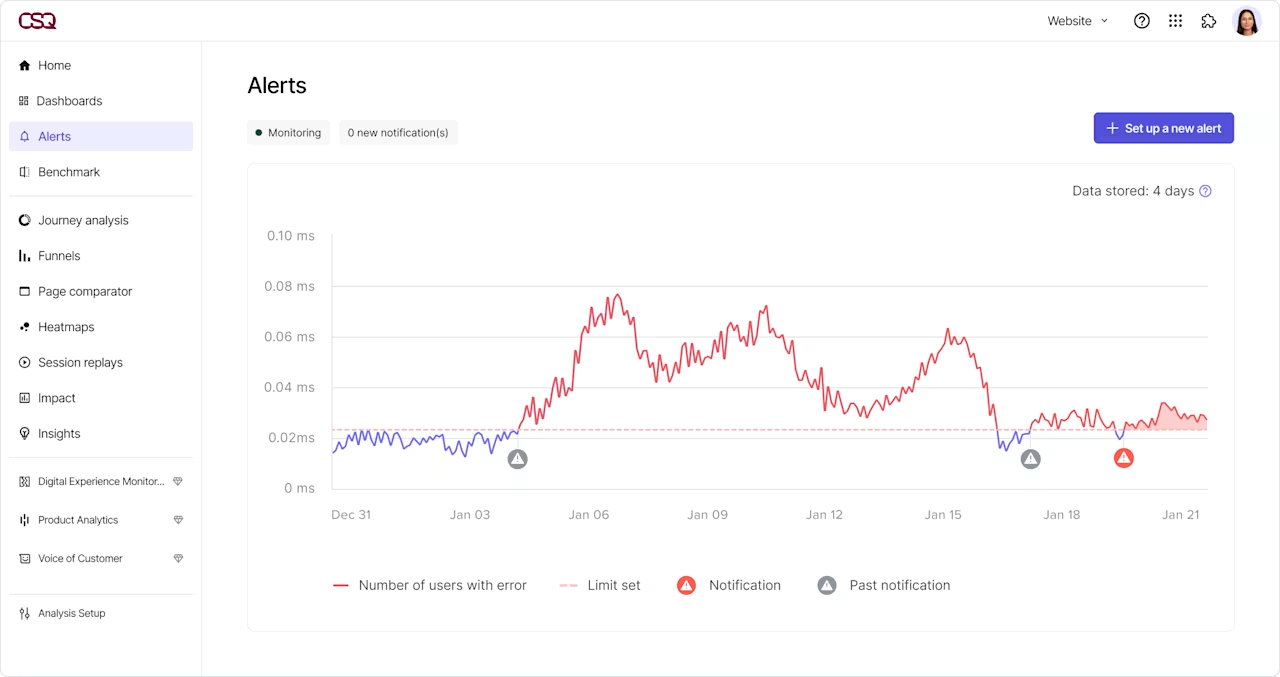
Contentsquare Alerts surfaces important issues so you can keep your campaigns running smoothly
Contentsquare is such a critical piece for any marketeer's analytics suite, because blending the qualitative and quantitative is really important, as web marketing is both an art and a science. It helps us to get a 360-degree view of the customer experience, and I think it’s a tool that everybody should be using.
2. Microsoft Clarity
Microsoft Clarity is a free digital experience analytics tool that gives teams a basic view into how users behave across their site. It’s a practical starting point for smaller teams who want to review heatmaps and session replays.
![[Visual] microsoft clarify dashboard](http://images.ctfassets.net/gwbpo1m641r7/7bj4ZR07VeCuCqxIlcdJAj/57f097d285293c4699129eea96674f73/microsoft_clarify_dashboard.png?w=1280&q=85&fit=scale&fm=avif)
Within your dashboard, you can review errors and events (like rage clicks) that are hurting campaign performance, then jump to the corresponding session replay to watch friction unfold in real time.
Clarity also segments sessions into 40+ categories like high-intent users or session sources, so you can compare the traffic from different marketing campaigns.
Key features:
AI-powered summarization from Copilot to help you extract faster insights
Manual funnel setup so you can see how different segments go from prospect to customer
Smart events that track meaningful interactions without custom coding for key actions like checkouts and signups
Integration with Google Analytics to view your GA4 data within Clarity’s dashboard
Weekly digest emails to keep your team updated without logging into the tool
Rage clicks, dead clicks, and quick back detection to flag friction points
3. Google Analytics
Google Analytics (GA4) is a free web analytics tool that gives marketing teams quantitative data about their site.
![[Visual] GA4 dashboard](http://images.ctfassets.net/gwbpo1m641r7/69rdcAGAr4xGWPefCnUPDm/54517e878976fdd6cfc1b56fe5b87d5e/GA4_dashboard.png?w=1280&q=85&fit=scale&fm=avif)
Set up is straightforward—a tracking code will start collecting data after you’ve added it to your site. Then, you can view funnels, identify where users come from, attribute which marketing efforts drive conversions, and more. And you can configure extra events by tweaking your tracking code (you may need help from a developer to do this).
For example, if you're part of the content marketing team, you could use Google Analytics to identify which pages drive the least amount of traffic from organic search. This way, you can focus your efforts on optimizing pages that need a refresh.
Key features:
Event-based tracking to see granular user behavior and understand how behavior differs among audiences
Real-time reporting to monitor campaign performance as it happens
Predictive metrics like churn likelihood to help you identify channels that aren’t driving high-value prospects
User data like demographics and interests
An AI chatbot where you can ask specific questions about your data
Funnel exploration reports to identify which pages cause users to leave
Insights you can easily surface in your dashboard through a ‘search’ function
Integration with CRO tools, landing page optimization tools, and experience tools (like Contentsquare)
💡 Pro tip: integrate GA4 with Contentsquare to see what people do after landing on your site.
Google Analytics shows you data like how many people land on different pages, which campaigns they come from, and how much time they spend.
Contentsquare gives you additional info like why people aren’t sticking around, what causes them frustration, and what will help them convert faster.
Pair the two tools together to get the most out of your data.
4. Mixpanel
Mixpanel is a marketing and analytics tool built to track interactions and user behavior on websites and apps. It goes beyond basic web analytics and offers behavioral insights you can use to get more context behind your metrics.
![[Visual] Mixpanel dashboard](http://images.ctfassets.net/gwbpo1m641r7/6WkGxl5EagZDeNzG8yyuS7/f5415bfae1dcae5cf5fa1d150422633d/Mixpanel_dashboard.png?w=753&q=85&fit=scale&fm=avif)
For example, Mixpanel’s session replays let you watch recordings of people using your site so you can see where they hesitate and get stuck, which helps you identify pages with potentially weak messaging or poor design.
Additionally, Mixpanel’s auto-capture lets you collect a variety of data, but you may need manual tagging to track complex interactions (like hesitation time).
As a marketer, you can use Mixpanel to view retention, revenue by source, and visualize funnel drop-offs, so you can quickly see which parts of the customer journey need attention and where your most valuable customers come from.
Key features:
Event-based tracking with custom set-up for complex events so you can see exactly how visitors interact with your campaigns, forms, and CTAs
Pre-built funnel and retention reports so you can analyze drop-offs without a data team
Metric trees that let you map your KPIs to one another so you can quickly spot weak areas
AI-powered querying so you can ask questions about your data
Integrations with tools like Contentsquare and HubSpot
Automated anomaly detection and root cause analysis to surface issues before they turn into bigger problems
Mixpanel 🤝 Contentsquare
Integrate Mixpanel events with Contentsquare so you don’t miss out on any behavioral insights. Launch surveys and create segments from your Mixpanel events to get deeper insight from your data.
5. Sprout Social
Sprout Social is a social media management and analytics platform that gives marketing teams a centralized place to manage, measure, and optimize their social presence.
![[Visual] sprout social dashboard](http://images.ctfassets.net/gwbpo1m641r7/521ZAJUq50IfMWO8JXxQkg/33c47a68f5a41e036a516f71a3b665f4/sprout_social_dashboard.png?w=1280&q=85&fit=scale&fm=avif)
Out of the box, you get clean, presentation-ready reports that help you visualize performance for your own brand and your competitors, across channels like X, TikTok, Facebook, Instagram, Pinterest, and more.
You’ll even get historical data after setup (how far back your data goes depends on the social network).
For marketers, the real strength of Sprout Social is that it tracks elements like engagement, follower growth, and share of voice across platforms. Plus, social listening lets you see what your audience says about your brand/industry.
Key features:
Cross-channel reporting to measure different social profiles in one place
Competitor benchmarking to see how you stack up to rivals
AI-powered sentiment analysis and trend detection to see how your audience actually feels about your brand
Publishing and scheduling tools alongside analytics to keep analytics and execution all in one place
Automated AI analysis so you can easily understand your data
Compare organic and paid content to help you figure out what types of content are worth putting budget behind
6. Buffer
Buffer is a straightforward social media management tool made for smaller teams and agencies that want to publish and analyze content on Instagram, Facebook, X, and LinkedIn.
![[Visual] buffer dashboard](http://images.ctfassets.net/gwbpo1m641r7/7l3H2iOdxer8IcLDsnVF91/29eadf58e7f32b9fb6338d6382f77ed3/buffer_dashboard.png?w=1024&q=85&fit=scale&fm=avif)
It has a clean interface that updates daily, so users can stay on top of their data for organic and paid content.
Marketers use it to dive into audience data (like demographics and content preferences), so they know what type of content will move them toward their goals.
Key features:
Post performance and engagement analytics to see what’s working so you can replicate it for future campaigns
Audience analytics to help you learn about what your audience likes and dislikes
AI assistant to analyze trend patterns within your data
Integrations with popular tools like Canva and Grammarly to help you create social content faster
On-brand reports you can pull together in minutes that highlight the metrics that matter most to stakeholders
Best time to post recommendations to increase your reach and engagement
7. Mailchimp
Mailchimp is an email marketing platform with built-in email analytics to help you understand how your campaigns are performing.
![[Visual] mailchimp data](http://images.ctfassets.net/gwbpo1m641r7/7ISYnZCKyKHa1mz86Hel7d/ea37f84e74086fe088301d4fe5790351/mailchimp_data.png?w=992&q=85&fit=scale&fm=avif)
From your dashboard, you can check open rates, unsubscribe rates, average sale order, revenue, and more for each email sent. You can also compare metrics for specific campaigns (multiple emails) to see what resonates with your audience.
Furthermore, the automated anomaly detection feature alerts you to performance changes and gives you recommendations to improve poor-performing metrics.
Key features:
Campaign performance reports with metrics like opens, bounces, unsubscribes, and clicks to see which emails resonate with your subscribers
Audience segmentation to see how different groups respond to your emails
Built-in A/B testing for elements like images, subject lines, layouts, and more
Predictive demographic analytics powered by AI to help you identify potentially high-value customers
Integrations with a variety of tools made for design, advertising, and booking and scheduling to keep your email marketing connected to the rest of your marketing activities
8. Klaviyo
Klaviyo is a CRM with advanced email and SMS capabilities and powerful analytics for ecommerce marketing teams.
![[Visual] klaviyo data](http://images.ctfassets.net/gwbpo1m641r7/7olHXLy5Y9ipq4lq9ML378/2c225cc226151757636993318f39988d/klaviyo_data.png?w=1280&q=85&fit=scale&fm=avif)
Klaviyo goes further than simply providing teams with metrics about their emails (like open, click, and unsubscribe rates), and links every email and SMS campaign to on-site behavior and actual purchases so you can see how each flow is performing.
This level of insight is especially useful for teams running complex campaigns with multiple touchpoints, like abandoned cart flows and post-purchase nurtures.
Key features:
Revenue attribution at the campaign, flow, and individual message level to know which messages drive purchases
Funnel analysis and multitouch attribution to make reporting more accurate
Predictive analytics to help you optimize sending times and deliver messages in places that customers prefer
Sentiment trend forecasting so teams can address negative reviews before they balloon out of control
Automatically creates recommended product lists powered by AI based on customer insights
9. Semrush
Semrush is an SEO and LLMO analytics tool that helps businesses track and improve their content marketing strategy, specifically for web content like blog posts and product pages.
![[Visual] Semrush dashboard](http://images.ctfassets.net/gwbpo1m641r7/6blhthsQxsPXd6dGwRQLeg/014ea7dcebb20fa6fb1949697ffb419b/image8.png?w=1280&q=85&fit=scale&fm=avif)
With Semrush, you can monitor on-page SEO for your website, track keyword positions, perform competitor analysis, and monitor your visibility in LLMs like ChatGPT, AI Overviews, and Perplexity.
For example, a marketer could use Semrush to identify which topics a competitor earns more mentions for within AI-generated responses, and use that information to plan new content or revise existing content.
Key features:
Keyword research and rank tracking across search engines and LLMs so you know where your content shows up
Competitive analysis to identify content gaps
Backlink analysis to see which pages attract the most links
AI-powered content creation tools to help you write optimized content faster
Brand monitoring to track how and where your brand gets mentions across the web
Integration with tools like Google Analytics and Search Console, so you can review important metrics in one place
10. Ahrefs
Ahrefs is another SEO and LLMO analytics platform that helps teams identify factors preventing them from ranking high in search engines and AI systems.
![[Visual] ahrefs dashboard](http://images.ctfassets.net/gwbpo1m641r7/4KB5venGBQUnutKOOpJAfR/3f907250f6cfc696cc95f3581a925f0d/ahrefs_dashboard.png?w=1280&q=85&fit=scale&fm=avif)
Use Ahrefs to track keywords, dive into competitor strategies, find content gaps, and check performance in LLMs. You can see exactly which pages and topics drive the most traffic to help you plan future content strategies.
Key features:
Evaluate the backlinks for any site to help you replicate successful backlink strategies
Keyword research tools to help you find high-volume, low competition keywords that will drive traffic to your site
Surface technical site issues that hurt your rankings with site audits
Find which keywords your competitors target that you don’t with content gap analysis
Monitor keyword positions in the SERPs and visibility in LLMs to understand the impact of your content marketing efforts
How to build a marketing analytics tech stack in 4 steps
Building an analytics tech stack is all about identifying your goals and finding the best tool to help you reach those goals. Here are 4 quick steps to follow:
Step 1: review your goals and identify gaps
Start by mapping out your campaign goals and your funnel, then compare them against the tools you already have. Where are the gaps? From there, decide whether a dedicated tool is actually necessary.
For example, if social media marketing isn’t a major focus, you likely won’t need a standalone tool to track your analytics and might be fine using built-in analytics that each platform provides.
If a tool is necessary, move on to step 2.
Step 2: audit your existing tools
Before adding anything new, take stock of what you already have. Look at each tool through 3 lenses:
Scalability: can the tool grow with your team as the business grows?
Overlap: are any tools giving you the same data?
Adoption: which tool does your team actually use, and why do some go untouched? For example, if a tool is clunky or confusing, avoid investing in new tools with a similar UX.
Step 3: check integration compatibility
You’ll get the most bang for your buck if your tools all work together. Before committing to anything new, confirm that it integrates with the tools already in use.
Step 4: ensure you capture qualitative data
Numbers tell you what is happening, while qualitative and behavioral data tell you why, so make sure you pick a tool that goes beyond surface-level metrics.
For example, web analytics might tell you that people who click on your site from an ad leave after 10 seconds, but that data alone isn’t enough to understand why they’re leaving. Surveys and session replays give you useful context so you know what to adjust in your campaigns.
Key features of the best marketing analytics tools
The best marketing analytics tools check off a variety of features. Make sure the tools you pick give you:
Channel attribution: you need to know which campaigns, channels, and touchpoints are actually driving conversions
Conversion tracking: your tool should tie behavior to business outcomes
Segmentation: the ability to slice your audience by source, demographics, or lifecycle stage gives you more insights
Integration capabilities: a tool that doesn’t talk to the rest of your stack creates silos
AI-powered insights: manual data analysis doesn’t scale, and AI features like anomaly detection and automated summaries help you get more value out of your tools
Real-time reporting: real-time reporting helps you catch problems before they snowball into bigger issues
Privacy compliance: cookieless tracking options, GDPR compliance, and data governance features are required in many countries
Ease of use: increase adoption rates and time to value with a tool your team will actually use
Behavioral data strengthens marketing stacks
No matter what type of data you need, whether that’s email marketing data or web analytics, behavioral data is the most important layer to give you greater context behind your users.
Even more, seeing your users get stuck and frustrated in real time with tools like session replay and heatmaps is the fastest way you’ll foster empathy as a marketer. And empathetic marketers create better campaigns that resonate with their target audiences.
FAQs about marketing analytics tools
Marketing analytics focuses on campaign performance and channel ROI, whereas web analytics focuses on web traffic and on-site behavior, and product analytics focuses on how users interact with your product. All 3 types overlap, and teams often use tools that span multiple categories.
![[Visual] Contentsquare's Content Team](http://images.ctfassets.net/gwbpo1m641r7/3IVEUbRzFIoC9mf5EJ2qHY/f25ccd2131dfd63f5c63b5b92cc4ba20/Copy_of_Copy_of_BLOG-icp-8117438.jpeg?w=946&q=85&fit=scale&fm=avif)