![[Visual] Digital analytics audit](http://images.ctfassets.net/gwbpo1m641r7/2El3YuZBTZ3ltpF9qBv0zR/51f43fc489bb72e00a83912902a982d9/AdobeStock_545543268.jpeg?w=1280&q=85&fit=scale&fm=avif)
A seamless digital customer experience should be your growth engine. Instead, most teams are flying blind—data scattered across platforms, ownership fuzzy between departments, and no clear picture of whether you're actually delivering what customers need at each touchpoint.
A regular digital analytics audit changes that. It doesn't just validate what's working—it exposes the conversion leaks you didn't know existed, the user frustrations hiding in plain sight, and the strategic gaps keeping you from building experiences that genuinely resonate.
This chapter walks you through six concrete steps for auditing your digital analytics, complete with the practical tactics that transform your audit from a one-time report into a living framework your entire team can use, share, and repeat.
Key insights
Use AI-powered digital analytics to turn your audits into a strategic advantage—uncovering patterns, predicting user behavior like churn, and detecting anomalies
Auditing your digital portfolio is a team sport, shared across marketing, product, user experience (UX), conversion rate optimization (CRO), and ecommerce teams
Document your audits to drive alignment now and empower your teams to run successful audits in the future
6 steps to a well-executed digital analytics audit
A digital analytics audit is a comprehensive review of your tools, tracking setup, and multichannel strategies across the user journey, from acquisition to retention.
Audit these areas, at least quarterly, to:
Understand users throughout your entire digital portfolio: from website and apps to support channels, social media, and marketing campaigns
Align with other teams on common metrics to achieve shared goals
Surface deeper, actionable insights that guide strategy and implementation
Lay the groundwork for a UX audit or CRO audit, so you can prioritize and optimize for maximum business impact
Below, we break down the auditing process into a simple, user-friendly format, enabling anyone on your team to carry out the audit successfully.
Step 1: define your objectives
To set clear and measurable objectives, look through the lens of your business goals and metrics.
What are you and your team trying to accomplish this quarter or year? Maybe it's increasing monthly recurring revenue, improving checkout conversion, or understanding which content resonates most with enterprise users. Whatever it is, you need to be able to tie it back to your company's goals.
Now ask: are your team objectives aligned with your current digital strategy? If not, it's time to define the metrics and key performance indicators (KPIs) that matter, which, in turn, will reshape your digital analytics strategy.
Step 2: analyze performance and identify gaps
Break down your digital efforts by channel to uncover what's working, what's not—and why. Focus on quantitative metrics first to know what's happening. You can pull this data from platforms like Google Analytics, Contentsquare, and Meta Business Suite.
Here's how you can analyze:
Web pages: are users finding what they need or bouncing quickly?
Product features: are they completing tasks or getting stuck mid-journey?
Email campaigns: which messages drive engagement or traffic that converts?
Paid ads: are certain campaigns attracting low-quality traffic?
Social media: do visitors from this channel explore or exit right away?
![[Visual] app onboarding tracking](http://images.ctfassets.net/gwbpo1m641r7/6NP96jHZUUbMijPvbLDsRu/697ceb67f406ea437138a37baa6044e3/app_onboarding_tracking.avif?w=1280&q=85&fit=scale&fm=avif)
Use Contentsquare's tools to investigate and optimize user journeys within your app
Meanwhile, qualitative data reveals the why behind the what. You can collect qualitative insights with a usability testing audit, social listening, and voice-of-customer (VoC) tools. VoC insights from surveys, feedback forms, and direct customer feedback offer real-world context to back up hard numbers like bounce rate and conversion rate.
![[Visual] Exit-Intent- Survey](http://images.ctfassets.net/gwbpo1m641r7/1UqasWRBnczjIUsx8wDIMB/149e80ca4b764400d3295ddb4c9c254b/Feedback_Widget__1_.png?w=692&q=85&fit=scale&fm=avif)
Launch surveys to contextualize exits from high-impact pages
Together, quantitative and qualitative data paint a complete picture of user behavior, and channel and campaign performance. You can then assess the strengths and weaknesses of each channel.
To perform an effective risk assessment and spot red flags, watch for channels driving high traffic but low conversion, increased bounce and exit rates, and poor retention or no repeat visits.
Analyze and double down on what works while addressing or reducing investment into what doesn't.
Pay attention to both types of data—qualitative and quantitative. A lot of clients will spend a lot of time in a voice of customer or traditional analytics tool but the merging of both of those data types really gives you the full, well-rounded picture and can really help you optimize.
Step 3: validate data accuracy
Ensure you're working with accurate, reliable data. High data quality sharpens your analysis, allowing you to make smarter decisions and take more impactful actions. Each user-centric improvement builds toward a consistently delightful CX.
Start with these three questions to set the right data foundation:
Are you tracking events correctly? Catch issues such as double tracking, misfiring, and missing events due to implementation errors or script conflicts.
Are you tracking key user actions? Identify gaps that might prevent you from capturing critical moments across your omnichannel campaigns.
Is data sampling skewing your reports? Check whether your digital analytics tools have a sampling limit—if you've exceeded that limit, you might miss valuable user behavior data.
A few checks make these answers concrete. Keep a simple tag inventory so you know which tags fire on which pages, and retire any that duplicate or conflict. Confirm your campaign tracking parameters (like UTMs) follow a consistent naming convention, so traffic sources don't fragment across reports. Finally, verify that cookie and consent settings are working as intended, since blocked or misconfigured consent can quietly distort your data. It also helps to compare a sample of numbers across two tools, since large discrepancies usually point to a tracking or definition mismatch worth investigating before you trust the report.
💡 Pro tip: leverage Contentsquare's tracking set-up assistant for websites and logging capabilities for apps to validate event tracking, even early in the development phase. While your engineers handle that, non-technical team members can flag issues when they notice data inconsistencies.
![[Visual] Contentsquare tracking set-up assistant](http://images.ctfassets.net/gwbpo1m641r7/2FNi58e2KK0FjAZmhkyHkS/411b5a9982ece4d2985f5ca02b372826/images.png?w=712&q=85&fit=scale&fm=avif)
Step 4: evaluate your tech stack
Look at the tools you're using to track your digital analytics metrics from Step 2. Evaluate whether they're still serving your needs or merely duplicating your efforts. Do they provide full coverage of key pages, journeys, and funnels? Are you using all of them enough to justify the cost and complexity?
So how do you choose an audit tool that earns its place? Rather than chasing a ranked list of vendors, judge each option against a few criteria:
Full-journey coverage across web, app, and campaigns, so you see the complete customer journey
Automatic, retroactive data capture, so you can analyze past behavior without heavy manual tagging
Quantitative and qualitative insights in one place, so you understand both what happens and why
Privacy by design, so you stay compliant with data protection and privacy regulations
Ease of use for non-technical team members, so insights aren't locked behind specialists
For a wider view of what's out there, explore our chapter on digital analytics tools.
If your current stack falls short on these criteria, maybe it's time to streamline. This is where Contentsquare's all-in-one experience intelligence platform comes in. It eliminates the need for multiple overlapping tools by capturing performance and user behavior across the entire digital journey.
You can run audits with the platform's tools to dive into conversion journeys, frustration areas, and feature usage. Use the Heatmaps capability to see exactly where users click, scroll, and hesitate, then jump into Session Replay to understand why they stay on or leave the page. Collect customer insights with Surveys to validate hypotheses, test new features or messaging, and identify unmet needs in specific journeys.
At the same time, Contentsquare enables constant, always-on monitoring so you can implement mini audits. Use the platform's experience monitoring tools with AI-powered alerts to spot patterns, trends, and shifts in user behavior, so you can surface and fix issues fast.
Launch on-site surveys to gather targeted feedback on usability, content relevance, or feature usefulness, helping you make informed decisions and prioritize improvements.
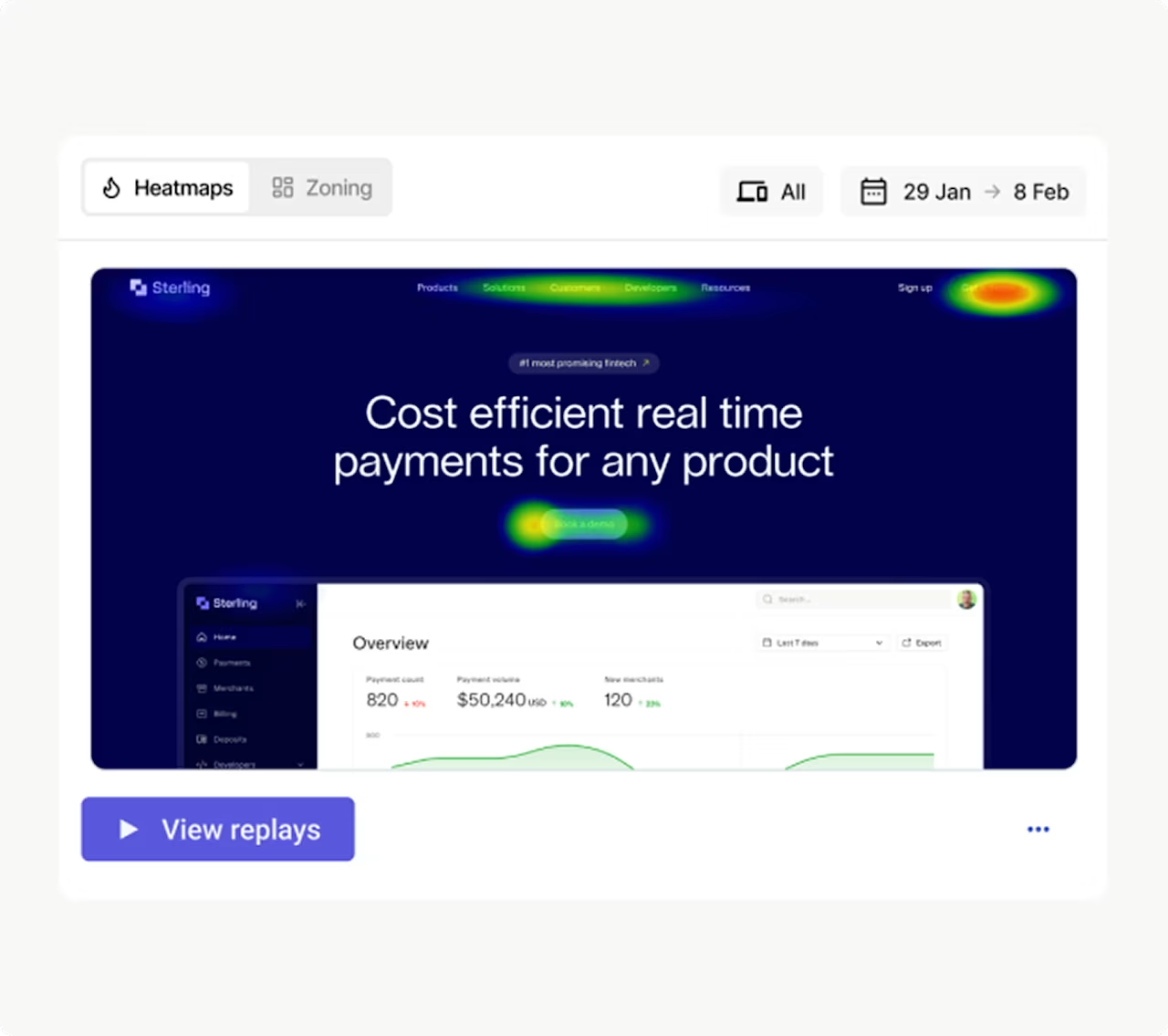
You can jump from heatmaps to related session replays to uncover user behavior in Contentsquare
💡 Pro tip: with Contentsquare's Data Connect capability, you can bring behavioral, performance, and error data directly into your warehouse of choice. Seamlessly combine insights—no manual effort needed—with other data sources, including AI and machine learning models. With faster time to insight, you can optimize journeys, predict churn, and personalize experiences more effectively than your competitors.
Step 5: review security and privacy
One more thing about tools…
Before adding any to your tech stack, make sure it meets users' expectations of data protection and privacy. Every website, app, and product tracking tool should comply with relevant acts and regulations, such as the General Data Protection Regulation (GDPR) and the California Consumer Privacy Act (CCPA).
A core part of compliance is also checking for operational basics, such as cookie and consent management and up-to-date access permissions.
At Contentsquare, privacy is built-in: this protection layer applies to all platform users and their end-users. In practice, this means Contentsquare:
Is GDPR- and CCPA-compliant
Holds ISO 27701 and ISO 27001 certifications
Enables users to request and delete their data at any time
Follows strict data minimization principles, collecting only what's necessary to deliver digital analytics services
Use the same criteria to evaluate any of your analytics solutions.
Step 6: recommend and act on improvements
A digital strategy audit isn't complete without recommending and driving action.
You should now have a clear idea of the metrics, tracking setup, and tools you need to maximize resources and refine your strategies. It's time to document your findings and report on your digital analytics performance so you can get buy-in from your collaborators, stakeholders, and company leaders.
Insight-driven collaboration is one of the emerging digital analytics trends of today and won't be going away in the near future. Use Contentsquare to build digital analytics dashboards and access powerful visual insights—from tools like heatmaps and session recordings—to effectively convey takeaways, overcome objections, and get support for executing your next-level strategy to transform digital CX.
![[Visual] Dashboard conversion and bounce rate](http://images.ctfassets.net/gwbpo1m641r7/3F2OzaDIkGuM3m2tO3lV01/2514a7af51bc3524d9644f3f61ba86da/platform-overview-dashboard.svg?w=1140&q=85&fit=scale)
An example of a Contentsquare dashboard
Acting on audit findings is where the payoff shows up. You can see how teams turn behavioral insight into measurable conversion and revenue gains across our customer stories.
Act on insights and optimize your digital strategy
Conducting a digital analytics audit is a surefire way to align your marketing, UX, CRO, and product strategies with your users' real needs. As such, it never really stops. You can schedule it two to four times a year—or more frequently, such as after campaign launches, new feature releases, or a website redesign.
This six-step audit guide gives you a repeatable, user-friendly framework to make sense of your digital portfolio and CX, helping you turn insight into action.
FAQs about digital analytics audit
A digital analytics audit—also known as a digital audit or digital strategy audit—is a thorough assessment of your digital portfolio to gain deeper insight into your users, metrics and KPIs, tools, data tracking setup, and strategies.
Unlike a more targeted digital marketing strategy audit, a digital analytics audit focuses on the entire user journey, from acquisition to retention, involving multiple channels and cross-functional teams.
![[Visual] Contentsquare's Content Team](http://images.ctfassets.net/gwbpo1m641r7/3IVEUbRzFIoC9mf5EJ2qHY/f25ccd2131dfd63f5c63b5b92cc4ba20/Copy_of_Copy_of_BLOG-icp-8117438.jpeg?w=946&q=85&fit=scale&fm=avif)
![[visual] VOC hp](http://images.ctfassets.net/gwbpo1m641r7/3FIARuhisVVhiHfAgqFc6H/8e8b715c08f66ed3c614e3efd9f5e851/AdobeStock_523788472.jpeg?w=624&q=85&fit=scale&fm=avif)