Think about the last time someone bought from you. How did they find you? A scroll-stopping post? A search result that finally answered their question? A friend's offhand recommendation? Now think about the last person who walked away, cart full and wallet closed. What happened in that moment? If you can't answer either question with confidence, you're running your business on guesswork.
Every point where a customer touches your brand is a tiny fork in the road. They can lean in, or they can drift off. Some of those moments pull people forward, and others quietly push them out the door. Until you know which is which, you're polishing pages, tweaking emails, and rewriting ads in the dark, hoping something sticks.
This chapter shines a light on the most important external and internal customer journey touchpoints, from the first social post a user sees to the review they leave months later. You'll learn how to optimize each one, and how to measure it so you know your fixes are working.
Key insights
Touchpoints span the journey: customers meet your brand before, during, and after purchase
Every touchpoint needs a metric: pair each customer journey touchpoint with one metric to spot friction
Fix friction first: prioritize touchpoints where users hesitate or drop off
15 customer journey touchpoints at a glance
Touchpoint | Type | Metric to track |
|---|---|---|
Social media | External | Shares and clickthrough rate |
Online ads | External | Clickthrough rate |
Events | External | Registrations and attendance rate |
CTA buttons | Internal | Click rate |
Homepage | Internal | Exit rate |
Landing pages | Internal | Conversion rate |
Signup forms | Internal | Form completion rate |
Blog posts | Internal | Organic traffic |
Video/visual media | Internal | View completion rate |
Product pages | Internal | Add-to-cart rate |
Point of exit | Internal | Exit rate and cart abandonment rate |
Starting a free trial | Internal | Trial-to-paid conversion rate |
Onboarding | Internal | Activation rate |
Using a new feature | Internal | Feature adoption rate |
Customer reviews | Internal | CSAT and NPS |
15 key touchpoints in the customer journey
Touchpoints are the key moments your customer interacts with your brand, be it through social media channels, your product, or your customer support. Together, they make up the wider customer journey.
It’s important for companies to do customer journey map research to understand which touchpoints are ineffective or even causing friction, so they can quickly remove blockers and streamline the user experience.
Below, we cover external and internal customer touchpoints. External ones mostly come before purchase; internal ones guide users during and after it.
3 external customer journey touchpoints to optimize
Before reaching your site or product, customers pass through three external touchpoints. Understand and perfect each one to guide users to you:
1. Social media
Social media lets you communicate directly with users, boost awareness, and grow your audience through posts and ads.
So how can you optimize your social media touchpoints? Start with these four tips:
Encourage engagement with contests, live Q&As, and ‘behind-the-scenes’ videos
Create interactive, high-quality content users will want to share—and track shares and clickthroughs
Use social listening tools to interact with users and track their questions and complaints
Humanize your brand by conveying your core values and involvement with social causes
Pro tip: highlight your expertise—explainer videos for software as a service (SaaS) teams, product tips for ecommerce businesses.
2. Online ads
Display, social media, and video ads introduce potential customers to your business and help you generate leads.
Here are four ways to optimize your online ads:
Deeply understand your target audience and plan campaigns around their interests and needs
Make sure you have a clear call to action (CTA) that guides users to the desired action
Use a landing page that mirrors the advertisements in your campaign
Use your ads to inform users about product upgrades, features, or improvements
Pro tip: use Google Ads to find underperforming keywords and optimize the matching landing pages.
3. Events
Virtual or in-person events are an important touchpoint to build brand awareness, display industry thought leadership and influence, and generate sales.
Here are three key tips for designing impactful event touchpoints:
Target the right audience to provide attendees with real value and ensure you’re attracting interested potential customers
Tailor and segment your event using customer relationship management (CRM) or registration data to curate the content to your audience’s interests for more meaningful engagement
Create an immersive experience that lets you connect deeply with your audience
12 internal customer journey touchpoints to optimize
Once potential customers reach your website, internal touchpoints can make or break their experience—whether you’re shaping a SaaS customer journey or a retail customer journey.
1. CTA buttons
Call-to-action buttons—like ‘Try it free’, ‘Learn more’, and ‘Add to cart’—guide your users to convert. Clear, compelling CTA buttons entice users to click, so they can take actions, like finding more information, booking a demo, starting a free trial, or initiating or completing a purchase.
Here are three ways to optimize your CTA buttons:
Keep your CTA ‘above the fold’, at the point before users have to start scrolling down your web page to learn more about your product offering
Use bright colors and white space to make sure your button stands out
Be concise and make sure any copy that accompanies your CTA clearly conveys how this action will solve the unique challenges of your potential customers
2. Homepage
Your homepage is your users' first impression and shapes whether they keep exploring. Make your web design customer-centric, with intuitive navigation, working links, and compelling content.
Use these four tips to make your homepage touchpoints more effective:
Set clear goals: define what you want your website to do and what its customer journey metrics should be
Create an attractive header: a consistent header with a recognizable logo builds awareness and trust
Build an intuitive navigation bar: help users find their way from the second they land
Add compelling CTAs: include CTAs that appeal to each type of user, and A/B test them to see which are most effective
Pro tip: use heatmaps and session replays to see where users click and scroll, and which A/B tests performed better and why. For example, John Lewis & Partners achieved a +27.3% increase in engagement on campaign banners.

Heatmaps help you A/B test CTAs and other homepage elements to get a granular view on which options compel users to click and engage
3. Landing pages
Landing pages focus users on one specific offer—like a promotion, free trial, ebook, or webinar—and one conversion action. Use yours to home in on one unique value proposition.
Our top four tips for optimizing landing pages:
Simplify design: avoid complex elements or extra media that distract users from your call to action
Clearly state your offer: explain the pains users will solve and why your solution meets their needs
Prioritize value-based information above the fold: show the most valuable information first
Watch session replays: Session Replay in Contentsquare shows every click, scroll, u-turn, and rage click, so you know which blockers to remove
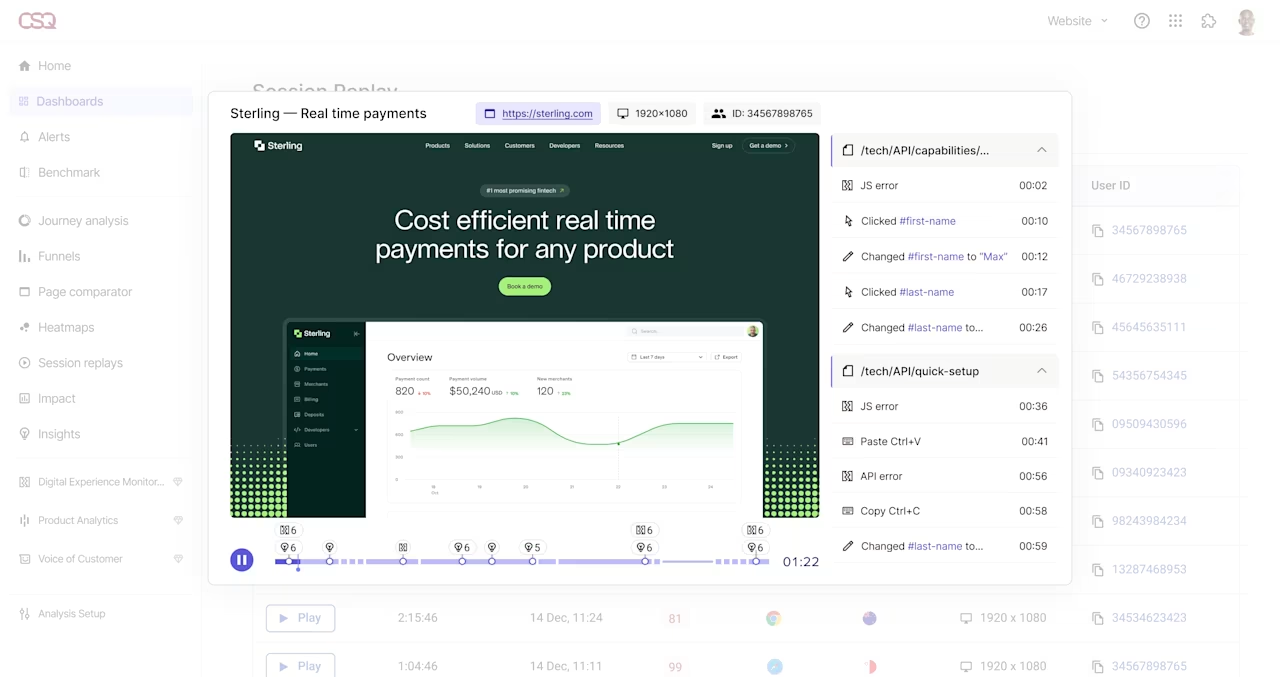
Watch your users as they navigate on your website during their customer journey to see where they're getting stuck with Session Replay
4. Signup forms
Signup forms let users opt in to communications like email newsletters or receiving educational resources. Using signup form touchpoints effectively can help you grow your mailing list, learn more about your users, and increase leads and conversions.
So, how can you make your signup touchpoints more effective? Try these four tips:
Make it clear to users what the value of signing up is, and how it will help them solve their problems
Make signup forms short and simple—the more form fields you include, the more friction users experience
Personalize sign-up with tools like Mailchimp
Make the signup process easy with autofill forms
5. Blog posts
Blog posts earn customers’ trust by showing you understand their pains, and search-optimized posts help them find you on search engine results pages (SERPs).
Here are five ways to make sure your blog posts are effective customer touchpoints:
Strengthen search engine optimization (SEO): improve website readability, headlines, images, and anchor text
Optimize for targeted keywords: use a few long-tail keywords that directly answer user questions instead of keyword stuffing
Add image alt text: describe each image for search engines and for users when it doesn’t load
Optimize URLs: make sure URLs and ‘slugs’ tell users what they’re about to open
Optimize meta descriptions: write a brief overview that inspires clicks
6. Video/visual media
Great media engages your audience and connects your brand with users’ needs.
Here are four ways to optimize your visual media:
Create user-centric videos: provide added value or educate users on your product and features
Have a clear goal: decide the responses you want from viewers before you design
Add key SEO information: add targeted keywords to meta descriptions and transcribe videos so search engines understand them
Consider lead capture methods: ask for an email in exchange for special content to attract qualified leads
7. Product pages
Product pages help ecommerce companies showcase different product offerings and encourage users to make a purchase or learn more.
Use an effective page navigation layout and high-quality images and product descriptions to give your customers everything they need to make their decision at this touchpoint.
Here are five ways to optimize product pages for your customers:
Organize your products: group your products in a way that makes sense to your users, with clearly labeled categories, intuitive filters, and search bars
Make user-centric design decisions: adjust the style of your page, including its language, layout type, and item placement, to help users easily access all the information they need and improve their digital experience. Test out different product page designs with heatmaps to see which attract more engagement—and ask users why with Surveys.
Add CTAs: include clear, compelling CTAs throughout the page to inspire users to carry out the intended action
Image quality: use professional, high-quality images of your products or services that clearly display their main features to compel users to keep browsing
Include all relevant information: add reviews, product comparisons, product specs, shipping information, and final price so your users have all the information they need to successfully convert

Quickly create, launch, and analyze surveys with Contentsquare
8. Point of exit
The point of exit is when a user stops engaging—by unsubscribing, abandoning their cart, or leaving a page.
Ask yourself—and your users—three questions at this stage:
If a user abandons their cart: what about your checkout experience caused friction?
If a user exits a page: what could you do to make your pages more targeted and engaging?
If a user unsubscribes: how can you improve your product experience?
Here are four ways to optimize point-of-exit touchpoints:
Identify where users drop off: use product analytics to track which pages are failing to convert and why
Optimize pages with high exit rates: improve design, navigation, responsiveness, and content
Watch what happens: explore session replays of high-bounce pages to see why users left
Launch exit-intent surveys: use exit-intent surveys to ask users why they’re leaving without converting
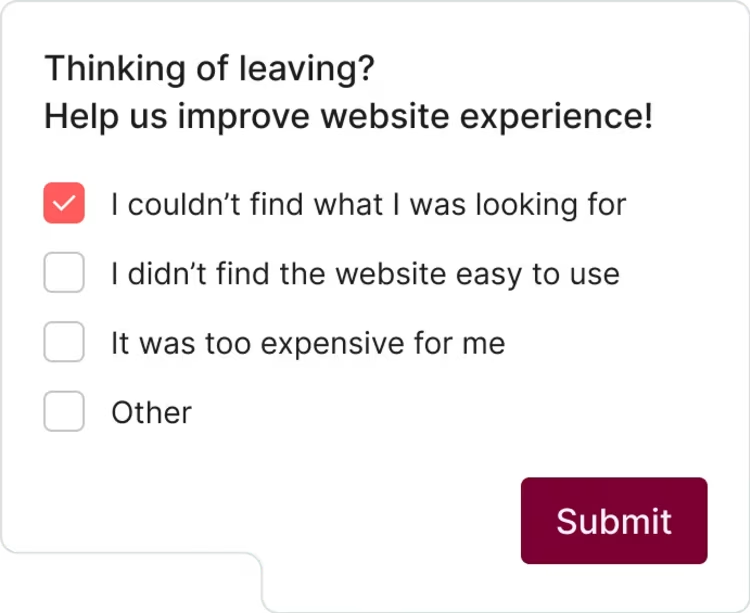
Exit-intent surveys let you understand why customers are leaving—and what you can do to improve
9. Starting a free trial
Free trials let users experience your product on their own terms—a ‘show, don’t tell’ approach instead of aggressive selling.
Try these four tips to improve your free trial customer touchpoints:
Build a trustworthy, informative landing page: explain trial benefits and conditions, with testimonials and trust seals
Make signup and download easy: use a simple form with minimal steps
Provide clear timeframes: tell users how long the trial lasts so they know when to cancel or upgrade
Showcase your product's value: show how the trial helps users achieve their goals
10. Onboarding
Onboarding directly impacts product adoption and can turn users into brand advocates. Show users how to get set up and introduce key features so they get value fast.
Here are four ways to optimize your customer onboarding:
Educational content and problem-solving: answer user questions with a knowledge base and responsive support
Introduce users to key features: use hotspots, banners, and tooltips to highlight helpful features
Optimize welcome emails: A/B test your welcome email to find out what users respond to most
Collect user feedback: use Contentsquare Surveys to ask users what you could improve during onboarding
11. Using a new feature
New features keep users engaged and help them become loyal customers—if they know how to use them.
Here are four ways to help users adopt new features:
Keep users in the loop on new features: announce them on your blog, social media, and newsletters
Set up guides and prompts: use in-product tooltips and hotspots to help users set up new features
Include relevant features: add the right features without overwhelming users
Track feature adoption: use Product Analytics to see who tries a new feature and comes back to it
12. Customer reviews
Customer reviews highly influence user decisions. Positive reviews build trust and act as a knowledge base for potential customers.
Here are four ways to optimize your customer reviews:
Increase customer confidence: happy customers leave good reviews that reassure other users
Learn from bad reviews: treat negative reviews as feedback to drive change, and follow up with reviewers where possible
Improve your customer experience (CX) through feedback: use a customer satisfaction (CSAT) survey to find what to improve
Track loyalty over time: turn survey responses into a Net Promoter Score® (NPS®) with the free NPS® calculator
Optimize your customer journey touchpoints for impressive results
Every touchpoint in this chapter is a chance to keep a customer moving forward or lose them to friction. Fixing them one at a time, with a clear metric attached to each, turns scattered guesses into changes you can actually trust. Over time, those small wins compound: smoother signups, clearer product pages, easier checkouts, and onboarding that gets people to value faster. The result is a journey that delights your users and moves your organization closer to its goals.
Don't try to fix everything at once. Start with the touchpoints where users hesitate or drop off, and map them against the customer journey stages to see which moments carry the most weight. Pair each fix with a metric, watch how real users respond, and let the data tell you what to tackle next. Then fold those improvements into a broader customer journey strategy, so every team knows which touchpoints they own and how their work shapes the next step in the journey.
FAQs about customer journey touchpoints
Touchpoints are the moments your customer interacts with your brand before, during, and after purchase. Their quality shapes the overall experience and often determines whether customers convert, stay loyal, or churn. Strong touchpoints build brand loyalty over time, and each one is a chance to spot customer pain points, so it's important to be aware of them.