You’re driving plenty of traffic—but somewhere along the user journey, momentum stalls and conversions trickle in. Funnel analytics replace hunches with hard evidence, tracing each step so you can uncover hidden bottlenecks, understand the experience in context, and guide more people to that final click.
In this chapter, you’ll learn how to use funnel analysis to spot high-exit pages, uncover the traffic sources that bring high-intent visitors, and prioritize the fixes that actually move the needle. You’ll also see how to pair funnel reports with complementary insights—like heatmaps, session replays, and on-page surveys—and how to choose the right funnel analysis tool, so you can send more of your hard-won traffic through the pages that matter.
Key insights
Measure conversion both step to step and start to finish to pinpoint your biggest drop-offs.
Compare segments by device, channel, campaign, cohort, or behavior to find your highest-converting paths.
Pair funnel metrics with qualitative context—heatmaps, session replays, and on-page surveys—to uncover the why behind drop-off.
Prioritize high-traffic, high-exit pages first to unlock outsized gains fast.
Don’t just fix friction—double down on what already works by making top-performing flows the default experience.
What is funnel analysis?
Funnel analysis is the process of mapping the flow of site visitors through a set of specific steps that end in a conversion or signup, so you can see how many people reach each stage. It works across every kind of funnel—marketing funnels, sales funnels, and ecommerce conversion funnels—which all narrow toward the end, so there are more users at the top than at the bottom. For the full definition and a breakdown of funnel types, see the funnels guide homepage.
For example, a basic ecommerce funnel path looks like this:
Homepage > category page > product page > cart > checkout > thank you page
3 benefits of using funnel analysis on your website
It's often easy (and tempting) to work on too many parts of your site at once. Funnel analysis helps you understand and prioritize what needs tackling first. Here's how.
📈 Before you get started: to get the most out of your funnel analysis, first make sure your funnels are set up for success. Use a customer journey map to outline the ideal customer journey and inform the steps of your funnel. Check out our chapter on how to create funnels for more.
1. Find the high-traffic, high-exit pages where people are leaving
Funnel analysis tools visualize the drop-off rate and conversion rate of your main pages, helping you understand when and where potential customers are leaving your website.

Funnel analysis shows the retention and drop-off of site traffic
It helps to measure conversion at two levels. Say 1,000 users start your funnel and 400 reach the final step: your overall start-to-finish conversion rate is 40%. But if 1,000 users reach the cart and only 600 move on to checkout, that single step-to-step conversion rate is 60%—which pinpoints the exact stage where the biggest drop-off happens.
Knowing where in the journey users drop off helps you to focus your optimization efforts on the biggest opportunities. To lean on the funnel metaphor: finding where users leave helps you plug holes in your funnel and send more traffic through it.
We've identified steps in our funnel that were confusing to our customers and caused them to abandon our product. We can easily identify screens that make them get lost and hesitate on what to do next, so then we can fix UX issues and continuously improve. Every small improvement increases conversions around 10 to 20 percent, which is really significant.
2. Determine where high-quality visitors come from
Funnels aren't only useful for finding issues that need fixing. They can also help you spot successes to double down on—for example, by revealing where your high-converting traffic comes from.
Using a funnel analysis capability from a customer experience intelligence platform like Contentsquare (that's us! 👋) will help you do this. For example, with Contentsquare's Funnel Analysis, you can compare different segments to see which ones are the most successful at converting.

Funnel analysis in Contentsquare showing comparisons across funnel views
Comparing segments side by side doesn't just surface problems—it shows you which flow converts best, so you can make your top-performing path the default experience for everyone.
🔥 If you're using Contentsquare
They often say that comparison is the thief of joy—but not when it comes to funnel analysis. Comparing funnels in Contentsquare gives you crucial insights to optimize and tailor your funnel flows for different segments. Try comparing:
A/B test variants, to see which version has the greatest impact on conversion rates
Marketing campaign performance by traffic channels, so you can see where your campaign is driving the greatest return on investment (ROI)
New and returning users, so you can identify and nurture behaviors associated with conversion and loyalty
Devices, so you can spot any issues specific to desktop, mobile, or app
User attributes, such as location, to spot how different user cohorts progress through your funnel
Events, like 'Saved to wishlist', so you can see which actions and behaviors are linked with conversion or drop-off
3. Help team members and stakeholders make decisions
Funnels are a straightforward way to share where your online business is doing well and where there are opportunities for improvement.
Funnel reports are an easy visual aid to use in stakeholder or team presentations—alongside your metrics and KPIs—to help you get buy-in for future optimization work and showcase successful projects. There's nothing quite like seeing a big red 'drop-off' alert to inspire people to take action.
What makes a good funnel analysis tool?
Not every funnel analysis tool answers the same questions, so it's worth knowing what to look for before you commit. A few criteria separate a basic report from a tool that actually helps you boost conversions:
Quantitative and qualitative data in one place: numbers tell you where users drop off, while behavior and feedback tell you why. The strongest tools show both without forcing you to stitch together separate systems.
Segment comparison: the ability to compare funnels side by side—by device, channel, or audience—so you can see which flows convert best.
Drill-down to session evidence: a click from a drop-off step straight to recordings of the users who left, so you can watch what actually happened.
No-tag, retroactive data capture: automatic capture means you can analyze a funnel you didn't set up in advance, using historical data rather than waiting weeks for new events to accumulate.
This combination is what turns a funnel report into a decision-making tool. MediaMarkt used funnel analysis to optimize its checkout journey and increase revenue—a clear example of how spotting drop-off translates into real conversions. Contentsquare pairs quantitative funnel data with the qualitative context of session recordings, heatmaps, and on-page surveys in one platform, so you can move from where users leave to why in a few clicks.
How to perform funnel analysis
At this point, it goes without saying that conversion funnels give you a clearer understanding of user behavior across your site—but you can supercharge your analysis by combining funnels with other complementary tools.
1. See what's happening between events and pages
After identifying problematic high-exit pages and roadblocks in your conversion funnel, use experience insights to get a more in-depth look at what users are interacting with right before they drop off. Contentsquare's Heatmaps and Session Replay offer much-needed context.
Heatmaps
Heatmaps record and aggregate user clicks, mouse movements, and scrolls, showing which elements were clicked (or ignored) and how far down the page users scrolled.

The different types of heatmaps
Placing a heatmap on your high-exit pages helps you spot problematic elements, such as broken links or unseen call to actions (CTAs), that are causing users to drop off.
Session Replay
Session replays offer renderings of individual user sessions on your website and offer more context to your heatmap insights.
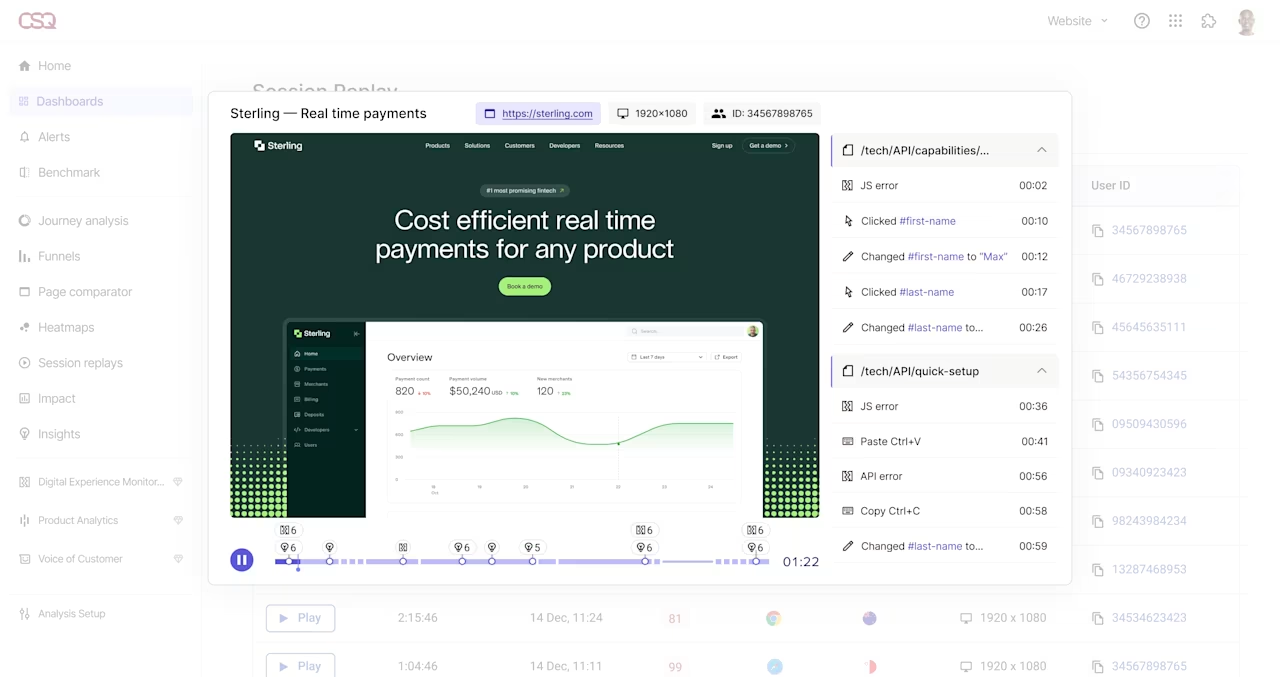
A session replay in the Contentsquare dashboard
Focus on your high-exit pages and watch how people browse, scroll through content, and interact with buttons before they leave your website. Spotting any issues they encounter gives you the data needed to improve your UX design or resolve technical issues to help guide visitors deeper into your site.
🔥 If you're using Contentsquare
Detected an unusually high drop-off rate in your Contentsquare Funnel Analysis? Click on the button next to the number of users who dropped.
This allows you to watch recordings of these specific user sessions, so you can understand exactly what happened at each step—and see what really prevented them from converting.
2. Find out what's going on by surveying visitors on the page
Heatmaps and Session Replay data can give you a few hypotheses for UX improvements, site performance, or design changes. You can experiment with design changes through A/B testing at this stage (and use funnel comparisons to see how these improvements perform against your old flows), but there's one key insight that's still missing: feedback from your users.
Qualitative data from on-page surveys and feedback is an invaluable part of funnel analysis. Instead of making assumptions and guesses about why visitors bounce and don't convert, you can simply talk to your users and let them tell you why.

Use surveys to get valuable qualitative feedback that informs your funnel analysis
Again, starting with your high-exit pages, set up a website survey with a couple of key questions to learn more:
What's missing from this page?
What's stopping you from continuing?
What were you looking for?
How can we help?
Asking the right open-ended questions allows your visitors to tell you how they feel, in their own words, so you can understand their needs and provide a better site experience.
Use funnel analysis to unlock more insights and improve conversions
By understanding how your funnels actually perform—and layering in heatmaps, session replays, and on-page feedback—you can see which steps create friction, which paths convert best, and why. That clarity helps you focus changes where they matter most and ship improvements you can connect to revenue.
Start with high-traffic, high-exit pages—the fixes there reach the most visitors. Make it a habit to review funnels regularly, compare key segments and devices, and test updates so the best flow becomes the norm. When you’re ready to extend this work beyond your site paths, keep building the journey with the sales funnel chapter to align your funnel with the wider buying process.
🔥 If you're using Contentsquare
Regular funnel reviews are the habit most teams drop first, usually because every check means rebuilding the same analysis by hand. Ask Sense Analyst what changed in your funnel, in plain language, and it segments the traffic, traces the paths, and shows you where the drop-off moved. It can also analyze user paths automatically after an important release, so you find out whether a redesign helped or hurt without having to go looking.

Ask what changed in your funnel and Sense Analyst returns the week-over-week comparison, step by step
FAQs about funnel analysis
A funnel strategy describes the conversion paths a business intends its customers to follow. It maps the specific pages a visitor is meant to click through with the ultimate goal of conversion. Typically, there are multiple potential conversion paths a customer can follow.