![[Visual] man and woman at work](http://images.ctfassets.net/gwbpo1m641r7/4D3Bx1EpecmrBLukibpry5/ed3a8812830ee731e439d49c29074160/472371070.jpeg?w=1280&q=85&fit=scale&fm=avif)
Whether you're an ecommerce business selling online or a SaaS company trying to engage new customers, it's important to create a website experience your users love. A poor user experience or frustrating customer journey can negatively affect your site's conversion rate and, ultimately, your revenue. To fully understand how users are interacting with your site and give them the best experience possible, you need to take a closer look at user behavior. That's where session replay tools come in.
A session replay—also known as session recording—is a video-like rendering of a customer's journey through your website that shows you what individual users saw and did on your site during their visit, including their clicks, page scrolls, and mouse movements. Design and UX, product, marketing, and conversion rate optimization (CRO) experts use session replay tools to truly empathize with their customers and understand how users experience their site from page to page.
Read on to discover our 8 top picks for session replay tools, understand the key features to look for, and learn how to choose the right tool for your team.
Key takeaways
Session replay tools let you watch real user interactions to understand behavior that analytics alone cannot reveal
Look for AI-powered summaries, segmentation, error tracking, and privacy controls when evaluating tools
The best tool for your team depends on your use case: enterprise platforms offer deeper integrations while free tools work for basic analysis
Combining session replay with heatmaps and error analysis provides the most complete picture of user experience
Session replay tools comparison table
Tool | Best for | Starting price | Key differentiator | Mobile support |
|---|---|---|---|---|
Contentsquare | Enterprise teams | Custom pricing | AI-powered summaries + Impact Quantification | Web + mobile |
FullStory | Product teams | Custom pricing | Autocapture without manual tagging | Web + mobile |
LogRocket | Development teams | Free tier available | Frontend monitoring + debugging | Web primarily |
Smartlook | Web + mobile teams | Free tier available | Native mobile app support | Web + mobile |
Mouseflow | Marketing teams | $31/month | Form analytics + friction scoring | Web only |
Crazy Egg | A/B testing focus | $29/month | Built-in A/B testing | Web only |
Lucky Orange | Small businesses | $32/month | Live visitor monitoring + chat | Web only |
Microsoft Clarity | Budget-conscious teams | Free | Unlimited sessions at no cost | Web only |
8 session replay tools to understand user behavior
The tools below range from free options ideal for basic analysis to enterprise platforms with deep integrations and advanced AI capabilities. Each entry includes what the tool does best, its key features, and its limitations to help you find the right fit.
1. Contentsquare
Contentsquare is an AI-powered customer experience intelligence platform that helps you understand how and why users interact with your site, app, or product. Its behavioral analytics tools, which include session replays, help you improve conversion, retention, and customer delight.
Best for: Enterprise teams that need deep behavioral insights combined with quantitative impact analysis
Key features:
Contentsquare's Session Replay includes advanced customer segmentation, event tracking, error flagging, frustration signals, and find-and-fix notifications. It also offers advanced filtering options you can use for deeper insights into user behavior over time:
Filter by traffic channels
Analyze individual user groups
Analyze mobile and desktop website versions separately
Track individual users across multiple sessions
Combine session replays with Contentsquare's other powerful capabilities and features to get even more from your data:
Frustration Score: every session is automatically scored based on friction signals—rage clicks, dead clicks, u-turns, and error encounters. Use it to filter directly to the sessions where something went wrong, so you spend your time on the recordings that actually matter rather than scrolling through uneventful ones.
![[Visual] CSQ-Frustration-Score](http://images.ctfassets.net/gwbpo1m641r7/42XUbRA4QZNcWpukMpln1m/44c3ab68cd5de383e3811680e94bd8a5/CSQ-Frustration-Score.png?w=1280&q=85&fit=scale&fm=avif)
Heatmaps: view heatmaps on key pages to get an aggregated visual view of user behavior. Find something interesting, like a page element that's getting a lot of unexpected attention? Watch session replays of individual users to understand why.
![[Visual] Heatmaps-and-session-replay](http://images.ctfassets.net/gwbpo1m641r7/2wP0r89VqXCSVVWgECyeKy/d5935f3ffda59562270b251885bf1dd6/Heatmaps-and-session-replay.png?w=1280&q=85&fit=scale&fm=avif)
Jump straight from heatmaps to session replays in a single click to get more in-depth insights
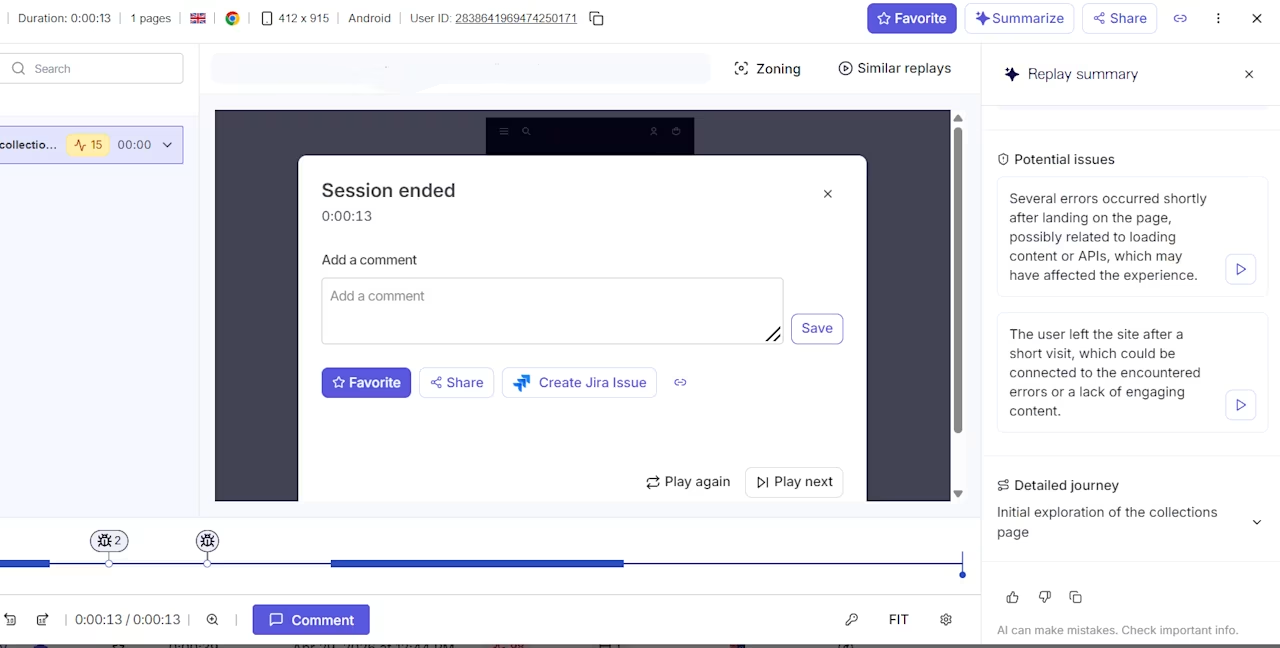
Sense: no time to watch every recording? Sense automatically summarizes what users experienced in each session — key pain points, friction moments, and recommended next steps—without you having to sit through hours of footage. You can also ask Sense in plain language to identify patterns across sessions and surface the issues with the biggest impact.
![[Visual] Replay summary](http://images.ctfassets.net/gwbpo1m641r7/1wLnYGETfHSNJGY5dqWTjS/ea8a72a1dbaf2b4ccedeb721cafd483b/Picture3.jpg?w=624&q=85&fit=scale&fm=avif)
Error Analysis: quickly pinpoint where technical errors are happening and view related session replays to see what the root cause is. With a few clicks, you can then quantify how many other users are seeing the same bugs, prioritize what to focus on, and expedite the fix.
💡Pro tip: get real-time notifications about error spikes right in your Slack or Microsoft Teams channels to automatically flag emerging issues and deal with them immediately.
Dashboards: these customizable, high-level views of your most important metrics let you zoom in on individual user behaviors by navigating to relevant session replays in a single click.
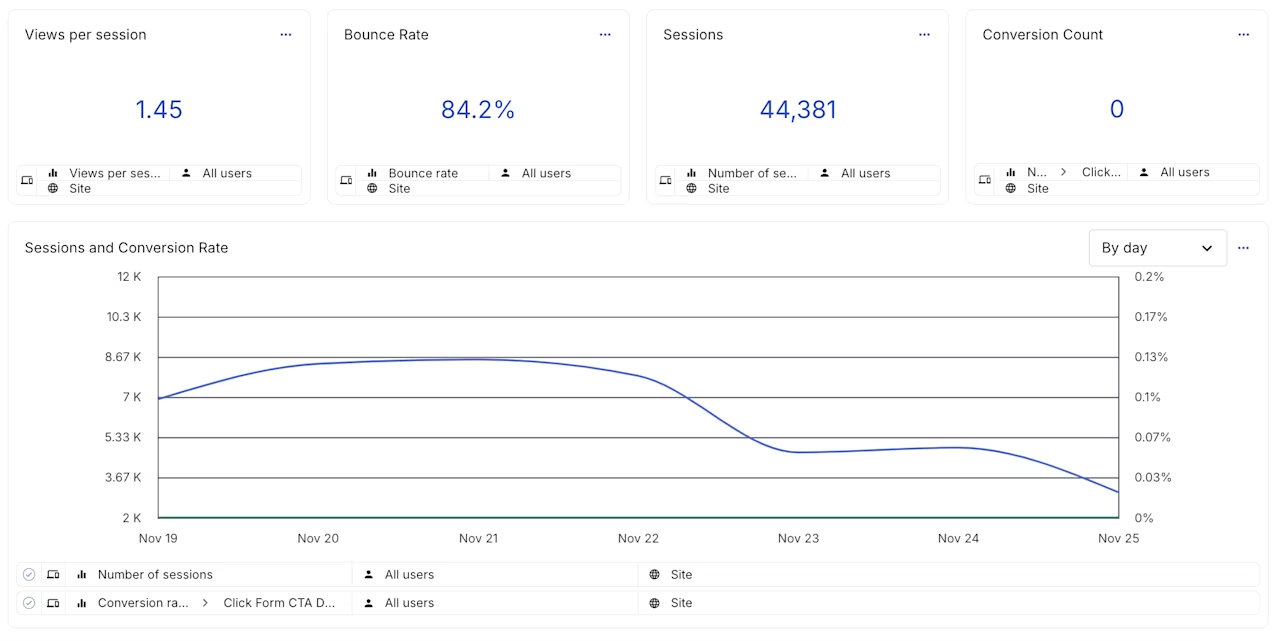
Stay on top of key metrics with customizable dashboards
Surveys: capture feedback as users browse your website or complete certain events, then contextualize it with session replays to understand why they left the response they did.
Impact Quantification: combine session replays with impact quantification to quickly understand how specific pages and elements impact conversion, revenue, and subscriptions. After watching a few replays, you might notice users scrolling past an important call-to-action (CTA) button or browsing a product page without continuing through the sales funnel. Impact Quantification helps you prioritize which issues to fix first based on their revenue impact.
Use the Contentsquare-Jira integration to quickly generate tickets with all the context required for developers to fix issues, including relevant session replays and behavior analytics metrics like u-turns (where users turn back before completing a key action).
Uncover what's hurting conversions. High-intent shoppers are dropping off before completing their purchase.
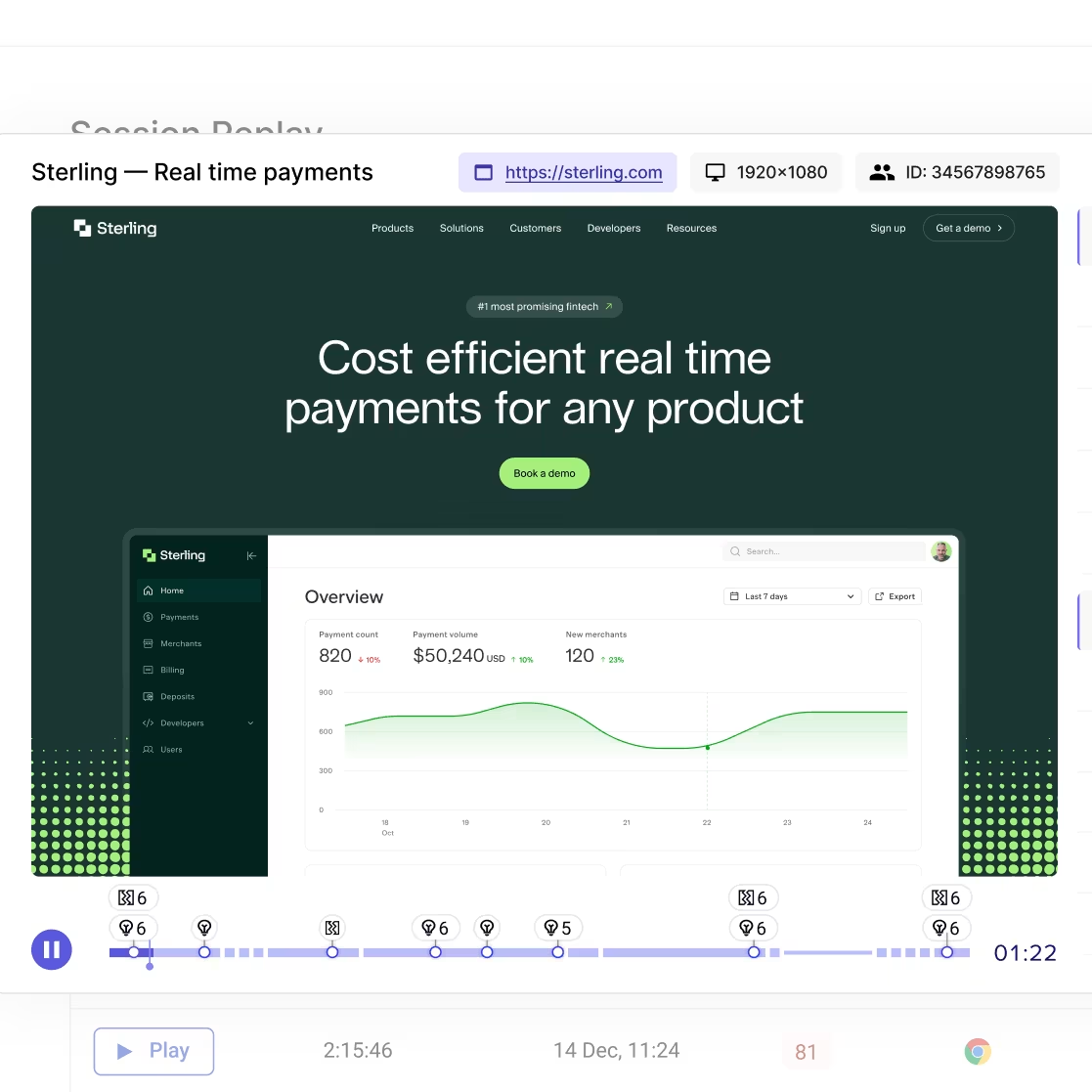
Contentsquare's Session Replay tool reveals exactly how users navigate your site, uncovering insights you would otherwise miss
2. Fullstory
Fullstory is a digital experience intelligence platform that combines session replay with product analytics to help teams understand user behavior across web and mobile applications.
Best for: Product and engineering teams that want autocapture functionality without manual event tagging
Key features:
Autocapture technology that records all user interactions with no manual instrumentation needed
Retroactive analysis that lets you query past sessions for events you didn't know you needed
Frustration detection including rage clicks, dead clicks, and error clicks
Integration with product analytics for combining qualitative and quantitative insights
Native mobile app support for iOS and Android
💡 Pro tip: Contentsquare's Smart Capture works the same way—automatically capturing every click, scroll, swipe, and tap from day one with no manual tagging. The difference is what you can do with it: Smart Capture feeds directly into Session Replay, Heatmaps, Journey Analysis, and Impact Quantification, so retroactive analysis comes with revenue context attached.
![[Visual] Contentsquare-Smart-Capture](http://images.ctfassets.net/gwbpo1m641r7/lUXNDEwI7dx3UhbmgtA5t/81827d3fdaebd132b1f5c1b04374a237/Contentsquare-Smart-Capture.avif?w=1280&q=85&fit=scale&fm=avif)
Contentsquare's Smart Capture in action
3. LogRocket
LogRocket is a frontend monitoring and session replay platform designed primarily for developers and product teams who need to understand and fix user-facing issues.
Best for: Development teams that need to connect user experience issues with technical errors and performance problems
Key features:
Session replay combined with console logs, network requests, and Redux state for debugging
Performance monitoring that identifies slow pages and JavaScript errors
Issue tracking integration with tools like Jira, Slack, and GitHub
User identification to track individual users across sessions
Frustration scoring to surface sessions where users struggled
4. Smartlook
Smartlook is a website conversion rate optimization platform that lets you perform qualitative analyses of mobile applications and web pages.
Best for: Teams that need session replay for both web and native mobile apps with a straightforward interface
Key features:
Session recording software with event tracking, adjustable playback speed, and filters
Friction score for individual pages, similar to Contentsquare's frustration score
JavaScript error logging to help identify bugs
Native mobile app support for iOS and Android
Funnel analysis to track conversion paths
5. Mouseflow
Mouseflow is a real-time digital experience analytics platform that incorporates session replays with web analytics, heatmaps, and other conversion optimization tools.
Best for: Marketing teams at small to mid-sized businesses who want an all-in-one behavior analytics solution
Key features:
Adjustable replay speed along with a wide range of segmenting and filtering options
Heatmaps including click, scroll, attention, and movement maps
Form analytics to identify where users abandon forms
Friction score to highlight problematic sessions
Feedback campaigns to collect user input
6. Crazy Egg
Crazy Egg is a platform designed to help businesses optimize their websites. Its features include session recordings, heatmaps, and A/B testing tools.
Best for: Teams that want to combine session replay insights with built-in A/B testing capabilities
Key features:
Site-wide visitor recording with filters, adjustable playback speed, and tagging
Ability to save favorite recordings for easy reference
Heatmaps including scroll maps and confetti reports
Built-in A/B testing tool to test page variants based on replay insights
Snapshots feature for quick page analysis
7. Lucky Orange
Lucky Orange is a platform designed to improve conversion rates on your website through session recordings, heatmaps, forms, conversion funnels, and surveys.
Best for: Small businesses and individuals who want real-time visitor monitoring and live chat capabilities
Key features:
Full replays with a timeline view to jump to key events
Live view to record and follow website visitors in real time
Adjustable play speed with ability to skip idle time
Built-in live chat to engage visitors directly
Form analytics to identify abandonment points
8. Microsoft Clarity
Microsoft Clarity is a free, open-source tool that lets you see what users are doing on your site with the help of its session replays and heatmaps tools.
Best for: Teams on a tight budget who need basic session replay functionality without cost
Key features:
Hi-def recordings at any speed with no traffic limits
Shareable recording clips for team collaboration
Bug detection that surfaces issues damaging the user experience
Filters to find specific session types
Heatmaps integration including click, scroll, and area maps
Copilot integration for AI-powered insights
Direct connection to Google Analytics for combined analysis
Completely free with no session caps or premium tiers
7 features to look for in a session replay tool
Getting insights from session replays can take a lot of time—, especially when you have thousands of sessions to sift through. Here are 710 features to look for in a session replay tool to save time and find the most relevant recordings.session replay tool to save time and find the most relevant recordings.
🤖 AI summaries: instead of watching sessions yourselvesyourself, let AI summarize key insights, pain points users experience in those sessions, and actionable ways to solve those issues. Contentsquare's AI-powered session replay summaries, for example, can surface the most important moments from a session so you can focus on fixing problems rather than hunting for them.
🎯 Segmentation: when you want to see session replays from users who took specific actions, creating segments (using user segmentation analysis) saves you a lot of time. For example, if you want to investigate why customers on your ecommerce site are abandoning their carts, you could create a segment for visitors who exited from the checkout page.
🔎 Filters: look for the ability to filter by criteria such as page event, behavior or technology—, or technology, like device, browser, and operating system—, so you can find the right session replays to match your precise requirements.
🔔 Alerts and notifications: stay one step ahead of issues with a session replay tool that sends you alerts and notifications about error spikes or key segments. Consider a tool that integrates with platforms like Slack or Microsoft Teams (like Contentsquare), so your most important session replays will automatically be sent to a dedicated channel with all the right people.
💻 Site-wide page viewing and recording: when you analyze user behavior when you analyze user behavior, you might want to understand how individuals move through multiple pages. Look for a tool that lets you watch the user’'s entire journey as they click through different parts of your site.
🔨 Adjustable replay speed: watching session replays can be time-consuming, especially when your users make long visits over multiple pages. Look for a tool that lets you adjust the replay speed to get you the insights you need in less time.
💬 Comments: align your team around a shared view by leaving comments in session replays for faster, more effective collaboration.
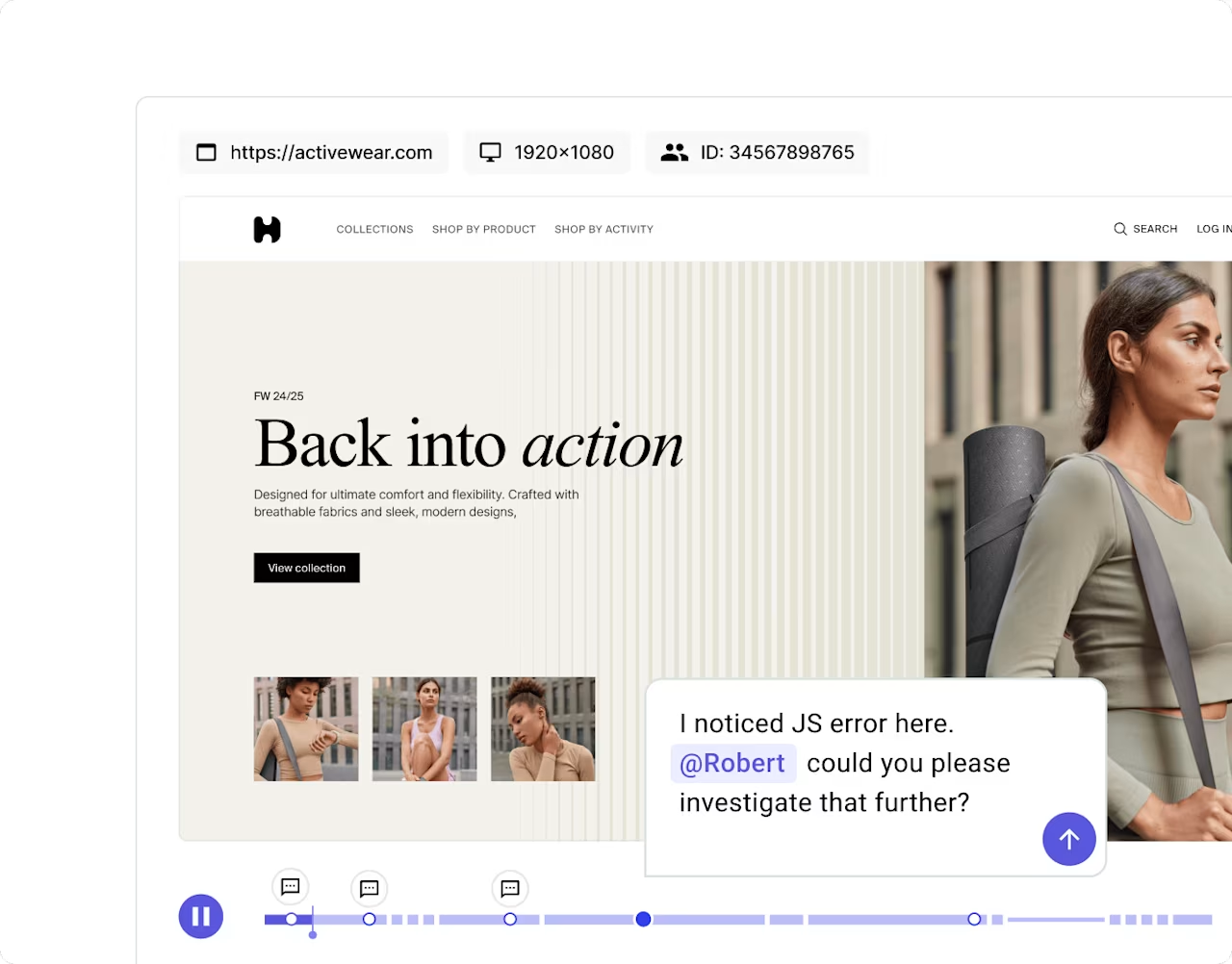
Leave comments directly in session replays to boost collaboration and provide extra context
How to choose the right session replay tool
With multiple options available, selecting the right session replay software depends on your team's specific needs, technical requirements, and budget. Here's a framework to guide your decision:
Consider your team size and expertise
Small teams or individuals may prefer simpler tools like Lucky Orange or Microsoft Clarity that require minimal setup
Enterprise organizations typically need platforms like Contentsquare or FullStory that offer advanced segmentation, integrations, and dedicated support
Evaluate your technical requirements
Do you need mobile app support? Not all tools offer native mobile SDKs
What integrations matter most? Check compatibility with your analytics stack, ticketing systems, and communication tools
How much traffic do you have? Some tools charge by session volume, which can add up quickly
Assess your use cases
Marketing teams focused on conversion optimization may prioritize heatmaps and A/B testing integration
Product teams might value autocapture and retroactive analysis
Development teams often need error tracking and debugging capabilities alongside session replay
Think about scale
Free tools work well for basic analysis but may lack the depth needed as your program matures
Consider not just current needs but where you'll be in 12-18 months
Contentsquare's Impact Quantification helps teams prioritize which sessions to analyze by connecting user behavior to business outcomes, making it easier to focus limited time on the issues that matter most
Make the most of session replay insights
Your website contains rich behavioral data waiting to be analyzed, and session replay tools offer a direct way to start understanding how users actually interact with your pages. Session replays show you how individual users explore your website, right down to their mouse movements and the places they click. They're the perfect complement to quantitative web analytics or product analytics tools which help you identify trends across your site.
Combine session replay insights with data from other capabilities, like heatmaps, error analysis, impact quantification, and Voice-of-Customer tools like surveys, to understand how users behave and why, helping you empathize with them and identify issues you might otherwise miss. The seamless connection between Contentsquare's session replay, heatmaps, and error analysis demonstrates how an integrated approach gives you the complete picture of user experience.
FAQs about session replay tools Read more
What is a session replay? : A session replay, sometimes known as a session recording, is a rendering of the actions taken by an individual user as they browse a website. It shows you exactly what they saw on screen, including their clicks, page scrolls, and mouse movements.
![[Visual] Contentsquare's Content Team](http://images.ctfassets.net/gwbpo1m641r7/3IVEUbRzFIoC9mf5EJ2qHY/f25ccd2131dfd63f5c63b5b92cc4ba20/Copy_of_Copy_of_BLOG-icp-8117438.jpeg?w=946&q=85&fit=scale&fm=avif)