![[Visual] AdobeStock 1](http://images.ctfassets.net/gwbpo1m641r7/4BGNTIBnRHqPqpgXWvh3OZ/893ff720c347e03b52974eb98321ba0d/AdobeStock_846417258.png?w=1280&q=85&fit=scale&fm=avif)
Your team just watched three hours of session recordings. You flagged some moments and took notes. But the sprint review is tomorrow, and your backlog is growing—and you have 200 more replays to watch.
That’s where AI-powered session replay summaries come in. Instead of scrubbing through footage, you get the key insights delivered in seconds, with links to the moments that matter most.
In this guide, you learn what session replay summaries are, how they work, and how teams across an organization use them to make faster, better decisions—without watching a single full recording.
Key insights
Summaries aren’t just for researchers. Everyone from product managers to customer support teams can use them to understand user behavior without devoting days to manual review.
Filtering your sessions before summarizing—by frustration score, error type, or user segment—leads to the most valuable insights and faster decisions
After generating a summary, use your session replay tool’s AI chat to ask follow-up questions, so you can understand the data better and get specific answers to your pressing questions
What are session replay summaries?
Watching one session replay is manageable. Watching a hundred is a different story.
Session replay summaries are AI overviews that extract the highlights of your users’ sessions on your site.
These summaries are perfect for teams needing to move fast. Rather than dedicating hours to user behavior analysis, anyone on your team can get the insights they need without deep technical knowledge or previous experience with session replays.
For example, Contentsquare’s AI-powered Session Replay summaries analyze one to 100 sessions at a time—drawing on behavioral signals like frustration, errors, and pages visited to surface what actually matters—and deliver a summary right in our platform in seconds.
Each one includes:
Key insights: a plain-language overview of what the user did and how they behaved—for a quick at-a-glance understanding
Potential friction points: specific moments where users struggled, with time-coded links that let you jump you directly to that part of the recording—no scrubbing through the timeline required
Detailed user journey: a step-by-step breakdown of the user’s path through your site or app, so you can see exactly where they went and in what order
💡 A note about privacy: you can generate summaries even if your project is set up to mask sensitive user information. Contentsquare’s AI focuses on how users behaved—where they went, where they struggled—not on personal details. That means you get useful insights while sensitive data stays protected. Read more about the steps we take to protect user data in our privacy center.
2 types of session replay summaries
Contentsquare offers two ways to summarize sessions—one for diving deep into a single recording, and one for spotting patterns across many. Here’s how they differ.
1. Individual session summaries
An individual session summary gives you a complete breakdown of a single replay—without ever having to watch it.
It’s perfect for when you need to
Investigate a specific user complaint
Follow up on a session a teammate flagged
Quickly understand what a particular user experienced before deciding whether to watch the full recording
👉 To access it: just click the sparkle icon ( ✨) next to any replay in the session list, or hit ‘Summarize replay’ while watching a session in the player.
![[Visual] Individual-session-replay-summaries](http://images.ctfassets.net/gwbpo1m641r7/2LOuWWTCKzba4Esj8F7B8b/8e74cfafb599b13ac6e4692bc7f4f0f9/Individual-session-replay-summaries.png?w=1280&q=85&fit=scale&fm=avif)
Click the sparkle icon next to any individual replay for a detailed summary
2. Group summaries
A group summary analyzes up to 100 sessions at once and surfaces the behavioral patterns they share—turning what would be hours of manual review into a single, scannable overview.
It’s especially helpful when you want to understand how a cohort of users behaved, like when you’re
Conducting a post-launch analysis
Analyzing campaign performance
Investigating a spike in errors
👉 To access it: apply your filters to the session list, then click ‘Summarize replays’ at the top of your results.
![[Visual] Group-session-replay-summaries](http://images.ctfassets.net/gwbpo1m641r7/2LtFKzTwoJXMgA6nP4RRt4/e0ec4419200d9c0cd89ba7254fb590f5/Group-session-replay-summaries.png?w=1280&q=85&fit=scale&fm=avif)
Summarize up to 100 replays at once with the click of a button
4 ways to effectively use session replay summaries
Summaries are powerful on their own—but a few simple habits make them even more useful. Here’s how to get the most out of them.
1. Filter before you summarize
The quality of a group summary depends on the quality of the group itself. Before generating a summary, narrow your session list with filters to ensure you’re analyzing the right cohort.
For example, with Contentsquare, you can analyze by
Device type
Traffic source
Error type
User segment
💡 Pro tip: filter your session replays by Frustration score before generating a group summary. Contentsquare’s AI assigns each session a score from 0–100, based on signals like rage clicks, JavaScript errors, and field resubmissions. Filtering for high-scoring sessions means your summary reflects the moments that hurt rather than just background noise.
![[Visual] Filter-frustration-score](http://images.ctfassets.net/gwbpo1m641r7/3rcnpHwXl6A4KPSzLcVhct/8751dfc49862a2dec2c392341beed58e/Filter-frustration-score.png?w=1280&q=85&fit=scale&fm=avif)
Filter your session recordings by Frustration score before generating a group summary to save time, finding which sessions affect users the most
2. Ask follow-up questions
A summary is a great starting point, but sometimes you need to dig deeper. AI analytics tools let you go beyond the initial output by asking follow-up questions, turning a one-time snapshot into an ongoing analysis.
With Contentsquare’s AI, the Sense Chat side panel opens automatically once you’ve generated your summary. Then, you can ask follow-up questions about the same session cohort without leaving your workflow.
For example, you could ask
Which pages had the most issues?
How many users encountered this problem?
It’s a fast way to go from a high-level summary to a specific, concrete answer.
![[Visual] Sense-chat-summaries](http://images.ctfassets.net/gwbpo1m641r7/2mHeRrzl7EM1GwQ9zwq4uU/23eead9e9f6fc254cbf298a22f4e00cd/Sense-chat-summaries.png?w=629&q=85&fit=scale&fm=avif)
Ask Sense Chat follow-up questions about your session replay summaries to dive deeper into your data
3. Combine summaries with other tools
Session replay summaries work best as part of your wider workflow—not a standalone step. Use them to add depth to what your other tools are already telling you.
With a 360 experience intelligence platform like Contentsquare, this kind of cross-tool workflow is built right in. Jump from Journey Analysis, Error Analysis, or Heatmaps directly to a pre-filtered set of replays—then summarize with a click of a button.
For example:
See a drop-off in your user journey? Pull up the relevant recordings and summarize them to see the friction firsthand.
Spot a high-impact error? Filter your replays to the affected sessions. Then, summarize the group sessions to see exactly what users experienced when things went wrong.
Notice a call to action (CTA) with unexpectedly low clicks in your heatmap data? Summarize that set of recordings to find out why users aren’t engaging!
![[Visual] Heatmaps-and-session-replay](http://images.ctfassets.net/gwbpo1m641r7/2wP0r89VqXCSVVWgECyeKy/d5935f3ffda59562270b251885bf1dd6/Heatmaps-and-session-replay.png?w=1280&q=85&fit=scale&fm=avif)
It’s easy to jump between Contentsquare tools, such as from Heatmaps to Session Replay
4. Share what you find
Insights have the biggest impact when they reach the right people. Most session replay tools let you export and share your findings with other team members.
In Contentsquare, just hit the ‘Copy summary’ button to export the output in Markdown—ready to paste directly into documentation tools like Jira, Notion, or Slack. And because summaries include time-coded links, anyone you share them with can jump straight to the moment in question with clarity.
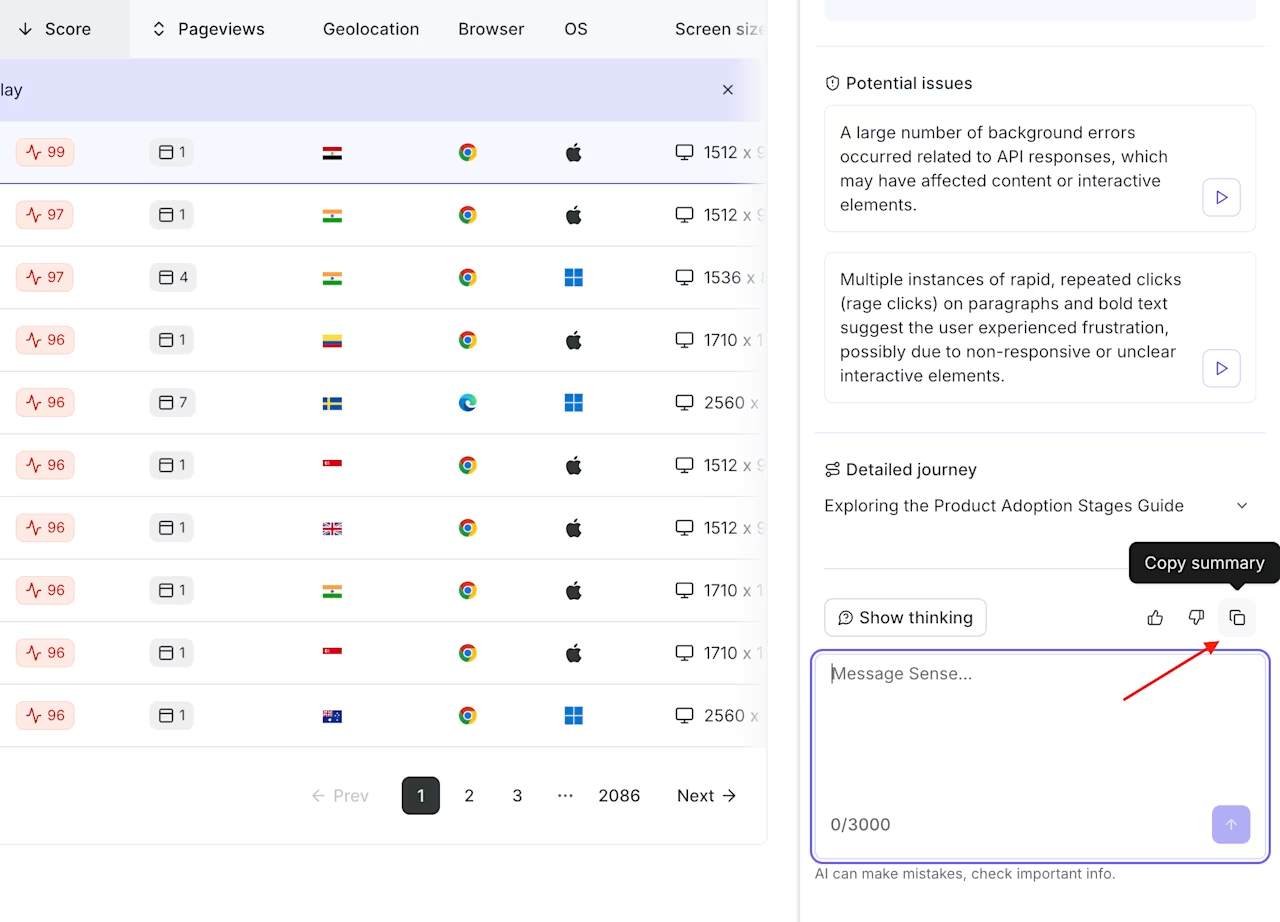
Click ‘Copy summary’ to share with your team in your communication tool of choice
How to use Contentsquare’s Session Replay summaries—by role
With Contentsquare’s Session Replay summaries, you don’t need a PhD in user experience (UX) research or log long hours reviewing recordings manually. Anyone who needs to understand user behavior can jump right in.
Here’s how different teams put these summaries to work in some common use cases:
Product managers: after a feature launch, filter replays by frustration score and summarize the top sessions to catch friction fast. Or, summarize test groups from an A/B test separately so your product team understands why a variant won or lost—instead of just relying on guesswork.
UX researchers: start by launching a Net Promoter Score® (NPS®) survey, which asks users to rate their experience on a scale of 0–10. Then, filter your replays to show sessions from users who gave negative scores, and summarize the group to identify common pain points. You get behavioral evidence tied directly to qualitative feedback—without watching every individual recording.
Growth and marketing teams: filter replays by UTM campaign, summarize the sessions, and immediately surface the top friction points on your landing page. Get fast, actionable insights you can act on before the campaign wraps.
Customer support and QA: when a spike in errors or rage clicks hits, filter replays to the affected sessions and create a summary to understand what users experienced—and what went wrong. Then, hit the ‘Copy summary’ button to share it directly with engineering so they have everything they need to investigate.
Analyzing screen recordings used to take an enormous amount of time. Now, with Contentsquare, we can summarize ten recordings at a time, or more, and get to bugs, friction points, and user frustration much faster.
Find insights from user sessions faster
Session replay analysis has always been valuable—the only issue was finding the time to watch all the sessions you wanted to see. With session replay summaries, that bottleneck vanishes. Your team gets the insights they need in seconds, not hours, and the people who need those insights most don’t have to wait for someone else to surface them.
The faster you understand what your users experience, the faster you can optimize your site experience for them.
FAQs about session replay summaries
Session Replay summaries is an AI analytics feature you can use to automatically analyze one or more user sessions and deliver a clear, concise breakdown of what happened—without you having to watch a single recording yourself.
Each summary includes
Key insights about the session
Friction points with time-coded links to jump to the relevant spots of the replay
A step-by-step breakdown of the user journey
You can access summaries with a click of a button, either directly from the session list or from within the replay player itself.


![[Visual] AI analytics home - stock](http://images.ctfassets.net/gwbpo1m641r7/64i3HakmQ9aHWYWEEqpFUM/f1d5d2a41b5c7d7a523a34b58bd50ece/AdobeStock_634961399.png?w=624&q=85&fit=scale&fm=avif)