
Every customer conversation is a data point. The words people use, the tone they carry, the moments they go quiet, all of it tells you something about what's working and what isn't. Speech analytics platforms are built to capture that signal at scale, turning hours of audio into structured insight about agent performance, compliance gaps, and how customers actually feel about what they're hearing.
The challenge isn't finding a platform with a long feature list. It's finding one that fits how your team works, what your contact center needs, and where the gaps in your current data are. This guide covers 8 of the best speech analytics tools available in 2026, with enough detail to help narrow down the right fit without wading through a vendor pitch.
Key insights
Real-time and post-call analytics solve different problems. Real-time tools prevent issues during the conversation. Post-call tools surface patterns that drive long-term improvement. Most contact centers eventually need both
Transcription accuracy is the foundation everything else is built on. A platform that mishears your customers will misidentify their problems, misscore your agents, and miss your compliance risks
The tools that deliver the most value connect conversation data to what happened before the call. Understanding why customers reached out, not just what they said, is what separates insight from transcription
Best speech analysis tools: at a glance
Use this comparison table to quickly evaluate which tools fit your needs:
Tool | Primary Focus | Best For | Real-time or Post-call | USP | Pricing |
|---|---|---|---|---|---|
Contentsquare | Conversation intelligence + digital experience | Teams that need to connect calls to digital journey data | Both | The only tool that connects conversation insights to session replays, journey data, and revenue impact | Custom pricing |
Balto | Real-time agent guidance | Sales and compliance-heavy contact centers | Real-time | Live prompts and compliance guardrails during the conversation | Custom pricing |
CallMiner | Post-call analytics at scale | Enterprise contact centers with high interaction volumes | Post-call | Root cause analysis across 100% of interactions | Custom pricing |
Observe.AI | Automated QA and coaching | Teams moving away from manual call sampling | Post-call | Moment-level scoring tied directly to coaching recommendations | Custom pricing |
NICE | Workforce optimization + speech analytics | Large, complex contact centers | Both | Phonetic and transcription-based analysis combined for higher accuracy | Custom pricing |
Verint | Compliance monitoring | Regulated industries like financial services and healthcare | Post-call | Pre-built compliance models for specific industries | Custom pricing |
Genesys | Native CCaaS analytics | Teams already running on Genesys Cloud | Both | No additional vendor or integration required | Custom pricing, varies by plan |
Talkdesk | Built-in CCaaS analytics | Mid-market teams needing fast setup | Both | Analytics included out of the box without separate procurement | Custom pricing, varies by plan |
8 speech analytics tools and platforms to shortlist
Speech analytics has matured a lot in the last few years. Most platforms now offer transcription, sentiment analysis, and some form of agent coaching. What separates them is how well they do it, how deeply they integrate with the rest of the stack, and whether they're built for the scale and complexity of a specific operation. Here's what makes each platform stand out and what to validate before making a decision:
1. Contentsquare
Most speech analytics tools stop at the call. Contentsquare's AI-powered Conversation Intelligence tool, starts there and goes further.
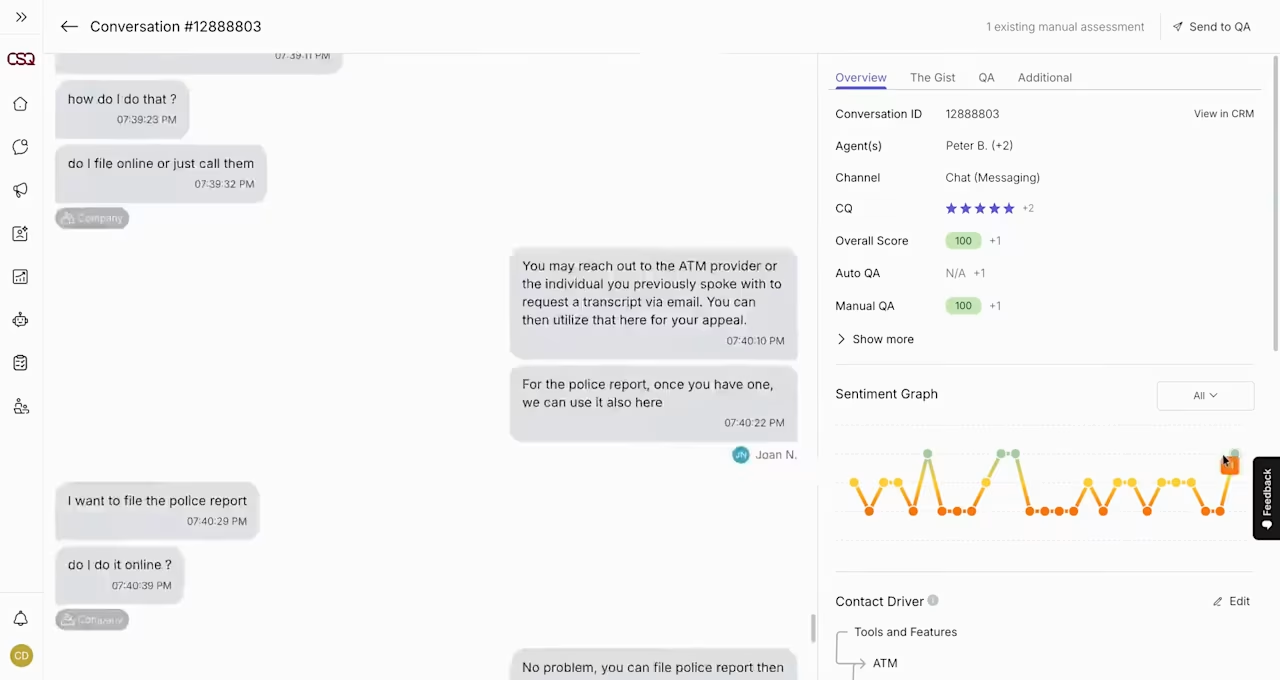
Contentsquare's Conversation Intelligence tool in action
The tool analyzes 100% of customer interactions across voice, chat, and email, using AI models trained on over a billion real customer service conversations. This means the models recognize what customers actually say in support conversations, not just what clean training data looks like. The result is more accurate contact driver detection, more reliable sentiment scoring, and actionable insights that stay consistent rather than shifting every time a query runs.
What makes it genuinely different is what happens after the conversation is analyzed. Contentsquare connects those insights to digital behavioral data, so when customers call about a checkout issue, teams can pull up the exact session replay showing what they encountered, see where others dropped off in the journey, and quantify the revenue impact. The loop between detection and resolution is closed in one platform.
🔎 Why you need it: most platforms tell you what customers said. Contentsquare tells you what caused it, what it cost, and where to fix it.
📊 How it works:
AI Voice of the Customer: captures 100% of interactions and surfaces contact drivers, emerging trends, and churn risks without surveys
Automated QA: assesses every interaction against quality criteria automatically, eliminating the blind spots of manual sampling
Sentiment analysis: a 5-tier scoring model tracks how customer sentiment shifts throughout each conversation, with a separate model that identifies whether frustration is directed at the agent, the company, or both
Ask Loris: a conversational AI feature that surfaces root causes, trend shifts, and coaching recommendations in plain language, without manual analysis
Digital experience integration: connects conversation insights to session replays, heatmaps, and journey analysis so support data and behavioral data live in the same view
🎯 Real-world example: scheduling giant Calendly runs a 100-person support team operating 24/7 across a global customer base, handling around 35,000 cases a month. Their existing QA tool lacked AI capabilities, manual tagging was eating into agent time, and they had no reliable way to surface what was driving contact volume without hours of manual data work. After implementing Contentsquare's Conversation Intelligence, they cut average handle time by 3 minutes and reduced cost per case by 23%.
By leveraging the tool, Calendly's customer team was able to
Replace manual QA with AI-driven conversation scoring across 100% of interactions
Automate post-call tagging and summaries, freeing agents from after-call admin
Surface an undetected product issue within hours of a UI release, something that would have taken a week to catch otherwise
![[Visual] resolution-rate-by-agent-type](http://images.ctfassets.net/gwbpo1m641r7/6YgaMukOcmZmYQla3RqDXY/4a19bf3ebb3cbcd20067a0d491aa7b54/resolution-rate-by-agent-type.png?w=1280&q=85&fit=scale&fm=avif)
Contentsquare's Conversation Intelligence tool surfaces emerging issues before they become a crisis and provides insights on resolution rates.
2. Balto
Balto is built for the moment the conversation is happening. It listens to live calls and surfaces real-time prompts, compliance reminders, and suggested responses so agents don't have to rely on memory alone. It works best in environments where what gets said, and how, has direct consequences: sales calls, collections, or regulated industries where missed disclosures create risk.
🔎 Why you need it: when compliance gaps and missed sales moments are costing more than training can fix, real-time guidance closes that gap faster than post-call coaching alone.
📊 How it works:
Real-time prompts: surfaces suggested responses and talking points during live conversations based on what's being said
Compliance guardrails: alerts agents when required disclosures are at risk of being missed before the conversation ends
Win/loss analysis: identifies which conversation patterns correlate with positive outcomes and replicates them
Manager alerts: notifies supervisors when a live conversation needs intervention, without waiting for a post-call review
Playbook automation: triggers specific guidance based on keywords, objections, or customer sentiment detected mid-call
💡 Pro tip: use Contentsquare's Session Replay tool to see what customers encountered digitally before they called, so teams can identify whether the friction driving those conversations is a training problem or a product problem.
![[Visual] Experience Analytics - AB Test Session Replay](http://images.ctfassets.net/gwbpo1m641r7/6B0G5JrPHs7GYx3UTU4sm9/dd0a6aa32cad72ad6a6b087dcd21e816/Experience_Analytics_-_AB_Test.png?w=953&q=85&fit=scale&fm=avif)
Contentsquare's Session Replay tool in action
3. CallMiner
CallMiner has been in the speech analytics space for a long time, and it shows in the depth of its post-call analysis. The platform is built to handle large interaction volumes and pull structured insight from them, making it a common choice for enterprise contact centers that need to move from anecdotal QA to systematic pattern detection.
🔎 Why you need it: when manual QA covers 2% of calls and the other 98% is invisible, CallMiner gives structured visibility into what's happening across the full interaction set.
📊 How it works:
Eureka analytics engine: processes voice, chat, and digital interactions and applies custom scoring, tagging, and categorization at scale
Automated scorecards: evaluates conversations against quality rubrics without requiring manual review of each interaction
Root cause analysis: identifies the underlying drivers behind volume spikes, churn signals, or dissatisfaction trends
Compliance monitoring: tracks regulatory requirements across conversations and flags deviations before they escalate
Custom categories: lets teams define and measure the topics, phrases, and behaviors that matter most to their operation
💡 Pro tip: use Contentsquare's Journey Analysis tool to see where those callers came from digitally and what they encountered before picking up the phone. The contact driver tells you what customers said. The journey tells you what caused it.
![[visual] Journey analysis on reference mapping](http://images.ctfassets.net/gwbpo1m641r7/6Te4kpMphdNKd74ch9Ue9i/c170e3ec0a59200984836de56eba818e/Journey_analysis_on_reference_mapping.avif?w=1280&q=85&fit=scale&fm=avif)
Contentsquare's Journey Analysis tool maps the users' paths, with Sense AI helping you interpret the data.
4. Observe.AI
Observe.AI focuses on automating QA and making agent coaching more targeted. The core idea is that reviewing 5% of calls manually and hoping it's representative isn't a reliable quality program. The platform evaluates every interaction and ties performance scores to specific conversation moments, so coaching is grounded in evidence rather than gut feel.
🔎 Why you need it: sampling-based QA misses most of what's actually happening. Evaluate every interaction and coaching becomes less subjective and more consistent.
📊 How it works:
100% interaction coverage: evaluates every call against defined quality criteria automatically, without manual sampling
Moment-level scoring: links performance scores to specific points in the conversation so feedback is specific, not vague
AI coaching recommendations: generates suggested coaching actions based on patterns across all interactions, not just reviewed ones
QA automation: replaces or augments manual scorecard processes with consistent, auditable AI-driven assessment
Agent performance dashboards: tracks individual and team trends over time, with enough granularity to spot patterns early
💡 Pro tip: most speech analytics evaluations focus entirely on human agent conversations. As AI agents handle more of the contact volume, that blind spot gets expensive fast. Contentsquare's Conversation Intelligence tool includes AI agent analytics, which tracks bot performance alongside human interactions, measuring auto-resolution rates, call transfer patterns, and abandonment signals in the same view. When evaluating any platform on this list, it's worth asking explicitly how they handle AI agent coverage, not just assuming it's included.
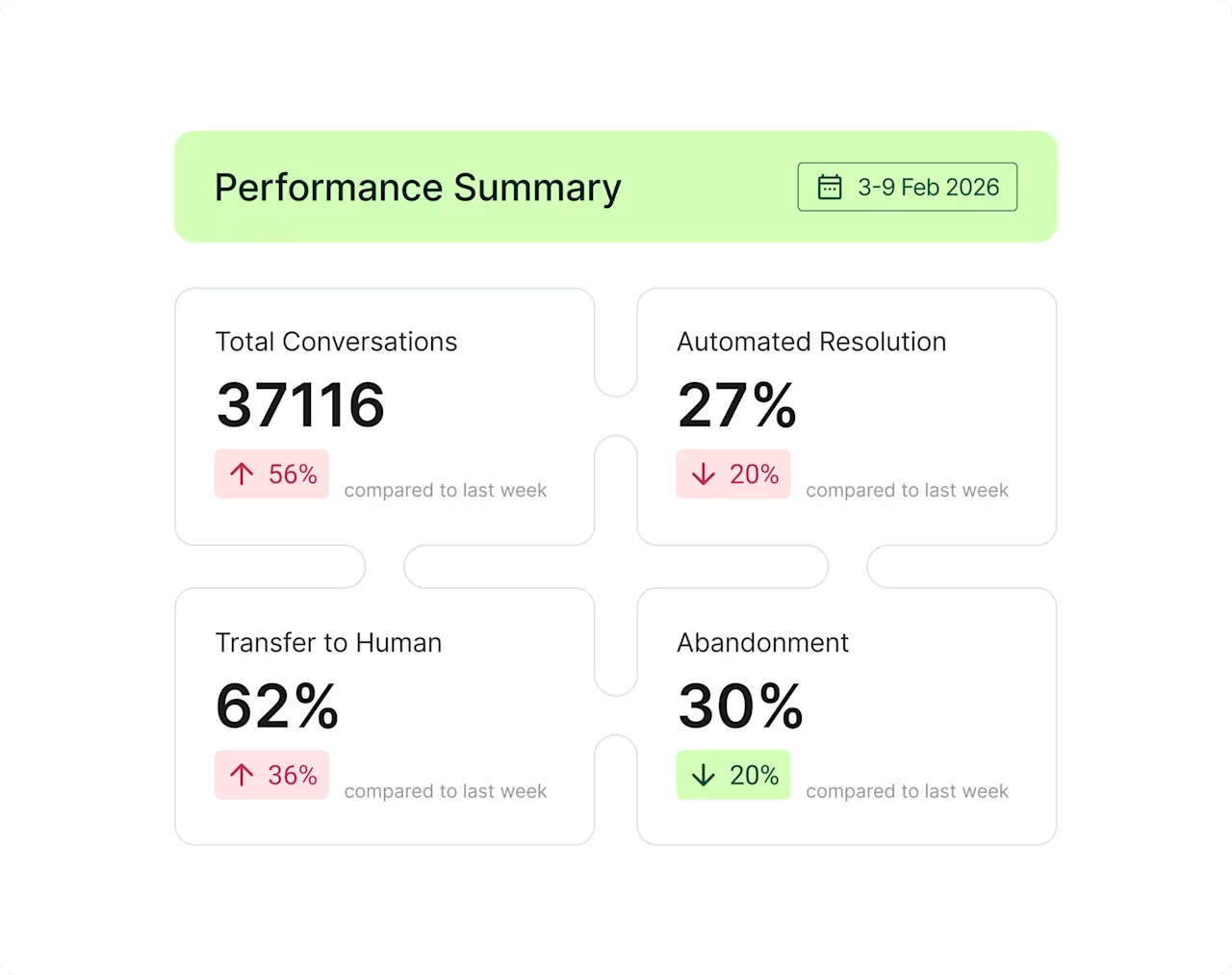
Contentsquare's Conversation Intelligence tool includes AI agent analytics that track bot performance in real time, showing automated resolution rates, transfer to human rates, and other important metrics
5. NICE
NICE is one of the larger players in contact center technology, and its speech analytics capabilities sit inside a broader workforce optimization suite. The platform uses a combination of phonetic analysis, natural language processing, and deep machine learning, which gives it an accuracy advantage in environments with varied accents, background noise, or complex audio conditions.
🔎 Why you need it: large, complex contact centers running multiple systems benefit from a platform that connects speech analytics directly to workforce management, scheduling, and performance without additional integration work.
📊 How it works:
Nexidia Analytics: uses both phonetic search and transcription-based analysis for accuracy across different audio conditions and accents
Deep learning sentiment: detects emotional shifts throughout conversations using layered AI rather than keyword matching alone
Compliance automation: monitors for regulatory requirements in real time and flags deviations before they become incidents
Workforce optimization integration: connects speech insights directly to scheduling, performance management, and quality workflows
Cross-channel analysis: applies the same models across voice, chat, and email interactions for a consistent view across channels
6. Verint
Verint is a strong choice for organizations where compliance isn't optional. The platform is built for regulated industries and comes with pre-configured models for financial services, healthcare, and other sectors where what gets said in a customer conversation carries legal weight. Its AI-powered bots extend the same analysis to digital channels.
🔎 Why you need it: in compliance-heavy environments, manual monitoring doesn't scale. Automated detection across every interaction reduces risk without adding headcount.
📊 How it works:
Pre-built industry models: configured compliance and conversation models for financial services, healthcare, retail, and other regulated sectors
Compliance detection: monitors every interaction for regulatory requirements and flags violations automatically
Bot analytics: applies conversation analysis to AI-powered agents as well as human ones, for consistent coverage across the full operation
Automated workflows: routes flagged conversations to the appropriate team based on content, risk level, or compliance status
Sentiment and intent detection: identifies customer emotional signals and contact reasons across channels
💡 Pro tip: Contentsquare integrates directly with Verint, so when a compliance risk or negative sentiment signal is flagged in a conversation, teams can pull up the corresponding session replay in Contentsquare to see what the customer encountered digitally before that call. It adds the upstream context that makes compliance flags easier to investigate and act on.
7. Genesys
Genesys is a contact center platform first, with speech analytics built in rather than bolted on. For organizations already running on Genesys Cloud, that means one less vendor and one less integration to manage. The analytics capabilities function well for most use cases, though teams with specialized needs sometimes find they hit limits that dedicated speech analytics vendors don't have.
🔎 Why you need it: if already running Genesys Cloud, native analytics removes integration friction and gives teams access to conversation insights without adding procurement complexity.
📊 How it works:
Native integration: speech analytics built directly into the contact center platform, with no separate setup or vendor management
Predictive engagement: connects speech signals to customer journey orchestration so routing and messaging can be adjusted based on what conversations are revealing
Omnichannel coverage: analyzes voice, messaging, and digital interactions in the same view
Journey orchestration: routes customers based on behavioral signals and conversation history across sessions
Real-time dashboards: surfaces conversation trends and agent performance data within the existing Genesys interface
8. Talkdesk
Talkdesk sits in the mid-market CCaaS space and positions its speech analytics as part of the platform rather than a separate product. The pitch is simplicity: one vendor, one contract, analytics included. It works well for teams that need fast setup and clear outputs without a long implementation cycle. Teams with more complex or specialized needs sometimes find they need to supplement it with dedicated tools.
🔎 Why you need it: mid-market teams that don't have the resources for a complex speech analytics implementation get meaningful conversation insights without a separate procurement process.
📊 How it works:
Built-in analytics: conversation insights available out of the box as part of the CCaaS platform, without additional integration
Agent assist: surfaces real-time recommendations during conversations based on detected intent and conversation context
Automated summaries: generates call notes and action items after each interaction, reducing post-call admin for agents
Sentiment tracking: monitors customer sentiment across interactions and surfaces trends at the team and individual level
Performance reporting: tracks key contact center metrics alongside conversation data in a single dashboard
💡 Pro tip: when conversation insights point to a recurring issue but the digital data is too complex to interrogate manually, Contentsquare Sense lets teams ask plain-language questions across behavioral, friction, and sentiment data and get an answer without building a report. It's the fastest way to move from "customers keep calling about X" to understanding what's causing X on the digital side.
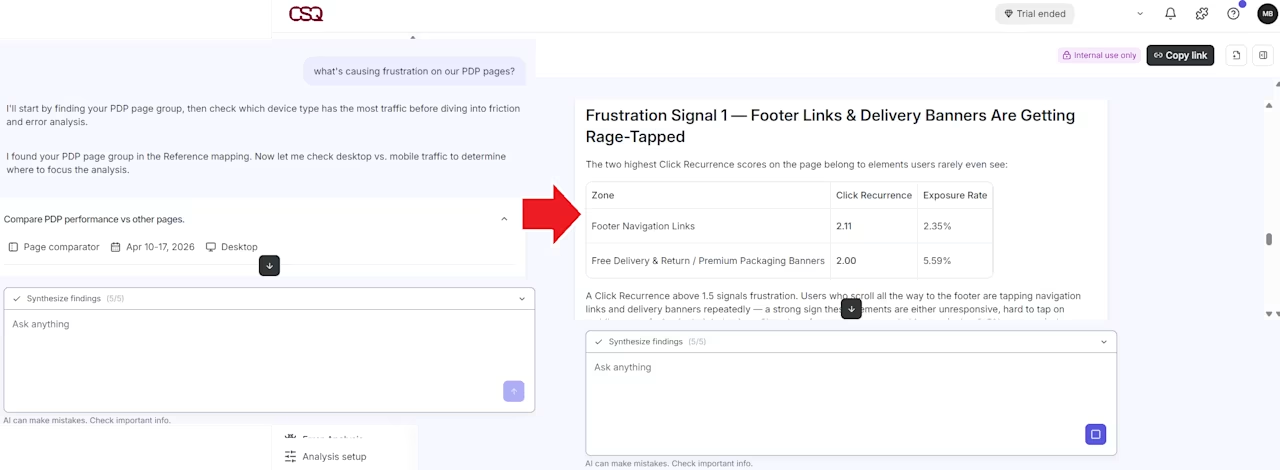
Ask Sense a plain-language question and it works through the data step by step, surfacing frustration signals, click patterns, and friction points without any manual analysis
How do you pick speech analytics software for your call center?
There's no universal answer, but there is a process that makes the decision easier. These 6 steps help cut through the vendor noise and focus on what actually matters for the operation.
Step 1: start with the problem, not the platform
Before looking at any tool, identify the one or two things that are costing the most right now. Is it QA coverage? Compliance gaps? Agent performance? Contact volume that shouldn't exist? The answer shapes everything else. A platform that's great at compliance monitoring isn't the right starting point for a team whose biggest problem is coaching consistency.
Step 2: decide where the value needs to happen
Real-time tools prevent problems during the conversation. Post-call tools surface patterns that drive long-term improvement. Both matter, but trying to solve for both at once usually means doing neither well. Start where the pain is sharpest and expand once that's working.
Step 3: know which channels need coverage
Voice-only analysis made sense when most contact centers ran on phone calls. Most don't anymore. If chat, email, and messaging are part of the operation, a tool that only handles voice will leave significant gaps. Channel coverage should be a filter, not an afterthought, especially for teams managing customer experience across multiple touchpoints.
Step 4: map the integrations before the demos
The most common reason speech analytics implementations fail isn't the platform. It's discovering an integration gap after the contract is signed. Before any vendor conversation, list every system the tool needs to connect to: the CCaaS platform, the CRM, workforce management, BI tools. Then confirm compatibility in writing, not just in a sales call. Key things to verify:
Whether the platform offers API access for custom integrations or only pre-built connectors
How frequently data syncs and whether real-time updates are available
Whether it's compatible with the specific versions of the tools already in use
💡 Pro tip: before finalizing any speech analytics stack, consider where the behavioral data will live once it's been analyzed. Contentsquare's Data Connect exports enriched behavioral segments directly to data warehouses like Snowflake, BigQuery, and Databricks, so conversation insights and digital experience data can be queried together without manual exports or custom engineering.
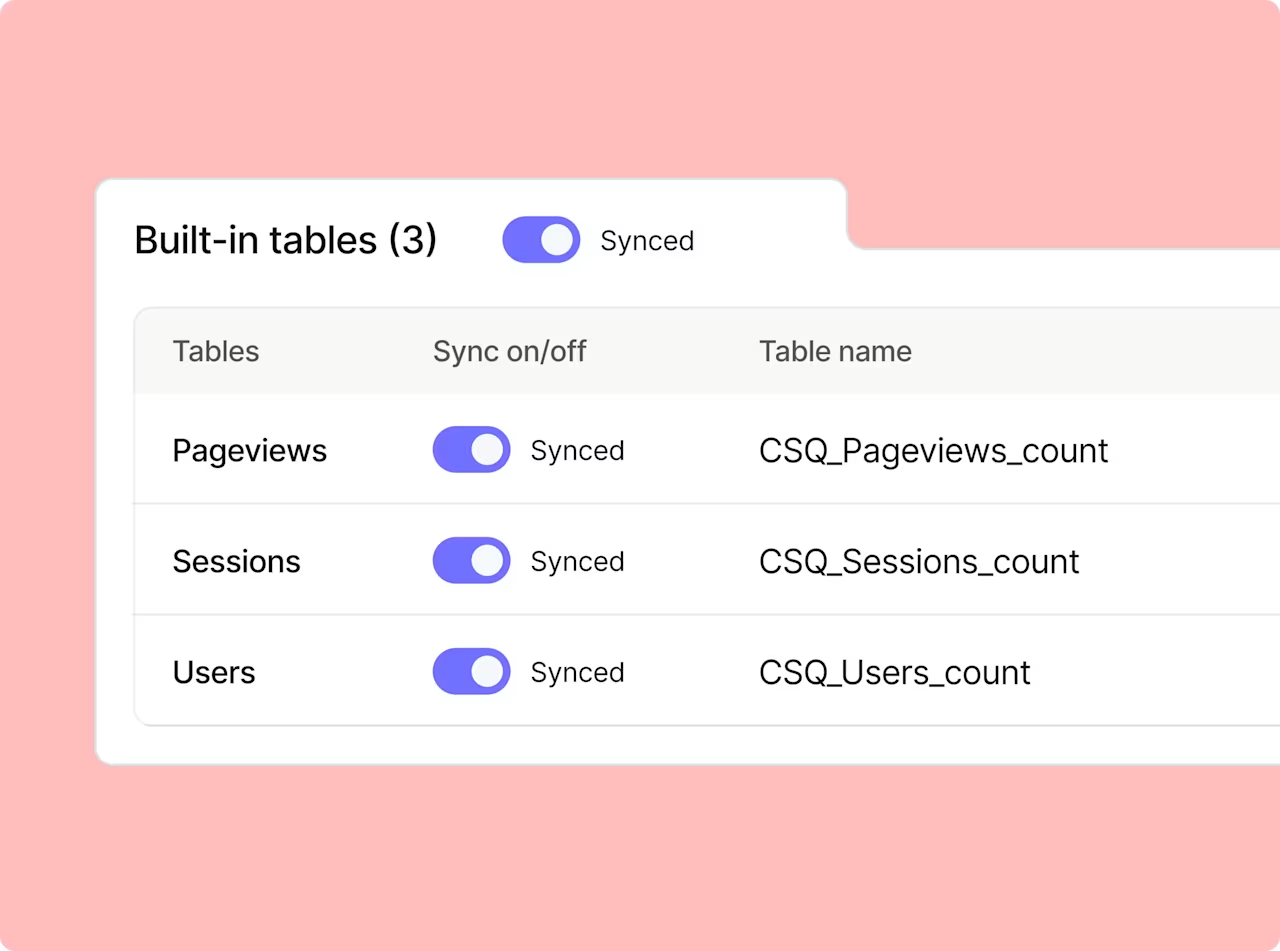
Contentsquare's Data Connect capability syncs pageview, session, and user data directly to external tables, so behavioral signals are available wherever the analysis needs to happen
Step 5: test with real calls, not demo recordings
Vendors always show their best-case transcription. The only way to know how a platform performs on actual calls is to upload a set of real recordings, ideally ones with background noise, varied accents, and industry-specific terminology, and compare results side by side. Transcription accuracy determines everything downstream, so this step isn't optional.
Step 6: get legal and security involved early
Personally identifiable information (PII), meaning any data that could identify a specific customer, comes up in almost every support call. Names, phone numbers, payment details, account numbers. How a platform handles that data matters. Bring legal and security in at the start, not 2 weeks before go-live. Key things to confirm:
PII redaction: how does the platform remove sensitive information from transcripts automatically
Compliance certifications: does it meet the regulatory requirements for the relevant industry (SOC 2, HIPAA, GDPR, etc.)
Data retention: how long are recordings and transcripts stored, and can that be configured
Speech analytics is a starting point, not a finish line
The most valuable insight rarely lives in the transcript alone. It lives in the connection between what a customer said on a call and what they experienced before picking up the phone. The friction that triggered the call, the page they abandoned, the error they hit. Teams that close that loop make better decisions faster, and build stronger customer success strategies, than those working from call recordings alone. Platforms built to connect conversation data to the full digital journey (like Contentsquare) give teams something most speech-only tools can't: the full picture. Start with one problem, prove the value, and build from there.
FAQs about speech analytics platforms and tools
Speech analytics transcribes customer conversations and runs AI models across them to extract structured insight. The process typically works in four steps: * **Recording**: conversations are captured from phone, chat, or other channels * **Transcription**: audio is converted into searchable, analyzable text * **Analysis**: AI models detect sentiment, intent, contact drivers, and compliance signals * **Insight**: results are surfaced in dashboards, scorecards, or alerts for teams to act on
![[Visual] Contentsquare's Content Team](http://images.ctfassets.net/gwbpo1m641r7/3IVEUbRzFIoC9mf5EJ2qHY/f25ccd2131dfd63f5c63b5b92cc4ba20/Copy_of_Copy_of_BLOG-icp-8117438.jpeg?w=946&q=85&fit=scale&fm=avif)