![[Visual] Stock group in office](http://images.ctfassets.net/gwbpo1m641r7/4qn7ZZ3yGGwvON1mesdH3s/c4d1c9d121d8d67b184011b4bcd2b6bd/Untitled_design__3_.jpg?w=1280&q=85&fit=scale&fm=avif)
Customer feedback surveys give you direct insight into what customers really think—but the questions you ask, when you ask them, and how you structure the survey determine whether those insights are actually useful.
This article walks you through nine ready-to-use survey templates for common feedback scenarios, plus practical guidance on questionnaire design, channel selection, and timing so you can start to gather feedback and deep customer insights more effectively right away.
Key insights
Survey timing determines response quality: deploy surveys at natural transition points in the customer journey to capture feedback when experiences are fresh and emotions are genuine
Question structure shapes answer depth: pair closed-ended rating questions with open-ended questions as follow-ups to capture both measurable trends and contextual understanding
Template selection matches intent to outcome: matching format and approach to customer touchpoints increases both completion rates and actionable insights
Response analysis needs systematic workflow: transform raw feedback into assigned tasks by connecting responses to specific teams through automated routing, sentiment categorization, and priority scoring
9 customer feedback surveys and example questions
These nine surveys offer proven frameworks for common feedback scenarios, providing versatile customer satisfaction survey templates complete with specific customer satisfaction survey questions, timing recommendations, and channel guidance you can implement immediately.
1. Post-purchase feedback surveys
Post-purchase surveys reveal friction points in your buying process that cost you repeat customers. Understanding what nearly prevented a purchase helps you prioritize checkout improvements that have the highest impact on conversion rates. The post-purchase survey captures satisfaction while the buying customer experience remains fresh.
Deploy this template within 24 hours of order confirmation through email or SMS.
For B2C contexts:
'How would you rate your checkout experience today?' (1-5 scale)
'What nearly stopped you from completing your purchase?' (Open text)
'How likely are you to shop with us again?' (1-10 scale)
For B2B contexts:
'How satisfied were you with the purchasing process?' (1-5 scale)
'Which team members were involved in this purchase decision?' (Multiple choice)
'What additional information would have made your evaluation easier?' (Open text)
Contentsquare's Surveys capability lets brands create surveys, automate deployment, and gather responses at the click of a button. These surveys can be sent based on customer behavior triggers, ensuring surveys are sent at the right moment without manual effort.
![[visual] Post-purchase survey (activewear)](http://images.ctfassets.net/gwbpo1m641r7/22Ax873Kqdr4ahX9D8BdtI/3513924949f08cfc161600d3da0ba91c/Reduce_churn_and_abandonment.svg?w=654&q=85&fit=scale)
Use surveys to find out how the purchase experience was for your customers.
And with Contentsquare's feedback button, you can keep feedback flowing with an always-visible feedback button that encourages users to share their thoughts at key points in their journey.
Responses can then be layered with experience analytics and segmented by customer value, purchase frequency, or product category to uncover patterns across different buyer groups.
2. Checkout abandonment surveys
Abandoned carts reveal exactly where your checkout process breaks down. Exit-intent surveys catch users at the moment of abandonment, capturing their reasons while the experience is still fresh. This feedback helps you prioritize which checkout barriers to remove first.
Trigger these when users show signs of leaving, such as cursor movement toward the browser close button, rapid scrolling away from checkout, or navigation to other sites like social media.
Core questions to ask:
'What stopped you from completing your purchase today?' (Multiple choice: shipping costs, payment options, security concerns, just browsing, technical issues, other)
'What would convince you to complete this purchase?'(Open text)
'Can we save your cart and send a reminder?' (Yes/No with email capture)
Pro tip: keep these surveys brief. Users leaving your site have already decided to go, and lengthy questions will increase abandonment without completion.
Get additional context on your survey responses by pairing them with Contentsquare's Session Replay, which shows exactly what users did (and encountered) before abandoning, such as struggling with form fields, encountering errors, or hesitating at specific information requests.
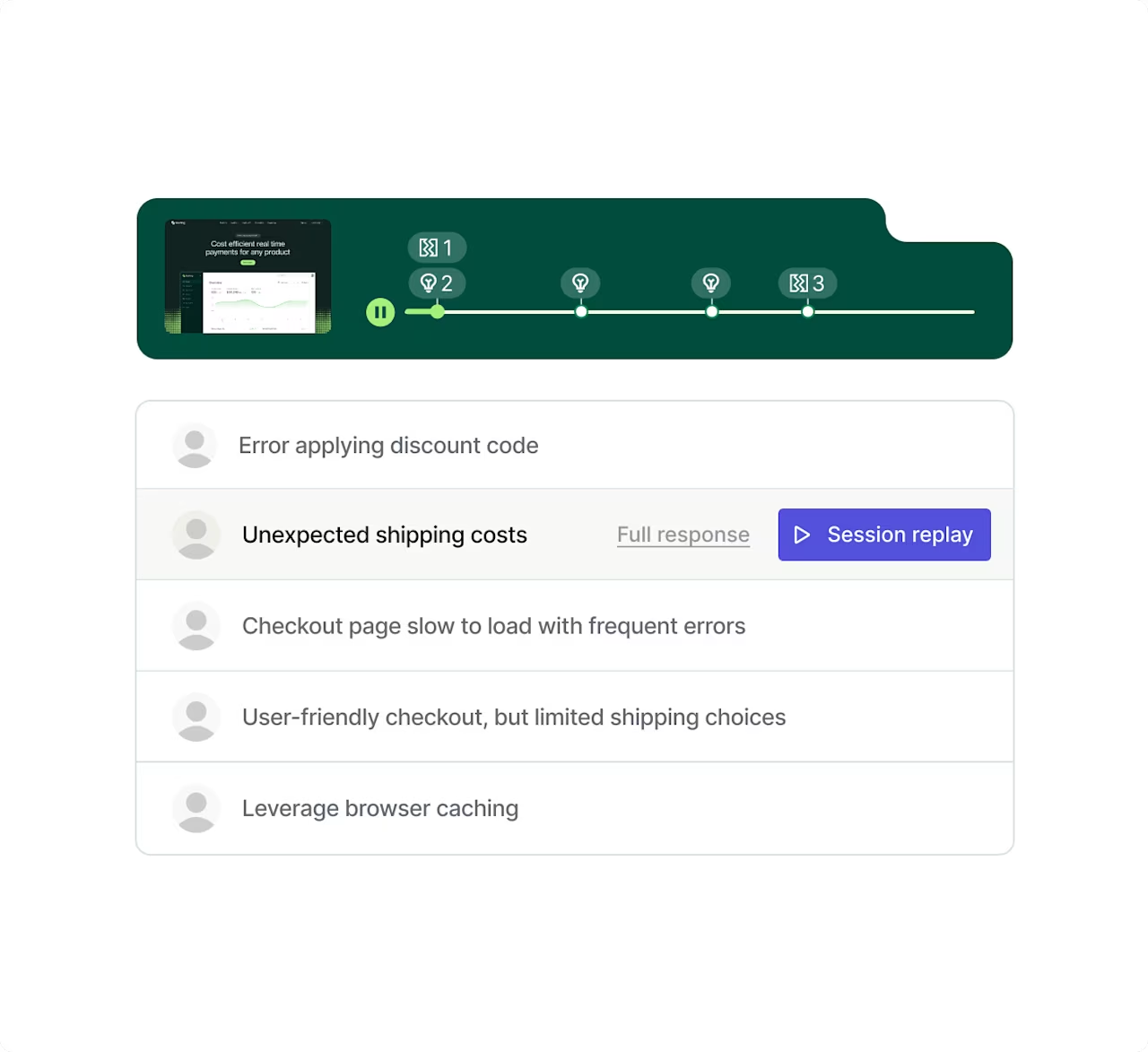
Find issues in your checkout process by watching back user sessions.
3. Pricing page clarity survey template
Pricing confusion kills conversions. When potential customers can't understand your pricing structure, they leave without buying, even if your product perfectly fits their specific customer needs.
Pricing page surveys identify which aspects of your pricing create confusion, helping you simplify the process and align with customer expectations before questions become objections.
Deploy this survey after users spend significant time on pricing pages—typically 30+ seconds or after scrolling through at least 75% of the content.
Essential questions:
'How clear is our pricing structure?' (Multiple choice)
'What questions do you still have about pricing?" (Open text)
'Which plan best fits your needs?' (list)
Trigger these surveys contextually based on engagement patterns. Users who repeatedly return to pricing pages, toggle between plans, or use pricing calculators multiple times are prime candidates for feedback.
For more targeted survey questions (and answers), use heatmap data to see which pricing elements draw the most attention then use those specific features or terms in your survey.
Not sure where to start? Choose from 40+ survey templates in Contentsquare or get it's AI, Sense, to prepare a unique survey for you by simply telling it what you want to know. Sense then gathers responses from respondents and delivers reports with sentiment analyses and aggregated insights.

Let Sense AI create a custom survey based on your goal.
4. Customer support follow-up surveys
Support interactions create natural feedback moments for a customer service survey or customer satisfaction survey (CSAT survey) as customers are already engaged with your brand. These surveys help you measure customer satisfaction and effort, revealing whether your support process or customer service representative helps or frustrates customers. These insights guide training priorities, process improvements, and help to foster customer loyalty.
Deploy these surveys immediately after ticket resolution for chat interactions, within 24 hours for email support, and within 48 hours for phone support.
Combine Customer Satisfaction Score (CSAT) and Customer Effort Score (CES) measurements in your survey:
'How satisfied were you with the support you received?' (CSAT: 1-5 scale)
'How easy was it to get your issue resolved?' (CES: 1-7 scale from Very Difficult to Very Easy)
'What could we have done better?' (Open text)
Different channels require different timing strategies. Chat surveys can appear immediately in the same window, while email surveys should wait until the customer confirms their issue is resolved. Phone support surveys work best as SMS follow-ups to avoid extending the call.
Contentsquare's Conversation Intelligence uses AI to analyze customer support interactions across channels, identifying patterns in conversation topics, sentiment, and resolution outcomes. It then analyzes support interactions and identifies patterns between conversation sentiment, resolution success, and satisfaction scores.
![[visual] Analyze customer chats at scale with Contentsquare Conversation Intelligence](http://images.ctfassets.net/gwbpo1m641r7/36RHOYw4IYDPvHKcnNmkC5/7cc4bc198309d05adb274761b0b8500f/Analyze_customer_chats_at_scale_with_Contentsquare_Conversation_Intelligence___1_.png?w=1280&q=85&fit=scale&fm=avif)
Track customer sentiment over time with Contentsquare's Conversation Intelligence.
5. Onboarding surveys
First impressions often shape long-term retention. Onboarding surveys reveal where new users struggle, what features they value most, and what prevents them from reaching value fast. This feedback helps you streamline setup processes and highlight the capabilities that matter most to new users.
Deploy onboarding surveys at key milestones rather than time-based intervals, such as after first login, upon completing setup, or following initial value realization.
Incorporate milestone-based questions:
'How would you rate your setup experience so far?' (1-5 scale)
'What's preventing you from getting started?' (If inactive after setup)
'Which features are you most excited to use?' (Multiple choice)
Timing depends on your product complexity. Simple tools might survey after 24 hours, while enterprise software might wait until users complete specific activation events.
Product analytics tools track how users interact with specific features and functions within your application, measuring adoption rates and usage patterns. Use these insights to segment users by activation status, ensuring you only survey users who've reached activation milestones and experienced enough of your product to provide meaningful feedback.
6. Feature feedback surveys
Feature-specific feedback form surveys require precise targeting, so only reach out to users who've actually used the feature you're asking about. Surveying active users reveals valuable feedback regarding genuine usability issues and improvement opportunities.
Focused questions:
'How useful is \[specific feature\] for your workflow?' (1-5 scale)
'What would make \[feature\] more valuable to you?' (Open text)
'How does \[feature\] compare to similar tools you've used?' (Multiple choice)
Trigger these based on feature interaction events, not time-based rules or general user segments. When users interact with your product at least 3 times, they've likely formed an opinion worth capturing.
7. Website content feedback surveys
Content effectiveness surveys show whether your pages are achieving their purpose. They reveal whether visitors find the information they need, what questions remain unanswered, and what topics deserve deeper coverage. This feedback guides content updates, new product ideas, and new topic development.
Trigger these after users consume meaningful content amounts—typically 60+ seconds on page or scrolling past 50% depth.
Content-specific questions:
'Did you find what you were looking for?' (Multiple choice)
'What questions do you still have?' (Open text)
'What should we cover next?' (Open text or multiple choice based on your content calendar)
Placement matters more than timing for content surveys. Inline surveys that appear within content get higher response rates than pop-ups.
8. Relationship surveys
Quarterly relationship surveys measure overall satisfaction and customer sentiment beyond individual transactions. They help you understand how customer perceptions evolve over time, identify at-risk accounts before they churn, and spot opportunities to expand successful relationships.
These work best on predictable schedules—customers expect and plan for quarterly business reviews or annual surveys.
Core framework for measuring net promoter score via an NPS survey:
'How likely are you to recommend us to a colleague?' (0-10 NPS® scale)
'What's the primary reason for your score?' (Open text)
'Which aspect of our service provides the most value?' (Multiple choice)
'What's one thing we should improve?' (Open text)
Use Contentsquare's User Segmentation capability to tailor surveys by customer cohort. For example, new customers need very different questions than five-year veterans. High-value accounts might receive personalized surveys with account-specific questions.
Segmenting users ensures each cohort receives relevant questions while maintaining comparable metrics across groups.
![[Visual] User segments - analysis setup](http://images.ctfassets.net/gwbpo1m641r7/477HHUHJYrGlEEXLjdrwog/8b2b1b1294c7578b624ae095f2ea58e7/User_segments.svg?w=655&q=85&fit=scale)
Segment users in Contentsquare to better understand each cohort's needs.
9. Cancellation or return surveys
Cancellation surveys capture crucial feedback at the moment of highest emotion. They reveal why customers leave, what might convince them to stay, and whether they'd consider returning later. This feedback identifies systemic issues that drive churn and helps you build win-back strategies to improve customer retention.
Deploy these immediately in the cancellation flow—not as emails afterward when customers have mentally moved on.
Churn prevention questions:
'What's the primary reason you're leaving?' (Multiple choice: price, features, support, found alternative, no longer need, other)
'What would convince you to stay?' (open text)
'Would you consider returning in the future?' (Yes/Maybe/No)
For physical returns, adjust the timing—survey after the return is processed but before refund completion. Connecting cancellation reasons to user journey patterns reveals common paths to churn.
When multiple users cite missing features but journey analysis shows they never accessed existing capabilities, the issue might be discovery rather than functionality.
Which channel and timing should you use for feedback surveys?
Survey success depends as much on when and where you ask as what you ask.
In-product and on-site surveys
Embedded surveys capture feedback in context, when experiences are fresh and emotions are genuine.
Pop-up surveys work for critical feedback moments but require careful timing. Exit-intent surveys should trigger only when users show genuine abandonment signals—not just any cursor movement toward the top of the page.
Slide-in surveys balance visibility with non-intrusiveness. These typically appear in the bottom corner, expanding when clicked, but not blocking content. They work well for ongoing feedback collection.
Mobile optimization requires different approaches. Full-screen mobile surveys have higher completion rates than small embedded forms, but they must be easily dismissible. Touch targets need to be at least 44x44 pixels, and forms should minimize typing through smart defaults and single-tap selections.
Voice-of-Customer (VoC) platforms can target surveys based on device type, user behavior, or page engagement patterns, ensuring mobile users receive appropriately formatted surveys while desktop users see richer interfaces.
Email and SMS surveys
Asynchronous channels suit relationship surveys and follow-ups that don't require immediate responses.
Timing varies by context:
Transactional surveys need to arrive within 24-48 hours while memories remain fresh
Relationship surveys can follow regular cadences, like quarterly NPS® measurements
Avoid Mondays (email overload) and Fridays (weekend mindset)
Subject lines determine open rates more than any other factor. Include the specific topic ('Your recent purchase from us' not 'We want your feedback') and set clear expectations ('2-minute survey' not 'Quick survey').
SMS surveys achieve higher response rates but require extreme brevity. Limit to 1-2 questions and always include opt-out instructions. Integration capabilities let you maintain consistent user identification across channels, connecting email or SMS survey responses back to behavioral data from your website or app.
How to pick the right customer feedback survey template to use
Selecting the right survey template starts with defining what question the specific form template will inform. Post-purchase surveys help optimize checkout flow. Support surveys identify training needs. Relationship surveys guide strategic planning.
Consider your response capacity before deploying surveys. If you can't act on feedback within 30 days, wait to survey until you can. Nothing damages customer relationships more than asking for input and then ignoring it.
Survey fatigue is real. Coordinate across teams to prevent bombarding customers with multiple surveys. A customer who just completed your NPS® survey shouldn't receive a feature feedback request the next day. Create a central calendar tracking all customer touchpoints and implement frequency caps—typically no more than one survey per customer per month.
FAQs about customer feedback surveys
Limit transactional surveys to 3-5 questions and relationship surveys to 7-10 questions to maintain completion rates while gathering essential insights.
![[Visual] Contentsquare's Content Team](http://images.ctfassets.net/gwbpo1m641r7/3IVEUbRzFIoC9mf5EJ2qHY/f25ccd2131dfd63f5c63b5b92cc4ba20/Copy_of_Copy_of_BLOG-icp-8117438.jpeg?w=946&q=85&fit=scale&fm=avif)