![[Visual] [Guide] Customer retention - Saas Stock image](http://images.ctfassets.net/gwbpo1m641r7/2Lmp9XhnD3Za2Q7fDglUJB/635404b1e617e2aa950703f719c0f0fa/Woman_with_Curly_Hair_Using_Tablet_on_Couch_Indoors.jpg?w=1280&q=85&fit=scale&fm=avif)
Mobile applications are one of your organization’s most powerful assets when it comes to engaging users, building loyalty, and increasing retention and lifetime value (LTV). But poor app performance—like slow loading times, app crashes, and battery drain—damages the user experience (UX), causing people to drop off before your business can realize the full value of its investment.
The right performance testing framework lets you catch and correct issues before launching your app—and before they negatively impact results.
In this article, we outline how to create an app performance testing workflow in 6 steps, with an easy-to-follow downloadable checklist to help you stay on track before every release.
Key insights
Combine proactive pre-launch testing, which ensures performance readiness, with reactive post-launch monitoring to continuously optimize your app based on real data
Choose your tests strategically. You don’t need to account for every possible edge case at the outset—start with the tests that cover your app’s highest-risk, highest-impact flows and conditions, whether that’s core user journeys, peak load, or long sessions. Once you get real data and feedback, you can iterate and expand your scope.
Bugs and crashes are just the symptoms. Dig into your test results to discover the why behind what happened to ensure you’re addressing the root cause of performance problems, not just their effects.

1. Define your KPIs
Start by outlining your goals and mapping them to key performance indicators (KPIs). These should reflect what ‘good’ mobile app performance looks like, including both functional and non-functional requirements:
Functional (technical) requirements define what the app should do, such as whether features work correctly and data is accurate
Non-functional (engagement) requirements define how well the app performs under different conditions, ensuring that it works at scale and under pressure
Together, these KPIs help you build an app that doesn’t just work well, but one that people actually want to use—ensuring it drives real business outcomes.
Category | Metric | What it measures |
|---|---|---|
Technical | Crash rate | The percentage of app sessions that end in a crash |
Technical | App startup time | How long it takes the app to fully load and be usable after a user taps the app icon |
Technical | Screen load time | How long it takes the app to fully load a screen after a user takes an action |
Technical | API error rate | The percentage of API requests that result in errors or failed calls |
Technical | Network request performance and latency | How the app performs over the network using sub-metrics like throughput, DNS resolution time, time to first byte (TTFB), and TCP connection time |
Technical | Resource usage | How efficiently the app uses device resources, including CPU, battery, and memory |
Engagement | Retention rate | How many users return after their first session and over time |
Engagement | Usage over time (DAU/MAU) | The number of daily and monthly active users |
Engagement | Frustration | How much friction a user experienced during their session on a scale from 0–100 |
Engagement | Conversion rate drop per error | How technical errors impact business goals like signups, purchases, and revenue |
Engagement | Session duration | How long users spend in the app per session |
Engagement | Feature adoption rate | How many users adopt a given feature and continue to use it over time |
💡 Pro tip: use experience monitoring in Contentsquare to track key functional and non-functional metrics and connect them to business impact. Here’s how.
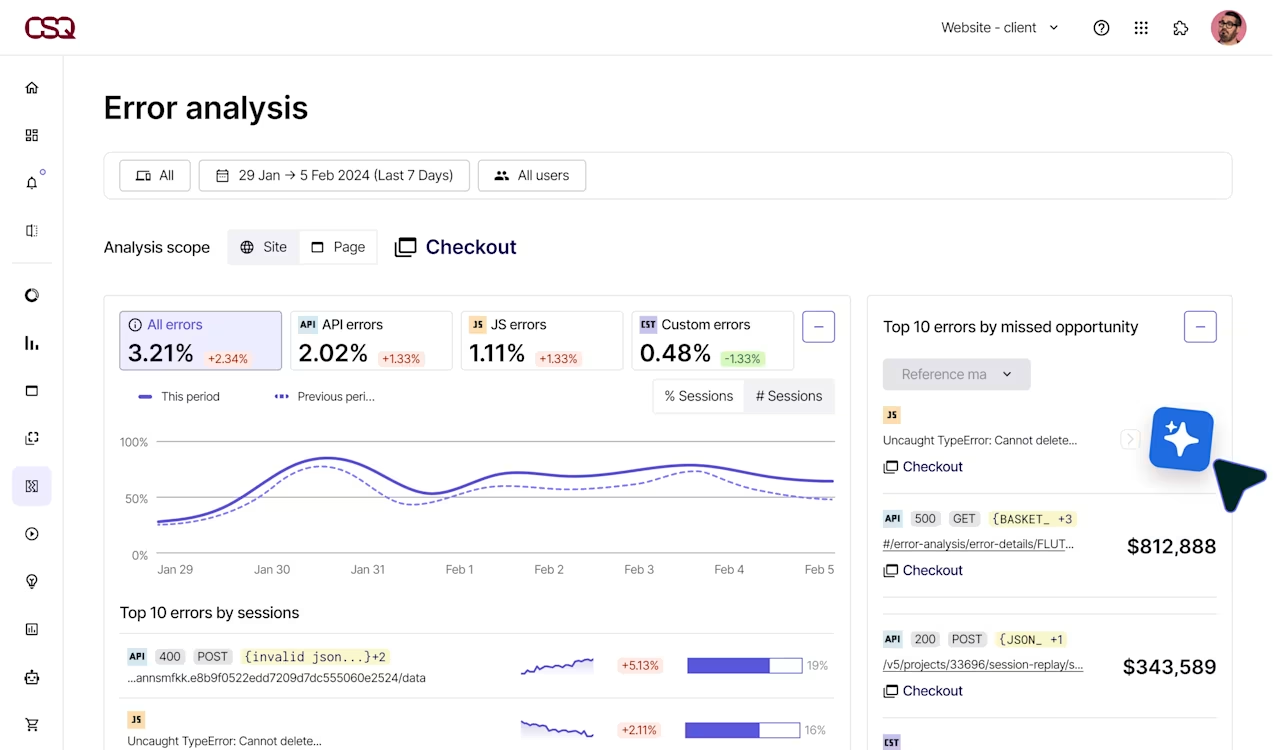
Use Error Analysis with AI-powered summaries to proactively surface both technical issues (such as crash rate and API errors) so teams can quickly prioritize the most important fixes
Segment errors by device type, OS version, and app version to drill into specifics and speed up troubleshooting
Then, contextualize issues by watching related session replays—playbacks that show exactly what happened from the user’s perspective—to understand exactly how errors impacted the user experience
2. Prioritize key test scenarios
Map out your testing strategy by identifying the devices, testing types, scenarios, and journeys you’ll prioritize.
Plan to test on all the target mobile devices and operating systems your app will be available on. Some performance bottlenecks only surface at scale, so account for real-world conditions.
Ensure you cover:
Various operating systems (e.g. iOS vs. Android) as well as OS versions (e.g. iOS 26 vs. iOS 18)
Different devices, including high-end, mid-range, and low-end devices across both mobiles and tablets
Varying network conditions, like Wi-Fi, 5G, and low connectivity
Scalability and performance under concurrent users
Then, select some common user journeys or scenarios you want to test, such as:
Checkout flow
Signup process
Onboarding sequence
Key feature workflows
These are the most crucial places to find errors and bottlenecks because they directly impact how users interact with value-adding (and revenue-generating) parts of your app. Start with a few key journeys before expanding to more use cases.
3. Select the right types of mobile app performance tests
Next, decide which type (or types) of mobile app performance tests to use. For example:
Load testing simulates the user load (that is, the total number of concurrent users interacting with your app at a specific moment) to assess application performance. Use load testing tools to uncover bottlenecks, app responsiveness, and resource utilization before you launch your app.
Stress testing simulates extreme conditions to push your app beyond its operating limits. This reveals the app’s breaking point as well as any security vulnerabilities or other risks, so you can proactively address them.
Spike testing evaluates app performance during a sudden increase in traffic. It differs from stress testing because the goal is to test how your app manages—and recovers from—these rapid changes, rather than aiming to push your app to breaking point.
Soak or endurance testing examines how your app handles a continuous user load over an extended period of time. Use it to find problems that only occur with sustained use, like memory leaks, poor resource usage, or performance degradation (like slowed system response times).
Usability testing reveals how easy or difficult it is for users to complete their goals using your app, such as navigating to the right content, finding specific products or features, or making a purchase. It uncovers user friction caused by your app’s UX and design that negatively impacts mobile customer experiences if left untreated.
Not every app release will require all 5 types, so prioritize which ones you’ll perform based on your goals.
4. Choose the right performance testing tools
Implement a combination of mobile analytics tools to perform your chosen tests. For example:
Apache JMeter (an open-source Java application) to simulate backend and network performance, using virtual users to perform automated testing like load tests, stress tests, spike tests, and endurance tests
Firebase Performance Monitoring to measure real device performance, like resource usage (CPU, battery, and memory)
Contentsquare to understand how real users and testers interact with your app in beta and post-release, including where they get stuck, frustrated, and bounce
5. Run tests and analyze results
Run tests across all outlined scenarios, conditions, and journeys, then dig into the results to find the underlying causes of performance problems.
Contextualize performance data using experience analytics tools like
Mobile session replays: reveal what users did before, during, and after experiencing an error or frustrating moment, uncovering pain points and interaction patterns
Heatmaps: see where people tap on the screen and which parts of your app get ignored to understand which layouts and messaging capture (or lose) user attention
Journey Analysis: map out how users progress through your app from entry to exit, including looping behavior and where they drop off, to spot confusing navigation and cognitive friction
AI: quickly analyze data and find patterns across the entire user journey, so you can spend less time searching for insights and jump straight to impactful action
💡 Pro tip: analyze your performance data with Sense, Contentsquare’s built-in AI agent, to accelerate your time to insight. Use Sense Analyst to run complex multi-step analyses and understand the impact of mobile app performance on users across a range of different devices and scenarios.
Ask questions like:
How do conversion rates compare for users who experienced an API error vs. users who didn’t, and how much revenue did these errors lose?
Where are users most likely to drop off in the onboarding flow and why? How should we fix this?
What’s different about sessions on iOS 18 vs. iOS 17?
![[Visual] what should your analyst look into](http://images.ctfassets.net/gwbpo1m641r7/pezpGZcvSbOQYrYkT0lyZ/1b95cd6c87bdfc25e303e32ae445d46c/what_should_your_analysit_look_into.jpg?w=610&q=85&fit=scale&fm=avif)
6. Fix issues, retest, and launch
Once you’ve identified any performance issues, make the necessary fixes. Retest again until your KPIs meet your targets—then you’re ready to launch.
If you make any updates during the beta, run key tests again to validate that your changes haven’t negatively impacted key performance metrics or introduced new errors. This process (known as regression testing) confirms that recent code changes haven’t broken existing functionality.
Once your app is live in the app store, switch from proactive performance testing to ongoing performance monitoring. This lets you identify errors and improvement opportunities for continuous mobile app optimization, so you can deliver better experiences and amplify your app’s return on investment.
💡 Pro tip: use Contentsquare’s real-time dashboards and alerts throughout both the pre-release testing and post-release monitoring stages to stay on top of your performance data.
Pre-release: configure dashboards and alerts to monitor error rates and performance signals during beta rollouts, giving your data and analytics teams early visibility into regressions before they escalate into production issues
Post-release: use alerts to get notified when issues occur or metrics deviate from the expected range. Get notified right in your Slack or Microsoft Teams to speed up investigation and debugging.
![[Visual] Share in real time via Slack](http://images.ctfassets.net/gwbpo1m641r7/NrQzonnNWGmn6RAF33WFI/ea4eb10640a11305675b4c4df6b0b0e1/Real_time_dashboards__1_.png?w=1280&q=85&fit=scale&fm=avif)
Discover what makes or breaks mobile app performance
With user expectations for smooth, friction-free experiences at an all-time high, pre-launch performance testing is the critical differentiator between your app’s success and failure.
Simulators and artificial testing environments are essential, but they can only reveal so much. To really deliver user satisfaction and create an app that people love to use—and come back to again and again—you need to go beyond numbers.
Experience insights connect the dots between raw data and real user behavior, helping you home in on the issues that matter most during the testing process and empowering mobile teams to ship with confidence.
FAQs about mobile app performance testing
Mobile app performance testing is the process of evaluating how your app responds to various conditions—like different user loads, devices, operating systems, and network connectivity—before you launch it. It uncovers bugs and technical errors, as well as issues that only occur at scale, so you can identify and fix usability issues before real customers use it.
Performance testing differs from performance monitoring because it happens before initial launch (during the app development process), whereas performance monitoring happens on an ongoing basis once your app is live.
![[Visual] Contentsquare's Content Team](http://images.ctfassets.net/gwbpo1m641r7/3IVEUbRzFIoC9mf5EJ2qHY/f25ccd2131dfd63f5c63b5b92cc4ba20/Copy_of_Copy_of_BLOG-icp-8117438.jpeg?w=946&q=85&fit=scale&fm=avif)