![[Visual] Group in office AdobeStock 747312086](http://images.ctfassets.net/gwbpo1m641r7/6tURvmFQ1htwwzllgOiHE9/99ca95cb8bde56d61c58478d472a8f07/AdobeStock_747312086.png?w=1280&q=85&fit=scale&fm=avif)
Understanding how customers interact with your website across every touchpoint is essential for improving digital experiences and driving conversions. Customer journey mapping tools help you capture this data and turn it into actionable insights. Whether you need to analyze behavioral data or create visual maps to share with stakeholders, the right tools turn fragmented customer data into actionable insights.
This article covers 10 tools across 2 categories: analytics tools that capture what customers actually do, and visualization tools that help you design and communicate journey maps. You'll learn what each tool does best, how they compare, and how to choose the right ones for your team.
Key takeaways
Customer journey analytics tools capture behavioral data and track clicks, scrolls, navigation paths, and conversions to reveal patterns in how customers move through their journey. These tools answer questions like "Where do users drop off?" and "Which paths lead to conversion?"
Visualization tools help you design, document, and share customer journey maps with your team. Think of them as the digital version of sticky notes on a whiteboard, but with collaboration features, templates, and the ability to link supporting data, making them essential for communicating insights across departments and aligning stakeholders around the customer experience.
Look for tools that integrate with your existing tech stack and match your team's technical expertise, and start with clear goals for your journey map before selecting tools to avoid feature overload
Understand, analyze, and improve the customer journey with Contentsquare
Contentsquare gives you in-depth insights about the user experience at every stage of the journey—so you can make data-driven optimizations.
Customer journey mapping tools comparison table
Tool | Type | Best for | Pricing | Key differentiator |
|---|---|---|---|---|
Contentsquare | Analytics | All-in-one behavioral analytics + VoC | Free tier; paid plans available | Combines journey analysis, heatmaps, session replay, and surveys in one platform |
Google Analytics 4 | Analytics | Free traffic and conversion analytics | Free | Comprehensive traffic data with Google ecosystem integration |
Fullstory | Analytics | Identifying friction points | Free tier; paid plans available | Automatic frustration detection in session replays |
Qualtrics XM | Analytics | Enterprise VoC programs | Enterprise pricing | AI-powered sentiment analysis across all channels |
InMoment | Analytics | Deep customer feedback analysis | Enterprise pricing | Active listening technology for detailed feedback |
Miro | Visualization | Flexible team collaboration | Free tier; from $8/month | Infinite whiteboard canvas with real-time collaboration |
UXPressia | Visualization | Polished, presentation-ready maps | Free tier; from $16/month | Purpose-built journey mapping with professional templates |
Smaply | Visualization | Complex multi-channel journeys | Free tier; from €19/month | Backstage process visualization and insight repository |
Figma/FigJam | Visualization | Design teams | Free tier; from $3/month | Seamless integration with design workflows |
Gliffy | Visualization | Simple diagramming | Free tier; from $8/month | Easy drag-and-drop with version history |
5 best customer journey analytics tools
Analytics tools give you insight into who your customers are and how they behave on your website. Traditional website analytics tools provide quantitative data like traffic metrics, bounce rates, and conversion rates. Behavior and experience analytics tools add qualitative insights into how users actually experience your site, helping you pinpoint where they spend time, which buttons they click (or don’t), and where they exit from the funnel.
Here are 5 analytics tools to help you understand your customers' journey.
1. Contentsquare
Contentsquare is an all-in-one digital experience platform that provides insights into user behavior. It combines experience analytics, experience monitoring, product analytics, voice of customer, and conversation intelligence tools to give you a comprehensive overview of how users interact with your site at every stage of their journey. What’s more, you can use AI to quickly extract insights from all of these tools.
Best for: teams that want behavioral analytics and voice of customer insights in one platform.
Key features:
Journey Analysis reconstructs the paths users take on your site, revealing common routes, looping behaviors, and which journeys lead to conversions
Heatmaps show aggregated visualizations of user engagement, revealing which page elements capture attention and which get overlooked
Session Replay lets you watch exactly how users navigate from page to page, where they click and scroll, and where they get stuck
Surveys capture what customers think in their own words, with AI-generated reports that analyze sentiment
Funnels let you monitor performance across your most critical conversion paths, pinpointing exactly where users drop off and which audience segments convert best
Error Analysis automatically surfaces technical friction that breaks journeys before you even know it's happening, including JavaScript errors, slow page loads, rage clicks, and dead clicks. Proactive AI Alerts flag sudden changes in behavior so you can act fast
![[Guide] Identify journey metrics](http://images.ctfassets.net/gwbpo1m641r7/1BnHTAbuNtabvBv3HS2QHT/866f1d2652f85b77f9e056d106fb47ea/Identify.svg?w=654&q=85&fit=scale)
Cutting across all of this is Sense, Contentsquare's AI. Instead of manually piecing together insights from different reports, you can ask Sense a plain-language question ("Where are high-intent visitors dropping off?"), and it runs the analysis for you, automatically configuring filters, dates, and segments, and delivering actionable recommendations. For teams mapping complex journeys across large sites, this turns hours of analysis into minutes.
Price: free tier available; paid plans for advanced features.
We make much more informed decisions than we used to. With Contentsquare, you can get a good sense of what the customers are doing in a few clicks of a button. Bar brain implants in all of our consumers I don’t think there’s any way we could get a better understanding of it.
2. Google Analytics 4
Google Analytics 4 is a web analytics tool that tracks and measures website traffic metrics, like bounce and exit rates, goal conversions, sources of traffic, and user demographics.
Best for: Teams that need free, comprehensive traffic analytics and already use Google's ecosystem
Key features:
Path exploration reports show how users navigate through your site
Funnel visualization reveals where users drop off in conversion flows
Audience segmentation lets you analyze behavior by user type, source, or custom dimensions
Event-based tracking captures specific user interactions beyond pageviews
Google Analytics 4 (GA4) tells you how much traffic your website gets, where it comes from, and which channels convert best. You can also see what your most popular landing pages are and where people are exiting from your website.
Pricing: free.
Pro tip: Google Analytics tells you what's happening on your site, but it doesn't tell you why. To really build empathy and create experiences users love, follow up on juicy insights (like high bounce rates) with Contentsquare session replays to understand the root cause behind the numbers.
3. Fullstory
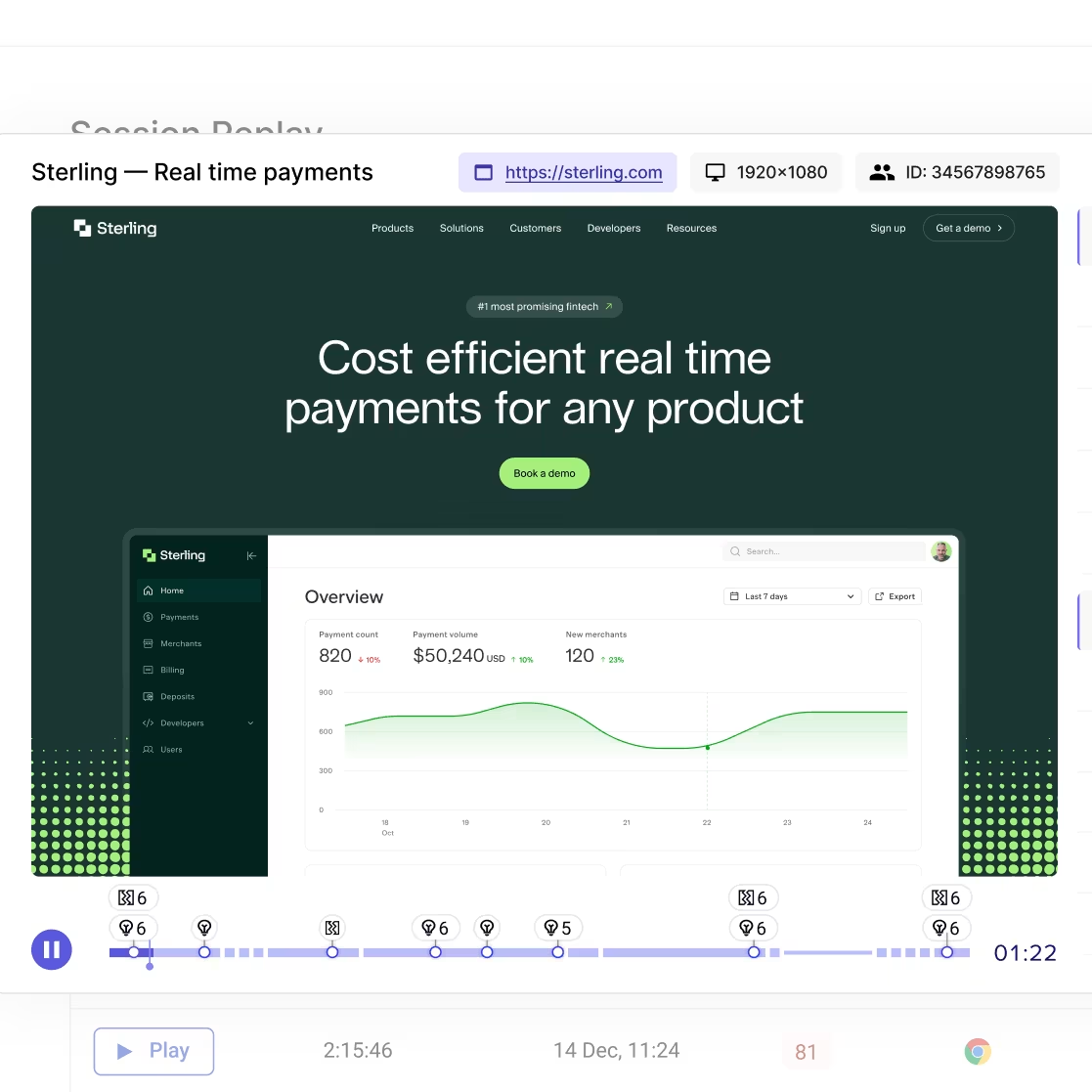
Fullstory is a behavioral data platform that combines session replay with analytics to help teams understand the complete customer experience.
Best for: product and UX teams focused on identifying and fixing friction points.
Key features:
Session replay with automatic frustration detection (rage clicks, error clicks, dead clicks)
Conversion funnel analysis to identify where users abandon key flows
Searchable session data lets you find specific user behaviors quickly
Integrations with popular product and analytics tools
Fullstory's strength is connecting quantitative metrics with qualitative session data, making it easier to diagnose why users struggle at specific points in their journey.
Pricing: free tier available; paid plans based on session volume.
4. Qualtrics XM
Qualtrics XM is an experience management platform that helps you capture and analyze customer feedback across every touchpoint in the journey.
Best for: enterprise teams running comprehensive voice of customer programs
Key features:
Omnichannel feedback collection from surveys, social media, reviews, and support interactions
AI-powered text analytics that detect emotion, intent, and effort in customer communications
Journey-based dashboards that map feedback to specific touchpoints
Predictive analytics to identify at-risk customers before they churn
The platform excels at uncovering topics and sentiment in customer communications, helping you understand not just what customers do, but how they feel about their experience. Voice of customer insights like these add crucial context to behavioral data.
Pricing: enterprise pricing (contact for quote).
💡 Pro tip: Already a Contentsquare user? You can get similar insights without a separate enterprise platform. Contentsquare's Conversation Intelligence automatically analyzes voice, chat, and email interactions to surface contact drivers, sentiment shifts, and resolution signals across every support touchpoint—powered by 14+ AI models trained on over a billion support interactions.
Where it goes further than a standalone feedback tool: Conversation Intelligence connects directly to Contentsquare's digital experience data. So when a spike in contacts suggests customers are struggling, you can immediately link those conversations to specific journey moments, watch session replays of affected users, and pinpoint exactly where the digital experience broke down—before it turns into churn.
![[Visual] Conversation Intelligence tracks how customer sentiment shifts by topic](http://images.ctfassets.net/gwbpo1m641r7/6KMrCPCNRZM0slfrT4ov16/9ff0dd758335c78a1650d56c795353ed/Sentiment_graph.avif?w=1280&q=85&fit=scale&fm=avif)
5. InMoment
InMoment is an experience intelligence platform that uses AI to help you get more detailed, actionable feedback from users.
Best for: teams that want to go deeper on customer feedback with AI-powered analysis.
Key features:
Active listening technology that prompts users for more detail (if they say "Good," it asks "What was good?")
Social monitoring that gathers feedback from online reviews and social media
Text and sentiment analysis across all feedback channels
Journey mapping capabilities that connect feedback to specific touchpoints
InMoment's approach focuses on capturing the "why" behind customer sentiment, making it easier to prioritize improvements that matter most to your users.
Pricing: enterprise pricing (contact for quote).
5 best customer journey visualization tools
Visualization tools help you turn customer data into shareable journey maps. Once you've collected data from analytics and feedback tools, these platforms make it easier to:
Identify all
See which pathways can be simplified
Find opportunities to increase engagement and build customer loyalty
Visualize which touchpoints belong to each part of the funnel
Create clearer CTAs and paths so users can navigate to the next step
Clarify and prioritize product decisions
Here are 5 tools to create visual and intuitive journey maps.
6. Miro
Miro is an online whiteboard workspace that's great for remote teams who want to brainstorm and put their thoughts onto a shared digital whiteboard.
Best for: teams that need flexible collaboration and already use whiteboard-style workflows.
Key features:
Create boards from scratch or use pre-made journey mapping templates
Real-time collaboration with comments, voting, and video chat
Integrations with popular tools like Slack, Jira, and Google Drive
Infinite canvas for complex, multi-stage journey maps
The software lets you create a board from scratch—so you can still use your sticky note strategy, just digitally—or use one of their pre-made templates. If you're manually creating your customer journey map using our 6-step guide, use Miro to bring heatmaps, survey responses, and other analytics data to life.
Pricing: free tier available; paid plans from $8/member/month.
7. UXPressia
UXPressia's main functionality is to create customer journey maps. If you need a little more than a whiteboard, UXPressia helps you create consistently good-looking customer journey maps (CJMs) for your customer personas.
Best for: teams that want polished, presentation-ready journey maps
Key features:
Purpose-built journey mapping interface with professional templates
Persona and impact map creation tools
Real-time collaboration across departments
Export options for presentations and stakeholder sharing
This tool has a beautiful and intuitive interface, perfect if you want to build maps that impress. You can easily visualize customer touchpoints and customize the maps to your own brand. UXPressia is also a good option if you're looking for a customer journey mapping template to help you get started.
Pricing: free tier available; paid plans from $16/month.
8. Smaply
Smaply is a mapping tool for complex customer journeys, helping you understand channel usage and backstage processes.
Best for: teams mapping complex, multi-channel journeys with lots of supporting documentation.
Key features:
Journey, persona, and stakeholder map creation
Repository for customer insights, including images, PDFs, and audio files
Backstage lane visualization for internal processes
Hierarchical journey management for enterprise-scale mapping
Use this tool when you’re manually mapping out a complex customer journey and you want to keep everything in one, easy-to-navigate place.
Pricing: free tier available; paid plans from €19/month.
9. Figma/FigJam
Figma is a design tool that's become popular for journey mapping thanks to its collaborative features and extensive template library. FigJam, its whiteboard companion, is particularly well-suited for journey mapping workshops.
Best for: Design teams and organizations already using Figma for product design
Key features:
Extensive library of community-created journey mapping templates
Real-time collaboration with commenting and cursor tracking
Seamless handoff between journey maps and design files
Widgets and plugins for enhanced functionality
If your team already uses Figma for design work, FigJam provides a natural extension for journey mapping without adding another tool to your stack.
Pricing: Free tier available; paid plans from $3/editor/month (FigJam) or $15/editor/month (Figma)
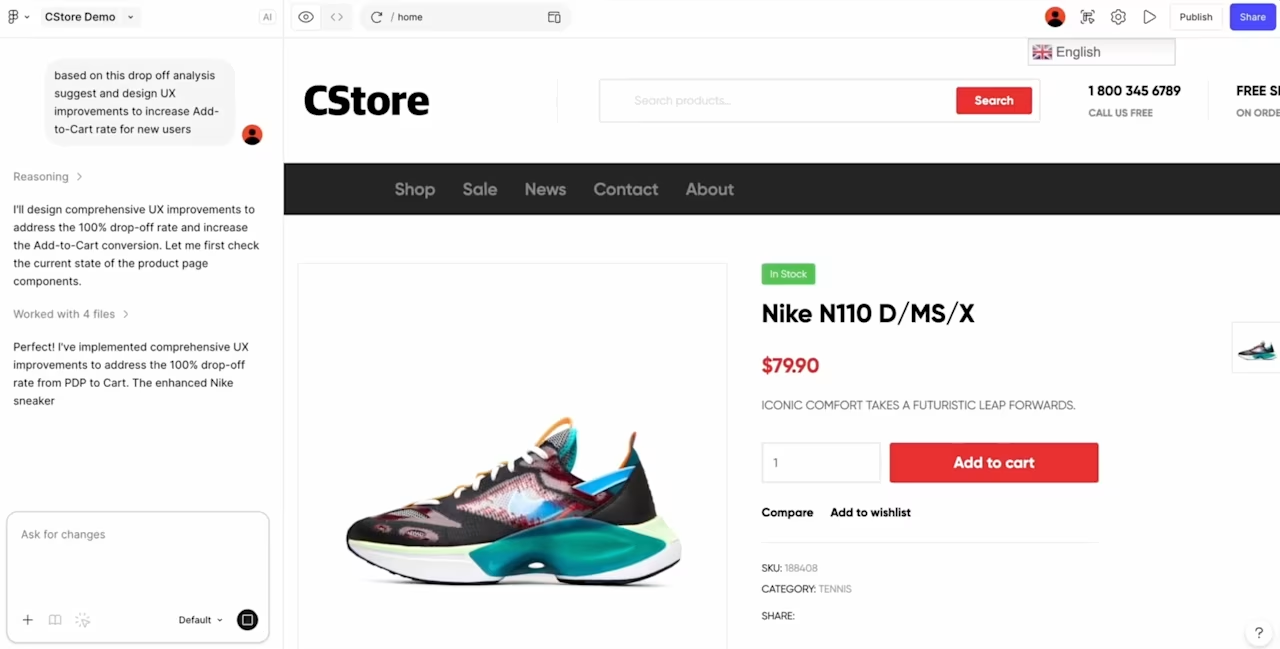
💡 Use Contentsquare's MCP with Figma to pull real user data from Contentsquare as you design, so the numbers describing how people behave sit right where you make design choices.
10. Gliffy
Gliffy is a fast and easy-to-use collaborative tool that lets you draw out large diagrams.
Best for: teams that need simple diagramming without a steep learning curve
Key features:
Drag-and-drop shape library for quick diagram creation
Version history to track changes and revert to previous iterations
Google Drive integration for easy storage and sharing
Feedback comments for asynchronous collaboration
Gliffy is a great option when you don't need a fancy journey mapping software, but something simple yet versatile to get your ideas on paper.
Pricing: free tier available; paid plans from $8/month
How to choose the right customer journey mapping tool
The right customer journey mapping tool depends on the complexity of your journey, your level of understanding of the journey, how steep the tool’s learning curve is, the structure of your team, and why you’re mapping the customer journey in the first place—that is, what you want to learn from it.
The most important part isn’t really the tool you pick, it's how you use it and what you do with the insights you get. For the best results, we recommend combining qualitative and quantitative data to give you a complete picture of not just where customers go, but what’s driving them.
Questions to ask before choosing
Before committing to a tool, work through these questions with your team:
What's your primary use case? Do you need to analyze existing journey data, create visual maps for stakeholders, or both?
What's your budget? Free tools can get you started, but enterprise platforms offer more advanced features and support.
What's your team's technical expertise? Some tools require implementation support, while others are plug-and-play.
What tools do you already use? Look for integrations with your existing analytics, CRM, and collaboration platforms.
How complex is your customer journey? Simple journeys might only need basic visualization, while multi-channel experiences require more robust analytics.
Who needs access? Consider whether you need collaboration features for cross-functional teams.
What decisions will this inform? Clarify what you want to learn so you can choose tools that provide the right type of data.
Putting your tools to work
Once you've selected your tools, here's how to get started:
Define your journey scope. Decide which journey you're mapping first—a specific conversion flow, the full customer lifecycle, or a particular persona's experience.
Gather existing data. Pull insights from your analytics tools before creating visual maps. Understanding actual behavior prevents you from mapping assumptions.
Start simple, then iterate. Your first journey map doesn't need to be perfect. Create a basic version, validate it with data, and refine over time.
Combine quantitative and qualitative insights. Use analytics to identify where customers struggle, then use surveys or session replays to understand why.
For a detailed walkthrough, check out our complete guide to the customer journey.
Understand, analyze, and improve the customer journey with Contentsquare
Contentsquare gives you in-depth insights about the user experience at every stage of the journey—so you can make data-driven optimizations.
FAQs about customer journey mapping tools
A customer journey map—sometimes called a user journey map—is a visual representation of how customers interact with and experience your website, products, or business across multiple touchpoints.
![[Visual] Contentsquare's Content Team](http://images.ctfassets.net/gwbpo1m641r7/3IVEUbRzFIoC9mf5EJ2qHY/f25ccd2131dfd63f5c63b5b92cc4ba20/Copy_of_Copy_of_BLOG-icp-8117438.jpeg?w=946&q=85&fit=scale&fm=avif)
![[Visual] Website metrics stock](http://images.ctfassets.net/gwbpo1m641r7/5MIcS2nwtCpFlpmcyyEDUv/8f7d4973395834424161ad428ebbdf7c/Untitled_design__1_.jpg?w=624&q=85&fit=scale&fm=avif)
![[visual] Follow our step-by-step approach to create customer journey maps that reflect the path users take to turn into loyal customers.](http://images.ctfassets.net/gwbpo1m641r7/vZLaCvfGgcw6q3XbSjjfk/0ffbdd07ba856607573349366b5ca221/5294329__1_.jpg?w=624&q=85&fit=scale&fm=avif)