![[Guide] [Behavior analytics] Tools > cover image](http://images.ctfassets.net/gwbpo1m641r7/4qSFHdTBRIg5QpJYMRC1Ls/fe5620b050f9b75c1e15fd3b98d6a5f8/3467644.jpg?w=1280&q=85&fit=scale&fm=avif)
If you really want to improve your website or app, looking at metrics like pageviews, bounce rates, and conversion rates alone isn't enough. Traditional metrics lack context: they leave you guessing and making assumptions about what users want.
Enter user behavior analytics tools, which reveal the actions users take on your website or app and help you understand how they experience and interact with your product.
This guide covers 12 behavior analytics tools across 5 categories and helps you choose the behavior analysis tool that will enable you to reach your goals throughout the customer lifecycle.
Key takeaways
Behavior analytics tools reveal why users act the way they do, filling the gap that traditional metrics like pageviews and bounce rates leave behind
5 main tool types exist: traditional analytics, session replay, heatmaps, feedback/Voice of Customer, and A/B testing—each solving different problems
The best tool depends on your specific goal, whether that's reducing ecommerce cart abandonment, improving landing page conversion rates, or understanding user frustration
Combining multiple tool types (Ex: session replay with heatmaps) provides the deepest insights into user behavior
Behavior analytics tools comparison
Tool | Category | Best for | Pricing | Key feature |
|---|---|---|---|---|
Google Analytics | Traditional analytics | Tracking quantitative metrics across devices | Free / Enterprise on request | Cross-platform user data collection |
Mixpanel | Traditional analytics | Event-based product analytics | Free / From $20/month | Funnel and cohort analysis |
Contentsquare Session Replay | Session replay | Understanding individual user journeys | Free tier / Paid plans available | AI-powered session summaries |
Fullstory | Session replay | Visualizing user frustration at scale | Free trial / Enterprise pricing | Live session viewing |
Crazy Egg | Session replay | Quick user behavior insights | From $29/month | Combined recordings and heatmaps |
Contentsquare Heatmaps | Heatmaps | Revenue attribution by page element | Free tier / Paid plans available | Zone-based heatmaps with conversion data |
Lucky Orange | Heatmaps | Real-time heatmap analysis | Free / From $32/month | Live heatmap updates |
Inspectlet | Heatmaps | Understanding scroll behavior | Free / From $39/month | Scroll depth analysis |
Contentsquare feedback button | Feedback/VoC | Visual element-specific feedback | Included in plans | Screenshot feedback on specific elements |
Contentsquare Surveys | Feedback/VoC | Direct user feedback collection | Included in plans | Behavior-triggered surveys |
Usersnap | Feedback/VoC | SaaS bug reporting and feedback | From $69/month | Screenshot-based issue reporting |
Optimizely | A/B testing | Enterprise experimentation | On request | Multi-device experiment iteration |
Traditional analytics tools
Traditional analytics tools are behavior analytics software that let you understand user activity and what users do on your website. They capture sessions and page visits, keep track of events, calculate exit and bounce rates, and more. These analytics collect data best suited to quantitative analysis.
1. Google Analytics
What it is: Google Analytics (GA) is an analytics platform that collects user data across devices and platforms. It lets you track quantitative data, from demographics to user behavior.
What it helps you do: Google Analytics translates user actions on your site or app into key data points. It's one of the best behavioral analytics tools to answer questions like:
How many users visited your pages?
What's your pages' bounce rate?
Where did those users come from?
Pricing: free for standard use; GA360 enterprise pricing available on request.
🔥 Pro tip: as a quantitative analysis tool, Google Analytics can't tell you why users are behaving the way that they do. To understand the why beyond the what, use the Contentsquare and Google Analytics integration. Filter heatmaps and replays by GA events to understand how users actually behave on your site.
2. Mixpanel
What it is: Mixpanel is a product analytics software that helps you convert and retain customers by analyzing user interactions on your website.
What it helps you do: Mixpanel opts for a self-serve approach to behavior analytics. Instead of traditional reports based on sessions and pageviews, they provide event-based tracking.
Once you've set up your events, properties, and user characteristics, Mixpanel helps you answer these 3 questions:
What's the drop-off rate at each step of the conversion funnel?
Which user cohorts converted best?
How are users moving through your product?
Pricing: free tier available; Growth plans from $20/month; enterprise pricing on request.
Session replay tools
Session replays are renderings of actions users take as they browse your website from page to page, including mouse movements, clicks, taps, and page scrolls.
They help you understand how individual users experience and interact with your website, learn where they get frustrated or stuck, and fix usability and UX mistakes.
3. Contentsquare's Session Replay
What it is: Contentsquare's Session Replay shows you how individual users navigate your site, helping you understand and identify blockers in the customer journey. See where users click elements over and over again out of frustration (also known as rage clicks) or turn back before taking action (known as 'U-turns'). It's like looking over your user's shoulder as they move their mouse, jump between pages, click on different elements, and exit your website.

Contentsquare's Session Replay shows the date, device, and location of each user session.
What it helps you do: get a real understanding of how people interact with your product instead of playing a user behavior guessing game. Session Replays helps you identify changes to improve UX and gives you visual, qualitative data proof of the positive impact your changes make (and get buy-in to make additional changes).
With a console tracking functionality and the error filter, Session Replay also lets you watch sessions with website bugs so you're able to fix issues quickly.
Contentsquare also offers AI-powered Session Replay summaries, which use automation to summarize key events and trends across multiple user sessions, giving teams quick UX insights without sifting through hours of footage.
Session Replays answer questions like:
Where do users focus? What do they spend time on, and what do they ignore?
What causes users to get confused or stuck?
What drives them to leave your website? What do they do in the moments before they abandon a product page or a checkout page?
Analyzing replays gives you insights to help fix UX issues and optimize your website for a smooth customer journey—and a higher conversion rate.
Pricing: included in Contentsquare plans.
Analyzing replays gives you insights to help fix UX issues and optimize your website for a smooth customer journey—and a higher conversion rate.
🔥 Pro tip: a quick way to identify blockers is to filter replays by sessions that include rage clicks and U-turns, indicating that something isn’t working.
For example, if a user repeatedly clicks on an element, it may be a broken button you need to fix or an element that looks clickable but isn't. If a user opens a page and quickly navigates back to the previous one, it may signal uncertainty or a bug on the page they exited from.
Use what you learn from these replays to remove blockers and improve UX for your users.
4. Fullstory
What it is: Fullstory Session Replay lets you visualize shopper frustration to better understand and solve issues. Like Contentsquare, their replays are designed to index every interaction a user has with your site, which you can search for and access in your dashboard.
What it helps you do: Fullstory indexes every digital interaction with your website or app, which helps teams measure, validate, and take action on an individual customer's digital experience at scale.
Fullstory's Session Replay can help you understand the impact an issue or blocker had on your business (Ex: users affected or dollars lost) so you can prioritize bug fixes appropriately.
With Fullstory, you can watch live sessions while the user is still online and browsing, which is particularly helpful to support teams.
Pricing: free trial available; Enterprise pricing on request.
5. Crazy Egg
What it is: Crazy Egg's recordings tool lets you watch recordings of real users on your website so you can learn what makes them take action or become frustrated. You can see how users click, scroll, and move around your site.
What it helps you do: get to the heart of the user experience. See where users move their mouse, which sections they visit or avoid, and how long they stay on each element. Find out where they struggle, and make updates to improve their flow through the conversion funnel (and your conversion rate).
Pricing: from $29/month.
Heatmap tools
A heatmap (or heat map) is a visual, color-coded representation of website pages and elements that users interact with the most (hot) or the least (cold).
Website heatmaps aggregate user behavior and show you whether users reach important content, get distracted by non-clickable elements, use links and buttons, or experience issues while browsing on desktop or mobile.
Heatmaps are a must-have tool for making data-based decisions when you're A/B testing, updating, or redesigning your website.
6. Contentsquare Heatmaps
What it is: Contentsquare Heatmaps show you what people do on your website pages, in aggregate, by displaying a range of colors from red (most popular) to blue (least popular) over different elements of your web pages.
![[Visual] zone-based Heatmaps](http://images.ctfassets.net/gwbpo1m641r7/51FF5QnG7PhtcAso8gTSGA/a12e1c5386434d34adfe78c64d018fbe/CSQ-Heatmaps.png?w=1140&q=85&fit=scale&fm=avif)
Heatmaps give you a visual breakdown of how users interact with page elements.
What it helps you do: track user behavior with 4 different heatmap types:
Scroll heatmaps: see the percentage of people who scroll down to any point on the page. Do users see your CTA or your unique selling proposition (USP)?
Click heatmaps: see how frequently users click or tap on elements of your web pages. Are there a lot of clicks on a non-clickable element, or are users overlooking the button you want them to click?
Move maps: see where desktop users move their mouse as they navigate a page. Is there a lot of mouse movement on important sections of the page?
Zone-based heatmaps: see how users interact with specific elements on your page, with the ability to view conversion and revenue attribution per element so you can understand which page components drive business results
Heatmaps help you identify opportunities to improve your page copy, layout, CTA placement, messaging, and design.
Pricing: included in Contentsquare plans.
7. Lucky Orange
What it is: Lucky Orange is a conversion rate optimization (CRO) tool that offers real-time heatmap insights and analytics.
What it helps you do: review heatmaps in real-time while your users toggle menus, navigate your website, open popups, or fill out a form.
With Lucky Orange, you can segment metrics, device types, and timeframes to learn how users browse and interact with your website.
Unless you use the Enterprise plan, you can only access Lucky Orange heatmap data for a set number of days (30 or 60 days). You can't spot patterns over a long period, but you can spot individual user issues that require immediate support.
Pricing: free tier available; paid plans from $32/month.
8. Inspectlet
What it is: Inspectlet is a heatmapping tool that helps you understand your website users' intentions and what they focus on as they browse.
What it helps you do: find out where your users are looking (and what they're missing) based on how they move their mouse and where they click. Inspectlet's scroll heatmaps show you whether people scroll far enough to reach page sections that matter to you (think: product descriptions, pricing information, or the 'buy' button).
Pricing: free tier available; paid plans from $39/month.
Feedback and VoC tools
Website feedback and voice of customer (VoC) tools give you what other tools can't: qualitative data from real customers. Feedback tools let you layer quantitative data like traffic, bounce rate, and session duration with why users behave a certain way on your site.
Aggregated numbers and metrics from tools like Google Analytics leave out important context about user behavior—context your website user can add, themselves.
Here are some common examples:
Traditional metrics tell you users are abandoning their carts; feedback tools let you ask them why
Traditional metrics tell you a specific page has a high exit rate; feedback tools let you survey users just before they leave to find out what turned them away
Traditional metrics tell you a CTA has a low conversion rate; feedback tools let you ask users what's stopping them from taking action.
9. Contentsquare’s feedback button
What it is: Contentsquare’s feedback button gives you instant visual feedback from real website users. Users select, rate, and comment on specific page elements so you can learn what they love about your site—and what they want you to improve.
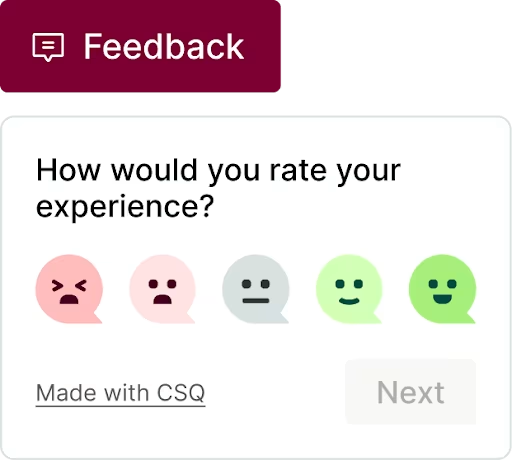
Contentsquare's feedback button.
What it helps you do: get a detailed picture of how your users feel about your website or app. Contentsquare offers a feedback button that sits at the edge of your page, so when a user clicks it, they can rate their experience on a scale, provide context and details, and even screenshot a specific page element.
Use the feedback widget to understand these 3 things:
How your users feel about important web pages and their elements (think: product images and descriptions, buttons, headlines, checkout page)
User happiness over time (based on a graph of feedback ratings)
User satisfaction before and after you make a change to your site or app
Pricing: included in Contentsquare plans.
10. Contentsquare Surveys
What it is: Contentsquare Surveys take the guesswork out of understanding user behavior. Find out exactly what users need or think, in their own words, by asking questions and getting answers directly from them.
![[Visual] template gallery feedback](http://images.ctfassets.net/gwbpo1m641r7/JhmoXjNgxcg9Z1E8gIHLQ/f77bbd54033babb0a0a52fca48d4b8ad/Screenshot_2024-12-04_at_16.20.43.png?w=1280&q=85&fit=scale&fm=avif)
Use Contentsquare Surveys to ask your users for the constructive feedback you need to improve your site.
What it helps you do: get answers to questions about user behavior directly from the users themselves. Find out what works and what doesn't, and discover pain points in the user experience that traditional analytics tools can't identify.
Survey questions can be short or long, closed- or open-ended, and you can ask for a rating on a scale with surveys like Net Promoter Score® (NPS) and Customer Satisfaction (CSAT).
Consider asking both open-ended questions (which can be answered in detail) and closed-ended questions (which offer a limited number of options, like yes/no or multiple-choice). Here are 4 examples of open-ended questions to try:
Is there something you're struggling to find?
What brought you here today?
Was this article useful?
How likely are you to recommend us to a friend or colleague?
With Contentsquare, you also have the option to trigger a survey after users take a specific action, limiting surveys to specific user segments.
Not sure where to start? Contentsquare's AI, Sense, can generate a survey for you instantly and deliver AI-driven reports from the responses, complete with sentiment analyses and aggregated insights.
Pricing: included in Contentsquare plans.
🔥 Pro tip: Contentsquare tools complement each other. Watch the session replay associated with a user's feedback to understand what their user journey was and why they left this feedback. This connection between qualitative data and behavioral context helps you understand not just what users said, but what they experienced.
11. Usersnap
What it is: Usersnap is a versatile feedback platform. They help SaaS (software as a service) companies grow through a single hub for customer requests, bug screenshots, and customer experience (CX) ratings.
What it helps you do: collect visitor feedback by asking your users to rate their experience and report an issue by screenshotting a specific part of the page.
You can view all the feedback on a dashboard with statistics and trends, so you can work on the improvements and track whether they worked.
Pricing: from $69/month.
A/B testing tools
A/B testing tools help you test changes you make to your website or app to find the variation that performs or converts the best—for example, the one that results in happier users, and more clicks, signups, or sales.
With A/B testing tools, you analyze user behavior on one or more variants to know which offers the best UX and converts more.
Note: A/B testing works particularly well on high-traffic website pages; traffic helps with statistical significance.
12. Optimizely
What it is: Optimizely is a test and experimentation platform designed to help users improve their site's UX to acquire more users and improve customer retention.
What it helps you do: test variations of your homepage, landing pages, and product pages against each other to find the one that results in higher conversion rates.
Optimizely lets you iterate on your experiments across all devices and provides a platform allowing for fast releases, feature validation, and safer tests.
Pricing: pricing is only available on request for Optimizely's experimentation platform.
🔥 Pro tip: Contentsquare integrates with Optimizely. By integrating the tools, you can filter your replays and surveys by experiment.
Get more out of your A/B tests
Finding the best-performing variation from an A/B test is an accomplishment—but why does one version work better than the other? How can you replicate its success across your website or app?
To find out, you need to look at behavior data such as Contentsquare's Session Replay (which shows you how individual users navigate your site) and Heatmaps (which show aggregate user behavior) on the pages or elements you're testing. Then, analyze the winning and losing versions and look for clues: what are users drawn to? What confuses them? What’'s the final thing they do before they convert—or leave?
Contentsquare also integrates with other A/B testing tools like Omniconvert, making it easy to connect your experiments to your Contentsquare account and filter your replays and heatmaps by experiment ID.
How to evaluate behavior analytics tools
If a behavior analytics tool gives you cool features and fancy reports but doesn’'t help you improve your website or app, it's not enough.
To determine which behavior analytics tool(s) you need—the one(s) that will improve your website and UX—you have to identify your goals. For example:
Do you want to increase conversion rates or average order value (AOV)?
Do you want to decrease cart abandonment rates or customer churn?
Do you want to find out which version of a site or app users prefer?
Do you want to find out if a product update had a positive impact?
When you know what you want to achieve, you can evaluate your options and find the tool to help you accomplish your goals.
Here are 3 questions you should ask yourself when you're choosing a behavior analytics tool:
1. What do you want to learn about your users?
Identifying what you want to learn about your users will help you determine which behavior analytics tool is right for you. To get the most valuable and actionable user insights, start by specifying the problem you want to solve. For example:
Problem 1: high exit and bounce rates on your checkout page
What you want to learn: why are users exiting? Is there an issue or bug? What do users do on your site just before they exit? Are there any behavioral clues like rage clicks or U-turns?
Tools that can help: Session Replay and Surveys
Problem 2: a low conversion rate on a landing page
What you want to learn: are users seeing the information they need? Is the call-to-action (CTA) button accessible and visible on all devices? Are the message and CTA appealing?
Tools that can help: Heatmaps and A/B testing tools
🔥 Pro tip: once you identify which insights matter to you, add them to a checklist to mark off as you evaluate behavior analytics tool options.
2. How can you enrich web analytics with behavior analytics?
Web analytics tools like Google Analytics or Mixpanel give you quantitative data about what happens on your website or app through metrics like traffic source, conversion rate, bounce and exit rate, and session duration.
Traditional analytics tools tell you what happens on your website, but not why it happens or how you can improve. That’s where behavior analytics tools come in, giving you qualitative data that adds context to traditional metrics.
Here are 2 examples of how to combine quantitative and qualitative data to paint a clearer picture of user behavior:
Keep an eye on your cart abandonment rate in Google Analytics. When it goes up, there may be an issue with your checkout process. Spot the problem by watching replays of sessions that included adding to cart but didn't end with a purchase.
Use Google Analytics to find pages with a lot of traffic but low conversion rates. A heatmap will show you what draws users' attention and whether they view all the details needed to convert.
3. Does the tool offer filtering and segmentation?
No matter how good your graph or chart looks, and no matter how much detail you include, if your user behavior data doesn't help you take action to improve your website—and UX, CX, conversion rates, and sales—it's not enough.
Basic filtering and segmentation capabilities may suffice for smaller websites with a relatively simple user base. However, larger websites with a diverse audience may necessitate a tool with advanced segmentation and filtering capabilities.
For example, let's say you had access to replays of every session that ever happened on your site, but no way to filter them by exit URL, specific behaviors, devices, or other useful criteria. Those replays would be pretty useless unless you took the time to sort through them—and it would take ages to find actionable insights.
Tools like Contentsquare's Impact Quantification can show you how many users experienced a specific issue and its revenue impact, helping you prioritize which problems to fix first.
To ensure you get valuable, actionable data from behavior analytics tools, check if the tool will allow you to filter insights in these 3 ways:
For different pages, including pages visited, landing pages, and exit pages
Based on audience segments and user attributes like traffic source, geolocation, and new or returning users
For different behaviors, like rage clicks and U-turns
Look for a tool that allows you to get specific, so you can identify challenges and friction points that need to be removed to improve the user experience.
Keep in mind: there's no one-size-fits-all behavior analytics solution. Each tool has different use cases and brings different results. When you combine tools based on your goals, you can get even deeper, more actionable insights and a fuller picture of user behavior.
Behavior analytics tools FAQs
Behavior analytics tools show you the actions users take (and don't take) on your website or app, revealing where they get stuck, what they do before they exit, how they experience and interact with page elements, and what draws their attention. Behavior analytics tools help you take actionable steps to fix UX issues, improve the customer journey , and increase conversion rates .

![[visual] [seo][guide][Web analytics] Tools](http://images.ctfassets.net/gwbpo1m641r7/EPZ5ussJOI79iSkmwuxG9/356169997bc72eb7b00661b28e5f27d3/AdobeStock_429015106.jpg?w=624&q=85&fit=scale&fm=avif)
![[Visual] Man at computer - stock](http://images.ctfassets.net/gwbpo1m641r7/7GloM7xPXUs1M75nfaIWtr/6566092d4d853e43c29d9df2bf791fd1/AdobeStock_540624504__1_.png?w=624&q=85&fit=scale&fm=avif)