![[Visual] Stock of happy man looking at computer](http://images.ctfassets.net/gwbpo1m641r7/4RBLXgWyUlSkeXZpOxc9sp/a0fc07679bfe1644d8dffe13ab004ee8/5173130.jpg?w=3840&q=100&fit=fill&fm=avif)
Gathering feedback without the right tools to help you collect and interpret your customers' comments, opinions, and ratings is like putting all your eggs in a broken basket—and hoping they’ll arrive home in one piece.
You need to select the right customer feedback software to access the most relevant customer sentiments and opinions for your business—and glean actionable insights about your product and the experience you provide. But, with the variety of tools available and all their different functions, it can be hard to know exactly which ones will help you reach your customer and business objectives.
This is your guide to the best customer feedback tools to collect and analyze feedback and better understand your customers. We’ll walk you through each tool and explain how you can use it to make customer-led improvements to your website or product.
7 powerful customer feedback tools to use in 2025
Great customer feedback tools let you create a positive feedback loop of incoming feedback and product discovery and development—so you can delight customers with relevant solutions.
They help you collect and analyze different types of customer feedback—like reviews, surveys, and activity on social media, so you can make informed decisions that elevate the digital customer experience.
1. Podium
Podium is a customer feedback management tool that organizes incoming feedback from multiple channels into a centralized inbox. It lets you collect unsolicited customer feedback across popular review sites—and respond to customers on their preferred channels.
Podium also helps you create and send SMS survey campaigns and respond faster to customers to increase user engagement.
How Podium helps you collect and analyze customer feedback
Use Podium to unify your feedback and better reach your customers. For example, after a new product rollout, you can track reviews and customer sentiments from multiple sources to see if your update successfully meets customer and market needs.
Podium's key features include
An analytics dashboard to track your feedback and goals
A centralized inbox to record customer interactions and manage communications from one place
Alerts for new survey submissions
SMS survey campaigns
Pulse surveys for customer feedback across touchpoints
Sentiment analysis to gauge the customer experience
2. Contentsquare
Contentsquare is an all-in-one experience intelligence platform that gives you an in-depth understanding of your customers through qualitative and quantitative insights. Its user-friendly dashboard makes it easy to visualize feedback—including overall customer satisfaction and sentiment—so you can quickly spot incoming negative feedback and resolve any issues in the customer experience.
How Contentsquare helps you collect and analyze holistic customer feedback for invaluable insights
Use Contentsquare to create unobtrusive and customizable feedback widgets and surveys that you can personalize for any occasion to better gauge customer delight.
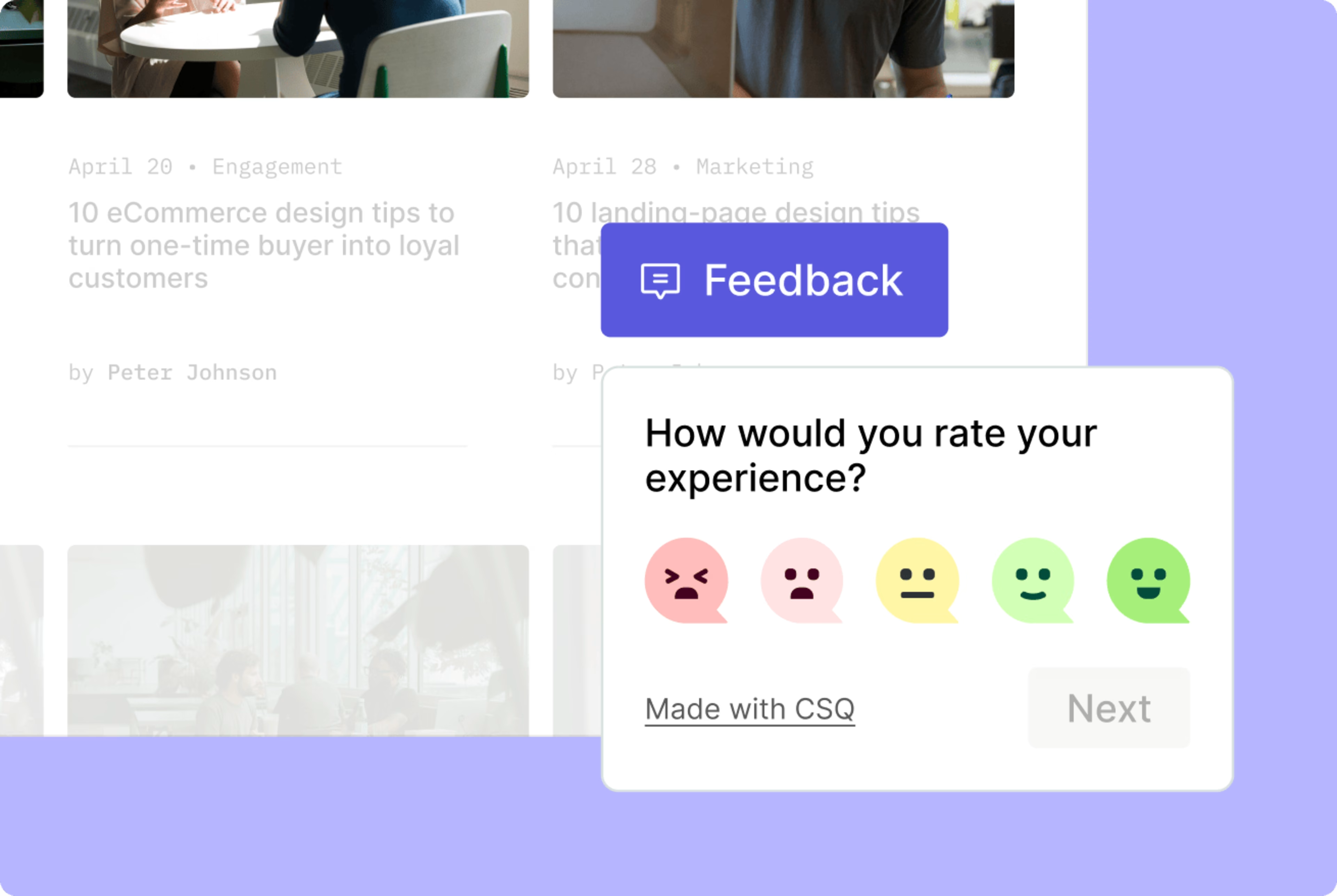
Contentsquare’s feedback button lets customers give on-page feedback for deeper insights into improvement
For example, your SaaS product team might send out post-purchase surveys to gauge customer satisfaction, understand their experience, and identify areas for improvement to enhance retention and loyalty over time.
Contentsquare’s tools and features help you
Gather feedback in the wild: place feedback widgets throughout the customer journey for insights into the customer experience at different touchpoints. Ask customers to rate their experience and provide a reason for their score.
Gauge customer opinions and feelings with Contentsquare’s Surveys: use customer satisfaction surveys to measure satisfaction, NPS® surveys to determine how likely customers are to recommend your product to others, or exit-intent surveys to ask customers why they’re leaving your website
Easily share feedback across teams by integrating Contentsquare with Slack: get updated on incoming feedback to make better, customer-backed decisions. For example, after receiving feedback about a sign-in button error, your user experience (UX) developers can act quickly to fix the problem without waiting for a support ticket or bug report.
Leverage built-in AI in Contentsquare’s Voice of Customer product to analyze survey results: uncover the themes and emotions behind responses to understand user sentiment without having to manually code each answer. Turn complex data into actionable insights that drive smarter decisions and customer-focused improvements.
![[Screenshot] Analyze responses with AI](http://images.ctfassets.net/gwbpo1m641r7/5cmilG7bzqNDaFONuGudeA/6d0fe0199660aa377200ea6941979f4e/Screenshot_2025-01-10_153053.png?w=1920&q=100&fit=fill&fm=avif)
Let Contentsquare’s AI-powered Surveys tool do the heavy lifting when analyzing results
💡Pro tip: use Contentsquare’s Session Replay capability to segment recordings of user sessions by customer type and action. Watch customers as they fill out feedback forms and submit survey scores for granular insights into why they feel the way they do.
![[Visual] Experience Analytics - AB Test Session Replay](http://images.ctfassets.net/gwbpo1m641r7/6B0G5JrPHs7GYx3UTU4sm9/dd0a6aa32cad72ad6a6b087dcd21e816/Experience_Analytics_-_AB_Test.png?w=1920&q=100&fit=fill&fm=avif)
Contentsquare’s Session Replay tool in action
3. Parlor.io
Parlor.io helps you collect and analyze customer feedback across internal business tools—like ticketing systems, live chat, analytics platforms, CRM, and engineering task management—and measures your performance across channels.
It also helps prioritize key feedback, like feature requests and support tickets, while automatically following up with customers to maintain the feedback loop. For example, after receiving requests from different customer segments about your SaaS product’s features, use Parlor.io to analyze which request will yield the biggest impact on the customer experience (compared to your other requests) and optimize accordingly.
How Parlor.io helps you collect and prioritize customer feedback
Use Parlor.io to improve your internal communication and feedback management, and track customer success.
Parlor.io's key features include
Analytics to prioritize feedback, requests, and product improvements
The ability to share product roadmap items across teams
Product updates that can be sent to relevant customer segments
Sentiment and friction analysis to understand the customer experience
Integrations with popular tools like Salesforce, HubSpot, and Zendesk
A 'Unified User Record' feature for real-time insights about every user
4. Zonka Feedback
Zonka Feedback is an omnichannel customer feedback management software that helps businesses measure and improve customer experience through feedback-driven actionable insights. It enables businesses to distribute surveys and capture customer sentiments across various channels like email, SMS, in-app SDKs, and more. As a full-suite feedback and experience management software, Zonka Feedback facilitates the collection and measurement of CX metrics, including CSAT, NPS®, and CES, with automated data processing.
How Zonka Feedback helps you gather feedback to enhance customer experience
Zonka Feedback offers an easy-to-use survey builder that lets you create and distribute surveys in minutes. Its powerful reporting and analytics software offers real-time alerts and in-depth insight into customer feedback to help you improve experience.
Zonka Feedback’s key features include
100+ survey templates with 30+ questions
Multi-channel survey distribution
Advanced reporting and analytics
Seamless integration with popular CRMs
Voice of Customer (VoC) analytics through customer comments, sentiments, and suggestions
Automatic routing of customer feedback to the appropriate teams or departments through workflow automation
5. Sprinklr
Sprinklr helps you collect valuable customer feedback across social media channels and websites. Not only does Sprinklr gather feedback, it also helps you create and optimize meaningful experiences on social media to better connect with customers.
For example, your marketing team might use Sprinklr to create an online community based on power users (and reviewers) of your product to increase customer engagement and loyalty.
Sprinklr gives you access to unsolicited customer reviews, opinions, and ratings about your product or customer experience within a single platform, and helps you create customer-backed strategies to improve customer satisfaction.
How Sprinklr helps you collect customer feedback to create meaningful experiences
Use Sprinklr to unify customer feedback across social media and brand websites and quickly respond to customer requests on all channels.
Sprinklr's key features include
Surveys that you can automate and trigger based on customer actions
Tools to collect, interpret, and act on customer feedback across channels
VoC feedback to research and understand your target audience
30+ channels to improve engagement
AI bots to automate routine interactions
The ability to create customer communities and feedback forums
6. Qualtrics
Qualtrics collects and tracks customer feedback from a variety of sources and automatically recommends actions to key decision-makers or relevant stakeholders. They can then prioritize important product and customer experiences.
It also gives you real-time survey design recommendations and lets you deploy surveys across channels, so you can collect feedback at pivotal moments in the customer journey.
How Qualtrics helps inform your customer feedback strategy
Use Qualtrics for powerful feedback analytics and reporting, and to better prioritize your product roadmap.
Qualtric’s key features include
Automatically routing customer feedback to relevant departments and team leads
Data visualization graphs
Report-sharing across teams
Real-time survey design and multi-channel survey distribution
Analytics for product backlog management and roadmap prioritization
7. Intercom
Intercom is a messaging platform that helps you gather customer feedback through live chat and chatbots. You can use it to interact with users throughout their customer experience. For example, you could send personalized onboarding and product activation messages to help boost adoption rates.
It also lets you connect with customers across internal teams, forging a direct connection between customers and relevant departments for more accurate and actionable feedback and improvements.
How Intercom helps you collect feedback to support customers
Use Intercom to reach and respond to your customers wherever they are, and improve cross-functional collaboration and transparency.
Intercom’s key features include
Automated chatbots and live chat on your website, product, or app
Direct channels of communication across customers and teams
1:1 customer support
The ability to spot and respond to customer feedback and frustrations
A unified inbox to keep communications in one place
Personalized responses and messages
💡Pro tip: Contentsquare integrates with Intercom and Qualtrics so you can combine your feedback for more actionable insights. For example, after receiving negative feedback through an Intercom chatbot about your onboarding process, use Contentsquare to watch replays of the onboarding experience, so you know exactly what and where to improve.
![[Screenshot] Contentsquare and Intercom integration](http://images.ctfassets.net/gwbpo1m641r7/4AJuPxY7ehZse3HdnAYCZN/f7475d1489bfb9a178b1824872793d75/unnamed__1_.png?w=1080&q=100&fit=fill&fm=avif)
Pick the right feedback software to fuel customer satisfaction
The right customer feedback software lets you set up a feedback loop of continuous user insights and product development so you can create an experience that aligns perfectly with your customers' goals.
When you make customer-led updates and improvements to your product, you’re showing your customers you care about their opinions. Not only that, you know you’re basing decisions that affect the success of your business on genuine insights rather than guesswork.
FAQs about customer feedback software
While there are many ways to collect customer feedback, here are some popular methods:
Send surveys
Use feedback widgets and forms
Host focus groups and customer interviews
Ask for video feedback
Check out review websites
Track mentions on social media
Listen to sales calls
Leverage customer service channels