![[Visual] Strategy stock photo](http://images.ctfassets.net/gwbpo1m641r7/1lYHddzeXDFxKBR7Ypwlzg/3f7c2e81084aba4291dfaa3e391de812/AdobeStock_558703997.png?w=3840&q=100&fit=fill&fm=avif)
You’ve invested in a site redesign and implemented all the best conversion strategies, but your ecommerce store is still stuck in the frustrating ‘traffic is up, sales are down’ cycle.
So, what’s going wrong? Traditional analytics might tell you what’s happening—like an increase in users dropping off at checkout—but they don’t explain why those users aren’t converting.
To turn things around, you need more than just surface-level data. Experience intelligence insights help you understand the ‘why’ behind those drop-offs.
In this article, we show you how Contentsquare’s tools and integrations help you create user-centric solutions for your site or product—your ultimate path to better sales.
The best way to meet your customers’ needs (and your business goals)
When you aim to make your site’s UX seamless, it’s essential to empathize with your users. But empathy doesn’t always come easily—especially when users’ behavior baffles you.
Perhaps you notice potential customers consistently flocking to your product pages and then bouncing without buying anything. It’s far easier to feel frustration rather than empathy when you see the number of abandoned carts eclipsing your sales.
Fortunately, there’s Contentsquare (hello! 👋), an experience intelligence platform that helps you understand your users more intimately. Our platform allows you to
Discover how users interact with your site, spot patterns in their behavior, and add or remove features to boost conversions
Ask for direct feedback from your customers, understand what works for them, and remove barriers to their buying journey
Integrate analytics tools and connect the dots between the changes you implemented and sales performance
With Contentsquare, you can introduce changes that make a genuine impact instead of being sidetracked by what you ‘think’ will work.
How Contentsquare tools and integrations improve your ecommerce sales
Better UX and an optimized customer journey are keys to selling more.
So, whether you’re lean and still growing or expanding aggressively, equip your organization with tools that empower you to understand your customers: what motivates them, what makes them hesitate, and what they need to enjoy their experience of your product or online store.
At your disposal are Contentsquare’s helpful tools for ecommerce sites:
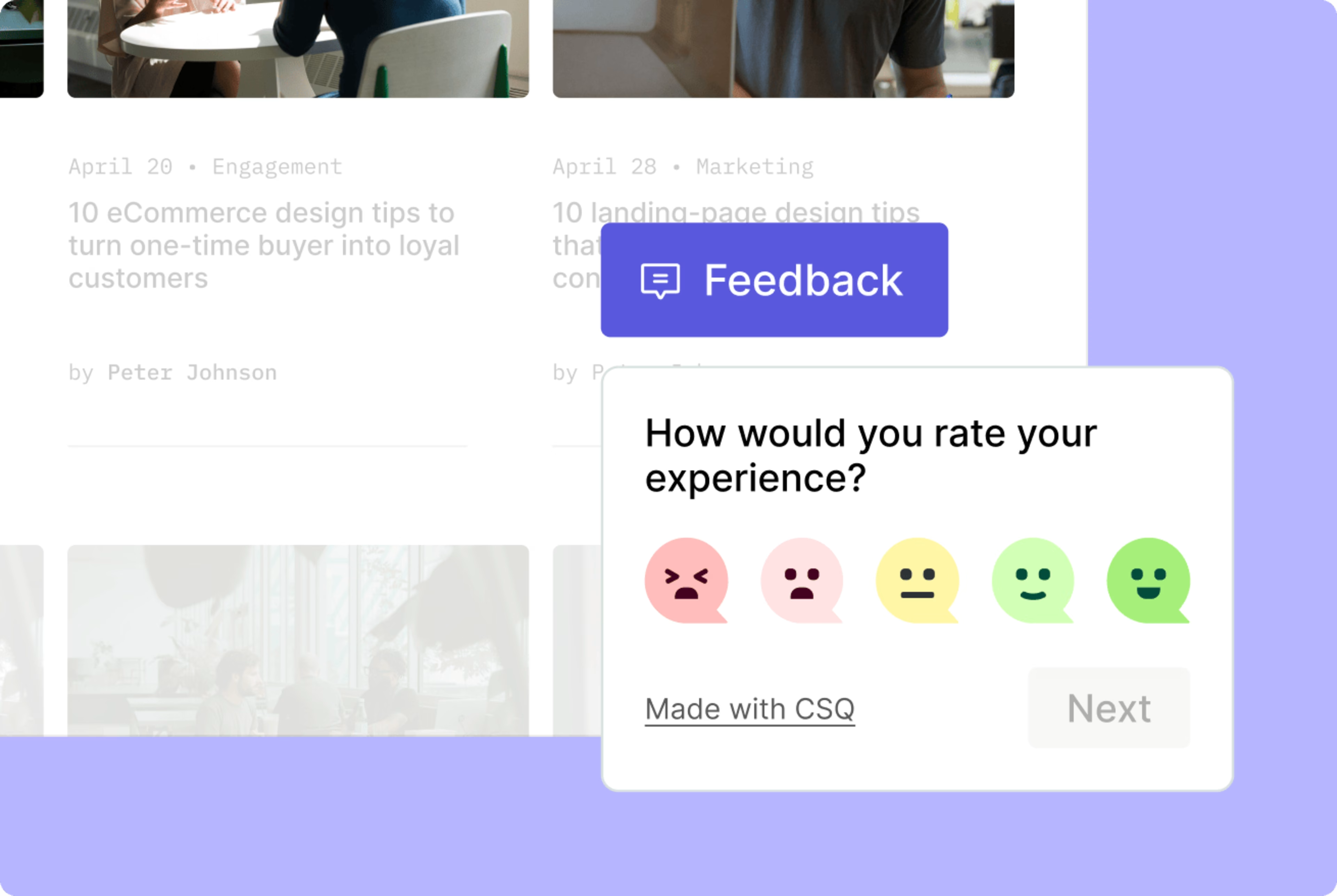
An example of a Contentsquare feedback widget, a great addition to any ecommerce page
Let’s quickly touch on how these tools, alongside Contentsquare’s integrations, help you deliver an experience that delights customers and dramatically improves your bottom line.
1. Combine hard data with in-depth customer behavior insights
You’re probably no stranger to tools like Google Analytics, which gives you an overview of important business metrics like traffic and conversions. This quantitative data points you to specific pages, including those driving the highest traffic or bounce rate.
However, the numbers alone can’t tell you why users love or leave your site. You need qualitative data to deepen your analysis.
Contentsquare tools like Session Replay and Heatmaps for ecommerce offer user behavior insights, so you can:
Get a complete picture
Go beyond the numbers, and dig deeper into how real users experience your website.
Let’s return to the classic example of product pages with high traffic but a low conversion rate. Here, you can watch session replays to see if there’s any issue causing customers to abandon the page. It could be a page element that’s hard to see or an out-of-stock notification that appears at the wrong time.
Gather actionable data
Integrating a handful of replays into your analysis can inspire you to make user-centric improvements. Using the example above, you can recommend new design and color options to make a critical page element more visible, or ask the development team to review the backend and fix the timing of an important message.
2. Track, analyze, and optimize metrics that drive sales
We know sales data is a key component of your growth strategy, but it’s also a valuable metric in the customer journey—particularly in the decision stage. It goes hand-in-hand with other key performance indicators (KPIs) like conversion rate and cost per conversion (CPC).
You can track these metrics using Google Analytics or sales analytics software. But the cool part is that you can also send the data to Contentsquare with our integrations. Contentsquare will work its magic, connecting quantitative and qualitative data for more in-depth analysis.
3. Discover pain points and opportunities for improvement
The detailed numbers derived from traditional analytics may hint at a problem. But you need user behavior analytics to see the problem from your user’s perspective.
Again, incorporating both hard data and behavioral insights comes with many benefits, including the following:
Easily find drop-offs in the user flow
Let’s say you discover that users are dropping off. You use Google Analytics to understand what’s happening across your website, while a combination of Contentsquare tools helps you diagnose the problem.
This sequence allows you to narrow down the possible causes of drop-offs and devise real solutions. It eliminates guesswork and prevents you from chasing hypothetical solutions.
British global fashion retailer New Look had this exact experience. Here’s how they managed to reduce drop-off rates:
The problem: New Look’s team spotted a general decline in movement through the funnel from their product detail pages (PDPs), with a -34% drop-off rate between product view and add to bag
The real-world, impactful solution: after leveraging insights gleaned from Heatmaps and Journey Analysis, the digital team carried out tests on 16 of their PDPs, which led them to optimize inline imagery and size selectors. Thanks to these incremental changes, add-to-bag rates have increased and helped drive additional revenue for the brand.
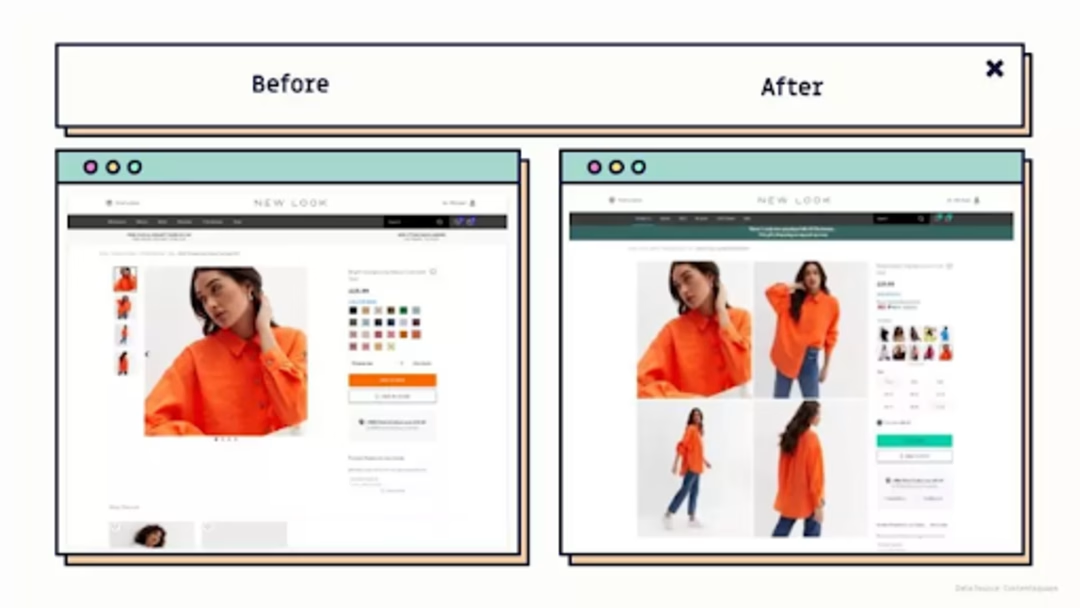
New Look’s PDP before and after Contentsquare
Effectively identify bugs and UX issues
Sometimes, it’s difficult to spot exact problems or find top pain points. By launching a survey on exit pages, you’ll hear what users need right before they leave. You can also watch recorded sessions of users who encountered a problem to see if there are missing links or broken features.
The discovery empowers you to prioritize a fix and achieve results immediately. It also opens up opportunities to add additional features and similar changes, with the ultimate goal of generating more conversions and sales.
4. Fine-tune your customer journey
The customer journey often starts even before users visit your site. But in the context of this guide, most of the stages are set in motion when they reach your online store.
That’s why it’s vital to remember that users—both new and returning—constantly form opinions about your brand based on the sum of their interactions with your website.

An example of a Contentsquare Net Promoter Score® (NPS®) survey
You can rely on behavior and experience analytics to improve the UX and deliver a satisfying customer journey all throughout. Aim to become a brand customers trust, because the greater their trust, the greater your sales.
Here’s a quick overview of what you can do:
Discovery: know your customers—where they’re coming from, the pages they land on and navigate to—to build a picture of what they’re looking for on your site
Interest: uncover opportunities to get prospects to browse more products and help them find what they’re looking for
Intent: identify pages and page elements that are getting prospects to add products to their wishlists or shopping carts
Purchase: start building a long-term relationship with customers; send a post-purchase survey to people who just completed a purchase, asking them what worked (or what didn’t), so you can better serve them in the future
Engagement: figure out how to keep customers engaged, make them come back to browse more products, and convert them into brand advocates
5. Identify underperforming products hiding in plain sight
Sometimes, it’s not about what your visitors aren’t seeing—it’s what they’re seeing but skipping over. Contentsquare’s Merchandising capability helps you uncover which products are getting exposure but not converting.
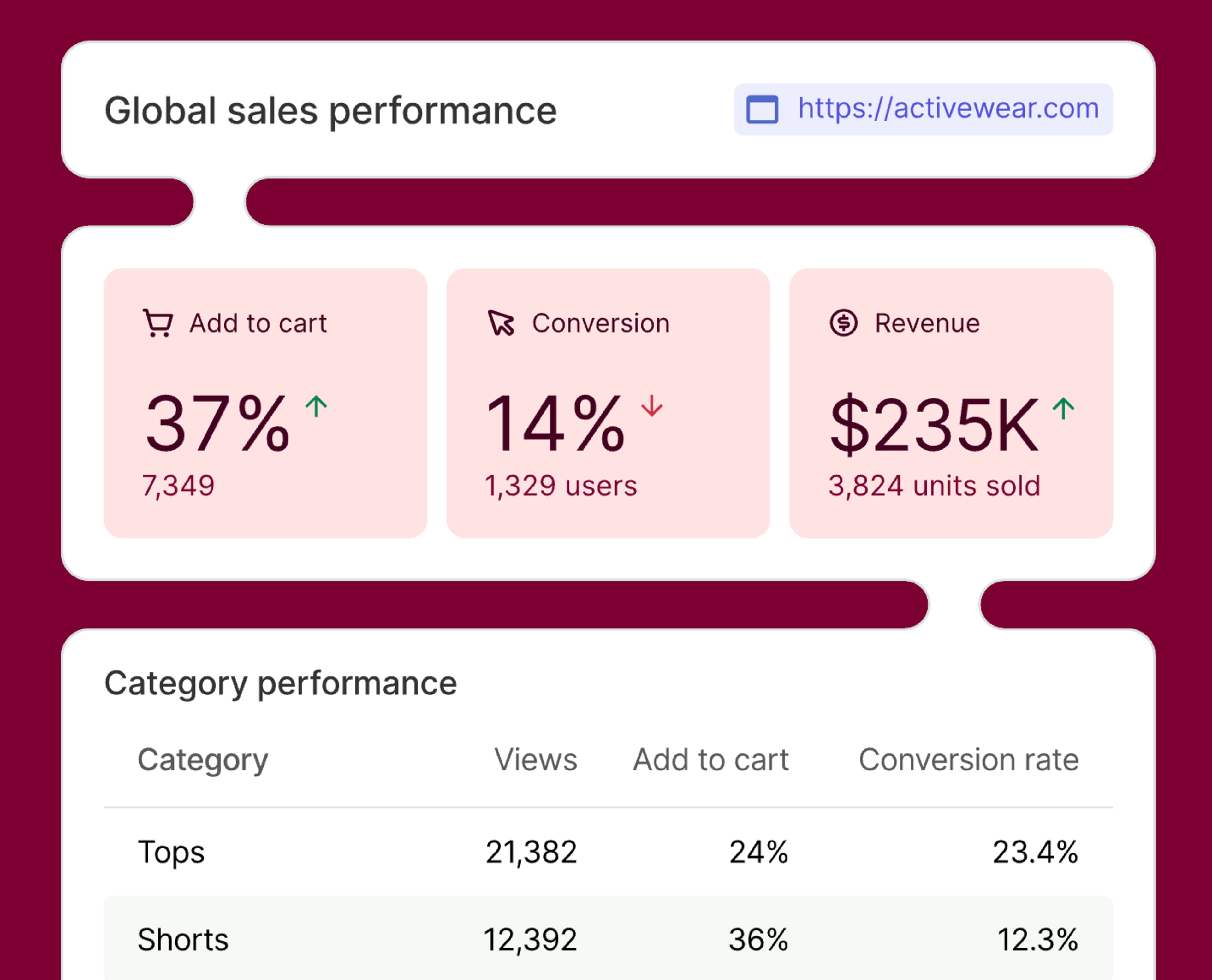
Maybe they’re priced too high, maybe they’re in the wrong spot, or maybe the supporting content isn’t doing them justice. Either way, by tying product visibility to actual outcomes like add-to-cart and conversion rates, you get a clearer picture of what’s working—and what’s quietly costing you. It's a data-backed nudge to rethink how you feature, price, and position your products.
6. Share data across different collaborators (teams)
Do you want to get buy-in and alignment within a team or across different departments?
Contentsquare was made with cross-functional collaboration in mind. The platform provides you with the tools needed to build your case so that you can:
Capture snapshots of your most valuable insights
When you access a session replay or heatmap, you can capture a relevant insight as a snapshot that can be shared and analyzed with your team to spot patterns and validate assumptions.
![[Visual] Session replay snapshot](http://images.ctfassets.net/gwbpo1m641r7/IXFMTMNyJUeEZiuIkWIUY/3150b895ddd91517ab0036bea174289e/Screenshot_2025-02-01_011249.png?w=3840&q=100&fit=fill&fm=avif)
Share your findings using integrations
Make the most of integrations to boost your team collaboration. Share replays and forward survey or feedback responses directly to Slack channels. Or set VoC tools for ecommerce to send the responses to multiple email addresses.
![[Visual] forward](http://images.ctfassets.net/gwbpo1m641r7/2Z3Y9NlvtPAVCudN7aKopX/4661c0c39626406e04cb0d63b79f8c22/forward.png?w=3840&q=100&fit=fill&fm=avif)
7. Make user-centric (and much better) business decisions
These days, customers seek online brands and businesses that cater to their exact needs. And while they may not need (or want) insight into what goes on inside your organization, it’s always great to have someone advocate for your customers internally.
This is why user research and testing should be ingrained in your company culture. Start by checking out our Interviews tool to learn something new about your ideal customer. Then, turn that information into more revenue.
![[Product illustration] Interviews - 4 people meeting](http://images.ctfassets.net/gwbpo1m641r7/1pnTF7gILq6ceAdMPr4Mkt/9bfe5c31882dc81eee98b3eee10a8cc3/User_interview.png?w=1920&q=100&fit=fill&fm=avif)
Get to know your customers with Contentsquare’s Interviews tool
💡 Pro-tip: not all steps have to be bold and big. Watching session replays for 15 minutes each morning can make a difference, as does sending an open-ended survey at the right moment. These small acts may lead to spotting an issue that annoys a particular user segment. And what makes it effective is that you’re there to fix it when it happens—just what your customers need to have a smooth-sailing website experience.

8. Optimize your cross-functional tech stack
Contentsquare integrates with top tools for planning, communication, workflow, testing, and many more. Connect with HubSpot to build automations and notify your sales team when a session replay is available for a highly engaged prospect. And share findings and alerts with teammates in real time via the Slack integration.
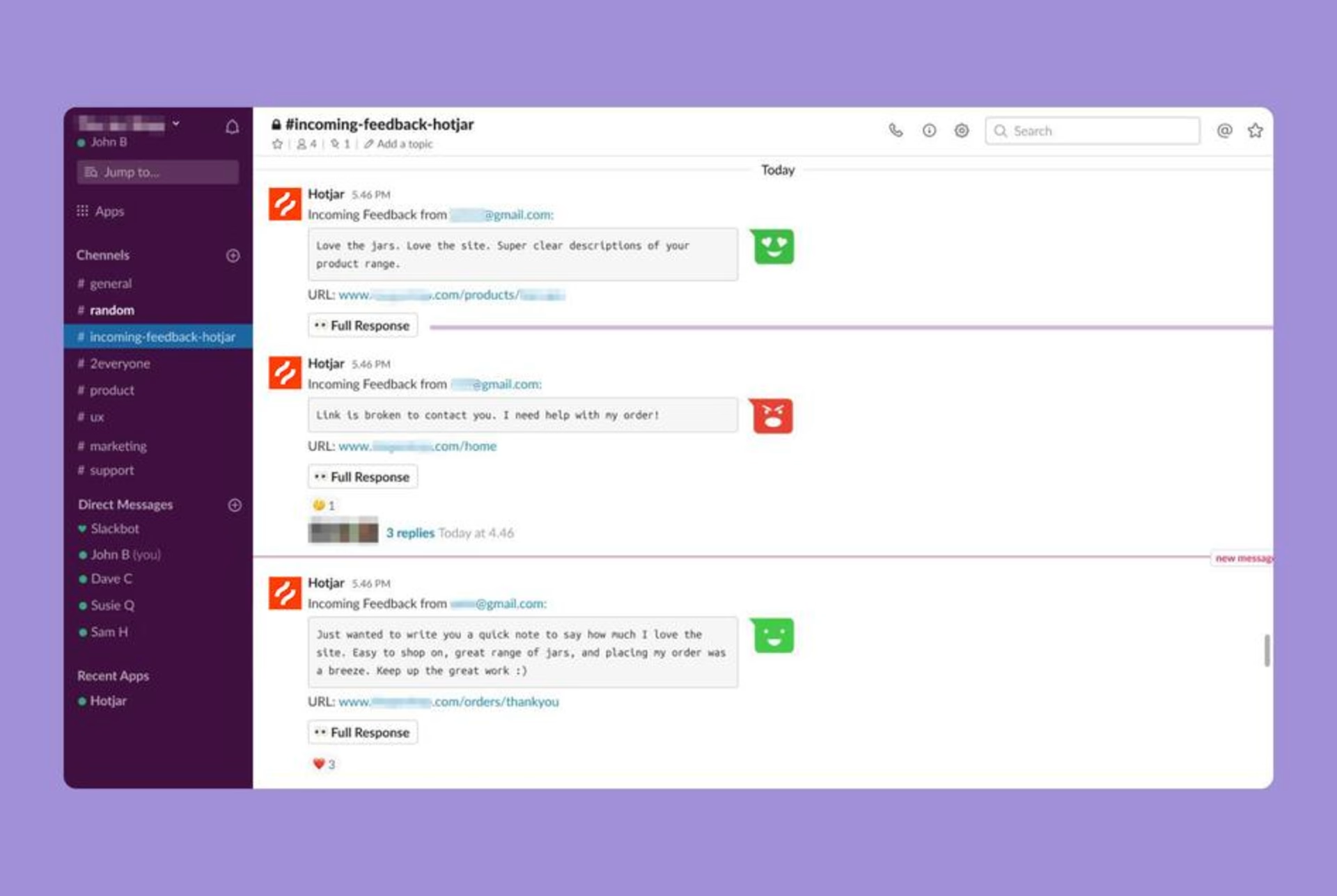
Contentsquare’s Slack integration in action
You can also install Contentsquare on your ecommerce platform, whether you’re using WordPress or Shopify. Visit our Help Center to set up the plugin in seconds and be on your way to unlocking priceless qualitative insights.
A simpler, smarter way to boost sales
User behavior data can be the foundation of many other decisions that impact your bottom line. Did you notice a sudden sales drop after implementing a change? Connect the dots by watching replays or viewing heatmaps. Will customers still be willing to buy if you adjust a certain product’s pricing? Create a survey and ask for feedback.
Numbers won’t be enough to get your growth metrics to where they should be. The quantitative needs to meet the qualitative for in-depth analysis to happen.
Take that game-changing step now and use Contentsquare’s tools and integrations to turn the information you gather about user behavior into plans and strategies that generate more revenue for your ecommerce brand.
This is just the beginning of what you can do with Contentsquare
Excited about the possibilities? We have so much more to show you. Check out the next 3 chapters of our Contentsquare for ecommerce guide, where we unpack all the ways to increase your ecommerce conversions and boost your customer experience with Contentsquare’s tools.
🔥 Using Contentsquare Heatmaps to improve your UX for ecommerce
📹 Contentsquare's Session Replay best practices to find bugs and boost ecommerce conversions
📄 Setting up Contentsquare Surveys to understand your customers on a deeper level
Contentsquare for ecommerce FAQs
Yes! After taking many steps—including putting a strategy in place and rewriting our Data Protection Agreement—we’re pleased to report we are General Data Protection Regulation or GDPR-ready.
We’ve made efforts (and continue to do so) to improve anonymity in our analytics tools and the ability to tailor how you request consent in our Voice-of-Customer (VoC) tools. For ecommerce stores, you can suppress keystroke data, credit card numbers, and specific webpage elements as needed.