For dev-first teams, Fullstory is a reliable solution for visualizing session replays and debugging user experiences. But if you’re looking to go beyond technical troubleshooting and get the actual full story (pun intended) about what’s blocking growth across the org, Contentsquare (that’s us, hello! 👋) is a better fit.
In this guide, we break down exactly how Fullstory compares with Contentsquare. You'll learn which features overlap and how Contentsquare's experience intelligence, product analytics, and VoC capabilities outperform Fullstory’s technical, error-centric focus.
TL;DR
Contentsquare and Fullstory both offer autocapture (no tagging needed), session replay, and product analytics, but they’re built for different buyers and teams
Fullstory is a dev-first replay and error tracking platform that combines experience analytics, product analytics, and employee experience tools
Contentsquare is an all-in-one experience intelligence platform that combines best-in-class experience analytics, monitoring, product analytics, and customer insights with AI and revenue impact analysis
Contentsquare is the market leader, relied on by +3,700 enterprise brands and +1.3 million websites and apps
Fullstory is popular with technical teams for replay, debugging, and page-level behavior analysis
Contentsquare is for cross-functional digital teams spanning product, UX, marketing, ecommerce, CX, and data, focused on ROI-driven optimization across websites and apps
Contentsquare outperforms Fullstory with advanced journey analysis and product analytics, zoning heatmaps, speed analysis, voice of customer, and granular revenue insights
You’ll get more value from Contentsquare’s AI, Sense, because it connects every customer touchpoint (what users say and do) and turns it into prioritized actions
For teams that just need a developer-friendly replay and analytics tool, Fullstory is a safe option. For organizations that need a single source of truth to understand, prioritize, and improve digital experiences at scale, Contentsquare is the best choic
What are the main differences between Contentsquare and Fullstory?
The best way to choose is by starting from your business goals. What are your biggest challenges in the business? Focus on the use cases that will actually let you solve those challenges.
Typical business goals and use cases | Fullstory | |
|---|---|---|
How do we surface obstacles on our sites and apps and prioritize what to fix based on revenue impact? | Very Strong | Very Strong |
How do we improve marketing acquisition, besides eliminating friction? | Very Strong | Medium |
How do we create better products, experiences, and A/B tests, besides fixing errors? | Very Strong | Medium |
How do we listen better by collecting feedback more automatically? | Medium | - |
How do we empower and align all teams, not just technical ones, to create better experiences? | Very Strong | Light |
How do we choose a partner that has the most local offices worldwide so they can support us locally? | Strong | Light |
Use cases that both Contentsquare and Fullstory do well
Fullstory and Contentsquare capabilities are best compared in the context of the use cases that they help solve. Let’s go through them one by one.
How do we surface obstacles on our sites and apps and prioritize what to fix?
Both Contentsquare and Fullstory excel at experience monitoring use cases supported by key capabilities such as Session Replay, Error Analysis, and Speed Analysis.
Session replay
Session replays are great when you need more context about specific events, like when visitors encounter a bug.
Fullstory and Contentsquare both provide best-in-class session replay tools:
Both provide session replay capture for 100% of traffic
Both platforms let you recreate sessions on desktop, mobile, tablet, and apps
Both platforms enable advanced support teams to resolve escalated issues by replaying the exact sessions related to customer service tickets, understanding root causes of issues down to errors, granular network details, request/response headers, and bodies
Both platforms ensure security by enabling only authorized personnel to decrypt data needed for handling customer service issues and masking PII
Both platforms let you click to see how common an error is and quantify the revenue impact of any error so you can prioritize fixes
Both platforms let you share specific replays and events with your team to resolve issues quickly via platforms like Jira, Slack, or Microsoft Teams
Both platforms use AI to generate session summaries so you can quickly understand the key insights from single or multiple sessions
Both platforms automatically surface sessions with high levels of user frustration (in Contentsquare, we call it Frustration Score)
![[Visual] Session replays AI summaries](http://images.ctfassets.net/gwbpo1m641r7/513RGRBy7acZFtxrrMg1cE/7f6851e3d8f3c4ca804c3e8cde0f847a/Session_replays_summaries.png?w=3840&q=100&fit=fill&fm=avif)
Focus on what matters with Contentsquare session replay summaries
Error analysis
Both Fullstory and Contentsquare are extremely strong for website and mobile app error analysis:
Both platforms have customizable real-time alerts for critical issues
Both platforms provide error reporting that surfaces any type of technical issues blocking users from completing their goals, like API errors, apps crashes, Javascript errors, console messages, and functional errors
Both platforms use AI to create error summaries and automatically prioritize issues
Both platforms make it easy to file tickets via Jira or rally teams to action via Slack and Microsoft Teams
![[Visual] error analysis](http://images.ctfassets.net/gwbpo1m641r7/2RHGIcGhjdzYE7tMVVWzzg/2bc7b35d22f6b8a0806a09a23f6f7c71/error_analysis.avif?w=3840&q=100&fit=fill&fm=avif)
Error analysis in Contentsquare
But you’ll get some extra features if you choose Contentsquare, for example:
Only Contentsquare provides retroactive text search which enables teams to
Surface and quantify all occurrences where site users encountered unexpected error messages of any kind, like ‘Oops, something went wrong’
Visualize how users experience these messages
Only Contentsquare enables 1-click impact quantification from session replays:
Select any issue and click to quantify how many users are affected
Automatically compare customers who encounter the issue with those who don’t at that step to reveal its true impact on conversion and revenue
Prioritize issues that will have the biggest impact on business metrics and customer satisfaction
Speed analysis
Both Contentsquare and Fullstory surface where your site or app is too slow and costing you conversions.
Both Contentsquare and Fullstory provide speed analysis based on real user monitoring (RUM) to identify performance issues affecting conversion
But you’ll get additional features if you choose Contentsquare:
Only Contentsquare provides additional Speed Analysis tools based on synthetic monitoring, i.e. lab testing. Teams use these t
Test new product releases in controlled conditions before they go live, so performance issues never reach customers
Continuously test live journeys and get alerted when performance degrades
Get automated, actionable recommendations on what’s slowing pages down and how to improve it
📈 Why this matters: Fullstory only shows you when slow pages are already costing you business. Contentsquare lets you catch issues before they ship, keep key journeys optimized, and proactively protect conversions.
What Contentsquare does better than Fullstory (and why it matters)
You've seen what both Contentsquare and Fullstory can handle. Now it's time to face facts: Fullstory isn't going to give you the actual 'full story' of what's going on on your site and app.
You need a platform that goes beyond dev-led troubleshooting to give every team a clear understanding of what to optimize to grow company-wide metrics, not just reduce bug counts.
Here's everything you need to know about where Contentsquare outperforms Fullstory, and why it matters for your team.
How do we improve marketing acquisition, besides eliminating friction?
Session replay is great for dev debugging, but everyone else needs faster, scalable ways to see what’s working and what’s not.
Contentsquare goes beyond Fullstory with macro-level visualizations and metrics that turn thousands of sessions into clear patterns and prioritized opportunities any team can act.
Heatmaps
Heatmaps show how users interact with your site at a glance. Both platforms offer them, but the depth and usability of Contentsquare’s heatmaps is one of the biggest differences vs. Fullstory.
Both Fullstory and Contentsquare provide classic scroll and click maps popular with analysts
Both have conversion maps with conversion rates
Both let you filter and segment heatmaps to focus on specific audiences, journeys or traffic sources
Both let you jump from a heatmap into session replay to see real behavior behind an element
That’s where the similarities end. Contentsquare’s heatmaps add many more metrics and views that answer everyday questions on engagement, conversion and content performance for business teams, not just analysts.
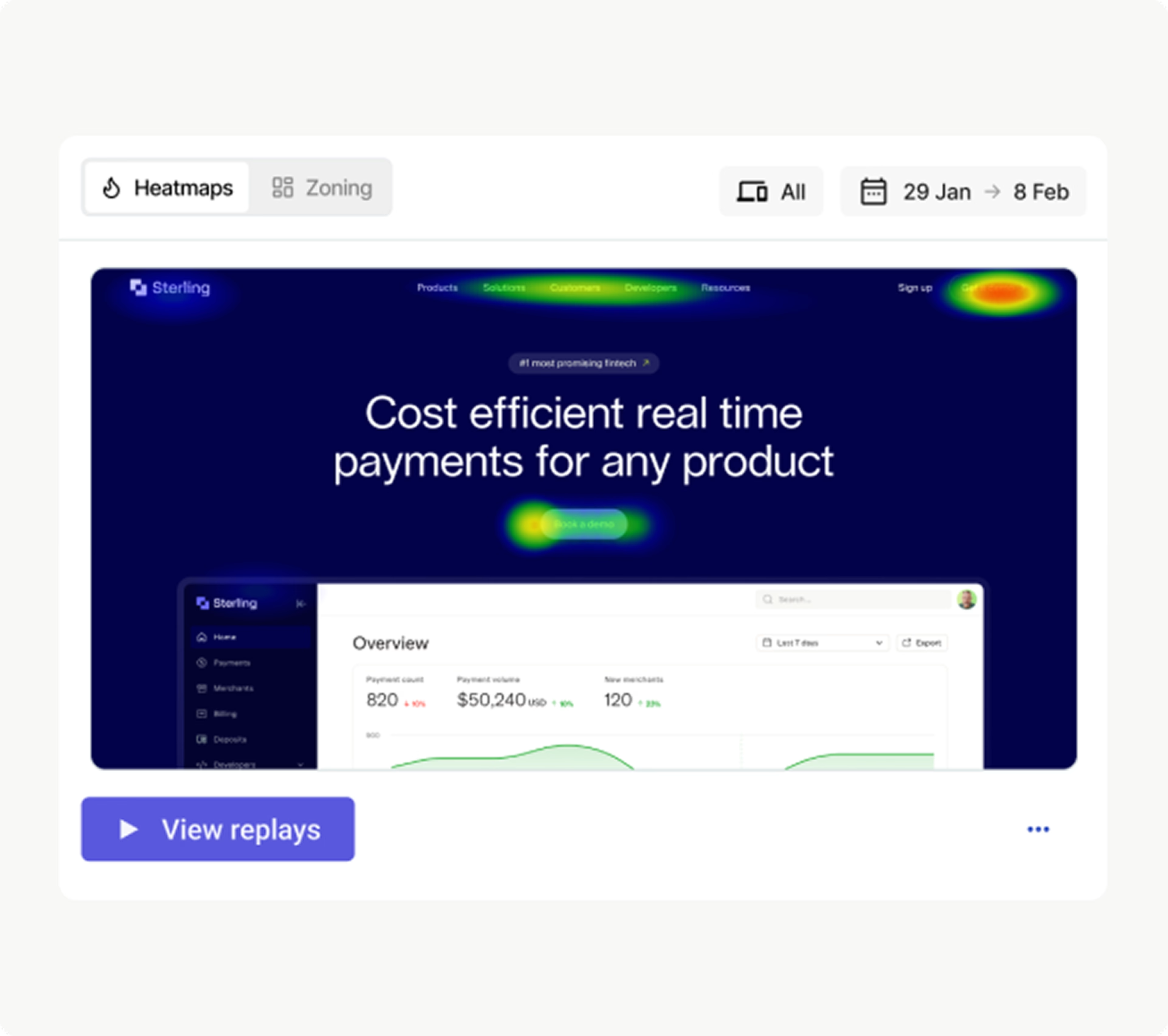
Visualize what’s driving revenue with Contentsquare Heatmaps
Here’s what you get if you choose Contentsquare over Fullstory:
Only Contentsquare provides live heatmaps—use the Contentsquare CS Live Chrome extension to explore site engagement instantly
Only Contentsquare offers side-by-side heatmap views for analyzing visitor behavior across segments—this is a game-changer for A/B testing and comparing different traffic sources
Contentsquare’s zoning heatmaps surface richer business metrics than Fullstory’s heatmaps and conversion maps, including
Revenue attribution (for example, revenue per click)
Engagement quality (for example, attractiveness rate, hesitation time, time to first click)
Conversion contribution (for example, conversion rate per hover)
Form friction (for example, drop-off rate, refill rate)
Retention indicators and multi-session behaviors
Friction signals like click recurrence
Merchandising metrics for item exposure, cart adds and sales
![[Visual] ab test heatmaps](http://images.ctfassets.net/gwbpo1m641r7/71Feljv3nwR0ng3PEiPGEG/c5c4f991ef679e660e08970edb2a894a/ab_test_heatmaps.png?w=3840&q=100&fit=fill&fm=avif)
Use side-by-side heatmaps to compare segments and A/B test variants in Contentsquare
Contentsquare also makes it easier to analyze experiences across evolving page states:
Run heatmaps on a single URL or grouped templates (🔥 Pro tip: we automatically map your page groups with our AI Mapping Assistant
Compare historic snapshots of a page, including different states like menus opened vs. closed
For most business teams, heatmaps are one of the fastest ways to understand content performance and find opportunities. This is where the gap between Contentsquare and Fullstory becomes obvious. Fullstory provides basic scroll, click and conversion maps; Contentsquare turns heatmaps into a full behavioral and revenue lens that supports daily decision-making across product, UX, marketing and ecommerce.
How do we create better products, experiences, and A/B tests, besides fixing errors?
Product teams are always strapped for resources which is why they are so dependent on data to decide which of their roadmap items to prioritize vs. improve vs. drop.
Their goals with analytics are not just to catch obstacles and errors, but also to understand their users at each milestone of the journey, what drives adoption, what gets users to become loyal repeat users? What do they miss that should be easier to use or find? What helps them connect the dots between your website vs. mobile app?
Here’s how you can answer these questions in Fullstory vs. Contentsquare.
Customer journey mapping
Customer journey maps illustrate all the pathways users take when browsing your site. Both Contentsquare and Fullstory have comprehensive journey-mapping tools:
Both platforms let you filter journeys and click through to relevant session replays for more context
Both platforms have exit/drop-off analysis analytics to surface the most common reasons people leave
Both platforms let you analyze journeys through plain language prompts like “Where do visitors go after reading my blog posts?” (at Contentsquare, we call it Sense Chat)
![[Customer story]](http://images.ctfassets.net/gwbpo1m641r7/1EBVc3VNWgha5ZRmeTHz1n/fb310c67dc08d024572322b469277415/segmentation.webp?w=1920&q=100&fit=fill&fm=avif)
How journey maps look in Contentsquare
But Contentsquare goes further when business impact matters:
Only Contentsquare visualizes journeys in a sunburst view that reveals unexpected paths at a glance (inner rings show entry points, outer rings show exits and colors show page types)
Only Contentsquare lets you compare journeys side-by-side to see how successful users behave differently from those who drop off
Only Contentsquare generates different page mappings for different user roles. For example a VP might look at journeys across major site sections to see the big picture, while the ecommerce or content team can visualize journeys at a granular page level so they understand the ‘why’ behind actions and decide what to optimize next.
Product analytics
Product analytics shows how your product, website, or app is performing through easy-to-understand charts and metrics.
Both platforms provide product analytics dashboards, funnels, journeys and retention views. The real difference is how product teams use them.
Fullstory’s approach is replay-first: you click a metric, jump into a session, and validate what happened. Useful for understanding the moment, but limiting when you need to understand patterns, adoption, or the long-term behaviors that shape your roadmap.
Contentsquare Product Analytics started life as Heap, the market leader in retroactive, tagless analytics. We’ve built on top of that foundation, so you can now:
Generate charts and insights by chatting with Sense Chat
Analyze feature adoption, activation, and retention without tagging everything in advance
Use the Engagement Matrix to see which features actually drive key journeys, not just which ones get clicked
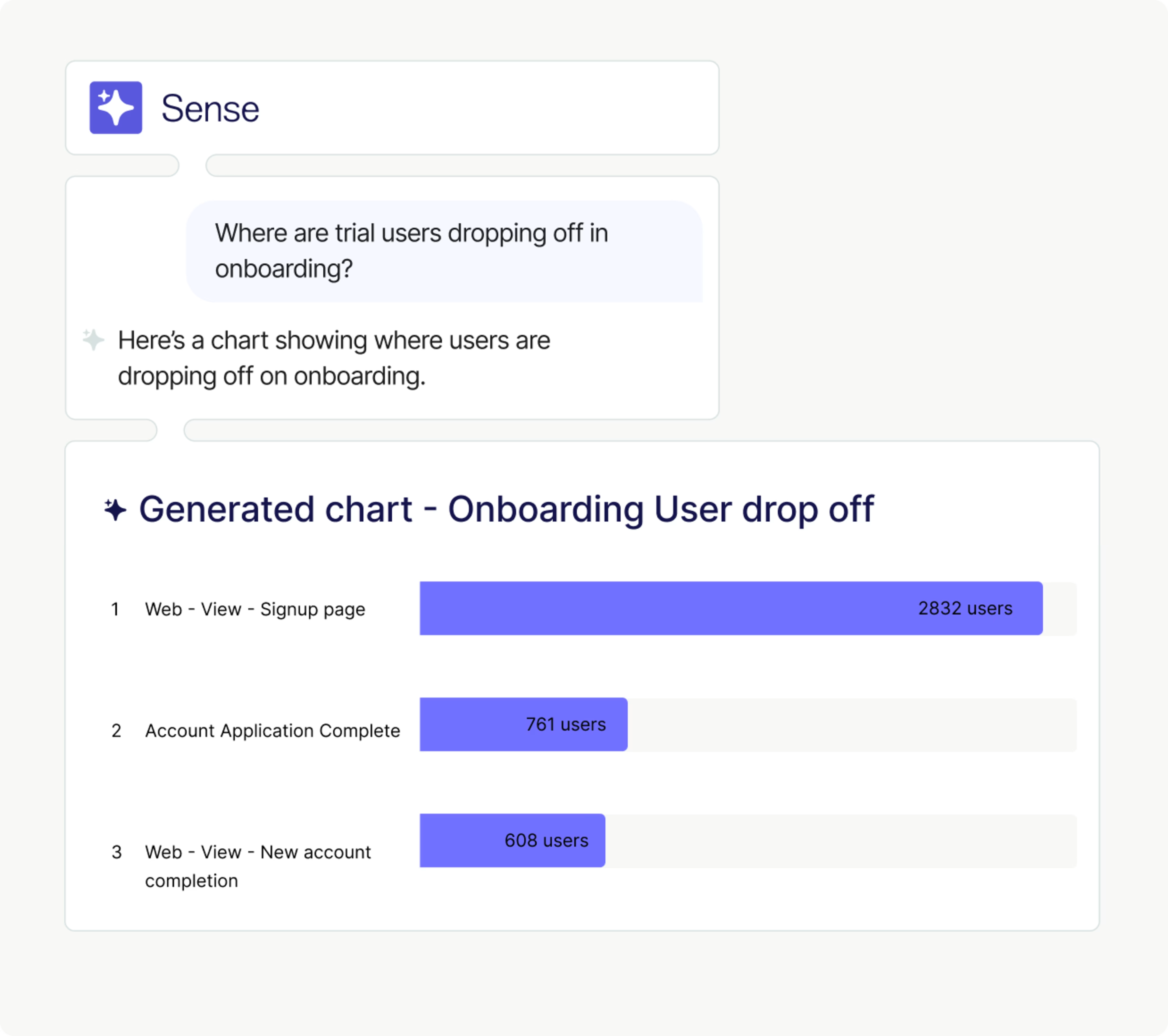
Generate any product insight in seconds with Contentsquare’s Sense Chat
And we don’t just cover comprehensive product and app analytics. Our User Lifecycle extension gives marketers the data they need to grow retention and lifetime value across every stage of the journey.
It’s a lot more intuitive than wrangling GA4 for insights, and you’re already in the right place to click through to Heatmaps, Funnels, and Journeys for further investigation.
![[visual] Acquisition analysis in Contentsquare](http://images.ctfassets.net/gwbpo1m641r7/1C7LrEYFHRYGLw1DDaGLz5/532437b6f638add945f13243dcaa542f/Acquisition-analysis-in-Contentsquare-vs-GA4.png?w=3840&q=100&fit=fill&fm=avif)
Acquisition analysis in Contentsquare
In a nutshell, Fullstory shows you what happened in your product. Contentsquare also lets you zoom out and pinpoint which behaviors and channels drive activation, retention, and revenue, so product, UX, marketing, and data teams know what to build, fix, and scale next.
How do we listen better by collecting feedback more automatically?
While session replays are technically qualitative, they still require a fair bit of guesswork. You need real Voice of Customer (VoC) and user feedback to understand why people behave the way they do, not just what they clicked.
Here’s why Contentsquare beats Fullstory when it comes to VoC.
Voice of the customer
Voice of the customer feedback uncovers your customer’s thoughts as they browse. It helps you resolve issues faster by connecting with tools like session replays and error monitoring.
Fullstory integrates with third-party VoC tools but doesn’t provide a native VoC tool —you’ll need to add other paid tools like Qualtrics or InMoment to collect and investigate feedback responses.
With Contentsquare’s all-in-one platform, you have the option to integrate or use built-in VoC tools, including
Surveys—for any use case, like exit-intent surveys and Net Promoter Score® (NPS®) surveys
Feedback buttons: collect effortless feedback anytime with contextual screenshot capture
AI analysis: make sense of feedback at scale with AI survey generation, reports, and sentiment analysis
User testing: run user interviews and concept testing to validate designs and uncover emotions you’d miss in written responses
Conversation analytics: pull insights from your chatbots and support conversations, powered by Loris AI
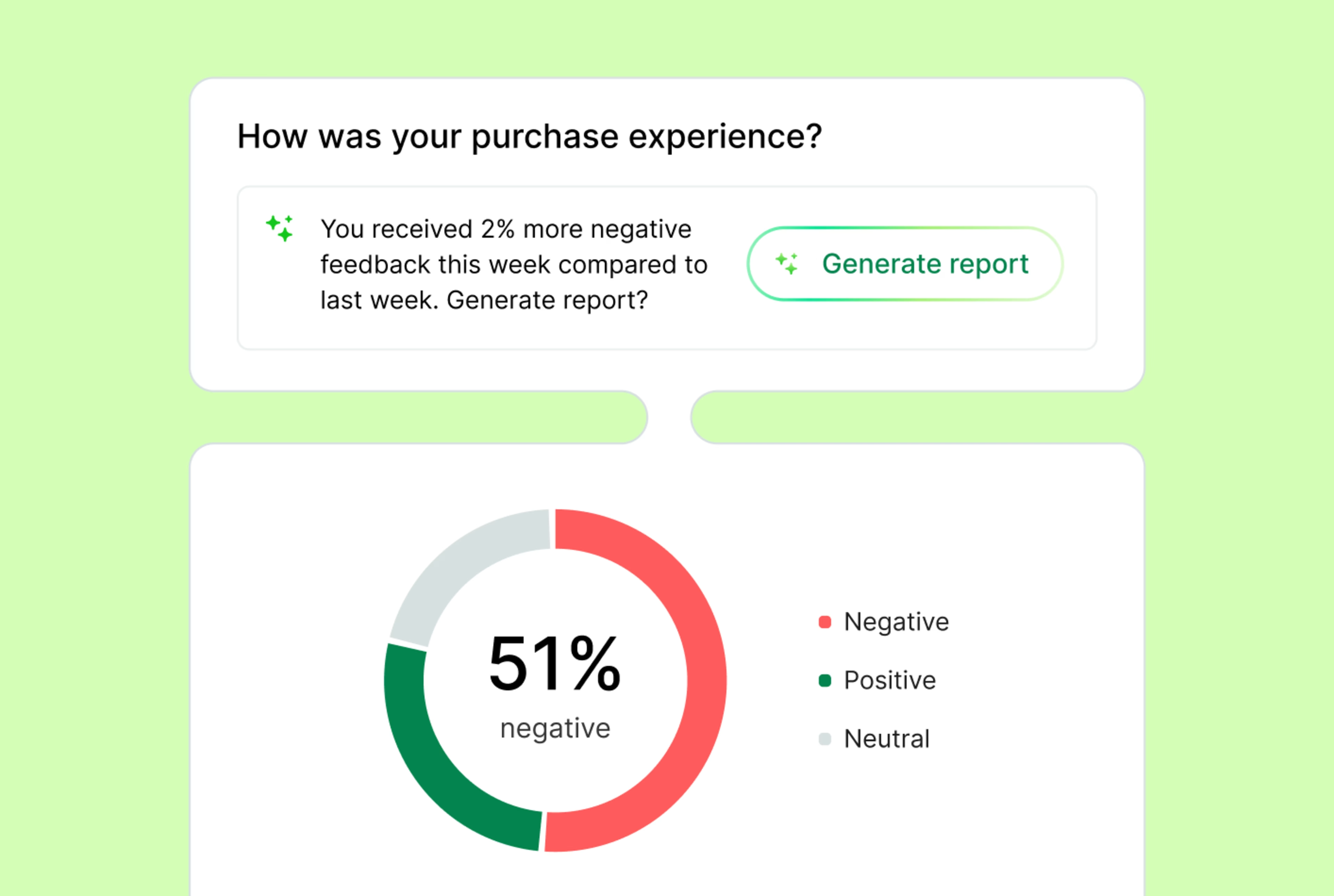
Contentsquare collects, analyzes, and prioritizes VoC feedback for you
The real power comes from connecting feedback with behavior and revenue. Instead of simply looking at a bad NPS® rating, you can zoom out and open the exact session replay to see the behavior that led to the feedback. Or filter heatmaps to understand what’s contributing to low scores. You can even quantify how many people hit the same friction, segment users with similar sentiment or behaviors, and analyze their conversion or drop-off patterns.
And with Sense AI, all of that magic happens in the background. Just tell it your goal (or set up an agent) and Contentsquare the key data together in seconds.
![[Visual] data connect capabilities](http://images.ctfassets.net/gwbpo1m641r7/1Rg4YQD74J4DVauEjmRcmO/48274e9fb774404f76e0913746e0b62f/data_connect_capabilities.png?w=3840&q=100&fit=fill&fm=avif)
Contentsquare combines comprehensive experience, VoC, and product data in one platform
To sum up, Fullstory and Contentsquare are autocapture analytics platforms. Both capture what users do on your site and app, but only Contentsquare also brings in what they think and feel.
You need this piece to understand why behavior happens, what to fix first, and how changes land with real customers, not just your dashboards.
The verdict: is Contentsquare or Fullstory better for your team?
Let’s give credit where it’s due: Fullstory has earned its reputation as a strong, developer-friendly session replay tool. If your only goal is to watch sessions and troubleshoot issues, it’s a safe bet.
But most teams need more than technical replays.
Contentsquare is the only all-in-one experience intelligence platform that combines best-in-class experience analytics, monitoring, product analytics, and voice of customer insights with AI and revenue impact analysis.
We’re confident we’re the best choice for
Whole org adoption: unify and maximize insights across the org with easy-to-use, visual tools
Leveraging AI: generate reports in plain language, and shortcut straight to the most impactful optimizations
Revenue-focused teams: back up any optimization recommendation with revenue and conversion metrics
Ecommerce teams: automatically surface insights and use competitive intelligence to increase product sales
Marketers: understand which journeys, campaigns, and messages actually convert, then optimize pages and A/B tests
Product managers: create retention dashboards and prioritize product backlog with data
CX, UX, and QA teams: find bugs, collect VoC feedback, speed up reporting with AI alerts, summaries, and next steps
Unrivaled support: benefit from a dedicated customer success manager, tailored training & certification program, and a 600+ member community of top global brands
Enterprise organizations: scale whole funnel insights across multiple brands, websites, and apps with robust governance and cutting-edge features (100+ patents)
However, Fullstory might be a better choice than Contentsquare if
Your technical team is already familiar with Fullstory and your company does not have any use case for any other teams or for improving experiences proactively beyond finding and fixing areas of friction
You want an employee experience platform to optimize internal workflows
In summary, Contentsquare offers a more comprehensive, technologically advanced, and user-friendly solution with superior AI capabilities, extensive integrations, comprehensive support, and a larger global presence.
That’s why Forrester found that Contentsquare delivers an average 602% ROI and helped brands recover over $3.2 million in revenue in just 6 months.
Ready to see which solution fits your team best? Take the 7-minute Contentsquare product tour and discover how Contentsquare turns your data into growth-driving insights.
Contentsquare vs Fullstory FAQs
Fullstory is a behavioral analytics platform founded in Atlanta in 2014 by Scott Voigt, Bruce Johnson, and Joel Webber. The company has since raised around $200 million in funding and employs a team of 400+ remotely and in offices in Atlanta, London, Sydney, and Singapore.
Net Promoter®, NPS®, NPS Prism®, and the NPS-related emoticons are registered trademarks of Bain & Company, Inc., NICE Systems, Inc., and Fred Reichheld. Net Promoter ScoreSM and Net Promoter SystemSM are service marks of Bain & Company, Inc., NICE Systems, Inc., and Fred Reichheld.
![[Visual] Contentsquare's Content Team](http://images.ctfassets.net/gwbpo1m641r7/3IVEUbRzFIoC9mf5EJ2qHY/f25ccd2131dfd63f5c63b5b92cc4ba20/Copy_of_Copy_of_BLOG-icp-8117438.jpeg?w=1920&q=100&fit=fill&fm=avif)
We’re an international team of content experts and writers with a passion for all things customer experience (CX). From best practices to the hottest trends in digital, we’ve got it covered. Explore our guides to learn everything you need to know to create experiences that your customers will love. Happy reading!