
Collecting behavioral data like clicks, scrolls, and session recordings helps teams understand how users experience their digital products, but that data is only useful if you collected it with the user's knowledge and agreement. This article explains what consented experience data is, how to build the technical and organizational systems that enforce user consent across your entire analytics stack, and how marketing, product, UX, and analytics teams can use that data to make better decisions.
Key insights
Consented experience data is behavioral information like clicks, scrolls, and session recordings collected only from users who actively agreed to tracking. Without proper consent, you're creating legal risk and breaking user trust.
Consent enforcement determines which users appear in your analytics. If you're not enforcing consent properly, your conversion rates and user journey data are incomplete and potentially misleading.
Building a consent program requires coordination across your entire tech stack, following data management strategy principles. From the moment a user sees your consent banner to when their data flows into your warehouse, every system needs to respect their choice.
Privacy-first analytics isn't about collecting less data. It's about collecting intentionally by defining what you need, storing proof of consent, and building workflows that survive regulatory audits.
How do you capture consent signals for privacy-first analytics?
Before you can collect any experience data ethically or legally, users must make a clear, informed choice. That choice becomes a consent signal, which is the machine-readable record of a user's opt-in or opt-out decision. This signal passes from your consent management platform (CMP) to your analytics stack.
Think of consent signals as traffic lights for your data collection. When a user clicks "accept" or "decline" on your banner, that decision needs to instantly reach every tool that touches user data.
What should your consent prompt explain so users can choose confidently?
Your consent prompt must communicate 4 essential pieces of information. Prompts that hide details in legal language or pre-tick boxes don't meet the standard for "freely given, specific, informed, and unambiguous" consent under regulations like the General Data Protection Regulation (GDPR).
What's collected: the types of behavioral data you're tracking, like clicks, scroll depth, and session recordings
Why it's collected: the specific purpose, such as improving page usability or measuring conversion
Who sees it: which internal teams and third-party vendors receive the data
How to withdraw: a clear way to change or revoke consent at any time
Users who understand what they're agreeing to are more likely to consent. They're also less likely to feel deceived if they later discover you're tracking more than expected.
Where should consent be collected on web and app experiences?
You must collect consent before any tracking begins. This timing requirement isn't negotiable under most privacy regulations, yet many organizations fire analytics tags the moment a page loads.
The 3 primary collection points each serve different needs. Cookie banners on web typically appear as top banners, bottom bars, or modal overlays. In-app permission prompts on mobile follow platform guidelines from Apple and Google. Preference centers give users a dedicated space to update their choices later.
The placement and design of these touchpoints represent a testable UX decision, not just a legal checkbox. Teams that test their consent interfaces often discover that small changes can significantly improve opt-in rates without compromising compliance.
What consent events should you pass to tags and software development kits (SDKs)?
Once a user makes a choice, that decision must travel through your technology stack as a structured event that other tools can read and act on. These consent events need to carry enough information to prove the user's choice was valid and to allow every tool in your stack to make the right decision about whether to collect data. Without structured consent data, your analytics tools can't distinguish between users who opted in and those who didn't.
Most implementations pass 3 core pieces: a consent state like accepted, declined, or partial, a timestamp marking when the choice was made, and the policy version in effect at that moment.
Most CMPs fire a JavaScript event or update a data layer variable that your tag management system reads before loading analytics tags. The key is ensuring your CMP and analytics tools speak the same language. If your CMP sets a variable called "analytics_consent" but your tag manager looks for "consent_analytics," an opt-out won't stop collection.
What consent and preference data do you need for consented experience data?
Capturing consent is only half the job. You also need to store the right fields so anyone can answer: "was this user's data collected with valid consent?"
Consent data has structure. It's not just a yes/no flag but a record of scope, timing, and version.
What consent scopes should you store for collection, personalization, and marketing?
A consent scope is the specific purpose a user agreed to. A single user may consent to analytics but not to personalization or marketing, so storing a single "consented: true" flag isn't enough.
Consent scop | What it covers | Why it matters for experience data |
|---|---|---|
Collection | Capturing behavioral signals like clicks, scrolls, and replays | Without this, no experience data can be recorded |
Personalization | Adapting content or journeys based on behavior | Determines whether behavioral data can feed recommendation logic |
Marketing | Using behavioral data to target or retarget users | Governs whether journey data flows into ad platforms |
Data sharing | Passing data to third-party vendors or analytics tools | Controls which tools in your stack receive the data |
Each scope operates independently. A user might be comfortable with you analyzing their behavior to improve your website but uncomfortable with that data being used to retarget them with ads.
What timestamps and policy versions do you need for proof?
When regulators audit your data practices or users challenge your collection, you need to prove not just that consent was given, but that it was valid at the time of collection. This is why timestamps and policy versions are critical fields in every consent record.
Every consent record should include 3 critical fields. The datetime stamp records the exact moment the user made their choice. The policy version captures which privacy policy was in effect at that moment, since consent given under an old policy may not be valid under a new one. The channel field notes where consent was captured, like web banner, app prompt, or preference center.
When your privacy policy changes, existing consent records may no longer be valid. This is why versioning matters.
How do you enforce consent across user behavior analysis tools and vendors?
This is where most consent programs break down. The banner works, the record is stored, but the data still flows. Enforcement means a user's opt-out decision is respected at every point in your data pipeline, which is the path data takes from a user's browser through to your analytics tools, data warehouse, and downstream platforms.
What should stop immediately when a user opts out?
The moment a user declines or withdraws consent, several collection mechanisms must halt. "Immediately" is the operative word. Delayed enforcement, like collecting one more session before stopping, is a compliance failure.
JavaScript tag firing for analytics and experience tools
Session replay and screen recording
Behavioral event streaming like clicks, form interactions, and scroll depth
Real-time data exports to customer data platforms (CDPs) or ad platforms
Modern analytics platforms increasingly support consent-aware collection. Contentsquare offers privacy-first collection modes that respect consent signals from your CMP, ensuring that when a user opts out, their behavioral data isn't captured or processed. For technical configuration details, refer to Contentsquare's Privacy Center.
Where does consent enforcement break in real stacks?
These 4 common failure points can undermine consent programs:
Tag firing before CMP loads: if your analytics tags load before the CMP registers the user's choice, you're collecting data without consent
Hardcoded tags outside tag management: tags placed directly in page source bypass consent logic entirely
Server-side collection gaps: server-to-server data flows that don't check consent state before processing
Vendor contracts without data processing agreements (DPAs): third-party tools that receive data may not honor opt-outs unless contractually required
The first failure point is especially common. Many sites load analytics tags asynchronously for performance, but if these tags fire before the CMP initializes, you're collecting data before establishing consent.
How do you handle third-party sharing and exports?
Every vendor or tool that receives experience data is a potential enforcement gap. Data sharing consent is a separate scope from collection consent.
Your data exports, integrations, and API connections need to check consent scope before sending. This means your customer data platform needs to know which users consented to marketing use. Your data warehouse exports need to exclude users who haven't agreed to data sharing.
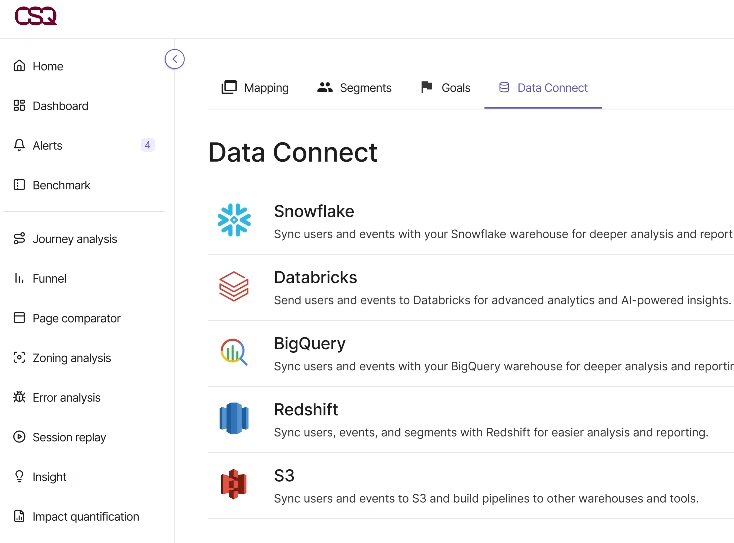
Tools that sync behavioral data to external systems need particular attention. For example, Contentsquare's Data Connect feature, which syncs behavioral data to external data warehouses, should be configured to respect consent scopes, ensuring only consented user data flows into downstream tools where it might be used for purposes beyond the original collection intent.
How do teams use consented customer journey data to improve conversion?
Once consent is captured and enforced correctly, the data that remains is more valuable. It comes from users who knowingly agreed to be tracked, so it reflects genuine behavior without the noise of accidental or coerced consent.
Each team uses this data differently, but all depend on the same foundation: a clean, consented dataset that accurately represents users who chose to participate.
How do marketing teams use consented experience data to optimize campaigns?
Marketing teams use consented experience data to understand which campaign-driven journeys actually convert and which create friction that erodes ROI. Three practical applications demonstrate the value.
First, they identify which landing page variants perform best among consented users, ensuring optimization decisions are based on complete behavioral data. Second, they analyze where paid traffic drops off before converting, pinpointing exact steps where expensive clicks fail to turn into customers. Third, they validate A/B test results against a clean user population.
![[Visual] AB test](http://images.ctfassets.net/gwbpo1m641r7/EoYER2ZCVhvPAzfbjR6ql/fc6a235a2b62f694a145fa26862258bd/AB_Test.png?w=1106&q=85&fit=scale&fm=avif)
Without consent enforcement, A/B test results may be skewed by users whose behavior isn't being fully tracked. Journey Analysis is a visualization tool that maps how users navigate through multiple pages of your site in sequence. This capability lets marketing teams trace the paths consented users take from campaign landing pages to conversion, identifying where drop-offs occur across multiple navigational steps.
How do product teams use consented experience data to prioritize fixes?
Product teams use consented experience data to understand feature adoption and identify friction in user flows. Consented data provides 3 critical insights for product prioritization.
Teams track which features consented users engage with most, revealing true usage patterns rather than inflated metrics from bot traffic. They identify rage-clicks or repeated interactions that signal confusion, catching usability issues that might not surface in user testing. Most importantly, they prioritize fixes based on how many real users hit a specific friction point.
Some product analytics platforms use automatic event capture, which records all user interactions without requiring developers to manually tag each action. Contentsquare's Product Analytics capability—powered by Heap's automatic event capture—records all user interactions without manual tagging, meaning product teams can retroactively analyze consented user behavior without needing to instrument every feature in advance. This capability becomes crucial when you need to investigate an issue that wasn't anticipated when tracking was implemented.
How do UX teams use consented experience data to remove friction?
UX teams use consented experience data to validate design decisions with real behavior rather than assumptions. Three use cases illustrate how consented data improves design decisions.
Designers watch session replays to see where users hesitate or abandon, observing actual friction rather than hypothetical pain points. They use heatmaps to identify which elements get attention and which are ignored. They test whether a redesigned flow reduces error rates among consented users.
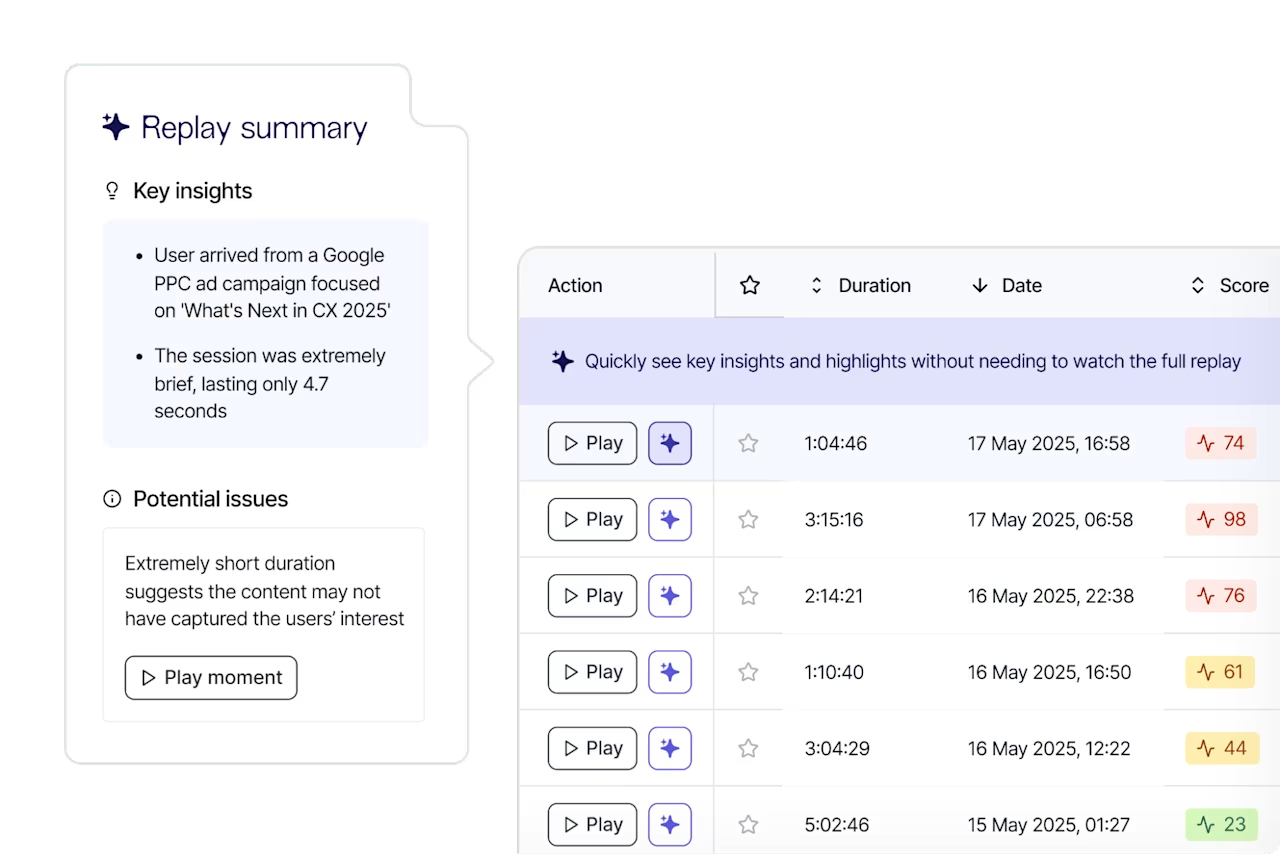
The key advantage of consented data for UX teams is that it reflects deliberate, aware behavior. Session Replay is a tool that records and plays back individual user sessions, showing exactly what users clicked, scrolled, and interacted with. Session Replay in Contentsquare lets UX teams watch recordings of real user sessions—including clicks, gestures, and errors—to see exactly where friction occurs. When combined with AI-powered session summaries in Sense Chat, teams can surface patterns across large volumes of replays without watching every recording manually.
How do analytics teams use consented experience data to protect data quality?
Analytics teams face a specific challenge with consent. Opt-outs create gaps in the data, and those gaps can distort conversion rates, funnel metrics, and cohort comparisons if they're not accounted for.
Three approaches help analytics teams maintain data quality despite consent-driven gaps. First, teams segment consented versus non-consented populations to understand the gap, quantifying how much data they're missing. Second, they employ privacy-first analytics modes like cookieless measurement or aggregated behavioral data to maintain baseline visibility. Third, they document consent rate trends so sudden drops in analytics data can be attributed to consent changes rather than product problems.
AI-powered analytics tools allow teams to ask questions about their data in plain English rather than building complex queries manually. Contentsquare's Sense—the platform's AI capability—can be used to query consented behavioral datasets in natural language, allowing analytics teams to ask questions like "where do consented users drop off in the checkout flow?" without building manual segments from scratch.
How do you prove you honored consent and retention rules?
Proving compliance isn't just about what you collected. It's about demonstrating you had the right to collect it, kept it only as long as permitted, and deleted or corrected it when asked.
What should your audit trail include?
Audit trails serve two purposes. They protect you in a regulatory investigation by providing timestamped proof of consent. They also let you identify when a user's consent record is outdated and needs renewal.
An audit trail is the documented record of every consent decision a user made, along with the context. Five fields form the backbone of a defensible audit trail:
User or session identifier: a pseudonymous ID linking the consent record to the data collected
Consent state: accepted, declined, or partial with scopes specified
Timestamp: the exact datetime the choice was recorded
Policy version: the privacy policy version in effect when consent was given
Collection surface: where consent was captured, like web banner, app prompt, or preference center
How do you handle deletion and consent changes without data leaks?
When a user withdraws consent or submits a deletion request, which is a right guaranteed under GDPR and the California Consumer Privacy Act (CCPA), their data must be removed from every system. A 3-step process handles these requests without creating data leaks.
First, identify all locations where the user's data lives: analytics platforms, data warehouses, CDPs, and third-party vendor exports. Second, trigger deletion across all systems simultaneously, not sequentially. Sequential deletion creates a window where data exists in some tools but not others. Third, confirm and document that deletion was completed, including confirmation from third-party vendors, and store that confirmation in your audit trail.
Consent changes, where a user narrows their preferences rather than withdrawing entirely, require the same cross-stack update process. Instead of deletion, you're updating the consent scope attached to that user's records going forward.
Put it into practice
Building a consented experience data program doesn't require rebuilding your entire analytics stack. It requires making deliberate decisions at 5 points in your current workflow.
Step 1: Map where consent is captured and where experience data is collected
Audit every surface where you collect experience data and every point where consent is or should be captured. The goal is a simple map showing whether consent actually gates collection at each touchpoint.
Start with your tag management system and work outward. List every tag that fires, when it fires, and what consent check gates its execution.
Step 2: Define what data you collect and what you exclude
Apply data minimization, which is the principle that you collect only what you need for a specific, stated purpose. For each data type like session recordings, click events, scroll depth, and form interactions, document the purpose it serves and confirm that purpose is disclosed in your consent prompt.
If you can't state a clear purpose for collecting specific data, don't collect it. This discipline reduces compliance risk and simplifies your analytics.
Step 3: Add enforcement checks across analytics, replay, and exports
Using your map from Step 1, add consent state checks at every collection and export point. Configure your tag management system to fire analytics tags only when consent is confirmed. Set your session replay tool to start recording only after opt-in. Review every data export or integration to confirm it checks consent scope before sending.
If your team uses Contentsquare for session replay and journey analysis, this is the step where you confirm that Contentsquare's data collection is configured to respect your CMP's consent signals. Contentsquare supports privacy-first collection modes that can be aligned with your consent setup. Reference the Privacy Center for configuration guidance.
Step 4: Validate results with a consented measurement approach
After enforcement is in place, check that your analytics data reflects only consented users. Compare key metrics like conversion rates, funnel drop-offs, and session depth before and after enforcement to understand the gap.
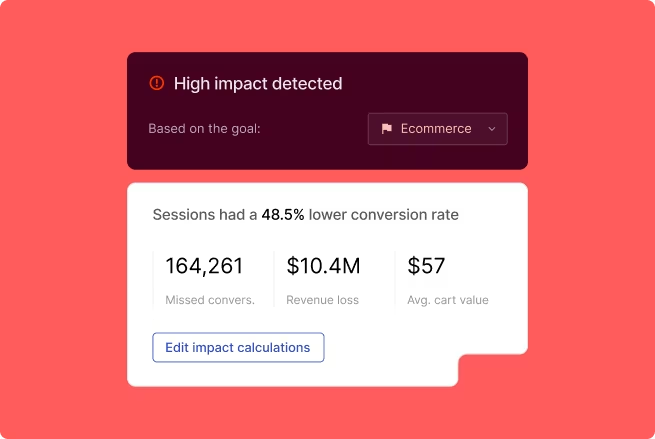
If metrics shift significantly, investigate whether the change reflects real behavior or a data quality correction from removing unconsented sessions. Impact Quantification is a capability that translates behavioral patterns into estimated revenue impact. Contentsquare's Impact Quantification feature—which connects behavioral signals to revenue impact—is most reliable when the underlying dataset is consented and clean. This is why consent enforcement directly improves the quality of business decisions made from experience data.
Step 5: Roll out a shared playbook for marketing, product, UX, and privacy
Consolidate your consent data program into a documented playbook that each team can follow. The playbook should cover which data types require which consent scopes, how to submit a deletion request, where audit trail records are stored, and who owns consent enforcement when a new tool is added.
Cross-functional alignment prevents the most common failure mode: one team adding a new analytics tag that bypasses the consent logic everyone else worked to build.
Frequently asked questions on consented experience data
It depends on your jurisdiction and the type of behavioral data you're collecting. Under GDPR, tracking user interactions like clicks and scrolls typically requires explicit consent, while some regions permit analytics under a "legitimate interest" basis if the data is anonymized and the purpose is proportionate.
![[Visual] Contentsquare's Content Team](http://images.ctfassets.net/gwbpo1m641r7/3IVEUbRzFIoC9mf5EJ2qHY/f25ccd2131dfd63f5c63b5b92cc4ba20/Copy_of_Copy_of_BLOG-icp-8117438.jpeg?w=946&q=85&fit=scale&fm=avif)
We’re an international team of content experts and writers with a passion for all things customer experience (CX). From best practices to the hottest trends in digital, we’ve got it covered. Explore our guides to learn everything you need to know to create experiences that your customers will love. Happy reading!
![[visual] fullstory alternative](http://images.ctfassets.net/gwbpo1m641r7/7bASJZ9MHcxtfTnp6c3b45/855f561cfd4ddc3d34212625d24f7a90/alternative-fullstory-blog.png?w=624&q=85&fit=scale&fm=avif)