
Too many analytics platforms promise fast time to value but deliver a months-long slog instead. So teams get stuck in endless implementation cycles or can’t connect what they see in the data to outcomes that leadership actually cares about—like increased revenue or reduced churn. The result? Tools end up underused, budgets are questioned, and opportunities slip through the cracks.
Contentsquare is different. With the right onboarding approach, data, product, and marketing teams consistently move from implementation to measurable wins in 90 days—not 6 months, not a year.
In this guide, you learn exactly how to get there with a 2-phase onboarding timeline that hundreds of our customers have used to unlock value fast, complete with the metrics to watch. By the end, you’ll have a clear playbook for turning Contentsquare into your team’s competitive advantage.
Key insights
Quality data is the foundation: the first 6 weeks focus on proper integration, customized tracking, and quality assurance so you can trust the insights you uncover
Quick wins build momentum: once you’ve run your first analysis, you see the true value of Contentsquare—and build enthusiasm for experimentation and scaling
Support is built in: you have a dedicated team of experts by your side, as well as e-learning resources, live workshops, and community forums to get answers to your most pressing questions
The first 6 weeks: implement and establish value
The first month is all about integrating Contentsquare into your tech stack. Think of it as building the foundation of a house—once you complete that step correctly, everything else becomes much easier. Accurate setup + quality data = trusted insights.
Depending on your company’s unique needs and the products you’ve selected, onboarding and implementation may take longer (or shorter!) than outlined here. This is what we typically see, but your onboarding team will customize a timeline for you.
👉What you’ll experience during Weeks 1–6:
Attend alignment meetings: kick things off with 3 short meetings between your team and ours: an executive alignment call to create a strategic plan for your long-term success; an onboarding call to discuss the onboarding approach; and an implementation call to make sure everyone understands the technical scope, roles, and success criteria
Attend implementation workshops: learn best practices for deploying the Contentsquare tag, how to configure Smart Capture to capture user interactions automatically, set up integrations, and understand how data flows in and out of Contentsquare
Get platform access and training: receive your login credentials, and start learning more about what Contentsquare does while implementation continues behind the scenes. Work through self-paced e-learning modules, attend webinars, and participate in use case workshops to discover how to analyze checkout flows or create alerts.
Validate data quality: having data you trust in Contentsquare is key to your success. We have multiple approaches to compare Contentsquare’s data with traditional analytics sources, giving you peace of mind that you can trust the insights you’re seeing in Contentsquare.
🤝The support you’ll have: you don’t have to figure any of this out on your own. We provide a dedicated onboarding team—including an onboarding project manager, implementation consultant, and training consultant to help you navigate the technical ins and outs while sticking to your timeline. Plus, you have access to our online help center so you can find quick answers to common questions.
The key selling point of Contentsquare was its ease of implementation and impressive client success program. Knowing we’d get dedicated support from Contentsquare while onboarding and upskilling made the decision easy.
💡Pro tip: take the fastest path to success by being prepared ahead of time. The teams that get the most value out of Contentsquare’s platform set aside time to manage these tasks before onboarding begins:
Identify your business goals and ways your site could improve to support them
Assemble an implementation team, including a project manager, to meet with the Contentsquare onboarding support team
Set aside time for your team to participate in workshops and testing sessions—this usually takes just a few hours and pays off with a smoother rollout
Plan around upcoming blockers, like code freezes or holidays
Locate where personally identifiable information (PII) lives on your site, so we can find an implementation path that protects and avoids it
Share a product overview with your teams to build product familiarity and excitement
Identify your key users who will be part of the Contentsquare training program
Weeks 7–12: from adoption to scale
With your foundation in place, it’s time to put Contentsquare to work. Within this next phase, you’ll shift from exploring the platform to actively using it to solve the problems that plague you—and see real results to celebrate with your team. 🙌
1. Get confident in the platform
The goal of this stage is for your team members to navigate Contentsquare with confidence and know where to look for answers when questions come up. When you can explore the platform without constantly needing support, you uncover insights faster and feel empowered to dig deeper into the data.
Here’s what that might look like:
Explore the platform: the best way to learn is to try, especially with a platform as intuitive as Contentsquare. Select items in the sidebar menu, such as Sense Chat or Insights, to familiarize yourself with the user interface and all the features Contentsquare has to offer.
![[Visual] Sidebar-Journeys-Sense-Chat](http://images.ctfassets.net/gwbpo1m641r7/1omSOfv6Ih6cp2wvbLB98w/f504965b9567dff80e856fb8d927682c/Sidebar-Journeys-Sense-Chat.png?w=3840&q=100&fit=fill&fm=avif)
Explore Contentsquare’s sidebar menu to gain practice with navigating the platform and get a better sense of each tool, including Journeys with Sense Chat
Attend live training sessions: work directly with an experienced, dedicated Contentsquare training consultant who guides you through foundational platform training and use-case workshops tailored to your team’s needs. These live sessions are designed to accelerate adoption and help you apply what you’re learning to real business problems.
Dive into e-learning: need support while exploring? You have access to all kinds of resources through your Essential Learning Kit, including helpful videos, how-to articles, and community forums.
Dig deep into role-specific use cases: determine ways to use Contentsquare in your role. For example, if you’re a digital marketer, discover how to set up a custom acquisition dashboard to track bounce rates and conversion rates across channels. If you’re a UX designer, learn how to use Form Analysis to see which form fields cause users to drop off and where abandonment happens.
📊 Metrics to watch: attendance to onboarding calls, adoption, the number of users who get certified in Contentsquare’s trainings and actively explore the platform, login frequency, questions asked in internal channels (fewer questions over time = growing confidence)
💡Pro tip: get the hang of Session Replay and Heatmaps—two of Contentsquare’s most essential tools.
Heatmaps show you a colorful aggregate view of where users click, tap, scroll, and hover. When you spot something interesting (like an unexpected click pattern or a frustration hotspot) in a heatmap, click directly into the linked session replays to watch individual experiences and understand the ‘why’ behind the behavior.
![[Visual] Session replay heatmaps](http://images.ctfassets.net/gwbpo1m641r7/7hZPhyLBOlTIk22lBfy8d3/8aa1430ae11dfb839e6f2192fd6c9c7c/Screenshot_2024-11-06_at_16.15.10.png?w=2048&q=100&fit=fill&fm=avif)
Easily switch between heatmaps and session replays with the click of a button to dig deeper into the user experience.
💡Pro tip: download our CS Live Chrome extension to overlay a heatmap onto any page of your site to see where users engage and key UX metrics like click rates and revenue impact right onto your website as you browse it. Instead of toggling between your site and the Contentsquare platform, you can create zones and identify friction points on the spot. It’s perfect for real-time analysis during team reviews or when you need quick answers without context-switching.
![[Visual] CS Live](http://images.ctfassets.net/gwbpo1m641r7/4J4Pu62Zqe8u3SyuJmRmMZ/2e182042538a2139488579f8c2e7ec79/CS_Live.png?w=3840&q=100&fit=fill&fm=avif)
2. Uncover your first high-impact opportunities
Now that you know your way around the platform, you can identify 2–3 high-impact opportunities backed by data and quantified business impact.
Sounds exciting, right? This is where Contentsquare starts to move from ‘an interesting tool’ to ‘revenue driver.’ By connecting user behavior to business outcomes, you build a case for optimization and experimentation.
Here’s what that might look like:
Map user journeys: use the Journey Analysis tool to visualize top user flows and spot exactly where drop-offs happen. This gives you the full context around problem areas and helps you figure out where your website could benefit from improvements.
Ask questions in plain language: ask our AI-powered analytics assistant Chat with Sense to analyze journeys for you. Ask a question like, ‘What do users do after visiting our contact page?’ Or, ask Sense to analyze your data and find improvement opportunities.
Measure what matters most: use our Impact Quantification to figure out which experiences on your site have the biggest impact on conversions or revenue—then create a short list of your highest impact opportunities.
📊Metrics to watch: number of insights documented, opportunities quantified with dollar values
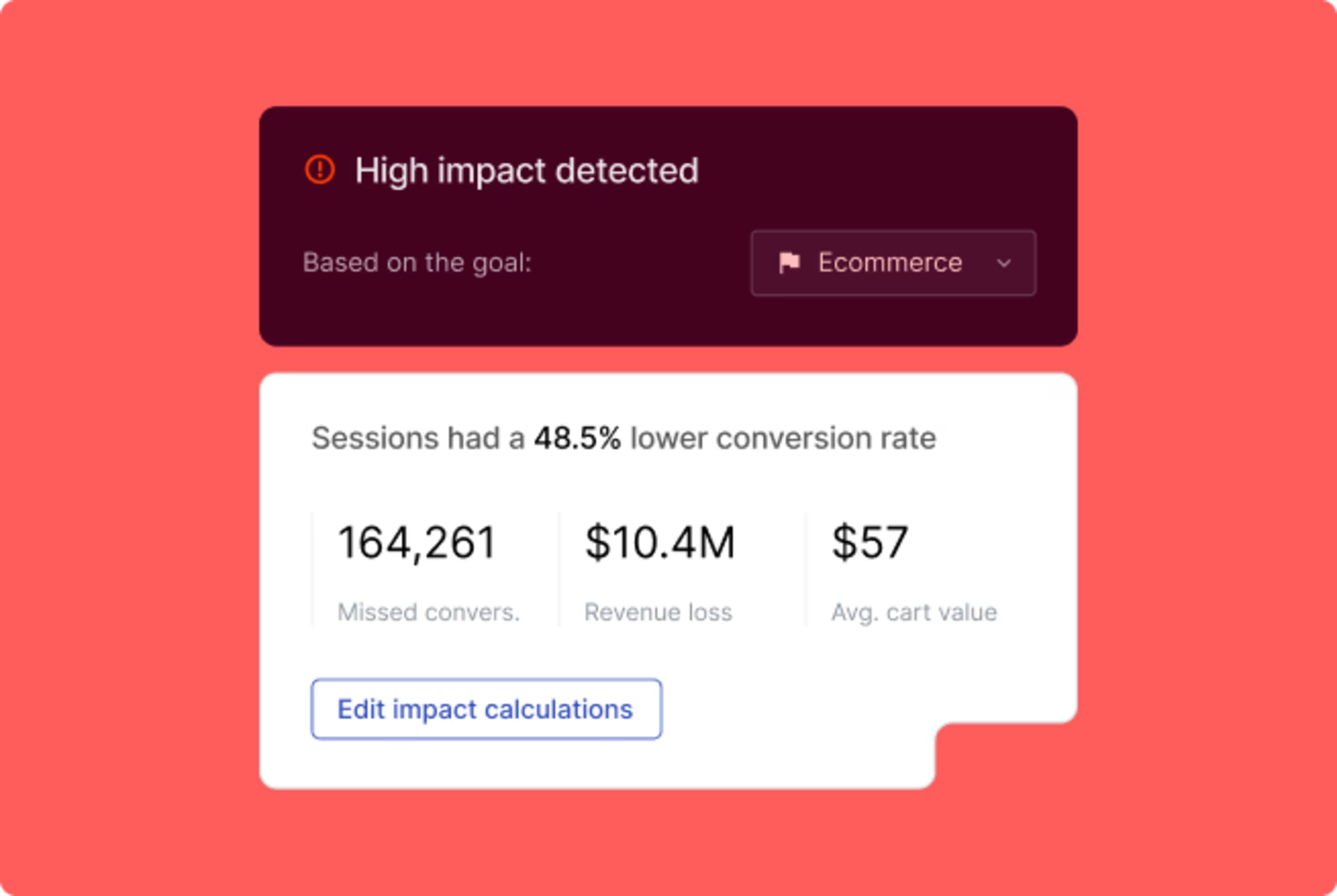
Use Contentsquare’s Impact Quantification tool to gauge which changes have the biggest impact or which errors are causing the biggest damage
3. Ship your first quick win
Pick one opportunity from your high-impact list and get it live. This helps you build momentum and gain buy-in from stakeholders.
Here’s what that might look like:
Optimize a high-traffic page: use Heatmaps on a critical page, like a product detail page or checkout, to identify an element that causes confusion or gets little attention. Then, make a targeted improvement, like creating a simpler call to action (CTA) or moving key information above the fold.
Fix an obvious obstacle: use Contentsquare’s Frustration Score to surface the top areas of friction on your site. This provides a clear, data-backed list of potential fixes to make—no backlog prioritization needed.
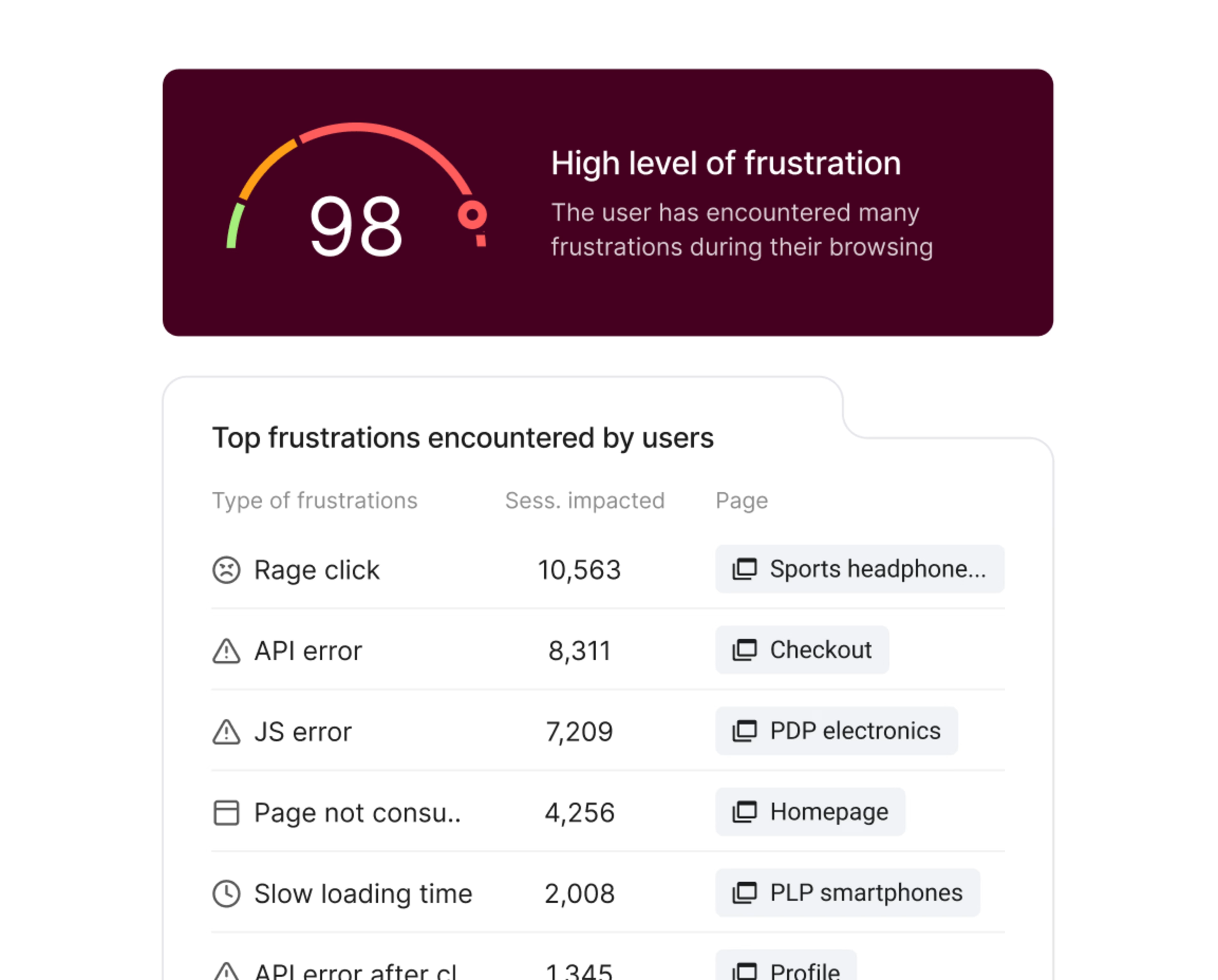
Make the customer experience easier by fixing users’ biggest frustrations
Pro tip: identify power users in each department who can spread the word about Contentsquare and show others how effective it can be. Consider recognizing these champions with special perks like gift cards or recognition in the company newsletter.
📊Metrics to watch: conversion lift, reduced frustration scores, decreased bounce rates on optimized pages
🔥NURO Hikari sees a small change making a big difference
Sony Network Communications’ NURO Hikari team used Contentsquare Heatmaps to analyze a mobile-optimized landing page. The heatmaps showed that users were tapping non-linked areas of service cards. To fix the issue, they decided to make the entire card clickable (versus just the ‘View details’ button).
The result? Click-through rates (CTR) increased by 2–3 points, resulting in a +15% uplift on the high-traffic page.
![[Visual] NURO win Contentsquare](http://images.ctfassets.net/gwbpo1m641r7/MxPoOvZPaaYJaIRA2VDFL/47efaecb50e0dd55c0b74155d33c9723/NURO_win_Contentsquare.png?w=3840&q=100&fit=fill&fm=avif)
NURO Hikari made a small fix that led to major CTR improvements using heatmap data
4. Establish your experimentation rhythm
Once you’ve shipped a quick but exciting win, it’s time to establish a repeatable process for testing and iterating. Experimentation supports your decisions, reduces risk, and helps you adapt to changing user behavior—a must-have for boosting conversions and delighting customers.
Here’s what that might look like:
Set up A/B test tracking: if you have integrated your A/B testing platform (like Kameleoon or Optimizely) with Contentsquare, it’s easy to compare user behavior between variants
Run weekly reviews: set a recurring meeting—same day and time every week—to review test results and decide which experiments to launch next
📊Metrics to watch: test velocity (number of tests per month) or cumulative revenue or conversion lift
💡Pro tip: use Contentsquare Surveys to understand why your winning tests succeed. Use on-page surveys during experiments to collect direct, qualitative feedback about what users think of each variant. This voice of customer data takes the guesswork out of optimization, helping you generate stronger hypotheses for future tests so you can double down on what works.
![[Visual] Analyze-Survey-results](http://images.ctfassets.net/gwbpo1m641r7/3YFo9vZ2ivJa7JzN2GYKO1/adfff684acb447a922ba05a34d369e2e/Analyze-Survey-results.png?w=3840&q=100&fit=fill&fm=avif)
Get insights on how to improve your site or product by surveying your customers
5. Prove value and scale across teams
By week 12, you should have measurable wins and a repeatable process. Now it’s time to turn those early successes into a company-wide return on investment (ROI) narrative that gets other teams on board.
Here’s what that might look like:
Revamp your processes: make Contentsquare an integral part of how your teams operate day to day. For example, use Error Analysis data in sprint planning to prioritize fixes, or view heatmaps side by side to see which A/B tests performed better and why.
Celebrate wins: gamify adoption by setting up leaderboards for top users or shouting out wins in team- or company-wide emails
Set up AI-powered alerts: create custom alerts for key metrics like error rates or conversion rates. Send notifications to Microsoft Teams or Slack, so team members can stay informed and collaborate quickly and effectively.
Save time with summaries: use Contentsquare’s AI-powered Session Replay Summaries tool to distill hours of footage into insights, issues, and trends. Then, filter by Frustration Score to prioritize the most urgent replays to watch.
📊 Metrics to watch: number of active users across teams, test velocity across departments, number of alerts wet up, program adoption rate.
When we first partnered with Contentsquare, it was just our team using it. But now other teams are beginning to take advantage of it—from across brand marketing, CRM, performance marketing, and customer service development.
💡Scale your experimentation program with AI: run more tests, faster, with agent-to-agent A/B testing. Use Contentsquare to identify a problem area, like a low-performing conversion funnel. Then, prompt Sense Analyst to build a test in Optimizely or Kameleoon. The agents work together to create an experiment based on your specifications, letting you run more experiments with less manual effort across teams.
![[Visual] Agent-to-agent-testing](http://images.ctfassets.net/gwbpo1m641r7/6XOlTB9cIRMuMcvSAqAfKh/db65547f789e8c510e36507613c429b9/Agent-to-agent-testing.png?w=3840&q=100&fit=fill&fm=avif)
Create an A/B test using agent-to-agent technology with a click of a button
Keep the momentum going
Getting value from Contentsquare shouldn’t take months of grunt work and cajoling your staff to participate. With the right preparation and our dedicated support, you can move from implementation to measurable site or product improvements in just 90 days.
That’s the solid start you need to see Contentsquare catch on and scale across teams—and see your investment really pay off. 👏
FAQs about your first 90 days with Contentsquare
Now that you got Contentsquare, we want you to get value from it fast. We aim for you to experience your first wins and feel ready to scale across teams within 90 days.
We might be different than what you’ve experienced in the past. Mid-market and enterprise businesses sometimes invest in platforms—and then have to wait for months and months before onboarding and implementation (let alone adoption and scaling usage). That’s too long.
![[Visual] Contentsquare's Content Team](http://images.ctfassets.net/gwbpo1m641r7/3IVEUbRzFIoC9mf5EJ2qHY/f25ccd2131dfd63f5c63b5b92cc4ba20/Copy_of_Copy_of_BLOG-icp-8117438.jpeg?w=1920&q=100&fit=fill&fm=avif)
We’re an international team of content experts and writers with a passion for all things customer experience (CX). From best practices to the hottest trends in digital, we’ve got it covered. Explore our guides to learn everything you need to know to create experiences that your customers will love. Happy reading!