
What is user feedback and why does it matter?
User feedback is the information, opinions, and suggestions provided by people who interact with your product every day. Without it, you are making decisions based on assumptions rather than reality. It drives product improvement, builds user trust, reduces churn, sparks innovation, and helps you adapt faster than competitors. Ignoring it means risking building something nobody wants.
Types of user feedback and what to look for in a tool
Feedback comes in three forms. Direct feedback is explicit input from users through surveys, interviews, usability testing, and support interactions. Indirect feedback is behavioral data gathered through observation, such as analytics, heatmaps, and session recordings. Contextual feedback is captured in the moment, through in-app micro-surveys or pop-up prompts triggered by specific actions. A strong strategy combines all three: direct feedback tells you why, indirect shows you what, and contextual captures how users feel in the moment.
When evaluating tools, focus on three things: data collection versatility (surveys, in-app widgets, session recordings, heatmaps), analysis and reporting quality (dashboards, sentiment analysis, segmentation, trend tracking), and ease of use and integration with your existing CRM, analytics, and communication platforms. A tool that excels across all three will not only capture better feedback, but ensure your team actually uses it.
How to choose the right user feedback tool
The right tool isn't the "best" one on the market, it's the one that fits your specific context. Four factors should guide your decision.
Budget is usually the first filter. Free and freemium options like SurveyMonkey or Canny suit startups and small teams. Mid-range tools like Typeform, Qualaroo, and AskNicely cover most SMB needs. Enterprise solutions like Contentsquare, Pendo, and UserTesting are built for organizations with complex requirements and larger budgets. Always use free trials, understand the pricing model, and factor in ROI before committing.
Your goals should drive the shortlist. To improve UX and identify usability issues, look at UserTesting, Contentsquare, FullStory, or Usabilla. To measure NPS, CSAT, or CES, consider SurveyMonkey, AskNicely, Qualaroo, or Pendo. For market research, SurveyMonkey and Typeform work well. For roadmapping and feature prioritization, Canny or Pendo are strong choices. For contextual or in-page feedback, Qualaroo and Usabilla are built for that.
Integration requirements matter more than most teams expect. Identify which connections are non-negotiable: your CRM, project management tools, analytics platforms, communication tools, and marketing automation. Where possible, prioritize native integrations over Zapier workarounds for reliability.
User experience applies on both sides. For your users, the feedback mechanism should be non-intrusive, mobile-responsive, and easy to complete. For your team, the interface should be intuitive and setup straightforward. Test both sides during your trial and involve the colleagues who will use it regularly. A tool your team finds frustrating will go unused, regardless of its features.
The top 10 user feedback tools for 2026
1. Qualaroo
In-context website and app feedback tool: Qualaroo captures feedback at the exact moment users experience your product. Its signature "Nudges" are non-intrusive pop-up surveys triggered by specific behaviors, page visits, or time spent on a page, making the feedback highly relevant and timely. Advanced targeting lets you reach the right users based on demographics, behavior, or integrations, and built-in AI surfaces themes and sentiment from open-ended responses automatically.
What it does well: Qualaroo is exceptionally strong at capturing contextual, in-the-moment feedback without disrupting the user experience. It supports standard metrics like NPS, CSAT, and CES, and integrates with tools like Salesforce, Slack, HubSpot, and Zapier.
Watch out for: It is primarily built for website and in-app use cases, so it won't cover session recording or broader usability testing. It can also be pricier than simpler survey tools.
Best for: Product managers, UX/UI designers, and marketing teams who need specific, contextual feedback directly from users to optimize digital experiences.
2. Contentsquare
Behavioral analytics and digital experience platform: Contentsquare (hi 👋🏼) doesn't ask users what they think, it shows you what they do. Rather than relying on direct feedback, it gives teams a complete, visual picture of how users interact with every element of a website or app, across sessions, devices, and channels. The platform is built around four core pillars: Experience Analytics, Product Analytics, Experience Monitoring, and Voice of Customer, making it one of the few tools that brings quantitative behavior data and qualitative feedback together in a single platform.

Experience Analytics covers the behavioral layer: Session Replays, zone-based Heatmaps, Journey Analysis, and Conversion Funnels. Session Replays allow teams to watch anonymized user sessions and pinpoint exactly where frustration or confusion occurs.
![[Asset] Session replay summaries](http://images.ctfassets.net/gwbpo1m641r7/37Slb23dAdFsAgNItuUNPc/5ad533ecdc801e082aeef8bfaca324ce/sessionreplaysummary.webp?w=3840&q=100&fit=fill&fm=avif)
Zone-based Heatmaps measure engagement on every clickable element on a page, from buttons and banners to CTAs and content blocks, so teams can assess what is driving or blocking user action.
![[Visual] Heatmaps user frustration](http://images.ctfassets.net/gwbpo1m641r7/1Ps6U3MhY0EczsbUpanFm1/9ff8e728c83ba304a60283affdd167f9/Screenshot_2025-03-03_020656.png?w=3840&q=100&fit=fill&fm=avif)
Journey Analysis visualizes how visitors move through a site page by page, from entry to exit, making it easy to identify drop-off points and friction in key flows like onboarding or checkout.
Product Analytics goes deeper, tracking user behavior across sessions and devices to answer questions like what drives retention, where users drop off over time, and which features are actually being used. Advanced journey analytics, user segmentation, and Sense, Contentsquare's AI, that runs analysis on demand give product teams a powerful toolkit for understanding and improving the product experience. Teams can build custom segments based on behavior or third-party data to compare journeys and tailor experiences accordingly.

Experience Monitoring addresses the technical side, detecting JavaScript errors, API errors slow page loads, and other performance issues that silently damage user experience and conversion rates. Proactive AI alerts flag anomalies such as sudden drops in engagement or spikes in exit rates, allowing teams to respond before issues escalate.
![[Visual] error analysis](http://images.ctfassets.net/gwbpo1m641r7/2RHGIcGhjdzYE7tMVVWzzg/2bc7b35d22f6b8a0806a09a23f6f7c71/error_analysis.avif?w=3840&q=100&fit=fill&fm=avif)
Voice of Customer rounds out the platform by adding a qualitative layer through AI-powered, customizable surveys. Teams can collect feedback on key conversion pages, run exit-intent surveys to understand why users are leaving, and measure NPS over time. AI-driven sentiment analysis then processes responses automatically, so teams can act on qualitative insights without manual review.
Across all four pillars, Contentsquare's Impact Quantification feature ties UX issues and behavioral patterns directly to business outcomes like revenue and conversion rate, helping teams prioritize the changes that matter most. The platform also offers 100+ pre-built integrations and supports cookie-less tracking for privacy-conscious teams.
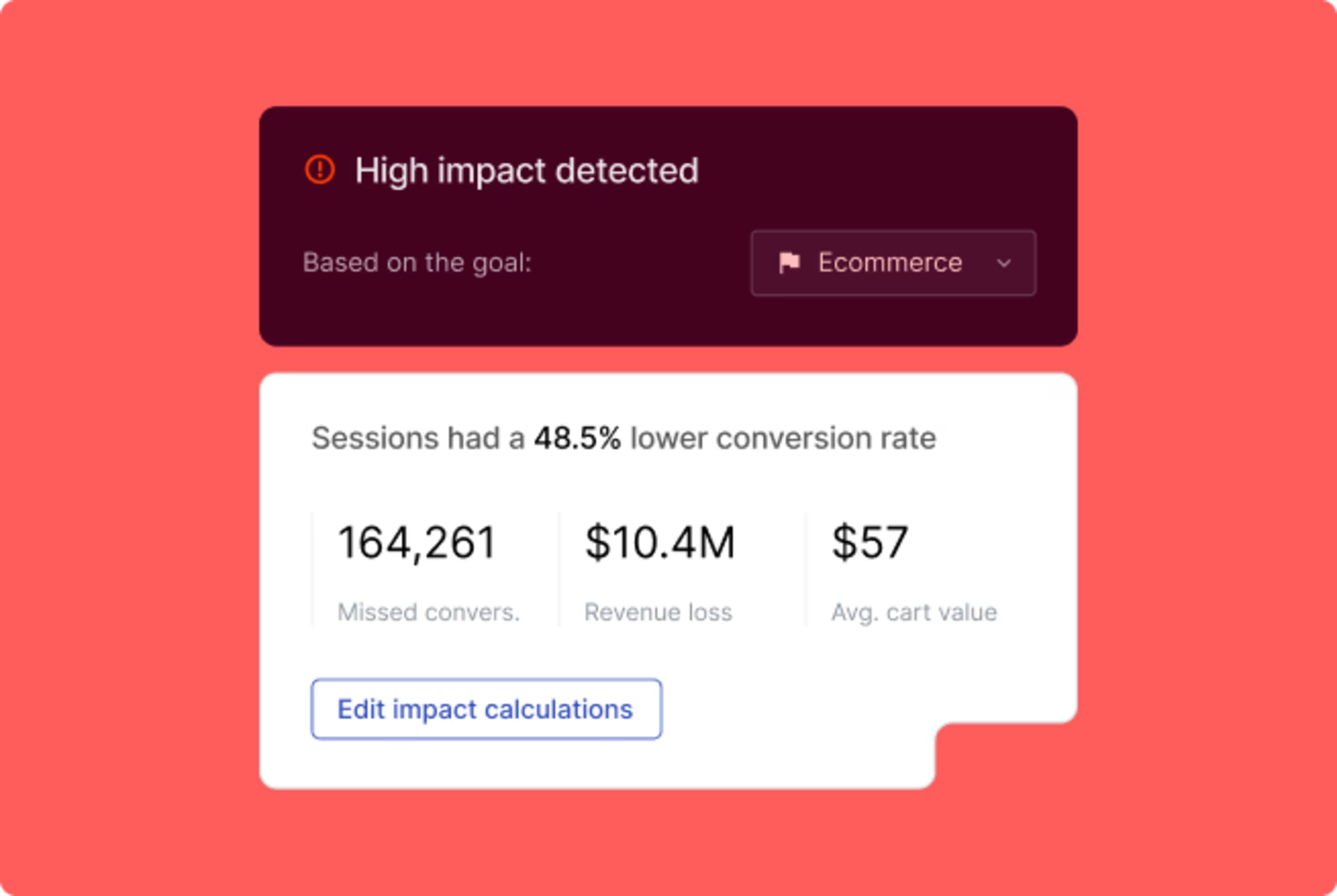
What it does well: Contentsquare is unmatched for understanding user behavior at a deep level. It combines behavioral analytics, technical monitoring, and voice of customer capabilities in a single platform, quantifies the business impact of UX problems, and provides AI-driven insights that reduce the time between identifying an issue and acting on it. It is particularly strong for validating A/B tests, optimizing conversion journeys, and understanding how different user segments experience a product.
Watch out for: It comes with enterprise-level pricing and a learning curve that reflects the breadth of its feature set. Teams looking for a lightweight survey tool or basic analytics will likely find it more than they need.
Best for: Large enterprises and digital teams focused on optimizing website and app performance, understanding user behavior at a granular level, and measuring the business impact of UX changes across web and mobile.
3. UserTesting
Human insight and usability testing platform: UserTesting connects you with real users from a global contributor network who match your target demographic, and captures their live reactions as they interact with your product, prototype, or website. Tests can be moderated (live conversations) or unmoderated (recorded task completion), and results are typically available within hours. Highlight reels make it easy to clip and share the most important moments with your team.
What it does well: The platform excels at delivering rich qualitative insights, fast. Watching and hearing real users interact with your product reveals genuine frustrations and mental models that no survey can fully capture. It also supports prototype testing and mobile app testing across iOS and Android.
Watch out for: Premium pricing can make frequent testing costly, especially for smaller teams. It is primarily a qualitative tool, so it lacks robust quantitative analytics like heatmaps or survey data.
Best for: UX researchers, product managers, designers, and marketers who need deep qualitative insights to validate designs, identify usability issues, and understand how real users think.
4. SurveyMonkey
Versatile and widely used online survey platform: SurveyMonkey is one of the most established survey tools on the market, offering a broad range of question types, thousands of pre-built templates, and flexible distribution options across email, web, social media, and embeddable forms, making it a versatile feedback platform. Logic and piping features allow for dynamic, branching surveys, and built-in analytics provide charts, graphs, and statistical summaries. AI-powered analysis can also help identify themes from open-ended responses.
What it does well: It is extremely user-friendly, highly scalable, and suitable for almost any survey use case, from customer satisfaction to employee engagement and market research. Entry-level plans are affordable, and the template library significantly speeds up setup.
Watch out for: The free plan is quite limited, and advanced features require higher-tier subscriptions. It is less suited for contextual, in-app feedback compared to specialized tools, and heavy use can contribute to survey fatigue among respondents.
Best for: Businesses and individuals of all sizes who need a reliable, easy-to-use platform for gathering broad quantitative and qualitative data through surveys.
5. FullStory
Digital experience intelligence platform: FullStory blends session replay, heatmaps, and behavioral analytics into a single platform that gives teams a complete picture of the user journey. It automatically detects frustration signals such as rage clicks and dead clicks, and its Omnisearch feature lets you search across all recorded sessions using any event, text string, or user attribute. Conversion funnels, journey maps, and developer-friendly integrations make it as useful for engineers as it is for product and design teams.
What it does well: FullStory is highly effective at combining qualitative and quantitative behavioral data in one place. Its proactive frustration detection and powerful segmentation make it easy to pinpoint and prioritize UX issues, and it is especially valuable for debugging and A/B test analysis.
Watch out for: Handling user data requires careful attention to privacy regulations and compliance. The volume of data available can also feel overwhelming for new users, and the platform does not offer built-in survey or direct feedback collection.
Best for: Product teams, UX researchers, engineers, and digital marketers who want a deep, visual understanding of user behavior and the ability to quantify the impact of UX issues.
6. Typeform
Conversational and visually engaging survey tool: Typeform transforms surveys into a conversational experience by presenting one question at a time, which significantly improves completion rates and user engagement. Its forms are known for their elegant design, and extensive customization options allow teams to align them closely with their brand. Conditional logic creates dynamic question paths, and unique question types like picture choices, opinion scales, and payment fields make it versatile beyond traditional surveys.
What it does well: Typeform is outstanding for maximizing response rates and creating a positive feedback experience. It works well for surveys, quizzes, lead generation forms, and even order forms, and integrates smoothly with tools like Slack, HubSpot, Mailchimp, and Google Analytics.
Watch out for: Advanced features come at a higher cost, and the one-question-at-a-time format may not suit very long or complex surveys. Its reporting and analytics capabilities are also less robust than those of dedicated analytics platforms.
Best for: Marketing teams, product managers, and small businesses looking for an engaging, aesthetically pleasing way to collect feedback, generate leads, or create interactive forms with high completion rates.
7. Usabilla (now part of Medallia)
In-page contextual feedback tool: Usabilla, now integrated into the Medallia experience management platform, enables users to provide feedback directly on specific elements of a webpage or app. Visual feedback buttons let users pinpoint exactly what they are reacting to, and a screenshot capture feature adds further precision. Targeted surveys can be triggered by user behavior or segment, exit surveys catch users before they leave, and a mobile SDK supports in-app feedback collection on iOS and Android.
What it does well: Usabilla excels at capturing highly specific, contextual feedback tied to exact page elements. It supports both qualitative comments and quantitative ratings, and when used within the broader Medallia platform, it benefits from advanced AI-driven analytics and enterprise-grade capabilities.
Watch out for: Standalone Usabilla is increasingly uncommon, and accessing its full potential typically requires a broader Medallia deployment, which can be expensive and complex. It is also primarily focused on in-page feedback rather than usability testing or session recording.
Best for: Mid-to-large enterprises and digital product teams who need precise, element-level feedback to identify usability issues and optimize specific touchpoints on their website or mobile app.
8. AskNicely
NPS and customer experience automation platform: AskNicely is built around one core mission: helping businesses collect, act on, and improve their Net Promoter Score. It automates the sending of NPS surveys following key customer interactions, distributes them across email, SMS, and in-app channels, and automatically routes follow-up messages to promoters, passives, and detractors. Leaderboards add a gamified layer by displaying team performance scores, and coaching tools help managers guide their teams based on real feedback data.
What it does well: AskNicely offers deep, specialized functionality for NPS management that general survey tools cannot match. Its automation reduces manual effort, its real-time insights are timely and actionable, and its integrations with CRMs and helpdesks like Salesforce, HubSpot, Zendesk, and Intercom streamline its embedding into existing workflows.
Watch out for: Its focus on NPS is both its greatest strength and its main limitation. It is not designed for broader user research or usability testing, and pricing can scale up quickly for larger teams or advanced features.
Best for: Customer success teams and businesses focused on measuring and continuously improving customer experience through NPS, particularly those who want to automate feedback collection after customer interactions.
9. Pendo
All-in-one product experience platform: Pendo brings together product analytics, in-app guidance, and product feedback under one roof. It tracks every user interaction automatically without requiring custom code, giving product teams deep visibility into feature adoption and usage patterns. In-app guides, tooltips, and onboarding walkthroughs help drive product adoption, while feedback tools including NPS prompts, custom polls, feedback boards, and open-ended widgets capture user sentiment in context. An optional session replay add-on and roadmap planning features round out the offering.
What it does well: Pendo is particularly powerful for SaaS product teams that want a unified view of how users behave, what they need, and how to guide them toward value. Its automatic tracking reduces engineering dependency, and its feedback boards create a transparent loop between users and the product team.
Watch out for: Enterprise-focused pricing puts it out of reach for many smaller businesses. The platform has a steep learning curve given its breadth of features, and while its feedback tools are capable, dedicated survey platforms may offer more sophisticated survey logic and question types.
Best for: Product managers and customer success teams in SaaS companies who need a holistic platform for understanding product usage, driving feature adoption, and collecting integrated user feedback to inform roadmap decisions.
10. Canny
Customer feedback and product roadmap management tool: Canny provides a structured space for users to submit feature requests, report bugs, and share ideas through dedicated feedback boards. A built-in voting system surfaces the most in-demand requests, and status updates keep users informed about the progress of their submissions. Feedback is directly connected to the product roadmap, making it easy to prioritize development based on real user demand. Internal commenting allows teams to discuss submissions privately, and integrations with Jira, Slack, Salesforce, and Zapier connect Canny to existing workflows.
What it does well: Canny creates a transparent, collaborative feedback loop that makes users feel heard and involved in the product development process. Its prioritization tools help product teams make data-informed roadmap decisions, and its intuitive interface is easy for both users and internal teams to navigate.
Watch out for: Canny is purpose-built for feature requests and bug reporting, so it is not the right tool for broad surveys, usability testing, or deep quantitative analytics. Keeping feedback boards organized and up to date also requires ongoing management effort.
Best for: Product managers, SaaS companies, and development teams who want to build a transparent, user-driven feedback loop for feature prioritization and roadmap planning.
Where to start
Not sure which tool to pick? Start by identifying your single most pressing need.
If you want to understand what users are doing on your site, start with Contentsquare or FullStory. If you need to hear directly from users through surveys, SurveyMonkey or Typeform are the easiest entry points. If your priority is improving NPS and automating CX follow-ups, look at AskNicely. If you are a product team trying to connect feedback to your roadmap, Pendo or Canny will serve you best. And if you want in-the-moment feedback without disrupting the user experience, Qualaroo or Usabilla are worth exploring first.
Most of these tools offer free trials. Pick the one that most closely matches your primary goal, test it with a real use case, and expand from there.
Final thoughts
The ten tools covered here each solve a distinct problem. Some show you what users do, others capture what they say, and others help you act on what you learn. The most effective feedback strategies tend to combine more than one approach.
What matters most is not which tool you choose, but that you start collecting and acting on feedback consistently. The teams that build the best products are not necessarily the ones with the most data; they are the ones who listen carefully and respond quickly
Frequently asked questions
There is no single best tool as it depends on your goals, team size, and budget. If you need behavioral insights, Contentsquare or FullStory are strong choices. For surveys and NPS, SurveyMonkey or AskNicely work well. For usability testing, UserTesting leads the field. The best approach is to identify your primary feedback goal first, then match it to the right tool.
![[Visual] Contentsquare's Content Team](http://images.ctfassets.net/gwbpo1m641r7/3IVEUbRzFIoC9mf5EJ2qHY/f25ccd2131dfd63f5c63b5b92cc4ba20/Copy_of_Copy_of_BLOG-icp-8117438.jpeg?w=1920&q=100&fit=fill&fm=avif)