
Why user feedback is your most powerful tool
Imagine shipping a feature your team spent months on, only to find out users never asked for it, and don't use it. It happens more often than you'd think. The solution isn't better guessing; it's better listening. User feedback tells you exactly what problems people are trying to solve, so you can build the right things, not just more things.
Crafting effective user feedback questions: Core principles
Before diving into examples, here are three principles that separate useful feedback from noise.
1. Be clear and specific
Vague questions produce vague answers. "How do you feel about our app?" will get you "It's good" — which tells you nothing. Instead:
Use simple language; avoid jargon
Ask about one thing at a time
Specify which part of the product or experience you mean
Quick check: Read your question aloud. If it sounds clunky, rephrase it.
2. Choose the right question type
Both question types serve a purpose; the key is knowing when to use each:
Closed-ended (scales, yes/no, multiple choice): best for measuring satisfaction, tracking trends, and generating metrics
Open-ended (free text): best for understanding the "why" behind a score or uncovering unexpected insights
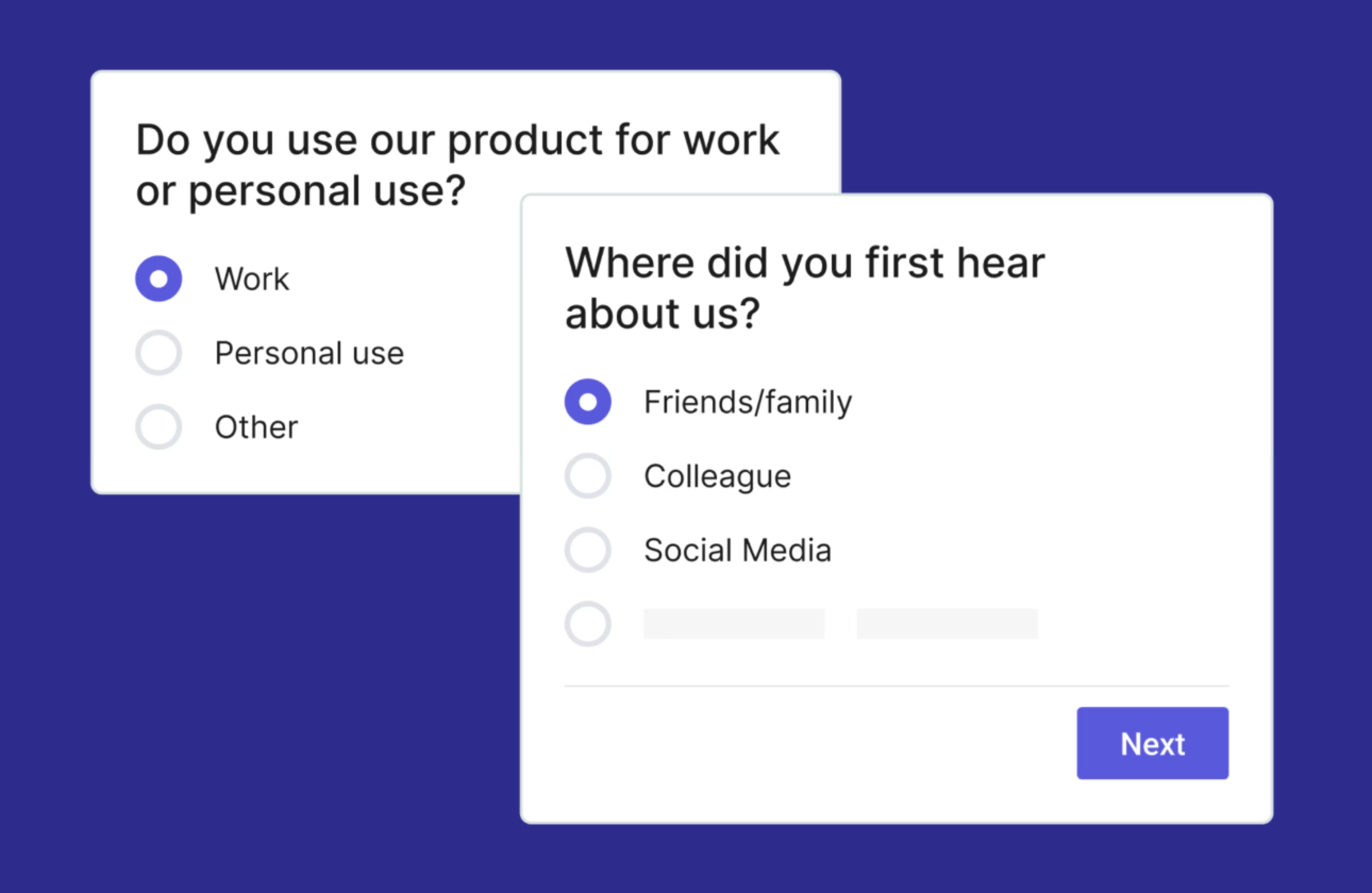
Best practice: Pair them in your feedback survey. Use a rating question to quantify, then follow up with "Why?" to get the full picture.
![[Visual] Asking open-ended questions can give you greater insights into your customers’ experiences.](http://images.ctfassets.net/gwbpo1m641r7/5GsHfWozKsLuI8oWevVmgA/aa143ae54e08789edbfec451c9a8d8bc/unnamed__2_.png?w=1080&q=100&fit=fill&fm=avif)
3. Design for action
Every question should connect to a decision you can make. Before adding a question, ask yourself: What will I do differently based on the answer?
Ask about problems and how the product could better solve them
Anchor questions to user goals, not just opinions
Prefer "what" and "how" over "do you like"
Example: "Do you like our new color scheme?" gives you an opinion. "Does our new color scheme make it easier or harder to find what you need?" gives you something to act on.
8 Essential user feedback questions (and why they work)
1. "What problem were you trying to solve when you used our product/service?"
This is a foundational question that gets right to the core of user motivation. It helps you understand the jobs to be done (JTBD) your users are hiring your product for. Their answers reveal their specific needs, goals, and the context in which they are operating. Why it works:
Reveals user needs: Uncovers the underlying problems your users are experiencing.
Validates your product's purpose: Confirms if your product is actually solving the problems you think it is.
Identifies new use cases: Users might be leveraging your product in ways you hadn't anticipated, opening doors for new features or marketing angles.
Informs feature prioritization: Helps you focus on features that directly address these core problems.
💡 Pro tip: This question is excellent for new users or when launching a new feature. Consider adding a follow-up: "Did our product/service help you solve that problem?"
2. "How easy or difficult was it to achieve your goal using our product/service?"
This question directly assesses usability and user experience (UX), similar to a CES (Customer Effort Score) metric. It's a critical metric for understanding friction points in your product's flow. By asking about their goal, you anchor their assessment to a concrete task. Why it works:
Quantifies usability: Often presented with a scale (e.g., 1-5, Very Difficult to Very Easy), it provides measurable data.
Highlights pain points: A low ease-of-use score points to areas needing immediate attention in the user journey.
Identifies design flaws: Users will often elaborate on why something was difficult, providing specific examples of confusing interfaces or complex steps.
Measures success: A high score indicates a smooth, intuitive experience.
💡 Pro tip: Pair this question with Contentsquare's friction detection and session replay features. If users report difficulty but can't articulate why, replaying their sessions will show you exactly where they hesitated, rage-clicked, or dropped off, turning a vague complaint into a precise fix.
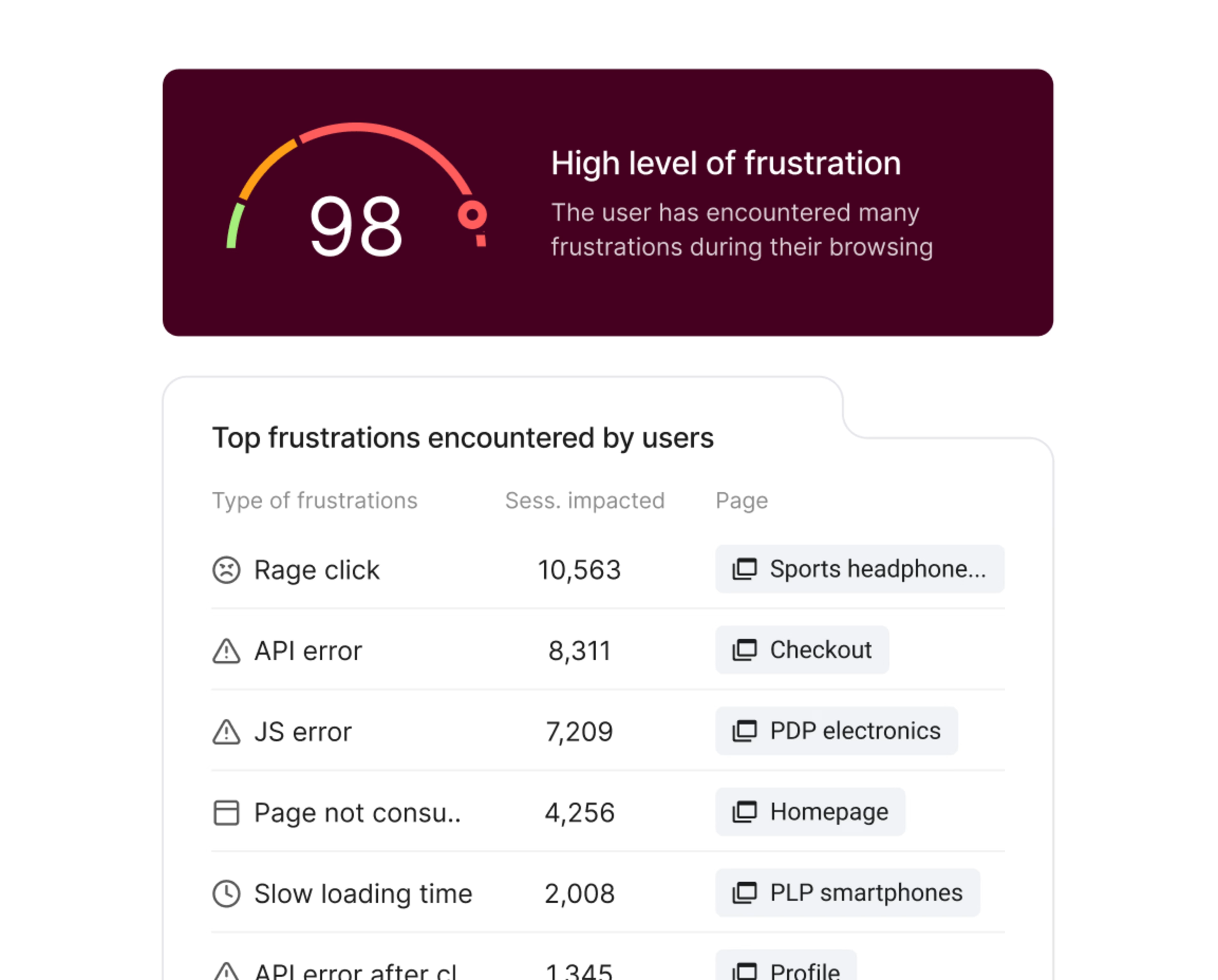
3. "What features do you use most often, and why?"
This question helps you understand feature usage, functionality, and perceived value. It's crucial for discerning which parts of your product are truly indispensable to your users and which might be underutilized or unnecessary. Why it works:
Identifies core value propositions: Reveals the features that deliver the most utility to your users.
Informs resource allocation: Helps you decide where to invest more development time — strengthening popular features or rethinking less-used ones.
Uncovers "hidden gems": Sometimes, users highlight features you didn't realize were so important.
Provides context for usage: The "why" explains the user's motivation and workflow.
💡 Pro tip: Cross-reference self-reported answers with Contentsquare's zone-based analytics and potential integrations to see actual feature engagement. Users often overestimate or underestimate their own usage, and behavioral data will surface discrepancies worth investigating.
![[Visual] zoning analysis](http://images.ctfassets.net/gwbpo1m641r7/1hHsnASr4FOYc5G28JEkHU/2416b0ee43f929889779f3221e2e0868/zoning_analysis.avif?w=3840&q=100&fit=fill&fm=avif)
4. "What features, if any, do you wish our product/service had?"
This is a forward-looking question designed to gather feature requests and uncover unmet needs. It encourages users to think creatively and share their desires for product evolution. Why it works:
Generates new ideas: Provides a direct source of potential features for your roadmap.
Identifies market gaps: Users might suggest features that competitors offer, or entirely new capabilities you haven't considered.
Gauges user priorities: If many users request the same feature, it signals a strong demand.
Fosters a sense of ownership: Users feel heard and valued when their suggestions are considered.
💡 Pro tip: Be careful not to promise product features based on feedback. Instead, use this as input for broader strategic discussions and prioritization. Clarify if the desired feature is a "must-have" or a "nice-to-have."
5. "How would you rate your overall satisfaction with our product/service?"
This is a high-level customer satisfaction metric, often presented on a scale (e.g., 1-5 stars, or a 1-10 numerical scale) as seen in CSAT surveys. It gives you a quick snapshot of general sentiment. Why it works:
Provides a benchmark: Allows you to track satisfaction over time and compare it against industry standards or competitors.
Acts as a health indicator: A drop in overall satisfaction often signals underlying issues that need investigation.
Simple and quick for users: Easy to answer, leading to higher response rates.
Segments users: You can often segment users into "satisfied," "neutral," and "dissatisfied" groups for targeted follow-up
.
💡 Pro tip: When satisfaction scores drop, use Contentsquare's Journey Analysis to pinpoint exactly where users are struggling. Its interactive sunburst visualization retraces up to seven navigational steps, showing where visitors drop off, loop back, or abandon the experience. Use the Reverse Journey feature to work backwards from an exit point
and understand what led users there. Then jump directly to Session Replay or Heatmaps to see what they were exper
iencing in that moment. This helps you move from "satisfaction is down" to "satisfaction is down because users are dropping off at this specific step, and here's why.
6. "Is there anything about your experience that surprised or delighted you?"
This question specifically targets positive emotional responses and "wow" moments. While it's easy to focus on problems, understanding what users love can be just as, if not more, valuable. Why it works:
Identifies strengths and differentiators: Pinpoints what makes your product stand out and where you're excelling.
Uncovers unexpected value: Users might delight in aspects you considered minor but are highly impactful to them.
Fuels marketing and branding: These "delight" moments make great testimonials and marketing copy.
Boosts team morale: Hearing about positive experiences can motivate your product and development teams.
💡 Pro tip: Use these insights to double down on what you're doing right, perhaps even sharing successes on social media. Can you enhance these delightful aspects or replicate them in other areas of your product? When users tell you something delighted them, use Contentsquare's zone-based Heatmaps to find the behavioral proof. Metrics like attractiveness rate (the percentage of visitors who click on an element after being exposed to it) and exposure rate (how far down a page users actually scroll) can reveal which content elements are genuinely captivating people, even ones you didn't expect. These are your hidden gems.
7. "What, if anything, could we do to improve your experience?"
This is a direct, open-ended question focused on actionable improvements, often found in a comprehensive questionnaire. It empowers users to offer their constructive criticism and suggestions without being led. Why it works:
Gathers specific improvement ideas: Users often articulate issues and even suggest solutions.
Uncovers unknown problems: Users might highlight small frustrations that, collectively, degrade the overall experience.
Shows you value their input: Directly asking for improvement suggestions communicates that you are committed to listening and acting.
Broad scope: Allows users to comment on anything from UI/UX to customer support or pricing.
💡 Pro tip: Be prepared for a wide range of answers. Categorize and prioritize these suggestions based on frequency, impact, and feasibility.
8. "How likely are you to recommend our product/service to a friend or colleague?" (NPS)
This is the standard Net Promoter Score (NPS) question, typically answered on a scale of 0-10. It measures customer loyalty and willingness to advocate for your product. Why it works:
Standardized metric: Universally recognized and allows for benchmarking against competitors and industry averages.
Identifies Promoters, Passives, and Detractors:
Promoters (9-10): Enthusiastic users who will recommend your product.
Passives (7-8): Satisfied but unenthusiastic users, vulnerable to competitors.
Detractors (0-6): Unhappy users who can damage your brand through negative word-of-mouth.
Predicts growth: Companies with high NPS scores tend to experience faster growth.
Easy to implement and track: Simple to deploy in various contexts.
💡 Pro tip: Always follow the NPS question with an open-ended "Why did you give that score?" This provides critical context for understanding what drives loyalty (or the lack of it).
![[Visual] NPS® surveys](http://images.ctfassets.net/gwbpo1m641r7/1xJjUdkWN6jxZD23Sb3z0y/f4cfd02fc2c488b405dc164aa07bd22e/NPSÂ__surveys.png?w=1920&q=100&fit=fill&fm=avif)
The value of direct user insights
Think of user feedback as the voice of your market, speaking directly to you. It provides an unfiltered view into how real people interact with your product, what challenges they face, and what truly delights them. This isn't guesswork; it's concrete data from the very individuals you aim to serve. By actively listening, you gain an invaluable perspective that internal brainstorming alone cannot provide.
Direct feedback is powerful, but it only tells part of the story. Users don't always articulate exactly where they struggled or why they left. That's where behavioral analytics tools like Contentsquare come in. By combining survey responses with behavioral data, such as Session Replays, Heatmaps, and Journey analysis, you get a complete picture: what users tell you, and what their actions reveal.
Why is this so crucial? Because it helps you:
Identify pain points: Discover where users struggle or get frustrated.
Validate assumptions: Confirm if your product is solving the intended problems.
Uncover new opportunities: Find features or improvements you hadn't considered.
Prioritize development: Focus your resources on what truly matters to users.
Increase user satisfaction and retention: Build a product people love and want to keep using.
Without this direct input, you risk developing features nobody wants or overlooking critical issues that drive users away.
Common pitfalls to avoid when gathering user feedback
Even a well-designed feedback strategy can go wrong. Here are the four most common mistakes and how to fix them.
1. Asking leading questions
Leading questions nudge users toward the answer you want, introducing bias and drowning out honest feedback. Example to avoid: "Don't you agree our new onboarding is much better?" How to fix it:
Use neutral language and avoid judgment words like "great" or "amazing"
Ask about the experience, not your assumption: replace "Is this feature useful?" with "How did you use this feature?"
2. Over-surveying
Too many surveys lead to fatigue among respondents, lower response rates, and rushed, low-quality answers. At worst, constant interruptions can contribute to churn. How to fix it:
Time surveys around meaningful moments (e.g., after task completion, after 30 days of use)
Keep surveys short and targeted; only ask what you truly need
Segment your audience so each survey reaches the most relevant users
3. Ignoring negative feedback
Critical feedback is uncomfortable but often the most valuable. Dismissing it means missing your clearest signal for improvement, and it leaves users feeling unheard. How to fix it:
Treat negative feedback as actionable data, not personal criticism
Look for recurring themes across responses; patterns reveal systemic issues
Follow up directly with dissatisfied users when possible; it can turn detractors into advocates
4. Failing to act on insights
Collecting feedback without acting on it erodes user trust and wastes resources. Users who see no change will stop responding. How to fix it:
Define a clear process: who collects, analyzes, and prioritizes feedback
Assign ownership so insights don't fall through the cracks
Close the loop: tell users when their feedback led to a change
Measure the impact: After making changes, use Contentsquare to validate improvements with behavioral data. Did the friction drop? Did users complete the flow more smoothly? Behavioral metrics confirm whether your changes actually moved the needle.
Transform your product with user-centric questions
You now possess a powerful toolkit of user feedback questions and the principles to craft them effectively. The journey of product development is continuous, and your users are your most valuable co-creators. By consistently seeking out, listening to, and acting upon their insights, you're not just improving a product; you're building a thriving ecosystem where user needs are at the core of every decision.
Embrace the power of inquiry. Be curious, be empathetic, and be strategic in how you engage with your audience. Remember that every piece of feedback, whether positive or critical, is a stepping stone toward a more intuitive, more effective, and ultimately, more beloved product. Start implementing these questions today, refine them as you learn, and watch as your product transforms through the invaluable voices of your users.
Frequently asked questions
There's no magic number, but shorter surveys consistently get higher response rates. As a rule of thumb, aim for 5 to 10 questions and only include what you'll actually act on. If you need more depth, consider running multiple focused surveys at different points in the user journey rather than one long questionnaire.
![[Visual] Contentsquare's Content Team](http://images.ctfassets.net/gwbpo1m641r7/3IVEUbRzFIoC9mf5EJ2qHY/f25ccd2131dfd63f5c63b5b92cc4ba20/Copy_of_Copy_of_BLOG-icp-8117438.jpeg?w=1920&q=100&fit=fill&fm=avif)