![[Visual] Cost Of Delay Analysis: Tips for Product Managers](http://images.ctfassets.net/gwbpo1m641r7/3Y4Rx3ltVbdX1RZs05WBbS/8ae17eefe3a003ddb0e1b527c050fc3d/Copy_of_AdobeStock_673731153.png?w=3840&q=100&fit=fill&fm=avif)
Google Optimize was a trusted testing tool for many businesses, but as of September 2023, Google officially shut it down.
If you're looking for a reliable alternative, you're in the right place. Today, we're reviewing 5 of the best options to meet your A/B testing needs.
5 Google Optimize alternatives
Optimize will certainly leave some big shoes to fill, but we’ve done the research for you, so your next experimentation tool suits your needs just as well. Here are a few of the best options on the table.
1. Optimizely
Founded in 2010, Optimizely is a popular choice for online businesses running A/B tests.
![[Visual] Optimizely dashboard](http://images.ctfassets.net/gwbpo1m641r7/1SLWh2cZ7vxFOTjOJNhQKA/ec1875661e948f39db4574b21c1deaee/optmizely.png?w=1920&q=100&fit=fill&fm=avif)
The Optimizely Experiments dashboard
The platform offers:
Multipage funnel tests: link related variants from different pages. For example, if you want to test a new slogan for your product, you could make sure that visitor ‘A’ sees the same variation of your slogan on your homepage as they do on your product page.
More audience targeting options: segment your experiments by multiple variables at once, and ensure your changes resonate with the precise audience they’re intended for
💡Pro tip: if you decide to invest in Optimizely, use Contentsquare to understand why your A/B test results look the way they do.
Link your Optimizely account to Contentsquare to set up surveys for users who participate in your experiments. For example, you might ask, “How easy was it to use this page?”
Once the survey has collected some responses, filter them by whether respondents saw the ‘A’ group or the ‘B’ group of the experiment, so you can understand the thought processes behind your users’ behavior.
2. Contentsquare
Contentsquare is an experience intelligence tool that shows you how your customers behave on a web page. Use it to deepen your understanding of the results you receive from other A/B testing tools or even in place of A/B testing.

The Contentsquare Dashboard collects all your important metrics in one place
It slides easily into your experimentation process by integrating with tools like Kameleoon, Optimizely, and Google Analytics. Plus, a handy Dashboard presents a clear overview of your user statistics.
How to use Contentsquare to add depth to your A/B tests
Use Contentsquare Heatmaps to understand where your customers click: a great way to identify new user testing hypotheses is with heatmaps, which show you where your customers linger on a web page—and the areas they ignore completely. For example, you might notice an important CTA is so far down a page that most users never see it—and come up with a strong hypothesis that you’d get more conversions by moving it a little higher up.
Use surveys to gather feedback on your A/B tests: use Contentsquare Surveys to learn what your users think about the changes you’re A/B testing. For example, if you’re testing a new feature, you might ask all participants, “What would you do to improve this feature?”
Watch recordings of users navigating your A/B tests: use Contentsquare Session Replay to capture videos of users’ click paths as they move through the pages you’re running an A/B test on. Once recorded, you can filter these between users who saw the ‘A’ and ‘B’ versions of your site. Watching how users interact with each version of your site helps you understand why your test results look the way they do.
![[Visual] AB Testing and session replay](http://images.ctfassets.net/gwbpo1m641r7/3pyi6K866dXK51H98XtJnd/fa1e174cb7560d0cd9e565aca3fb9019/Experience_Analytics_-_AB_Test__1_.png?w=3840&q=100&fit=fill&fm=avif)
Replays offer a ‘fly on the wall’ perspective on users’ journeys through your site
How to use Contentsquare to replace A/B tests
If you’re looking for time-tested conversion rate optimization (CRO) tactics beyond A/B testing, simply talk to your users to find out what they’d prefer.
Here’s how:
Run good old-fashioned user interviews: Contentsquare Interviews allows you to easily run remote user interviews with a searchable pool of 200,000+ verified participants. It streamlines the admin of user testing so you can get feedback from real people without weeks of planning and fix usability problems before they become expensive.
Concept test your new ideas: save time and money from having to run A/B tests at all—Contentsquare’s User Testing lets you test different user interfaces (UI) and designs with your visitors and customers, so you can see which version is more successful.
![[Visual] Contentsquare User Tests](http://images.ctfassets.net/gwbpo1m641r7/5f3yE1Po6HMCxof6eEDYun/aa67e09ab6261dc43e3faf87e1ba3a84/Unmoderated_testing__1_.png?w=2048&q=100&fit=fill&fm=avif)
Test different design hypotheses with Contentsquare’s User Testing
3. Omniconvert
Omniconvert is a user-friendly tool for conversion rate optimization, including running A/B tests.
![[Visual] Ominconvert](http://images.ctfassets.net/gwbpo1m641r7/5yGCYwmkF5ZpikwG5GpWsZ/07baf2283d5fa28ddd504c66c8ed7fa8/omniconvert.png?w=1920&q=100&fit=fill&fm=avif)
Omniconvert’s point-and-click editor lets you A/B test front-end changes without a developer’s help
Omniconvert’s key features include:
Advanced audience segmentation: split up your audience by more than 40 parameters—for example, you could choose to run a test on just returning visitors, or on visitors from Ohio.
CRO tools beyond experimentation: set up exit-intent surveys and pop-up banners, for example
Great user support: Omniconvert offers great support, according to many reviewers—which is invaluable with such a multifaceted platform
💡Pro tip: hook up your Omniconvert account to Contentsquare to understand what’s really going on with your A/B test results.
Set up Contentsquare to record sessions from the users in your test, and watch playbacks—videos that show how users interacted with your ‘A’ version compared to your ‘B’ version.
You’ll see your web page through your users’ eyes, and gain insight into the thought process behind their behavior.
4. VWO
VWO (Visual Website Optimizer) could be a good replacement for Google Optimize.
![[Visual] VWO](http://images.ctfassets.net/gwbpo1m641r7/3ax3iik48W5AjE7Cmf2KiT/a69f64237017695e2c835e1ec85905a8/vwo.png?w=1920&q=100&fit=fill&fm=avif)
VWO’s main testing dashboard VWO’s main testing dashboard
In terms of features, VWO offers
A range of experimentation options including A/B, multivariate, and URL split testing
Heatmap and survey features for connecting with your users’ experiences so you can form strong hypotheses to A/B test
5. Kameleoon
Kameleoon is a conversion rate optimization software for running A/B, multivariate, and URL split tests, primarily marketed to mid-size to enterprise-level clients.
![[Visual] Kameleoon](http://images.ctfassets.net/gwbpo1m641r7/1SDIzktJp54Zv8Uysh1drc/e3384a8d0dfc8962c714202a15910978/unnamed_-_2025-11-06T131518.615.png?w=1080&q=100&fit=fill&fm=avif)
Kameloon’s experiment dashboard gives you an overview of how your A/B tests are looking
Kameleoon offers:
Multiple page testing: create ambitious, site-wide tests without fear of a ‘flickering’ effect—that is, when customers in the ‘A’ group of your A/B test see a glimpse of the page intended for the ‘B’ group
Advanced personalization options: the platform uses machine learning to predict each visitor’s engagement intent in real-time. Kameleoon Predict™ AI can vary what it shows to your users depending on what’s most likely to convert them.
💡Pro tip: Kameleoon doesn’t offer a heatmaps feature, but if you integrate it with Contentsquare, you get this functionality.
Use Contentsquare Heatmaps and click maps to see where users spend the most time on the page of your experiment and tell at a glance whether there’s a difference in behavior between the ‘A’ and the ‘B’ versions.
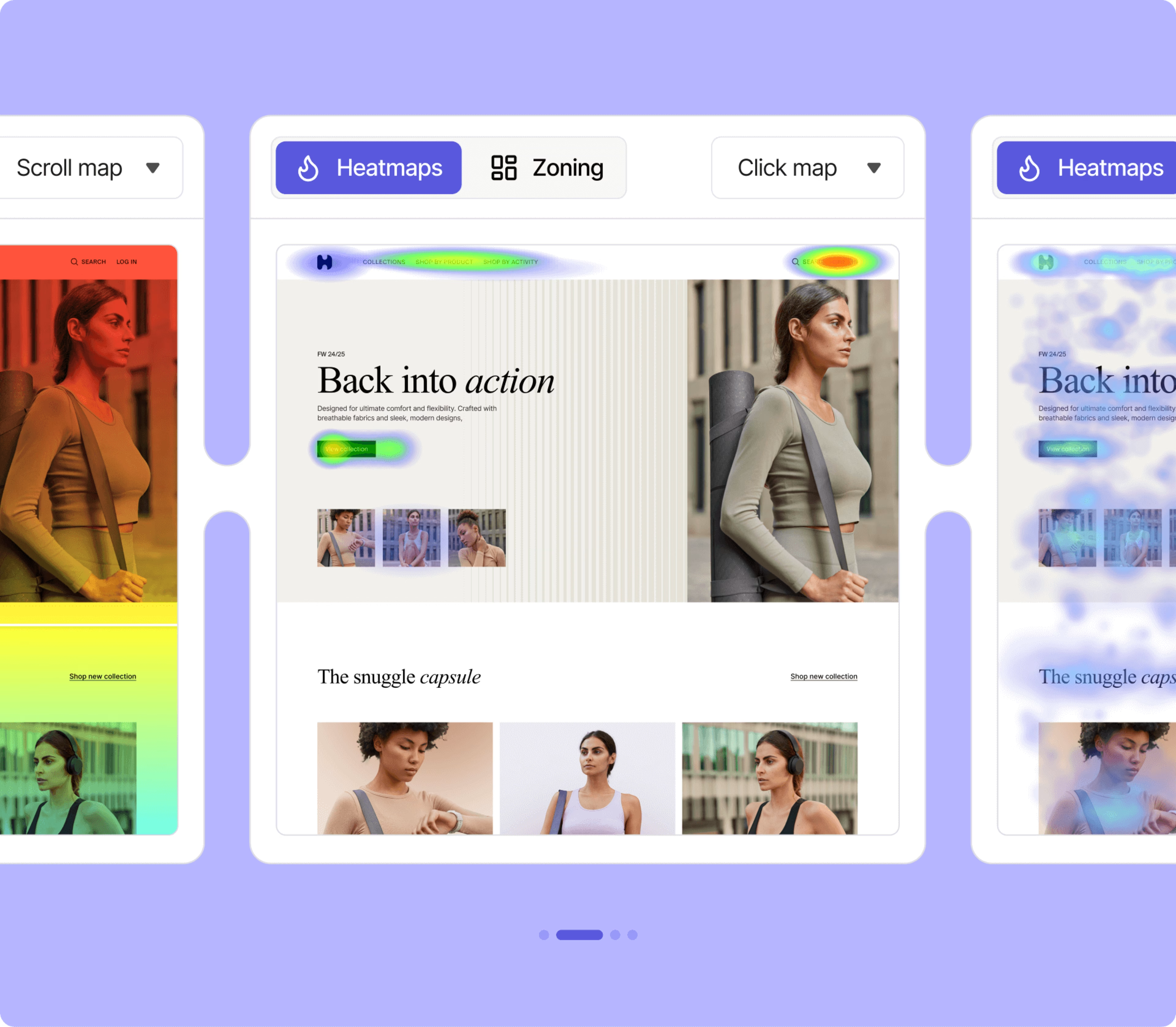
Clicks maps tell you where users are clicking and tapping the most
FAQs about Google Optimize alternatives
According to an official statement by Google, Optimize was just looking a bit creaky, and not meeting users’ needs:
“Optimize…does not have many of the features and services that our customers request and need for experimentation testing. We, therefore, have decided to invest in solutions that will be more effective for our customers.”

Dana is a copywriting specialist with deep expertise in creating assets like blog posts and landing pages that position organizations as the obvious first choice in their market. She holds a Bachelor of Business Administration in Marketing and has over 10 years of experience helping leading B2B brands drive traffic and increase conversions. Having taught more than 1,000 entrepreneurs the art of persuasive copywriting, Dana brings unique insight into what resonates with audiences and delivers results.