![[visual] Survey user persona - stock image](http://images.ctfassets.net/gwbpo1m641r7/2VbvazvLPF6fs6sLs2Fcsh/46d60c475882e8866fbe81161cf6704b/Team_Brainstorming_Session_with_Sticky_Notes_in_Conference_Room.jpg?w=3840&q=100&fit=fill&fm=avif)
Your company collects more customer data than ever before—website clicks, app interactions, purchase history, survey responses, support tickets, and more.
Without solid data management, all of that information might as well be sitting in your basement, collecting digital dust. It’s scattered, inconsistent, and nearly impossible to access when you need it most.
Data management changes this, transforming your raw data into trusted insights that power better decisions. Marketing can easily retrieve those data assets when personalizing campaigns, and product teams can use them when prioritizing features.
In this guide, you learn what data management actually is, why it matters for every team in your organization, and how to build a foundation that turns data chaos into clarity.
Key insights
Think beyond storage: data management goes beyond warehouses and databases—it powers your entire customer experience, from personalization to compliance
Measure maturity through usage, not tools: the best indicator of data management maturity isn’t what systems you have—it’s whether teams across your organization can retrieve and act on that data without delays
Build incrementally for quick wins: you don’t need to fix everything at once. Focus on one high-impact use case and solve it well to gain momentum.
What is data management?
Data management is the process of collecting, organizing, storing, and using data in ways that ensure it’s accurate and accessible across your organization.
The value of data management is in the shift it creates. It takes you from passively accumulating raw data to actively managing well-governed information that teams can rely on.
Instead of creating data silos, you build a foundation where people can access the right insights at the right time.
The challenge we need to address is the difficulty of dealing with siloed data, a lack of actionable insights, excessive complexity, analysis paralysis, and insufficient time and resources. This is where Contentsquare comes in: we strive to create a unified set of data truths, surface the most relevant insights for you, and present them in the right order.
What’s the difference between data management vs. data governance?
Since the words ‘manage’ and ‘govern’ are synonyms, many people think ‘data management’ and ‘data governance’ are, too. But these terms actually mean different things.
Data management is the broad umbrella term that covers everything involved in handling your data—from data storage and collection to integration and quality control
Data governance is one piece of the data management puzzle. It focuses specifically on the policies, standards, processes, and roles and responsibilities that keep your data safe and compliant.
In short, you need governance to manage your organization’s data well, but governance isn’t enough on its own—you also need the right architecture, tools, and processes to make your data truly useful.
4 benefits of data management
When you invest in data management, you ensure that you get real value from your tech stack. Here are 4 ways that solid data management practices directly impact both your business growth and customer experiences.
1. More agile decision-making
Good data management means your teams can access reliable insights when they need them. Instead of waiting for IT to pull reports or second-guessing whether your numbers are accurate, your teams can quickly spot issues and analyze trends.
For example, tools like Contentsquare’s Journey Analysis use well-managed data to show you exactly where customers drop off or succeed in their experiences—giving you clear insights you can use to optimize your product or site immediately.
![[Visual] Journey-analysis](http://images.ctfassets.net/gwbpo1m641r7/6tPAZ9qTMoZxRFAefYrFOG/1d647b24e5c93831f0fb25cfd4bca9d7/Journey-analysis.png?w=3840&q=100&fit=fill&fm=avif)
Journey Analysis relies on clearly structured, well-managed data to show you the paths your customers take after landing on your site
2. Improved personalization
Customers expect experiences tailored to their needs, but personalization is hard, if not impossible, when your data is scattered and inconsistent.
Effective data management ensures you have a unified view of your customers—combining behavioral data, preferences, and interactions in one place. This means you can ditch generic one-size-fits-all approaches and deliver targeted messaging and experiences that actually resonate and drive conversions.
📚 Learn all about predictive personalization—anticipating customer wants and needs and tailoring the customer experience to meet them—and how well-managed data helps you do just that.
3. Better digital experiences
Your website and product experience are only as good as the data informing them. Poor data management makes it tricky to spot friction points or understand why your users struggle to use your product or site.
With strong data management practices, you can surface experience issues with confidence. Tools like Contentsquare’s Heatmaps and Session Replay, for example, show users’ clicks and scrolls—but go well beyond that to reveal their frustration and hesitation. And since Contentsquare is an all-in-one platform, you can connect seamlessly to other tools and features to quantify the impact of addressing UX issues or compare segments.
When these rich behavioral insights are connected with other customer data (like purchase history or customer support trends), you can see not just what users did, but why they struggled and which fixes will drive the greatest impact.
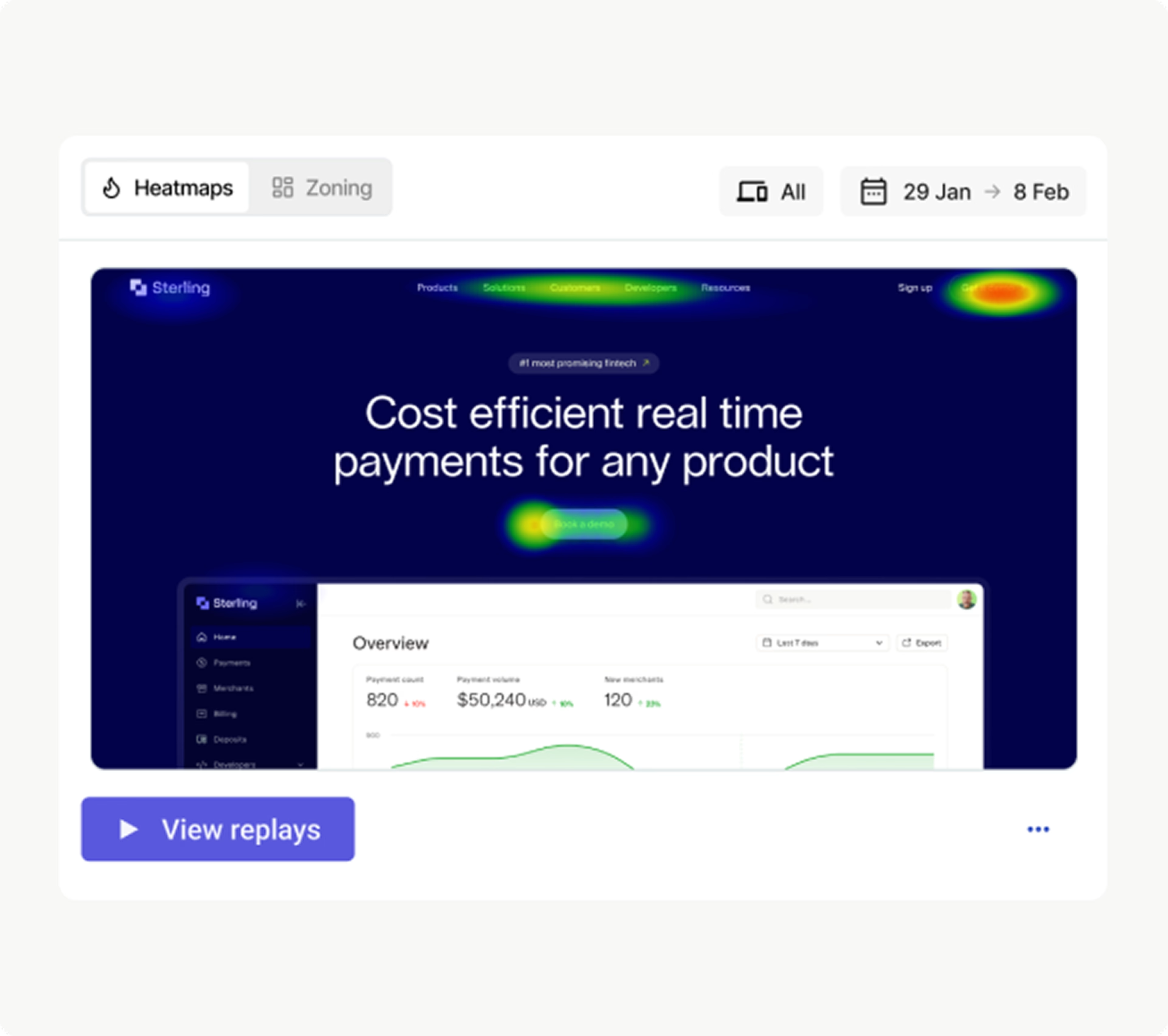
Start by viewing your customer experience data as a heatmap, and then click ‘View replays’ to watch session recordings with mouse clicks, scrolls, and hesitations
4. Stronger compliance and risk management
Regulations like the General Data Protection Regulation (GDPR) and the California Consumer Privacy Act (CCPA) set high standards for data privacy and protection—and you could face steep penalties for non-compliance. Data management helps you stay on the right side of these regulations by establishing clear processes for how you collect and store data.
When you know where your data lives and who has access to it, compliance feels manageable instead of overwhelming. Plus, good data management also reduces risk across the board—think fewer data breaches and clearer audit trails.
👉 Need help getting started? Check out our Privacy-Conscious Analytics Guide for practical steps to take today and a helpful checklist to evaluate vendors.
5 essential elements of data management
Strong data management isn’t built on a single tool or process—it requires multiple components working together. Here are the 5 essential elements that form the foundation.
1. Data governance
Data governance establishes the policies and standards that help you maintain control over your data and keep it safe.
It defines
Who owns different data sets
Who has access to the data
What format it should be
What compliance standards to follow
2. Architecture
Your data architecture is the blueprint or framework for how data flows through your organization.
It outlines
Where your data lives, like platforms, data lakes, and data warehouses
How data moves between systems, such as integrations and APIs
How data is organized—think naming conventions, structures, and metadata
Good data architecture allows data to move efficiently between systems while ensuring scalability and data security. This lets you focus on insights and outcomes instead of untangling data chaos.
3. Data quality
Data quality means your information is accurate, consistent, and up-to-date, helping you make great data-driven decisions and keep your customers’ hard-earned trust.
Some data quality practices are
Ensuring every team uses the same terms and metrics
Validating data during data processing to check for errors
Regularly cleaning and updating records to remove duplicates and fill in gaps
Monitoring data to catch data issues before they affect reporting or customer experiences
💡Pro tip: use Contentsquare’s Error Analysis to capture technical and non-technical issues on your site and get notifications sent to your Microsoft Teams or Slack channel—so you can find the root cause and fix it fast. Then, click on Impact Quantification to see how these errors affect your bottom line, or on Frustration Score to learn how they impact the customer experience.

Get an automated alert from Contentsquare when frustration signals spike—then investigate closer with Error Analysis and Impact Quantification
4. Integration
Integration means connecting your data sources so information can flow seamlessly between them. For example, your customer relationship management (CRM) platform talks to your analytics tool, your marketing platform syncs with your product data, and customer information stays consistent everywhere.
Without integration, you end up with siloed data that you can’t use effectively. On the other hand, a strong data integration strategy enables you to
Unify customer views across touchpoints so every team sees the same picture
Automate data flows between systems, eliminating manual exports and imports that create delays and errors
Power cross-functional insights by blending behavioral data with transaction records, support tickets, and marketing performance
💡Pro tip: use Contentsquare’s Data Connect to make data enrichment and integration effortless. Automatically stream behavioral data directly to your data warehouse, such as Snowflake, BigQuery, Databricks, Redshift, or Amazon S3. Set it up once, and your experience data flows continuously—structured, governed, and ready to blend with the rest of your data. No custom APIs and no complex transformations needed!
5. Lifecycle management
Data lifecycle management is how you handle information from the time it’s created to the time you delete it.
It includes determining the answers to questions like
How long should we retain different types of data?
When should we archive older information?
How do we securely dispose of data we no longer need?
Proper lifecycle management streamlines your systems and reduces storage costs. It also helps you meet regulatory compliance requirements for data retention.
What are some signs of data management maturity?
Data maturity is a measure of how well your company manages and uses data. Achieving advanced data maturity isn’t something you can do overnight—it’s a gradual process.
While there are formal maturity models and stages to help you assess where you stand, sometimes the simplest approach is to ask yourself a few honest questions about how your organization handles data.
Use this quick self-assessment checklist to gauge your progress:
Do you have a unified customer view?
Can your teams see a complete picture of each customer across touchpoints, or are you patching together snapshots from different systems? Mature data management means team members across departments can access a single source of truth that contains customer behavior data, interactions, and preferences.
Do you know how high-quality your data is?
Organizations with mature data management actively measure and compare their data to benchmarks instead of relying on gut checks. This means tracking error rates, monitoring duplicate records, and setting quality standards.
Is data used across departments?
Is data something only your analytics team touches, or do teams across your company—including marketing, product, and customer success—actively use data to make decisions? Organizations with mature data management democratize data so that everyone can easily retrieve the insights they need.
Are you reducing silos?
Can your systems talk to each other, or does every team maintain its own separate data universe? The fewer silos you have, the more mature your data management. Progress looks like integrated systems, shared data definitions, and cross-functional collaboration.
![[Visual] Single-source-of-truth](http://images.ctfassets.net/gwbpo1m641r7/w06D0Gg9IEG2uog3R5VlO/cce1c76a35b009c372b7b089ecda3b91/Single-source-of-truth.png?w=3840&q=100&fit=fill&fm=avif)
No data silos here. Contentsquare starts with trusted data and connects it in a single source of truth so you can make smarter decisions and take action fast.
Tips for getting started with data management
Increasing data management maturity can feel a bit overwhelming, but there’s no need to overhaul everything at once. Focus on building momentum with these data management best practices:
Start with a data audit: identify what data you collect, where it lives, who owns it, and how it’s used. You can’t improve what you don’t understand.
Establish cross-functional collaboration early: data management isn’t just an IT project. Loop in stakeholders from departments like data analytics and UX to ensure your approach serves everyone’s needs and gets buy-in across the company.
Define data quality standards: agree on what ‘good data’ looks like for your key performance indicators (KPIs). Set clear rules for formatting and required fields to build quality in from the get-go.
Choose tools that make data accessible: with a tool like Sense, Contentsquare’s AI assistant, you can automatically surface insights from your data. This makes it easier for non-technical teams to get quick answers.
Team members who might’ve once relied on a data analyst or waited for a report can now self-serve insights in real time. It’s made the experience more collaborative and empowered everyone to be more curious and more confident with data. Digital experience really is a team sport, and Sense is making sure everyone can play.
Build a solid data foundation
Getting the fundamentals of data management right sets you up for everything that follows: smarter personalization, faster innovation, better compliance, and experiences that truly impress your customers.
Ready to go deeper? Explore our other chapters in this guide to learn more:
Data management strategy: follow our step-by-step guide to building and implementing an effective data management strategy
Data management tools: explore the tools you need to collect, organize, and activate your data
FAQs about data management
Data management is the practice of collecting, organizing, and using data so you can use it efficiently. It includes everything from data governance to lifecycle management and ensures your data drives better business decisions and experiences.

![[Visual] Contentsquare's Content Team](http://images.ctfassets.net/gwbpo1m641r7/3IVEUbRzFIoC9mf5EJ2qHY/f25ccd2131dfd63f5c63b5b92cc4ba20/Copy_of_Copy_of_BLOG-icp-8117438.jpeg?w=1920&q=100&fit=fill&fm=avif)