![[Visual] Wesbite usability and B2B - stock image](http://images.ctfassets.net/gwbpo1m641r7/6f58ikhwJpzoO9Eyd16Mnf/558dc3756f3ef9a0fdbaea70d94280d2/AdobeStock_664400008.jpeg?w=3840&q=100&fit=fill&fm=avif)
What makes a good app performance?
A good app performance is characterized by speed, responsiveness, and reliability. Users expect applications to load quickly, execute tasks without delay, and function consistently across various devices and network conditions.
High-performing apps create seamless, intuitive experiences that minimize frustration and keep users coming back. The bar is high, and users aren't shy about abandoning apps that fall short.
Key indicators of great app performance include:
Fast launch times and smooth screen transitions
Responsive interactions with no lag or unexpected freezes
Efficient data processing that doesn't drain battery or consume excessive memory
Stability across platforms, whether users are on iOS, Android, or cross-platform frameworks like Flutter or React Native
Low error and crash rates, so users can complete their goals without interruption
But performance goes beyond technical metrics. It's also about understanding how users experience your app. Do they find what they're looking for? Do they get stuck? Are they abandoning a key flow halfway through? That's where behavioral data becomes just as important as infrastructure data.
Why teams should care about app performance?
Teams must prioritize app performance, and the reasons go far beyond speed benchmarks.
First, it directly shapes user satisfaction and retention. Slow, buggy apps lead to drop-offs, negative reviews, and churn. With mobile conversion rates still lagging behind web according to Contentsquare's Digital Experience Benchmark Report), every friction point costs you.
Second, app store visibility is tied to performance. Platforms factor in speed, crash rates, and user ratings when determining rankings. Poor performance doesn't just lose users; it makes you harder to find.
Third, efficient apps reduce operational costs. Less strain on servers means lower infrastructure spend, especially at scale.
And finally, a high-performing app builds brand trust. Users who enjoy a smooth experience are more likely to return, convert, and recommend your app to others.
The challenge? Most teams don't have full visibility into where performance breaks down. That's where Contentsquare comes in. With tools like Session Replay, Heatmaps, Journey Analysis, and Error and Crash Analytics, you can see exactly where users struggle, why they drop off, and what to fix first.
Add AI-powered insights with Sense, and you're not just reacting to problems; you're spotting opportunities before they become issues.
![[visual] Sense AI does the analysis for you](http://images.ctfassets.net/gwbpo1m641r7/2xsg2syOeOpHAUo1VRckyd/b12787cda2dec5ede73429fdbd36038f/Pendo-alternative-with-AI-mobile-analysis.png?w=3840&q=100&fit=fill&fm=avif)
Because improving app performance isn't just about fixing what's broken. It's about building experiences users love to come back to.
How to deliver a great app performance to users in 5 steps
Enhancing mobile app performance, including the efficiency of push notifications and other in-app experiences, is crucial for user satisfaction, retention, and preventing churn, making performance optimization and a superior user experience a key focus. This guide outlines actionable strategies to optimize your app for peak efficiency within the broader mobile ecosystem and make it scalable, a crucial aspect of successful mobile app development.
1. Map the user journey to find bottlenecks
To improve app performance, start by understanding the paths your users actually take. Journey Analysis lets you visualize how visitors move through your app, from first launch to checkout. You'll quickly see where users flow smoothly and where they drop off, giving you a clear starting point before you make a single change. Without this visibility, optimization becomes guesswork.
Look for patterns, not just individual drop-off points. Are users abandoning at the same screen repeatedly? Are they looping back through the same steps, suggesting they can't find what they need? Are certain flows performing well on one device but falling apart on another? These patterns reveal whether you're dealing with a performance issue, a navigation problem, or something deeper.
Pay particular attention to high-traffic, high-intent flows: product pages, login screens, and checkout. A bottleneck in a low-traffic corner of your app is a nuisance. A bottleneck in your checkout flow is a revenue problem.
Once you've identified where users are dropping off, you can go a layer deeper. Session Replay lets you watch exactly what happened in those sessions, so you can see whether a user abandoned because a screen was slow to load, because a button wasn't responding, or because the next step wasn't clear. That combination of journey-level patterns and session-level detail gives you the full picture you need to act with confidence, not assumptions.
![[Visual] Journey-analysis](http://images.ctfassets.net/gwbpo1m641r7/6tPAZ9qTMoZxRFAefYrFOG/1d647b24e5c93831f0fb25cfd4bca9d7/Journey-analysis.png?w=3840&q=100&fit=fill&fm=avif)
2. Optimize your code and reduce network latency
Strong performance starts at the code level. Refine your algorithms, remove dead or redundant code, and replace inefficient data structures with leaner alternatives. On the network side, compress data before sending, batch small requests into fewer larger ones, and use Content Delivery Networks (CDNs) to serve static assets from servers closer to your users.
The tricky part is knowing where to focus. Error and Crash Analytics can surface spikes in API errors and latency issues tied to specific screens or user flows, pointing your developers to the right place rather than asking them to audit the entire codebase. And since errors and performance problems are closely linked, fixing one often leads you straight to the other. Error and Crash Analytics detects client-side API errors, JavaScript errors, and crashes as they happen, and alerts your team immediately.
Knowing an error exists is only half the battle. The real value comes from understanding its business impact. You can see at a glance which errors are driving the biggest drops in conversion or the most significant revenue loss, using key performance metrics, so your team fixes what matters most first, not just what's most recent.
![[Visual] error analysis](http://images.ctfassets.net/gwbpo1m641r7/2RHGIcGhjdzYE7tMVVWzzg/2bc7b35d22f6b8a0806a09a23f6f7c71/error_analysis.avif?w=3840&q=100&fit=fill&fm=avif)
3. Minimize resource consumption and cache smartly
Reduce the footprint your app leaves on users' devices. Optimize images, video assets, and animations for mobile, and implement robust caching to store frequently accessed data locally, cutting down on unnecessary network requests.
Start with the basics: compress images without sacrificing visible quality, use modern formats like WebP where supported, and avoid autoloading heavy media that users may never scroll to. For animations, keep them lightweight. A subtle transition can enhance the experience; a complex one that causes frame drops will do the opposite. Apply lazy loading so resources are only fetched when they're actually needed, and limit background processes that quietly drain battery and memory when the app isn't in active use.
Caching is one of the highest-return investments you can make, especially for eCommerce apps where users browse the same product categories repeatedly. Storing frequently accessed data locally means fewer network round trips, faster perceived load times, and a smoother experience on slower connections. Done well, it's something users never notice, which is exactly the point.
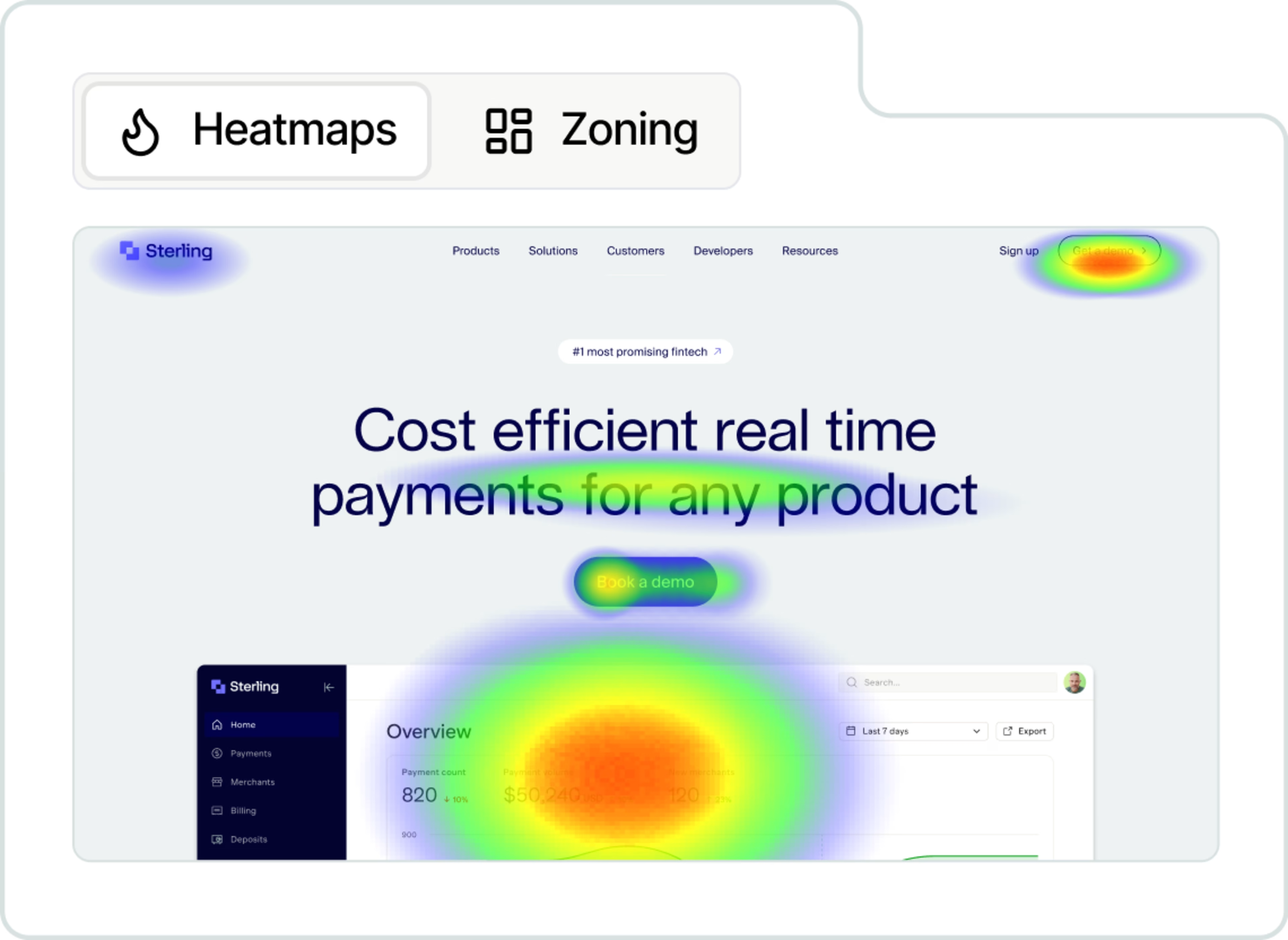
Before you start, it helps to know which assets are worth prioritizing. Heatmaps show you which images, banners, and product elements users actually engage with, and which ones are barely seen. If a heavy asset has a low exposure rate, it might not be worth the rendering cost at all. You might also find that a key visual, such as a promotional banner or a product hero image, has strong attractiveness but low click-through, which could point to a rendering delay rather than a relevance problem. That kind of context helps engineering and product teams make smarter trade-offs and focus their effort where it will have the most impact.
4. Use behavioral data to pinpoint UX friction
Performance issues, including those related to core functionality, don't always show up in error logs. Sometimes they show up in how users behave. A user who quietly closes your app after three seconds doesn't file a bug report. Neither does the one who taps the same button four times before giving up. But their behavior leaves a trace, and that's where Experience Analytics comes in.
Heatmaps let you check whether users are actually seeing your key content. Low exposure or attractiveness rates on a product banner or CTA often signal a slow-loading element, not just a design problem. If users aren't scrolling far enough to reach your content, or aren't engaging with elements they should be, it's worth asking whether the page is fully rendered by the time they get there.
Form Analysis is particularly telling when it comes to performance. It detects field-level friction without any extra tagging, surfacing things like repeated submission attempts, hesitation on specific fields, and the last field a user interacted with before abandoning. If users are consistently dropping off mid-form, there's a good chance the issue isn't the form itself but how fast it responds.

And with Journey Analysis, you can connect the dots between specific navigation paths and where drop-offs cluster, which is often where the real performance culprit is hiding.
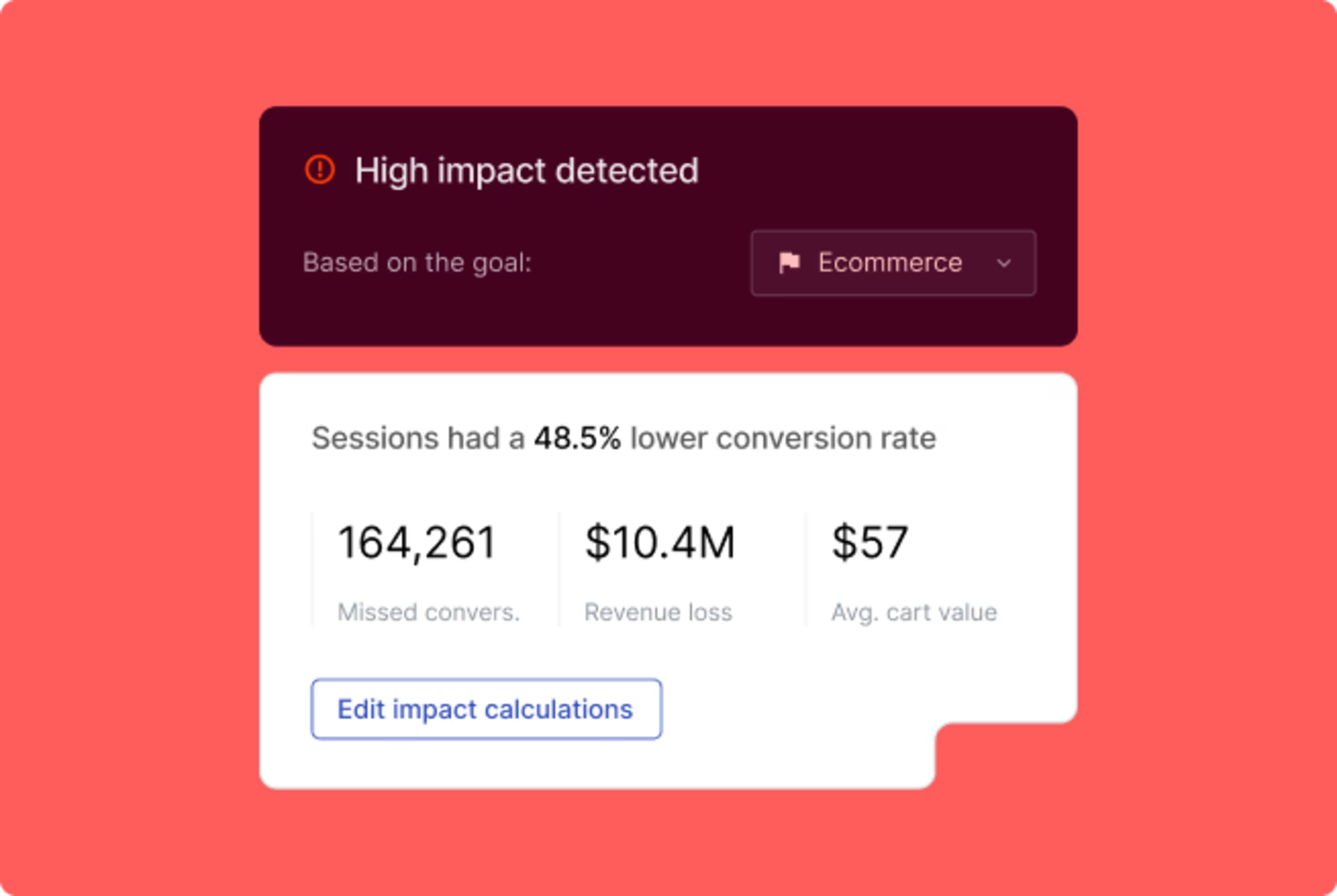
Once you've identified the friction points, Impact Quantification helps you make the case for fixing them. It ties behavioral issues directly to business outcomes, showing you how much a slow screen or a broken flow is actually costing you in revenue or conversion. That changes the conversation from "we should probably fix this" to "here's exactly why we need to fix this first.
5. Close the gap between data and decisions
Reviewing hundreds of replays manually to find a root cause isn't sustainable. Sense, Contentsquare's AI-powered agent, lets you ask questions in plain language and get answers quickly. Ask it to surface patterns behind crashes, flag sessions with rage gestures, or summarize what's happening across your checkout flow. It does the heavy lifting so your team can focus on fixing rather than finding.

But even the best analytics can only tell you so much. Behavioral data tells you what is happening. Your users tell you why. Targeted Voice of the Customer surveys let you ask users directly about their experience at the right moment, like an exit-intent prompt when someone abandons their cart. Pairing that qualitative context with the quantitative signals from Sense and your broader analytics gives you a fuller picture, and removes a lot of the uncertainty that can slow down decision-making.
3 app performance best practices
Start implementing these strategies now to see immediate improvements in your app's performance, which will also positively impact your app marketing efforts. Proactive optimization yields significant benefits.
1. Treat performance as a team sport, not an engineering problem
Performance optimization works best when product, engineering, and design are aligned around the same data. Engineers can fix a slow API call, but without context on which screens matter most to users, they're fixing in the dark. Product teams can identify high-drop-off flows, but without technical input, they can't distinguish a UX problem from a performance one. Shared visibility, through tools that surface both behavioral and technical signals in one place, is what turns performance from a backlog item into a shared priority.
2. Test early, test continuously
Performance tends to drift. What's fast at launch can become sluggish after six months of new features, third-party scripts, and expanding user traffic. Regular testing across devices, platforms, and network conditions catches regressions before they reach your users. Set performance benchmarks early, monitor them consistently, and treat a regression as seriously as a bug. The teams that maintain great app performance aren't the ones who fix it once. They're the ones who never let it slip.
3. Prioritize by impact, not intuition
Not every performance issue deserves equal attention. A crash that affects 1% of sessions on an obscure settings screen is very different from a form error in your checkout flow. The instinct is often to fix what's most visible or most recent, but that's not always what matters most. Use behavioral data alongside your technical metrics to understand which issues are costing you users, revenue, and trust. That's what turns a long list of performance fixes into a clear, defensible roadmap.
The bottom line
App performance is never really "done." User expectations shift, products grow more complex, and new devices and network conditions constantly raise the bar. The teams that stay ahead aren't necessarily the ones with the biggest engineering budgets. They're the ones who treat performance as an ongoing practice, not a one-time fix.
That means writing efficient code, testing regularly, and caching smartly. But it also means going beyond the technical layer to understand how real users experience your app, where they slow down, where they give up, and why.
When you combine strong engineering fundamentals with behavioral insights, you stop reacting to problems and start preventing them. You prioritize what actually affects your users, fix what actually affects your business, and build something people genuinely enjoy using because at the end of the day, a fast app isn't just a technical achievement. It's a better experience and better experiences are what keep users coming back.
Frequently asked questions
There's no universal number, but a widely used rule of thumb is that apps should load in under three seconds. Beyond that, abandonment rates rise sharply. That said, load time alone doesn't tell the full story. An app can load quickly but still feel slow if transitions are janky, interactions lag, or key content takes extra time to render. The goal is a consistently responsive experience from launch to checkout, not just a fast first screen.
![[Visual] Contentsquare's Content Team](http://images.ctfassets.net/gwbpo1m641r7/3IVEUbRzFIoC9mf5EJ2qHY/f25ccd2131dfd63f5c63b5b92cc4ba20/Copy_of_Copy_of_BLOG-icp-8117438.jpeg?w=1920&q=100&fit=fill&fm=avif)
We’re an international team of content experts and writers with a passion for all things customer experience (CX). From best practices to the hottest trends in digital, we’ve got it covered. Explore our guides to learn everything you need to know to create experiences that your customers will love. Happy reading!