
Your conversion rate is a symptom. What's behind it, the form that frustrates users on mobile, the checkout step where people loop back, the support ticket that should have been a self-serve answer, is what customer experience software is built to surface.
The challenge isn't finding tools. It's finding the right ones for what your team is actually trying to solve, whether that's understanding why users drop off, collecting feedback at the right moments, or delivering faster support across every channel.
This guide breaks down 10 of the best CX platforms available today, helping you select the ideal customer experience platform with key features, pricing, and guidance on choosing the right fit for your team.
Key takeaways
Most CX problems aren't tool problems. They're visibility problems. The right platform shows you what's happening in the experience before it shows up as a drop in your metrics.
No single tool covers everything. The best CX stacks pair behavioral analytics with feedback collection, service management, and performance monitoring to streamline operations, each solving a different layer of the same problem.
AI is the differentiator in 2026. The platforms worth investing in don't just collect data. They surface actionable insights that matter, prioritize by business impact, and reduce the time between spotting an issue and fixing it.
Pricing varies wildly. Free tiers exist for GA4 and Contentsquare, while enterprise platforms like Salesforce and Adobe require custom quotes. Match the tool to your team's maturity, not just your budget.
Customer experience software comparison table
Tool | Best for | Starting price | Key capability |
|---|---|---|---|
Contentsquare | Experience intelligence and behavioral analytics | Free tier; custom pricing | AI-powered journey analysis and frustration detection |
Zendesk | Omnichannel customer service | $49/agent/month | Unified support across email, chat, social, and voice |
HubSpot Service Hub | Growing businesses needing CRM integration | $17/month | Connected service, sales, and marketing data |
Salesforce Service Cloud | Enterprise organizations | Custom pricing | AI-powered service automation at scale |
Freshdesk | Small to mid-size support teams | Free for up to 10 agents | Automated ticket routing and prioritization |
Intercom | Conversational customer engagement | Custom pricing | AI chatbots with live chat handoff |
Qualtrics XM | Enterprise survey and research | Custom pricing | Advanced experience management analytics |
Mixpanel | Product and retention analytics | Free up to 100K users | Conversion and churn analysis |
Google Analytics | Web traffic and behavior tracking | Free | Funnel visualization and audience insights |
Adobe Experience Manager | Enterprise content and asset management | Custom pricing | Personalized content delivery at scale |
10 best customer experience software platforms
No 2 CX teams are solving the same problem. For some, it’s about spotting friction in real user journeys; for others, it’s about closing the loop between feedback, support, and product decisions. The real value comes from matching the tool to the specific gaps in your customer experience stack—not just adding more software for the sake of coverage.
Here's a closer look at each platform, including key features, pricing, and how it improves the customer experience:
1. Contentsquare
Contentsquare (that's us 👋) is an all-in-one experience intelligence platform built around one idea: you can't improve the customer experience if you don't understand what's actually happening in it. Behavioral analytics, voice of customer feedback, AI-powered insights, and session-level detail all sit in one platform, connected, so the context you need to understand a drop-off, a rage click, or a funnel breakdown is never in a different tool.
Best for: teams that need to connect behavioral data, revenue impact, and user feedback without stitching together multiple platforms
Key features:
Heatmaps: see exactly how users interact with every element on your pages, including revenue and conversion impact per zone
Session Replay: watch real user sessions with AI-powered summaries that surface key friction moments automatically, no full watch required
Journey Analysis: visualize how users move through your site across multiple sessions and where they drop off
Funnel Analysis: identify exactly where users abandon conversion flows and quantify the revenue impact of each drop-off
Error Analysis: surface JavaScript or API errors and link them directly to the sessions where they occurred
Impact Quantification: attach a revenue figure to every friction point so your team prioritizes fixes by business cost, not gut feel
Frustration Score: harness AI-driven scoring to surface the pages and sessions where users struggle most, from rage clicks and loading issues to API errors
Surveys: collect user feedback through AI-powered surveys with 40+ templates and sentiment analysis built in
Sense: Contentsquare's AI automatically connects insights across heatmaps, funnels, and session replays, and surfaces what matters most without you having to ask
Pricing: free tier available up to 200k sessions/month. Full platform pricing is custom.
💡 Pro tip: use Sense to investigate why a specific customer segment is dropping off before you start pulling reports manually. Ask it a plain-language question about your funnel and it runs the full analysis across behavioral data, frustration signals, and session patterns autonomously, then tells you what to fix and why it matters.
![[Visual] Ask sense a question about your funnel](http://images.ctfassets.net/gwbpo1m641r7/1Dx1JgTXOXjQ2f7cRdClE1/f30500732f90b3473cbd7b3a45f20c11/Ask_Sense_question_about_your_funnel.png?w=1280&q=85&fit=scale&fm=avif)
Ask Sense Analyst a plain-language question and Contentsquare runs the full analysis, funnel drop-offs, zoning, behavioral patterns, across your data autonomously
2. Zendesk
Zendesk is a customer experience management platform built for businesses that need to manage high volumes of customer interactions across multiple channels without losing context between them. Its unified contact center brings together email, chat, voice, social, and SMS so agents always have the full picture of a customer's history before they respond.
Best for: mid-size to enterprise companies that need to unify customer interactions across many channels and want AI-assisted routing and automation built in
Key features:
Omnichannel support across email, chat, social media, voice, and SMS
AI-powered ticket routing and response suggestions
Unified contact center with full customer history per agent view
Self-service portal and knowledge base for deflecting common requests
CRM integration for a complete view of each customer
Pricing: Zendesk for Service starts at $49/agent/month. Free 30-day trial available.
💡 Pro tip: Contentsquare's Session Replay tool lets you create a Jira ticket directly from the session where something went wrong. It pre-fills with the error type, replay link, and AI summary automatically, so your engineering team gets everything they need to reproduce and fix the issue without a single back-and-forth to gather context.
![[Visual] session replay tool shows error type, replay link and AI summary](http://images.ctfassets.net/gwbpo1m641r7/yhMyysQDqjgBwMrHCY8WR/d952d41cd5c6eb24736e1d08273195e6/session_replay_tool_error_type__replay_link_and_AI_summary.png?w=1188&q=85&fit=scale&fm=avif)
Share a Contentsquare session replay with your team or send it straight to Jira as an issue, without leaving the player
3. HubSpot Service Hub
HubSpot Service Hub connects customer service directly to the CRM, marketing, and sales data your team is already working with. For teams already in the HubSpot ecosystem, it removes the need to switch between platforms to get context on a customer before responding to them.
Best for: growing businesses already using HubSpot's CRM or marketing tools who want connected customer data across their entire stack
Key features:
Integrated CRM with full contact history tied to every service interaction
Omnichannel messaging including live chat, email, and a customer portal
Ticketing system with automated routing and workflow triggers
Knowledge base and self-service tools to reduce inbound volume
Conversational AI and automation for faster resolution
Pricing: HubSpot Service Hub starts at $17/month. Free plan available.
💡 Pro tip: use Sense to run recurring behavioral analysis without the manual work. Save a prompt for your conversion flows or friction points, schedule it to run daily or weekly, and the analysis gets emailed to whoever needs it automatically, no dashboard checks, no report building.
![[visual] Sense Analyst automatically runs full analysis](http://images.ctfassets.net/gwbpo1m641r7/1l7IlSpGcSqO1VGCA5162p/de83a319ccc688f041056c8d92b4a56e/Sense_Analyst_automatically_runs_full_analysis.png?w=1280&q=85&fit=scale&fm=avif)
Type a plain-language question into Contentsquare's Sense Analyst and it runs the full analysis, or save it as a template and schedule it to run automatically
4. Salesforce Service Cloud
Salesforce Service Cloud is an AI-powered customer service platform built for enterprise organizations that need to deliver personalized support at scale across multiple products, regions, and channels. Its Einstein AI layer handles intelligent case routing, predictive suggestions, and automated responses without requiring manual rules for every scenario.
Best for: enterprise organizations with complex service needs and existing Salesforce investments who need AI-assisted automation across large support teams
Key features:
Einstein AI for intelligent case routing, predictive analytics, and automated responses
Omnichannel support across phone, email, chat, social, and self-service portals
360-degree customer view connecting service, sales, marketing, and commerce data
Field service management with scheduling, mobile tools, and real-time updates
Extensive AppExchange integrations for customizing the platform to your stack
Pricing: custom pricing based on features and user count. Contact Salesforce for a quote.
💡 Pro tip: Salesforce integrates with Contentsquare, allowing you to connect behavioral data to your CRM. Segments built from real user behavior, users who hit errors, showed frustration, or abandoned a key flow, feed directly into Salesforce to power more relevant campaigns and smarter service interactions.
![[Visual] Salesforce integration](http://images.ctfassets.net/gwbpo1m641r7/67drxjiGqxnXJ4F4XcsA7d/3ec8d14bab01204c7fec8ed133e1dbc5/CSQ-Salesforce.jpg?w=700&q=85&fit=scale&fm=avif)
How Contentsquare and Salesforce work together, from understanding behavior on-site to enriching profiles and personalizing campaigns
5. Freshdesk
Freshdesk is a help desk platform that handles the fundamentals of customer support without the complexity or cost of enterprise tools. Automated ticket routing, a built-in knowledge base, and live chat make it easy for small teams to deliver consistent support without a dedicated operations function to manage it.
Best for: small to mid-size support teams that need affordable, easy-to-implement help desk software with solid automation
Key features:
Automated ticket routing and prioritization based on rules you set
Live chat and chatbot tools for handling requests in real time
Self-service knowledge base so customers can find answers without opening a ticket
Multi-channel support across email, phone, chat, and social
Reporting and SLA management built in
Pricing: Freshdesk is free for up to 10 agents. Paid plans from $15/agent/month.
💡 Pro tip: Contentsquare's Frustration Score helps you find and fix the experiences generating your highest support volume before users have to open a ticket. Small support teams spend most of their time answering the same questions repeatedly. Frustration Score shows you which pages and flows are driving those requests so you fix the source, not just the symptom.
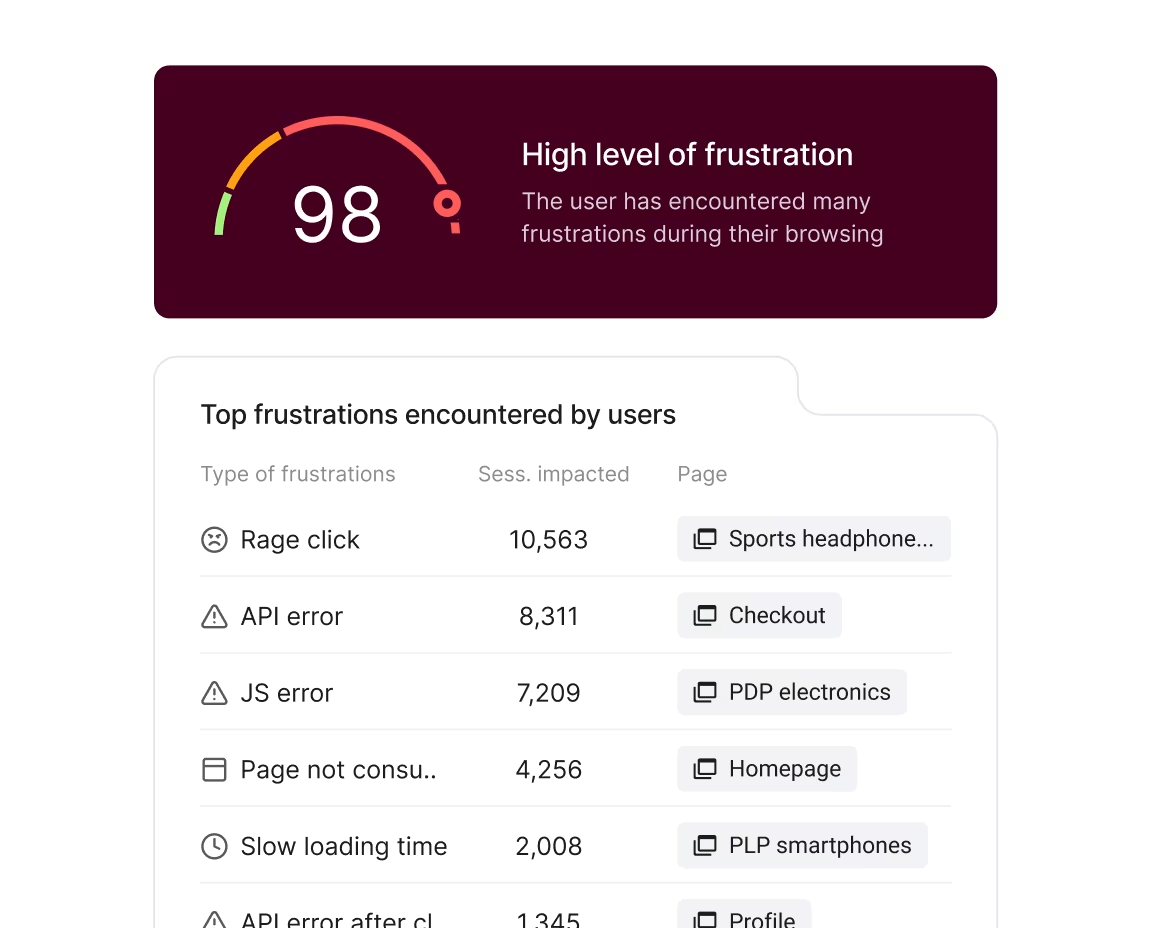
Contentsquare's Frustration Score surfaces every friction type, from rage clicks to slow loading, ranked by sessions impacted and mapped to the exact pages where they're happening
6. Intercom
Intercom is a conversational engagement platform that combines AI chatbots, live chat, and in-app messaging in one place. It's built for product-led businesses that want to engage users inside the product itself, whether that's onboarding a new user, addressing specific customer needs, announcing a feature, or handling a support query without pushing them to a separate channel.
Best for: product-led companies that want to engage customers through in-app messaging and handle support through conversational AI with seamless human handoff
Key features:
AI-powered chatbots with live agent handoff for complex queries
In-app messaging for onboarding, feature announcements, and engagement campaigns
Unified inbox across chat, email, and social channels
In-context surveys for collecting user feedback at key moments in the product
Integrations with CRMs, analytics tools, and product platforms
Pricing: custom pricing. Add-ons available for Product Tours, WhatsApp Messaging, and Surveys.
💡 Pro tip: use Sense to automatically generate a report from your survey responses. Instead of reading through every reply, Sense surfaces the main themes, pulls the most relevant customer quotes, and recommends what to address first, so your team acts on the full picture rather than the loudest voices.
![[Visual] VOC generates report from survey responses](http://images.ctfassets.net/gwbpo1m641r7/4jloEDc0QQ89qoQaiad84R/f1f9e0dd289557929a9e8e8553be8881/VOC_generate_report_from_survey_responses.svg?w=1140&q=85&fit=scale)
Contentsquare Surveys surfaces AI-generated insights from survey responses, from key findings to overall user sentiment, without manually reading through every reply
7. Qualtrics XM
Qualtrics XM is an enterprise experience management platform built for organizations that run large-scale voice of customer programs and need statistical rigor behind every insight. Its survey capabilities go well beyond standard tools, with branching logic, embedded data, and multiple distribution channels, and its analytics layer uses AI to identify key satisfaction drivers and predict behavior at scale.
Best for: enterprise organizations that need robust survey capabilities, advanced analytics, and systematic action planning for large-scale CX programs
Key features:
Advanced surveys with branching logic, embedded data, and multi-channel distribution
AI and statistical analysis to identify key drivers of customer satisfaction and predict customer behavior
Automated action routing to get insights to the right teams quickly
Integration with CRM and operational data for closed-loop feedback
Industry benchmarking to compare performance against competitors
Pricing: custom pricing based on features and response volume. Contact Qualtrics for a quote.
💡 Pro tip: Contentsquare's Digital Experience Benchmark is built from 99 billion sessions across 6,000+ websites and gives you industry-level data on conversion rates, frustration, bounce rates, and engagement by sector, so you know whether what you're seeing is a real problem or a baseline everyone in your industry is dealing with.
The 2026 Digital Experience Benchmark from Contentsquare, built from billions of sessions across thousands of websites, filterable by industry, traffic source, device, and more
8. Mixpanel
Mixpanel is a product analytics platform that specializes in tracking what users do inside mobile and web applications over time. Its retention and conversion analysis helps product teams identify which features drive engagement, which user segments are at risk of churning, and where users drop off before completing key actions.
Best for: product teams that need detailed analytics on in-app user behavior and retention across mobile and web
Key features:
Conversion analysis to see user paths and remove friction from key flows
Retention analytics to identify early signs of churn by audience segment
In-app behavior monitoring with engagement stage breakdown
Cohort analysis and user segmentation for targeted insights
Integrations with CRM and marketing automation tools
Pricing: free for up to 100,000 monthly tracked users. Paid plans available for additional limits and features.
💡 Pro tip: stop losing behavioral data you didn't know you'd need. While Mixpanel requires you to manually tag every interaction before you can track it, Contentsquare's Smart Capture capability automatically records every click, scroll, and form fill from day one, retroactively. If a new question comes up about how users behaved last month, the data is already there.
![[visual] Contentsquare automatically gives every team complete data from day 1, no tagging or planning required](http://images.ctfassets.net/gwbpo1m641r7/lzfsSU4NBtqUEgTfKYC3w/80f70d921102f226f5945a3bf90aade0/mixpanel-vs-csq.png?w=655&q=85&fit=scale&fm=avif)
Manual tracking in Mixpanel means setup, engineering, QA, and waiting, before you get an answer. Contentsquare's Smart Capture skips all of that
9. Google Analytics (GA4)
Google Analytics (GA4) is the most widely used web analytics platform. It gives teams foundational visibility into where traffic comes from, how users move through the site, and where they drop off, at no cost. For teams building a CX analytics stack from scratch, it's the natural starting point before layering in deeper behavioral tools.
Best for: any organization that needs free, comprehensive web analytics as a foundation for understanding user behavior and conversion paths
Key features:
Real-time traffic monitoring and audience segmentation
Conversion tracking and goal setup with funnel visualization
Behavior flow reports showing how users navigate across pages
Integration with Google Ads and Search Console for campaign attribution
Custom dashboards for tracking the metrics that matter to your team
Pricing: free.
💡 Pro tip: use Contentsquare's Speed Analysis to monitor your full conversion funnel for performance issues, not just individual pages. GA4 tracks pageviews and sessions. Speed Analysis runs your checkout flow, login, or any multi-step journey on a schedule, measures its success rate, tracks Core Web Vitals across every step, and flags the scenarios that are failing before your users tell you.
![[Visual] csq funnel travel](http://images.ctfassets.net/gwbpo1m641r7/1ClUfxpJZfUVc7OZNo3JR0/2b9e130b6b598f11d0dbf6604da3e5ed/csq.svg?w=1280&q=85&fit=scale)
Contentsquare's Speed Analysis monitors entire conversion journeys as scenarios, tracking success rates and Core Web Vitals across every step, not just single pages
10. Adobe Experience Manager
Adobe Experience Manager is an enterprise content management system built for organizations that deliver personalized digital experiences across multiple brands, regions, or channels at scale. It combines content management, digital asset management, and personalization in one platform, with API-first delivery that works across web, mobile, and any other channel your team manages.
Best for: enterprise organizations with complex content needs across multiple brands, regions, or channels that need personalized delivery at scale
Key features:
Content management across websites, mobile apps, and digital channels from a single platform
Digital asset management with AI-powered tagging, search, and distribution
Personalization based on user behavior, preferences, and context
Headless CMS with API delivery to any channel or device
Deep integration with the Adobe Experience Cloud
Pricing: custom pricing based on implementation scope. Contact Adobe for a quote.
💡 Pro tip: use Contentsquare's Data Connect to automatically sync behavioral data to your data warehouse and blend it with the content performance data coming out of Adobe. Which content drove the most engagement, which personalization variant held attention longest, which page sent users toward conversion and which sent them the other way, all in one governed dataset your team can build on.
![[Visual] Data-connect-warehouses](http://images.ctfassets.net/gwbpo1m641r7/7I3BUMjz9UdK66mvBkLZNl/327db6b3de02d490f7561b5f1836f86a/Data-connect-warehouses.png?w=1280&q=85&fit=scale&fm=avif)
Contentsquare's Data Connect works with the major data warehouses your team already uses
Key features to look for in CX software
Not every CX tool does the same thing. When evaluating platforms, here are the capabilities that separate the ones that deliver real impact from the ones that just collect data:
AI-powered analytics that surface friction points automatically, prioritize improvements by business impact, and don't require an analyst to extract every insight
Omnichannel data integration that connects customer interactions across web, mobile, email, and chat into a single coherent view
Real-time monitoring that helps you spot and respond to issues as they happen, not days later
Feedback collection with built-in surveys and feedback widgets that capture input at the moments that matter
Session replay capability that lets you watch real user sessions and understand the experience behind the data
Seamless integrations with your existing CRM, marketing automation, and analytics stack
Customer journey mapping and visualization that shows how customers move through your site, where they struggle, and where they convert
💡 Pro tip: use Contentsquare's Journey Analysis capability to map how users actually move through your site, not how you assumed they would. It surfaces the unexpected paths, the loops, the U-turns, and the exits that never show up in a planned journey map but account for most of your drop-off.
![[Visual] Trace every user path is journey analysis](http://images.ctfassets.net/gwbpo1m641r7/5P5sT9SL1LLFu5dLEd4kl/cd9e19d9543ada967d1e37a000b492c2/Complex.svg?w=655&q=85&fit=scale)
Contentsquare's Journey Analysis shows every path users take after landing, including the ones that end in an exit before they reach where you wanted them to go
How to choose the right CX software
The honest answer is that no tool will fix a CX problem your team hasn't clearly defined yet. Before you compare pricing pages or book demos, it's worth getting specific about where your current process breaks down, what data you're missing, and what decision you'd make differently if you had it. The right platform is the one that closes that gap without creating 3 new ones. Follow these 5 steps for a confident decision:
Define your CX goals: are you trying to reduce churn, improve conversion rates, speed up support, or understand why users abandon key flows? Your goals determine which capabilities matter most
Assess your current processes: map out how your team currently collects and acts on customer insights. Identify where you lack visibility or where manual processes slow you down
Evaluate integration requirements: list the tools your team already uses. The right CX platform connects with your existing stack rather than creating new data silos
Consider scalability: choose a platform that can grow with you, whether that means handling more traffic, supporting additional channels, or adding team members over time
Weigh ROI against total cost: look beyond the sticker price. Consider implementation time, training requirements, and the potential revenue impact of better customer experiences
Frequently asked questions about customer experience software
Customer experience software is any technology solution used to monitor and improve the experience customers have when interacting with your company and product. These tools help you track user behavior, collect feedback, and deliver better service across digital touchpoints.
![[Visual] Contentsquare's Content Team](http://images.ctfassets.net/gwbpo1m641r7/3IVEUbRzFIoC9mf5EJ2qHY/f25ccd2131dfd63f5c63b5b92cc4ba20/Copy_of_Copy_of_BLOG-icp-8117438.jpeg?w=946&q=85&fit=scale&fm=avif)
![[Visual] [Product experience] Tools](http://images.ctfassets.net/gwbpo1m641r7/3MceIMHkl4FUoBlAA2GL1X/e8042ca6e0858bc23fe4c1dc765e2686/AdobeStock_690282136.png?w=624&q=85&fit=scale&fm=avif)