
Peak seasons are always a big deal for ecommerce brands. Whether it’s Christmas, Valentine’s Day, or Cyber Week, the holiday season is invariably the busiest time of year for ecommerce retailers.
However, the challenge is real: traffic acquisition costs are rising, consumers are more selective with their spending, and competition for attention has never been fiercer.
This guide gives you the strategic framework and tactical playbooks you need to win. Whether you're an ecommerce manager, CRO lead, or digital product director, you'll walk away with a clear action plan for your most successful peak season yet.
Key insights
During Black Friday in 2024, ecommerce sites saw traffic surge by 65% compared to any other Friday in the year. The brands that convert this demand are those that plan strategically, optimize, and put their buyer at the heart of everything they do.
Many companies go into ‘code freezes’ during peak season, but it’s important to stay agile and respond to critical issues. Sometimes, it’s less risky to make a change than not to.
Pay attention to coupon UX and ensure codes are easy to remember (like BLACKFRIDAY2025) and easy to use. It’s even better if you can apply coupon codes automatically.
What is the ecommerce peak season?
Peak season is the time of year when consumers spend the most money, and it typically falls within the months of mid-October to mid-January.
Major ecommerce holidays include Black Friday, Cyber Monday, and Christmas.
The modern peak season calendar typically looks like this:
Mid-October: ramp-up of seasonal promotions, email teasing, and awareness campaigns
Early November: pre-Black Friday campaigns and early-bird deals
Black Friday weekend: biggest traffic and conversion surge (Friday–Monday)
Cyber Week: extended promotions maintain momentum
December holiday shopping: gift-buying period with shipping deadline waves
Post-Christmas/New Year: last-minute shoppers, gift card redemption, and returns/exchanges
Some categories also experience additional peaks outside the main holiday season, like Valentine’s Day, Mother’s Day, Halloween, and back-to-school periods.
How to prepare for ecommerce peak season
Preparation is the key to thriving during peak shopping seasons. But what does the prep work actually look like?
Here’s a checklist of everything you need to do from pre- to post-peak this season.
Pre-peak season
Pre-peak season is the lead-up to your first campaign, and your team might start it as early as August.
Having a strong pre-peak plan is just as important as your actual peak season promotions. As Susanne Smulovitch, Contentsquare’s customer success strategy manager, says:
You can't run a marathon without practice. If you can, run some trial tests and periods ahead of the holiday season. Pick up any bugs ahead of time, see what's working and not. Don’t just plan a campaign and launch it on Black Friday without road-testing it. You don’t want any surprises on the day!
We recommend following these 5 steps throughout your pre-peak ecommerce season.
Step 1: understand your user
Understanding who’s landing on your site (and looking to spend money) during the peak season helps you optimize for the right behaviors.
Here’s some general information about ecommerce shoppers during peak season:
73.08% of site traffic is mobile. Your mobile experience isn't optional—it's your primary source of traffic (and ultimately, sales, with 61.8% of sales coming from mobile devices).
4 out of 5 buyers want a consistent, omni-channel shopping experience. Assets like your ads, social media posts, and landing pages need to seamlessly reflect your brand.
Shoppers only scroll roughly half of your page. Placing key information higher up on pages is critical if you want people to move forward in their buying journey.
🔥 Pro tip: use Contentsquare Heatmaps to see your pages’ scroll depths.
You can learn more about your site’s visitors by digging into ecommerce analytics from your last peak season. Here’s the data you’ll want to get:
The percentage of mobile vs. desktop users
The conversion rates for mobile vs. desktop users
Your top acquisition channels
Which pages had the highest conversions
Which pages had the highest bounce rates
The search terms visitors used to find your site
Step 2: review the customer journey
Even the best campaigns can fall flat if the on-site journey is confusing or cumbersome.
For instance, you might review your site and learn that shoppers who arrive via social media often browse multiple pages before converting, while visitors from organic search convert right away. Having this insight helps you tailor your messaging and funnel paths for different audiences.
To get a comprehensive understanding of your visitors and what makes them engage, return, and convert, use Contentsquare’s Product Analytics suite, powered by Heap. Product Analytics lets you track and analyze user journeys across multiple sessions spanning your website, app, and other branded experiences.
![[Visual] Journey analysis on reference mapping](http://images.ctfassets.net/gwbpo1m641r7/30V6WdNQ7xg3mlOFV7DkmY/0e2235977563e2c759fdbd873d51ae59/01-Masthead__1_.png?w=3840&q=100&fit=fill&fm=avif)
See the exact steps users take to convert on your site and app with Contentsquare’s Product Analytics
James Fearne, the director of customer success at Contentsquare, has this to say when thinking about your users’ peak season journey:
Your customers know it's Black Friday. Don't overcomplicate the journey and potentially block people from buying. Lots of brands may create a bespoke Black Friday landing page, where previously you would have just gone to a product page. Don't risk putting users in front of (potentially) useless content for the sake of it. Make sure it's useful.
Build upsells into the journey, because according to Dan Yoffe (our director of analytics), customers are more receptive to upsells this time of year:
Holiday visitors tend to enter the site looking for a specific product that is on sale, but are much more willing to interact with upsell carousels during this time of year. Think carefully about the places where different segments will be open to upsell—and make sure visitors are constantly exposed to these opportunities throughout the journey to increase ACV.
Step 3: optimize your site
After collecting information about your users and their journey, you’ll have a starting point to optimize your ecommerce site for this year’s campaign.
For example, say you find pages with higher-than-normal bounce rates. If those pages are part of your peak campaign, you’ll want to prioritize fixing them.
With this insight, you can pinpoint exactly where users struggle and take targeted actions to improve the user experience, and in turn, conversions.
Review your site’s
Checkout flows
Page speed and mobile responsiveness
Navigation, filters, and on-site search
Product page content (images, details, UGC)
Promo code and cart functionality
Upsell placements
Accessibility basics (contrast, tap targets)
By using Contentsquare’s experience intelligence tools, you can
Evaluate page performance so you know what adjustments you need to make to improve UX (for example, layouts, copy, and content positioning)
Identify and fix frustration to quickly resolve technical errors and ecommerce UX issues
Benchmark your metrics against your competitors so have a better idea of your performance
Contentsquare’s Heatmaps and Session Replay show you how users interact with your page. See what they ignore, what causes frustration, and what elements nudge them forward in their journey.
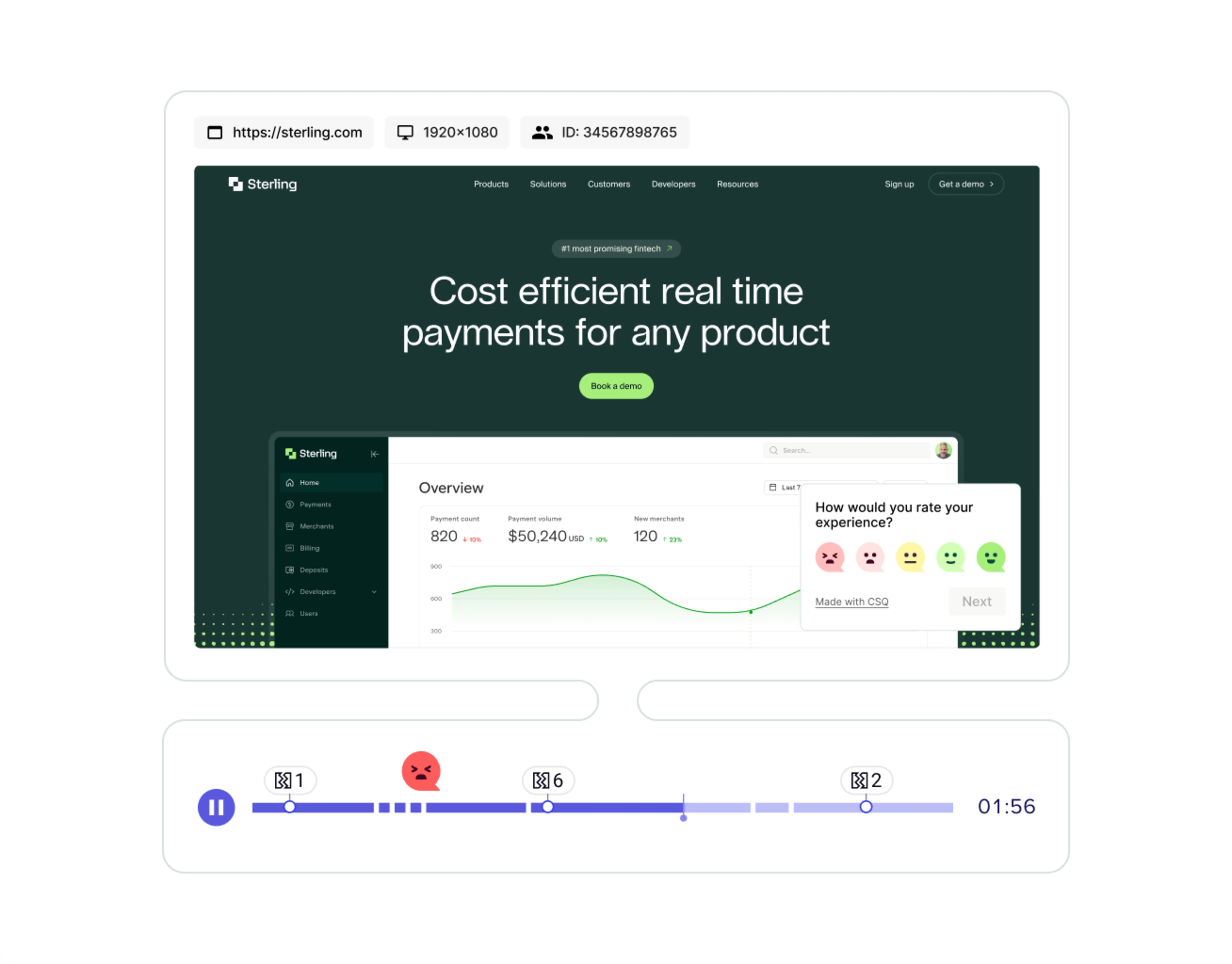
Use session replays to see errors and pinpoint the exact moments leading up to visitor frustration
Step 4: collect user-generated content
For ecommerce brands, user-generated content (UGC)—content your customers create for your brand and post online (think product reviews and demo videos)—is a crucial part of the buying process.
Customers trust other customers more than they trust brands. Bazaarvoice's Shopper Experience Index survey found that 8 out of 10 customers feel that UGC is an essential part of the buyer’s journey.
Featuring UGC on your product pages is one proven strategy to drive better outcomes during peak season, like furniture retailer Edloe Finch does:
![[Visual] ugc-example](http://images.ctfassets.net/gwbpo1m641r7/6TiwRSPLdJHt8t7bH7i9F7/8c3c4167adf6c918037b174e95ca1370/ugc-example.png?w=3840&q=100&fit=fill&fm=avif)
Consider
Adding product reviews and testimonials to landing pages
Highlighting customer photos or videos showcasing products in use
Featuring social media posts that showcase customers
Take time to collect UGC before you launch so you have enough to last throughout the entire peak season.
💡 Pro tip: for brands looking to make their next ecommerce peak season pop, one of our key integration partners is Bazaarvoice, a full-funnel user-generated content (UGC) platform for ecommerce brands.
By integrating Contentsquare with Bazaarvoice, you get a better understanding of the impact UGC, ratings, and reviews have on your engagement metrics, conversion rates, and online revenue.
You can read more about how this integration enhances both Contentsquare and Bazaarvoice here.
Step 5: test your site
Test your site with users before peak season hits to work out any surprise bugs or issues you may have missed.
Contentsquare’s Experience Monitoring product has synthetic monitoring capabilities that let you send bot traffic to your site so you can scale your troubleshooting and uncover any issues before real people experience them.
You can also test your site with real users with Contentsquare’s User Tests to collect raw, unfiltered feedback.
![[Visual] User tests dashboard](http://images.ctfassets.net/gwbpo1m641r7/sqwAOl693ETZdIkhDvSVo/83e366a323fa2b5c160a2f87f5516626/01-Masthead__1_.png?w=3840&q=100&fit=fill&fm=avif)
Testing (with both real users and bots) will save you time and money, and ensure your customers have a seamless shopping experience
During peak season
The work doesn’t slow down after preparation. During the peak ecommerce season, you’ll want to focus all your effort monitoring and responding to what’s happening on your site.
Step 6: monitor, respond, and optimize
Even the best preparation can’t prevent every challenge during peak season. Customer activity and data flow constantly, and brands need real-time adaptability to capitalize on surges and avoid lost revenue.
Here’s a checklist of activities for your team when you’re in the thick of the ecommerce peak season:
Monitor site performance continuously: continue using Contentsquare’s synthetic monitoring to track page load times, errors, and crashes immediately. Metrics like Frustration Score (tracking rage clicks, hesitation, and slow loads) help identify where customers are struggling in real time.
Leverage real-time analytics and AI-driven insights: machine learning can uncover trends, predict customer behavior, and guide instant decisions—like adjusting campaigns, surfacing high-demand products, or highlighting promotions based on live traffic. Contentsquare’s AI Sense takes out the manual labor of deep analysis. Just ask Sense a question and instantly get the data you need to make smarter decisions.
Automate routine tasks and alerts: integrate systems so critical issues trigger automatic notifications via Slack, Jira, or dashboards, ensuring your team responds instantly to technical or UX problems. Contentsquare integrates with many popular collaboration tools like Slack, Jira, and Microsoft Teams, so your team instantly receives alerts to issues that need their attention.
Track key KPIs in real time: monitor conversion rates, cart abandonment, traffic spikes, and server performance to catch problems before they impact revenue
Act on friction immediately: fix JavaScript errors, slow pages, or broken links as soon as they appear. Even small delays or UX barriers can drive shoppers away. A CSQ tool like Impact Quantification assigns a dollar value to errors, making it easy for you to prioritize which errors to fix.
Dynamic campaign and content adjustments: surface trending products, emphasize user-generated content on product pages to boost conversions, or shift budget toward high-performing channels (use Contentsquare’s Acquisition Analysis to quickly spot which channels bring the highest ROI.
Support readiness: peak season increases inquiries and returns—ensure live chat, FAQs, and support staff are fully scaled to maintain customer satisfaction
By combining real-time monitoring, AI-powered insights, and automated workflows, brands can fix issues before they turn into big problems and lost revenue.
Post-peak season
Post-peak season is all about reviewing your data and ensuring you have what you need to build a stronger ecommerce marketing campaign next year.
Step 7: review and plan for next year
Once the peak season winds down, shift from real-time management to retrospective analysis and optimization:
Analyze performance metrics: look at conversions, traffic sources, bounce rates, checkout abandonment, and mobile vs desktop performance. Identify what worked, what didn’t, and where friction occurred.
Evaluate campaign ROI: compare advertising spend to revenue, and determine which channels, promotions, and creatives delivered the best results
Review customer feedback and UGC: assess reviews, ratings, and social content to understand customer satisfaction and highlight areas for improvement. A Contentsquare tool like Surveys lets you embed surveys and feedback widgets directly on your site so you can collect feedback from all users—even those who don’t become a customer.
Document lessons learned: capture insights from technical issues, UX friction, inventory management, and campaign execution for reference in future peak seasons
Identify optimization opportunities: fix lingering site errors (easy to find with a tool like Error Analysis), update high-bounce pages, improve product descriptions, and refine checkout flows (use a journey mapping tool like Journeys to find where users drop out of the checkout process).
Plan post-season engagement: lean on data from returning customers for retargeting, loyalty programs, and email campaigns. Encourage reviews or feedback to enrich UGC for future campaigns.
Benchmark against peers and industry trends: compare your performance to competitors and sector-wide trends to spot gaps and opportunities. Contentsquare’s Benchmarks gives you access to industry data from your peers (data that is typically impossible to find through a Google search). You’ll have a much clearer picture of how you performed this holiday season against your competitors, so you know exactly what to improve for next year.
Your peak season checklist
Peak season preparation can feel overwhelming, but a concise checklist helps ensure no key area is overlooked. Here’s a practical list you can follow:
✅Pre-Peak
Review traffic sources, top converting pages, and mobile vs desktop usage
Map the customer journey and identify friction points
Optimize pages, copy, UX, pricing, and catalog performance
Collect enough user-generated content (reviews, photos, videos) for the season
Test site functionality, checkout flows, and mobile experience
Ensure every touchpoint reflects your brand for a cohesive experience
✅During Peak
Monitor site performance, page loads, errors, and frustration signals in real time
Fix issues immediately and adjust campaigns as needed
Highlight high-demand products and relevant UGC on pages
Ensure live chat, FAQs, and support staff are fully scaled
✅Post-Peak
Analyze metrics like conversions, bounce rates, campaign ROI, mobile vs desktop
Review and implement customer feedback
Document lessons learned so you know what to avoid next year
Benchmark your data with competitors and trends to identify opportunities for next year
FAQs about peak season
Peak season typically runs from mid-October to mid-January, including major shopping events like Black Friday, Cyber Monday, and the December holiday period.
![[Visual] Contentsquare's Content Team](http://images.ctfassets.net/gwbpo1m641r7/3IVEUbRzFIoC9mf5EJ2qHY/f25ccd2131dfd63f5c63b5b92cc4ba20/Copy_of_Copy_of_BLOG-icp-8117438.jpeg?w=1920&q=100&fit=fill&fm=avif)