![[CSQ for ecomm] [Visual] Session replay](http://images.ctfassets.net/gwbpo1m641r7/7jVnopVsh6HrZR9i5TL8ts/72d0851f781af5e76e2ba903c202556d/AdobeStock_950001038__1_.jpeg?w=3840&q=100&fit=fill&fm=avif)
Rows and rows of analytics data will never tell you exactly what’s happening as customers browse through your ecommerce store. But session replays let you watch how visitors interact with every page, giving you valuable insights to improve user experience (UX) and convert more visitors into happy customers.
This guide will take you through 6 actionable ways session replays can improve your ecommerce store, from finding usability issues and understanding conversion blockers to getting the most out of your surveys and ensuring your site is optimized for mobile.
What’s an ecommerce session replay?
An ecommerce session replay (also known as a user recording or session recording) is a re-creation of real visitor behavior and user interactions—including movements, taps, scrolls, clicks, and typing—across your store’s site. It’s a video that shows a users’ movements during a single session.
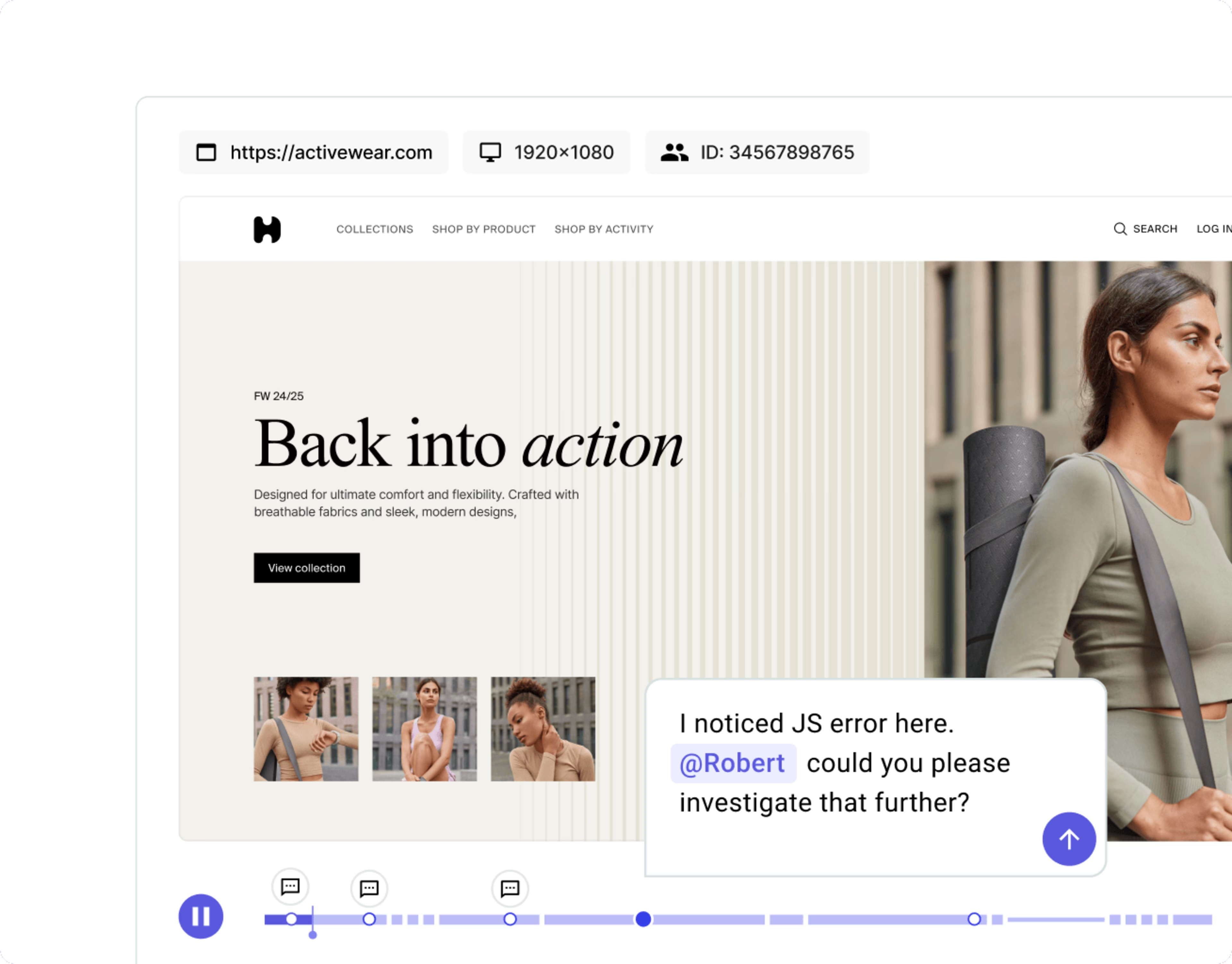
Contentsquare’s Session Replay capability in action: a video-style playback of a user session, featuring a timeline you can use to comment on key moments
💡Pro tip: using session replay tools doesn’t have to mean sacrificing user privacy. Contentsquare complies with GDPR, CCPA, and other other country-specific privacy legislation (Australia, Brazil, Canada). It’s also ISO 27701 certified.
Why use session replays on your ecommerce store?
Ecommerce session replays grant you behind-the-scenes access to the full customer journey, helping you:
Build empathy for your customers. Watching customers struggle to use your site helps you put yourself in their shoes and come up with creative solutions to improve user experience.
Understand how to increase ecommerce conversions. By seeing how real users interact with your site, you’ll spot areas to troubleshoot and fix; you’ll also get ideas for improvements and A/B tests that could boost your ecommerce purchases.
Analyze your customers' experience, without technical knowledge. You don’t need a masters in data analytics to draw conclusions from session replays. They’re one of the best ways to see what users like and dislike about your site.
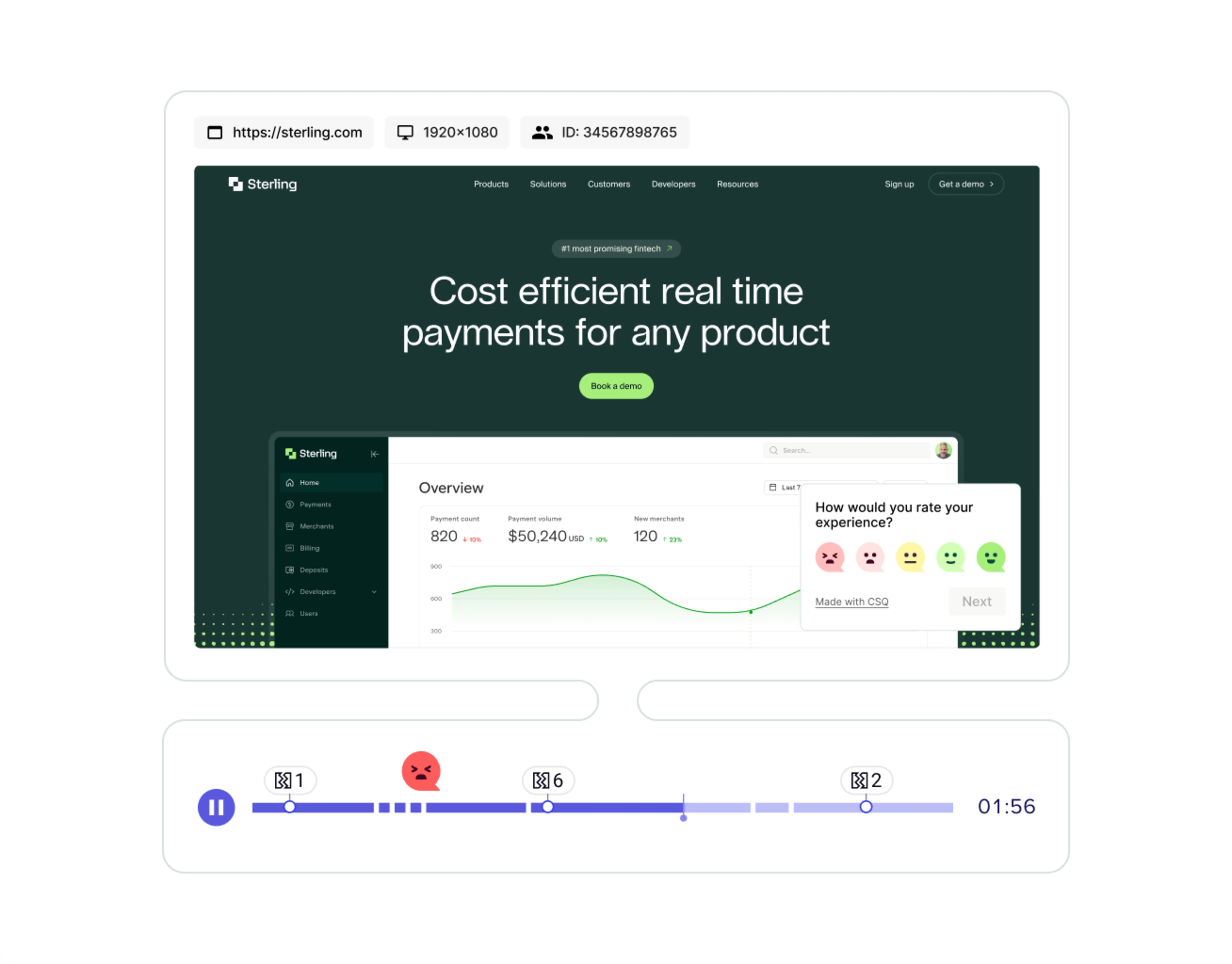
Contentsquare’s Session Replays capability reveals what really happened during moments of frustration and delight for your users on site
What’s more, with the right session replay tool, you can skip straight to the most relevant videos—and enjoy all the above benefits without unnecessary watch time. If you’re using Contentsquare, replays are tagged with a Frustration Score, allowing you to filter for sessions where shoppers experienced issues—or what your user journey looks like when everything runs smoothly.
You can also filter by other relevant factors such as the user’s device, how many pages they viewed in that session, or the country they accessed your site from.
![[visual] Create segments and filters in every Contentsquare tool](http://images.ctfassets.net/gwbpo1m641r7/1OGYAzrKhl0k66DTOgh5MQ/8cf0739a58d2e34caa7328ca59e08664/Contentsquare-filter-session-replays.png?w=3840&q=100&fit=fill&fm=avif)
Filter session replays by factors such as frustration score, events, pageviews, and device
6 ways to use session replays to grow your ecommerce store
If you’re not sure how to use session replays to optimize your ecommerce store, here are 6 ideas to get you started.
1. Find usability issues that frustrate potential customers
Visitor replays help you find the hidden bugs and pages where potential customers get confused or encounter something that doesn’t work as it should. By removing annoying barriers, you can simultaneously improve the user experience and increase conversions.
For example, when fishing gear retailer Orvis launched their new website, they decided to watch back some session replays to better understand how the design affected user behavior.
Before Contentsquare we were kind of blind to our shopping behavior.
They noticed a nasty usability issue that was leaving customers frustrated. For one user segment, clicking on the shopping cart icon, which was supposed to start the checkout process, led to a blank screen—with no messaging at all.
Spotting and fixing this error allowed Orvis to recover conversions that would’ve otherwise been lost.
2. See why visitors aren’t converting
Conversion rate optimization helps you increase the percentage of visitors to your site who go on to become customers. Instead of following generic best practices, use session replays to see exactly what needs to be changed for your potential customers to improve conversion rates.
For example, home appliances retailer Electrolux watched back session replays of users on their repair service page. To book a repair, users had to find their specific product and model—the washing machine, hairdryer, or refrigerator model they needed fixed.
However, replays revealed that users struggled to identify the right product option for their appliance. The drop-off rate for this step of the booking process was very high. Electrolux’s search tool was unintuitive, inaccurate, and provided results that weren’t relevant to the search queries used.
![[Visual] [Electrolux website]](http://images.ctfassets.net/gwbpo1m641r7/5sEtHolWao8pq7r7Jwcnzn/77592d6c1ac260b1390efbf7596fec24/Capture_d_e_cran_2024-12-09_a__10.51.56.avif?w=3840&q=100&fit=fill&fm=avif)
Screenshot of a session replay from Electrolux’s site
With this insight, the team redesigned the search function, which resulted in a +4% increase in their repair booking rate in just 3 weeks.
3. Understand the user behavior behind analytics reports
Traditional web analytics tools like Google Analytics or Tableau make it easy to track what happens on your site: how much traffic each page gets or how many sales you make in a month. But session replays show you the real, qualitative user behavior behind the numbers.
For example, let's say that your analytics tool reveals your bounce rate’s increasing. You could cross-reference this figure with other numerical metrics like page speed and conversion to try and understand what’s going on—but you’d still be making educated guesses.
Another tactic would be to sort your session replays by duration, and watch back some of the shortest ones. This would give you an ‘over the shoulder’ view of what your customers are seeing or experiencing that’s putting them off. That way, you can know definitively what’s causing your visitors to bounce—no guesswork involved.
The ability to make data-driven decisions at pace is really important for success. I could spend all day in Tableau and not come up with an answer when that can be found very simply and quickly within Contentsquare.
💡Pro tip: here’s an easy way to sort your session replays, by duration, in Contentsquare:
![[Visual] Session replay sort](http://images.ctfassets.net/gwbpo1m641r7/6NTA1h1EqpR5yKwWy5Lxr5/7c6f7c355625712990eb891e6eb6b728/Session_replay_sort_.png?w=3840&q=100&fit=fill&fm=avif)
Open the Contentsquare platform and select “Session replay” from the menu on the left
Find the column titled “Duration”, and click on it. When the arrow is pointing upwards ( ⬆️) your replays are sorted from the shortest to the longest time.
4. Optimize the checkout experience
The checkout process—where people input their payment and shipping details—is the final barrier between site visitors and your conversion goals. Session replays help you reduce checkout abandonment—and therefore increase conversions and sales—by showing you exactly what stops people from getting to the end of the process.
Examining the checkout process with Contentsquare’s Session Replay capability was very revealing for Harrods, a British department store with an ecommerce offering. Contentsquare flagged to Harrods that there were lots of users with a high frustration score on their checkout page, so the team watched some session replays.
They noticed that some users were entering their chosen names into the checkout form, then encountering a vague error message: “Please enter a valid first name”. Customers were inputting special characters or multiple names, not understanding that the form was not set up to accommodate these.
Armed with this insight, the UX team revisited the wording to provide a more specific error message: “Please enter a first name using characters A-Z, - and ‘ “. This simple explanation reduced checkout abandonment considerably.
![[Visual] Harrods error message](http://images.ctfassets.net/gwbpo1m641r7/3938fk0DVO6xwvlJL4Bl7q/93bf3b28b35cdc27ad5e60617f20c3b0/harrods.png?w=3840&q=100&fit=fill&fm=avif)
Harrods’ updated, clear error message
5. Connect survey data to customer behavior
If you want to understand how your users feel about your ecommerce site, there’s no substitute for asking them, via a customer survey. But, interpreting their responses can be trickier than expected. If you ask for opinions on your interface, users may have a hard time expressing what they’re referring to. Not everyone knows the difference between a pop-up, a banner, and a tool-tip, so users may simply mention ‘the message that appeared’, which could mean almost anything.
That’s why it’s useful to watch session replays that correspond to your survey responses. That way, if a response discusses ‘a message that appeared’, you can see which piece of content they’re referring to.
Motoring and cycling product retailer Halfords used Contentsquare’s Session Replay capability to better understand their survey responses. They were able to see exactly what visitors did before answering, uncovering precisely what they needed to change to improve the customer experience.
By acting on these insights, they achieve a 2.4 percentage point increase in their Net Promoter Score® (NPS) after just 2 months.
![[Visual] Session replay cross-reference](http://images.ctfassets.net/gwbpo1m641r7/5i3w0NGN4tuC33GslkTI3E/52c4ff9248e7a7bfcd8c8abb4e42beca/Get_clarity_on_survey_responses.png?w=1920&q=100&fit=fill&fm=avif)
Easily connect your survey responses to session replays in Contentsquare
Our Voice of Customer [survey tool] is integrated with Contentsquare. If we get feedback from customers about problems with the shipping flow for example, we can go into Session Replay and watch the sessions. The replay can show us that here is where the API is failing X amount of times. With this data, we can see whether it's an urgent issue that needs our immediate attention or if it's something we need to monitor for a while.
6. Make sure your store is mobile friendly
If you get traffic to your landing pages from mobile devices, mobile or tablet session replays help you understand how non-desktop visitors experience your store. This allows you to spot issues and learn ways to improve mobile conversion rate.
Given that 68% of ecommerce purchases take place on mobile, it’s well worth investigating how users behave on this version of your site.
Increasingly, optimization is moving ‘mobile only.’ It’s been ‘mobile-first’ for a while. That means doing usability testing on mobile, ideating and designing for mobile, and reviewing test previews on mobile.
While session replays are traditionally only available for desktop devices, Contentsquare collects mobile sessions automatically. To find your mobile session replays in Contentsquare, head to the “Session Replay” tab, then click on the devices icon that says “All”. A module will appear that allows you to toggle between session replays on different device types. Select Mobile, then click “Apply”—-and away you go.
![[Visual] Contentsquare lets you understand user behavior across desktop, mobile, and tablet versions of your site](http://images.ctfassets.net/gwbpo1m641r7/7jsTgeFf7iCO2Ms4vYNTqn/b6f2bf6f756e3e3d1397b5fda95bbb55/unnamed__1_.png?w=3840&q=100&fit=fill&fm=avif)
Contentsquare lets you understand user behavior across desktop, mobile, and tablet versions of your site
Gather around the small screen: it’s time for a watch party
Now you know exactly how to use session replays to grow your ecommerce store, it’s time to call your team together, grab a snack, and start your watch party.
When you’re ready to take your ecommerce insights to the next next level, combine session replays and heatmaps (what customers do at page level) with surveys and user interviews (what customers think and feel) to get the complete picture of what happens on your site—helping you make it work better for customers, and your business.
FAQs about ecommerce session replay
An ecommerce session replay is a playback of user interactions with an online store that shows how real shoppers browse, click, tap, scroll, and type through multiple pages in a session.


![[Visual][guide] sentiment analysis home page](http://images.ctfassets.net/gwbpo1m641r7/5Ambj2K5EYDaS0tiOWyuZz/e923f90fb57af8a30a7d8f5e626ff9ea/sentiment-analysis-team-work.jpeg?w=1920&q=100&fit=fill&fm=avif)