![[Visual] Man at computer - stock](http://images.ctfassets.net/gwbpo1m641r7/7GloM7xPXUs1M75nfaIWtr/6566092d4d853e43c29d9df2bf791fd1/AdobeStock_540624504__1_.png?w=3840&q=100&fit=fill&fm=avif)
Traditionally, call centers have been seen as money drainers, not value drivers. Businesses know they need to provide customer support, but the data from these interactions remains siloed and difficult to extract at scale, particularly when using voice or IVR support.
Call center analytics changes this dynamic, transforming customer issues into insights. Machine learning and AI models analyze every conversation across voice, email, and chat to pinpoint why customers are reaching out and categorize emerging trends, enabling you to take action before issues impact customer loyalty or revenue.
The result? A wealth of customer data that doesn’t just tell you how to improve your support experience but also reveals opportunities to improve your product. Read on to discover why call center analytics should be a crucial part of any customer experience (CX) toolkit, and follow our 4 easy steps to start collecting and using cross-channel analytics today.
Key insights
Despite the name, call center (or contact center) analytics isn’t just limited to phone calls. Modern call center analytics tools draw on a range of data sources, like call recordings, chat, and email, to provide omnichannel coverage.
AI and machine learning models operate at an inhuman scale to analyze otherwise-impossible volumes of data, enabling customer support teams to refocus their resources on strategic, value-adding tasks
Combine call center analytics with other data (from tools like your experience intelligence platform and CRM) to connect the dots between what customers say and what they do, including tracking how improved support experiences influence key business goals like retention and revenue
What is call center analytics?
Call center analytics is the practice of collecting, organizing, and analyzing call center data, like customer interactions and agent activity, to understand and improve performance.
It works by capturing a range of operational and behavioral information, such as customer sentiment, wait and response times, and resolution rates. Then, AI analyzes this data to identify root causes, find trends, and predict issues before they affect your customer’s experience—or your business’s bottom line.
The different types of call center analytics include
Conversational intelligence, which analyzes multiple voice and text touchpoints like live chat, AI agent transcripts, sales call recordings, email threads, and support tickets to give a comprehensive omnichannel understanding of CX
Speech and sentiment analysis, which uses nuances in spoken or written conversations (like tone, pauses, and common phrases) to categorize how they really feel
Customer experience analysis, which explores the entire customer journey before and after people interact with your call center to contextualize the overall experience, including where they clicked, what pages captured (or lost) their attention, and any frustrations they experienced on your site or app
Agent performance insights, which reveal where human and AI agents excel and struggle when dealing with specific queries or customer segments, so you can spot issues, fill knowledge gaps, and provide coaching
💡 Pro tip: Contentsquare’s Conversation Intelligence, powered by Loris, turns every conversation into actionable customer insights. It works across voice and text channels to consolidate previously fragmented call center, customer support, and customer success data, then uses powerful machine learning and AI models to extract insights and issues.
The top 3 call center analytics benefits for customer-focused teams
Call center analytics is invaluable for improving your support experience—but the true benefits extend across your whole organization. Here’s how.
1. Uncover critical customer insights
Traditional voice of customer (VoC) analysis is extremely insightful, but it has limitations. Because only a small subset of customers will submit their feedback (usually those who have had either a very good or a very bad experience)—it only provides one piece of the picture.
AI-powered call center analytics platforms turn every interaction into real-time customer feedback, providing surveyless VoC at an unprecedented scale. This unlocks actionable insights from your customer data that fuel data-driven decisions, predictive analytics, and churn forecasting—without requiring any additional effort from your customers.
💡 Pro tip: surveyless VoC is great—but it should complement, not replace, your other customer satisfaction tools.
Use Contentsquare’s AI assistant, Sense, to generate targeted surveys based on your research goals, or choose from a library of pre-made templates. Let AI quickly analyze the results to spot trends and get summary reports of key findings.
![[Guide] Surveys AI sentiment analysis](http://images.ctfassets.net/gwbpo1m641r7/36jQmowoqQcZwulSdW26qj/17a48e2b87a9b324d3bda705c2d790ed/Surveys-AI-sentiment-analysis.png?w=1920&q=100&fit=fill&fm=avif)
2. Pinpoint improvement opportunities
Contact center analytics tools like Conversation Intelligence use natural language processing to analyze billions of conversations and uncover the root causes of issues.
Knowing what type of user friction you’re dealing with is essential to properly addressing it. For example, pain points in the customer journey may be due to functionality issues that prevent users from completing their tasks (like broken links, errors, or looping pathways), but they can also arise from misleading messaging, overly complex sign-up processes, or confusing navigation.
Once you understand the driver behind each inquiry, you can route issues to owners and share insights cross-functionally with other teams—like product, UX, and marketing—to make improvements at the source. This lets teams work together to optimize your CX and customer satisfaction scores (CSAT), while also increasing your deflection rate and reducing inbound conversation volume.
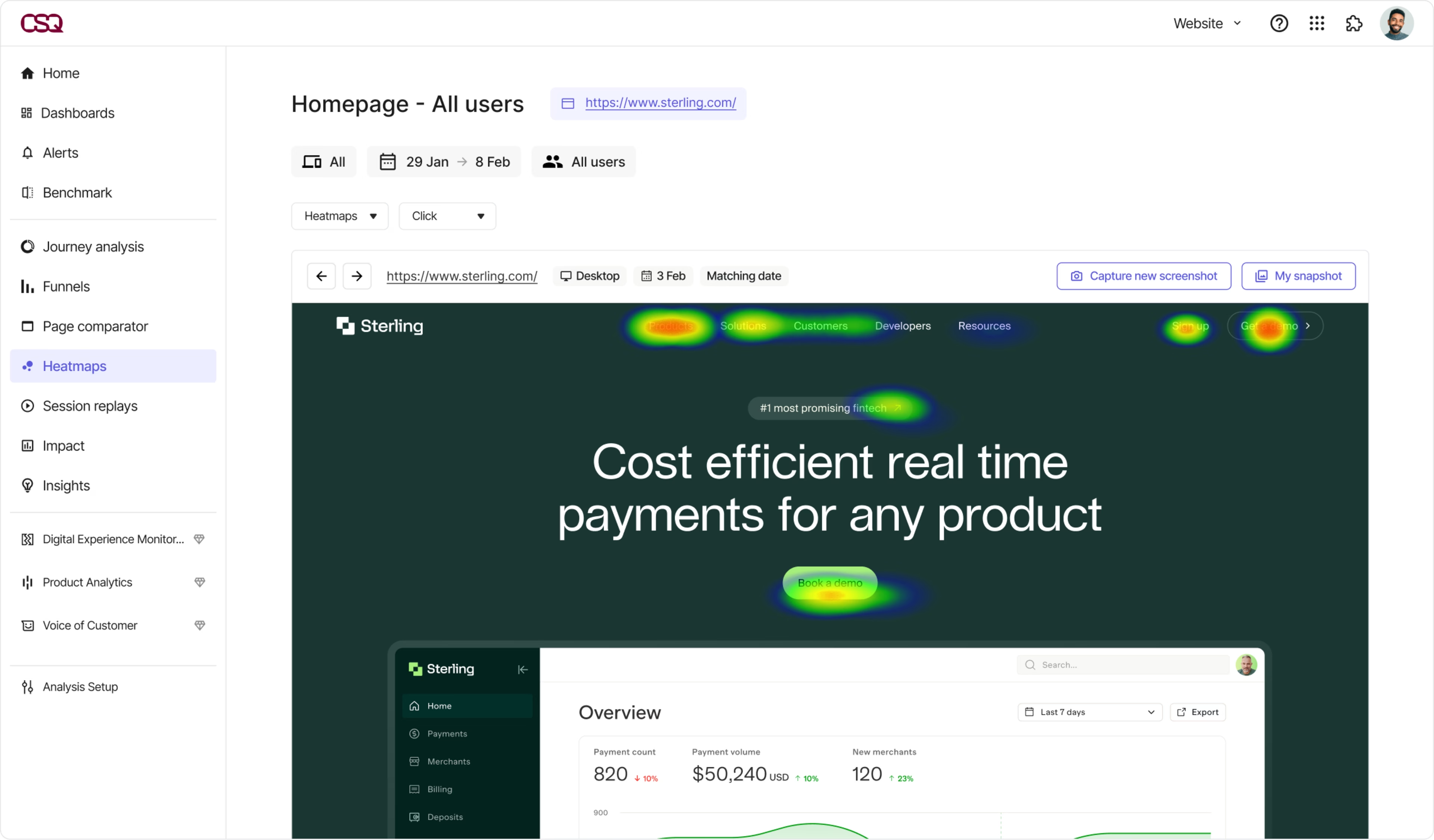
💡 Pro tip: combine your call center analytics with Contentsquare’s Experience Analytics tools to get a 360° view of the customer experience. Explore issues raised in customer conversations using session replays, journey analysis, and heatmaps to see exactly what happened—and ask Sense in-depth questions about your data to find the best way to fix the underlying triggers.
3. Optimize support workflows to save time and money
Dig into call center analytics data to spot the issues taking up most of your agents’ time, as well as any gaps in your AI agent’s performance. Then, find ways to make these workflows more efficient and cost-effective.
For example, if you notice that your human support team spends a lot of time answering the same repetitive, simple questions, use an AI agent to handle these issues or create new content on the topic for your self-service knowledge base.
Automating high-volume, low-complexity issues and FAQs reduces call volumes, wait times, and average handle time (AHT). This doesn’t just create a better customer experience—it gives agents more time to focus on high-impact work, ultimately reducing cost per contact and increasing agent productivity.
We have actually shaved a little over three minutes of AHT now that we don’t have the agent tag tickets anymore. That has reduced our cost per case by 23%.
How to get started with call center analytics in 4 easy steps
1. Define your goals
Start by clearly outlining what you want to achieve. What areas do you want to improve? For example, some common goals might be to
Raise CSAT or Net Promoter Score®
Improve resolution times
Reduce call handle time
Enhance service quality
Implement quality assurance (QA) frameworks
Lower support costs
2. Identify key metrics
Once you’ve picked your goal(s), decide which metrics you’ll track to help you monitor and optimize performance. This can include interaction analytics and metrics from your call center analytics platform, as well as operational efficiency, customer behavior, and digital experience metrics from other tools that give you additional insights.
Here are some metrics to inspire you:
Metric | What it is | Why it matters |
First call resolution (FCR) | The percentage of calls (or other forms of customer contact) that are resolved in the first instance. | A high FCR means customers get the answers they need quickly. It’s associated with higher CSAT and loyalty. It also shows agents have the training and resources needed to solve problems without further investigation, freeing them up to handle more cases. |
Average handle time (AHT) | The average duration of a call from beginning to end. | An efficiency and profitability metric used to monitor agent performance and gauge the complexity of certain topics. |
After-call work (ACW) | Time spent on follow-up actions, like taking notes, writing emails, or creating escalations. | After-call work is crucial, but it takes up valuable agent time that could be spent helping customers. High ACW times may indicate efficiency issues or optimization opportunities (like using AI summarization tools). |
Cost per contact (CPC) | The average cost for each customer interaction. | Assess profitability and efficiency. |
Customer satisfaction (CSAT) | A ranking of how satisfied customers are with their experience on a numerical scale (e.g. 1–5). | Understand how customers feel about the interaction and experience overall. |
Net Promoter Score® (NPS®) | A numerical score based on the question, “How likely are you to recommend us to a friend or colleague on a scale of 0–10?” | Like CSAT, NPS® is a signifier of customer satisfaction. It also reflects long-term customer loyalty and may predict the likelihood of retention or churn |
Resolution rate | Overall percentage of resolved queries. | Track overall performance and identify gaps in specific areas. Topics or agents with poor resolution rates may require additional content or training. |
Sentiment trajectory | A visualization of how sentiment changes over the course of a customer interaction. | Monitor how agent behavior and other factors (like company policies) affect customer sentiment. |
Abandonment rate | The percentage of calls abandoned before completion, usually without connecting to an agent. | High abandonment rates indicate staffing issues leading to customer frustration and poor experiences that may negatively impact your business or brand. |
Customer effort score (CES) | How difficult it is for a customer to complete a certain task or action. | If it’s too time- or effort-intensive for customers to get help with their issues, they’re more likely to seek out easier alternatives from competitors. |
3. Use AI-powered tools to find patterns
Implement call center analytics software (like Contentsquare’s Conversation Intelligence 👋) to instantly analyze interactions across multiple touchpoints. Use machine learning and a library of out-of-the-box AI models to surface performance trends, customer needs, and the root causes behind dissatisfaction. Visualize this data with dashboards for at-a-glance overviews.
Combine your findings with data from other platforms—like customer relationship info from your CRM and digital experience and behavioral insights from Contentsquare—to connect your call center performance to key business outcomes, like revenue growth and retention, for even deeper and more valuable insights.
4. Turn your insights into action
Share key takeaways from your call center analytics cross-functionally to improve decision-making, guide prioritization, and deliver better customer experiences. For example:
Add self-service options for common queries to give customers instant answers and reduce bottlenecks for your support team
Share feedback about customer use cases and needs with your product team to inform their roadmap
Inform customer success and education teams about key problems impacting feature and product adoption so they can create new onboarding or training modules
Get more from every customer interaction
Customers tell you about their problems and needs every day—but most customer service platforms keep that data locked away where you can’t access it.
The right call center analytics tool connects key channels and analyzes interactions at scale to find trends, patterns, and opportunities you would otherwise miss, turning your most underutilized resource into a strategic differentiator.
FAQs about call center analytics
Call center analytics (also called contact center analytics) is the process of collecting call center data and using advanced analytics capabilities (including text analytics and speech analytics) to understand performance, optimize call center operations, and deliver better customer experiences.
Today, call center analytics doesn’t just apply to call centers: it includes channels like phone, voice, and IVR; live chat; social media; and interactions with chatbots.

![[Visual] Contentsquare's Content Team](http://images.ctfassets.net/gwbpo1m641r7/3IVEUbRzFIoC9mf5EJ2qHY/f25ccd2131dfd63f5c63b5b92cc4ba20/Copy_of_Copy_of_BLOG-icp-8117438.jpeg?w=1920&q=100&fit=fill&fm=avif)