
Most websites convert between 2% and 4% of visitors. Which means for every hundred people who show up, 96 leave without doing the thing you built the page for.
The uncomfortable truth is that most teams know their conversion rate is bad. They just don't know exactly why. Is it the headline? The form? The page speed? The fact that the CTA button is the same color as the background? Without the right conversion rate optimization tools, it's guesswork dressed up as strategy.
CRO tools exist to close that gap. Whether you're running an ecommerce store, a SaaS product, or a content platform, they show you where users hesitate, what they ignore, where they give up, and occasionally, what finally convinces them to stay. The best ones don't just collect customer data—as seen in numerous case studies—they surface the specific moments where a small fix could make a measurable difference to the user experience.
This guide covers 12 of them across 5 categories: web analytics, user behavior, A/B testing, landing pages, and lead capture. Not every tool belongs in every stack, but by the end you'll know which ones match how your team actually works.
Key takeaways
Conversion rate optimization (CRO) tools fall into distinct categories including analytics, user behavior, A/B testing, landing pages, and lead capture—most teams need tools from multiple categories to optimize effectively
The best CRO approach combines quantitative data (what users do) with qualitative insights (why they do it) using complementary tools
Free options like Google Analytics and Microsoft Clarity provide solid foundations, while paid tools offer deeper behavioral insights and testing capabilities
Effective CRO focuses on understanding user drivers, barriers, and hooks—not just boosting conversion numbers
CRO tools comparison table
Tool | Category | Best for | Pricing | Key CRO feature |
|---|---|---|---|---|
Google Analytics (GA4) | Web analytics | All businesses tracking traffic and conversions | Free | Conversion tracking and funnel visualization |
Adobe Analytics | Web analytics | Large enterprises with complex data needs | Enterprise (contact for pricing) | Cross-channel attribution |
Contentsquare | User behavior | Teams needing deep behavioral insights | Free tier available; enterprise plans | Funnel Analysis with drop-off insights |
Crazy Egg | User behavior | Small to mid-sized teams starting with heatmaps | From $29/month | Heatmaps and scroll maps |
FullStory | User behavior | Product teams debugging user issues | Free tier; paid plans available | Session replay with frustration signals |
Microsoft Clarity | User behavior | Budget-conscious teams and beginners | Free | Heatmaps and rage click detection |
Optimizely | A/B testing | Enterprise experimentation at scale | Enterprise (contact for pricing) | Feature flagging and multivariate testing |
VWO | A/B testing | Mid-market teams wanting all-in-one testing | From $99/month (free trial) | A/B testing with built-in heatmaps |
Instapage | Landing pages | Marketers personalizing landing experiences | From $79/month | Dynamic content personalization |
Unbounce | Landing pages | Paid campaign optimization | From $74/month | Smart Traffic AI routing |
HubSpot | Lead capture | Teams needing CRM and marketing automation | Free CRM; Marketing Hub from $45/month | Forms and lead nurturing workflows |
HelloBar | Lead capture | Quick lead capture implementation | Free plan; paid from $29/month | Exit-intent pop-ups |
Web analytics CRO tools
Web analytics tools track quantitative data about your website traffic and conversions. They answer the "what" questions: what pages get the most traffic, what's your conversion rate, and what paths do users take through your site.
1. Google Analytics (GA4)
Google Analytics is the most popular web analytics tool, installed on over 33 million websites. GA4 helps you track traffic patterns, traffic sources, and goal conversion rates in real time. You can also track common metrics like sessions and session duration, and identify where users exit or what web pages have high bounce rates.
Best for: All businesses needing foundational traffic and conversion data
Pricing: Free
Key features:
Real-time traffic monitoring
Conversion tracking and goal setup
Funnel visualization reports
Audience segmentation
Integration with Google Ads and Search Console
💡 Pro tip: GA4's manual tracking path goes: select event, engineer writes code, QA, update spreadsheet, wait for data, ask your question, repeat. With Contentsquare's Smart Capture, you only have to: install the snippet, ask your question, get your answer.
Manual tracking means five steps before you get an answer. Contentsquare's Smart Capture means one
2. Adobe Analytics
Adobe Analytics tracks real-time multichannel analytical data across various sources (your website, email marketing, kiosks, apps, and more). Use Adobe Analytics to examine user flow, measure key performance indicators (KPIs), and monitor conversion rates. Users appreciate the visually appealing reports, which are easy to understand.
Best for: Large enterprises with complex, multi-channel data needs and existing Adobe ecosystem investments
Pricing: Enterprise pricing (contact Adobe for a quote)
Key features:
Cross-channel data collection and attribution
Predictive analytics powered by AI
Advanced segmentation and cohort analysis
Real-time data processing
Deep integration with Adobe Experience Cloud
User behavior CRO tools
User behavior tools show you how users interact with your site—where they click, how far they scroll, and where they get stuck. These tools help you understand the "why" behind your analytics data by revealing actual user behavior patterns.
3. Contentsquare
Most CRO tools tell you where users drop off. Contentsquare (hey there 👋) shows you what was happening on the page before they did, what frustrated them, and how much that frustration is costing you in lost revenue. It's an all-in-one experience intelligence platform built for teams that want to stop guessing why conversions aren't happening and start fixing the right things in the right order.
Best for: teams that need behavioral data, friction detection, and revenue impact analysis in one place without stitching together multiple tools.
Pricing: free tier available (up to 200k sessions/month). Full platform pricing is custom.
Key features:
Heatmaps: see exactly which elements on a page attract clicks, which get ignored, and which are generating rage clicks or dead clicks that signal a broken experience
Session Replay: watch real user sessions with AI-powered summaries that surface the key friction moments automatically, so you're not watching hours of recordings to find one insight
Funnel Analysis: identify exactly where users drop off in your conversion flow, and quantify the revenue impact of each drop-off so your team knows which fix to prioritize first
Impact Quantification: attach a revenue figure to every friction point on your site, turning behavioral data into a prioritized list of fixes ranked by business value
Error Analysis: surface JavaScript errors and technical issues alongside behavioral data so you can separate UX problems from technical bugs, and fix the ones hurting conversions most
Surveys: trigger surveys at the exact moment users are about to leave, abandon a form, or complete a purchase to capture the intent data that behavioral analytics alone can't surface
Sense: Contentsquare's AI layer that runs across the entire platform, automatically connecting insights across heatmaps, funnels, and session replays so your team gets a coherent picture without manually piecing data together
💡 Pro tip: most teams find a drop-off in their funnel and start guessing what caused it. Ask Contentsquare's Sense Analyst "why are users dropping off at checkout?" and it runs the full investigation autonomously, comparing device types, page performance, frustration signals, and behavioral patterns, then delivers a structured answer with specific recommendations. No analyst required.
![[Visual] sense drop off](http://images.ctfassets.net/gwbpo1m641r7/2RhjAG8BYrbWb09We0nYkK/4e3718d57b25bcc78a344767c1adc27c/sense_drop_off.png?w=1280&q=85&fit=scale&fm=avif)
Ask Sense Analyst why users are dropping off and it runs the full analysis autonomously, surfacing the behavioral patterns, frustration signals, and revenue impact behind every conversion problem
4. Crazy Egg
Crazy Egg is a website heatmap and testing tool that helps you collect and evaluate visual data and test changes to your site. Crazy Egg can also be used to observe how users behave on your website through session replays.
Best for: Small to mid-sized teams getting started with visual analytics
Pricing: From $29/month
Key features:
Heatmaps showing click and scroll patterns
Session recordings to watch user behavior
A/B testing for page variations
Confetti reports showing clicks by referral source
Snapshots for quick page analysis
💡 Pro tip: winning an A/B test is the beginning of the analysis, not the end. Use Contentsquare Heatmaps on the winning variant to see which specific elements on the page drove the result, the ones worth replicating across every other page in your stack.
![[Visual] Heatmaps-revenue](http://images.ctfassets.net/gwbpo1m641r7/56RVjyrCwHgemeZSdmv7Bk/9cc61d18f7ec1dd1e7314290f4895ac3/Heatmaps-revenue.png?w=1280&q=85&fit=scale&fm=avif)
Which zone on the winning variant actually drove the conversion difference? Contentsquare Heatmaps shows revenue attribution by zone across both versions, so the answer is in the data, not in the debate
5. Fullstory
Fullstory is an analytics tool that measures digital interactions a user takes across multiple channels. Fullstory offers heatmaps, session replay, and bug tracking, which helps your team identify barriers and improve user behavior on your website and mobile app. Read our comparison of Contentsquare vs. Fullstory) to see which platform will help your business.
Best for: Product teams debugging user experience issues and tracking frustration signals
Pricing: Free tier available; paid plans for additional features
Key features:
Session replay with searchable interactions
Frustration signals (rage clicks, dead clicks, error clicks)
Heatmaps and click maps
Conversion funnel analysis
Mobile app analytics
6. Microsoft Clarity
Microsoft Clarity is a free user behavior analytics tool that provides heatmaps and session recordings to help you understand how users interact with your website. It's particularly useful for teams just starting with behavioral analytics or those with limited budgets.
Best for: Small businesses, startups, and teams new to behavioral analytics
Pricing: Free (no usage limits)
Key features:
Heatmaps showing clicks, scrolls, and attention areas
Session replays with privacy masking
Rage click and dead click detection
Integration with Google Analytics
Dashboard insights highlighting user frustration
💡 Pro tip: Clarity runs inside the Microsoft ecosystem. Use Contentsquare's MCP integration to bring behavioral data directly into Microsoft Copilot, so your team can ask "where are customers dropping off between browsing and buying?" and get a full funnel breakdown without opening a separate analytics tool or waiting on a report.
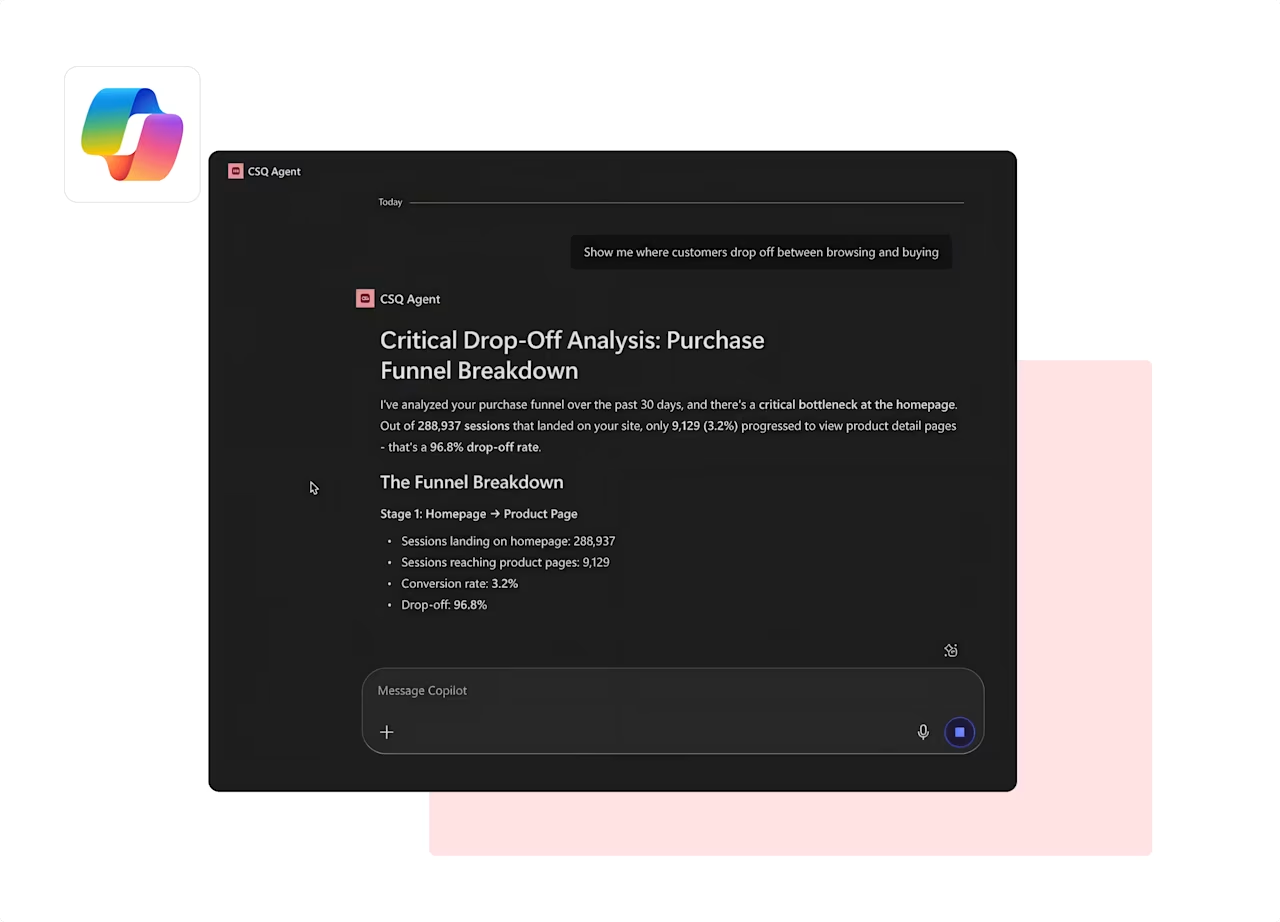
Contentsquare's MCP integration surfaces a complete purchase funnel breakdown inside Microsoft Copilot—no dashboards, no tool-switching required.
A/B testing CRO tools
A/B testing tools let you experiment with different versions of your pages to see which performs better. These tools help you validate hypotheses and make data-driven decisions about site changes.
7. Optimizely
Optimizely is a digital experience platform that lets you create content and run tests and experiments to improve conversions. Besides managing your content, Optimizely lets you run tests at scale, refine customer interactions, and validate new features in a single platform. Optimizely also includes built-in tools specifically designed to grow your ecommerce business.
Best for: Enterprise teams running experimentation programs at scale
Pricing: Enterprise pricing (contact for a quote)
Key features:
A/B and multivariate testing
Feature flagging for controlled rollouts
Server-side experimentation
Personalization engine
Statistical analysis and reporting
💡 Pro tip: filter recordings based on your experiments with the Contentsquare and Optimizely integration.
![[Visual] Contentsquare-Optimizely-partnership Experimentation cycle](http://images.ctfassets.net/gwbpo1m641r7/756HQEAwnfyi0yH9S3KmTU/bd171c6c7a14cf000644ccc8db425243/Contentsquare-Optimizely-partnership__1_.png?w=1280&q=85&fit=scale&fm=avif)
Contentsquare's Optimizely integration gives you context behind your A/B tests so you can see why one version of your product did better than the other
Contentsquare helps you measure user behavior and get feedback from real visitors while you’re A/B testing changes on your site.
For example, you can monitor A/B tests with heatmaps to see how users move, tap, or scroll on different versions of a page. And on-site surveys give you VoC feedback directly from real users: just place a survey on an optimized page to find out what they think of the changes.
8. VWO
VWO (Visual Website Optimizer) is an all-in-one A/B testing and conversion optimization platform that combines experimentation with behavioral insights. It's designed for teams that want testing, heatmaps, and surveys in a single tool.
Best for: Mid-market companies wanting comprehensive testing without enterprise pricing
Pricing: Free trial available; paid plans from $99/month
Key features:
A/B, multivariate, and split URL testing
Visual editor for creating test variations
Built-in heatmaps and session replays
On-site surveys and feedback collection
Bayesian statistics for faster results
💡 Pro tip: VWO tells you whether a page variation converted better. Use Contentsquare's Journey Analysis to see where those converting users came from before they hit the page you tested. Sometimes the variant didn't win because it was better designed. It won because it attracted a different type of visitor, and that's a different optimization problem entirely.
![[Visual] Journey Analysis tool lets you compare how all users and returning shoppers navigate](http://images.ctfassets.net/gwbpo1m641r7/1dUGnsXtV8p4pYBbfAStjR/1e71dc0a937d46f2c9771d8e38e1fe83/journey_analysis_compare_how_all_user_and_returning_shoppers_navigate.svg?w=654&q=85&fit=scale)
Contentsquare's Journey Analysis reveals how different user segments navigate your site, so when a test variant wins, you can see whether it converted better because of the design change or because it attracted a fundamentally different type of visitor
Landing page CRO tools
Landing page tools help you build, test, and optimize pages designed for specific campaigns or conversion goals. They're particularly valuable for paid advertising campaigns where every click costs money.
9. Instapage
Instapage is a landing page builder that focuses on personalization and behavioral targeting. It helps you create unique landing pages tailored to different audiences—use Instapage (which integrates with Contentsquare) to serve dynamic content to your visitors based on who they are and test different elements on your web page to create a tailored customer experience for every audience segment.
Best for: Marketing teams running personalized campaigns across multiple audience segments
Pricing: From $79/month
Key features:
Drag-and-drop landing page builder
Dynamic text replacement for ad personalization
A/B testing for landing page variations
Heatmaps and analytics
AMP landing page support
💡 Pro tip: use Contentsquare's AI-powered Session Replay summaries to get an instant written breakdown of what users did on each landing page variant, where they hesitated, what they skipped, and where they left, without watching a single full replay.
![[Asset] Session replay summaries](http://images.ctfassets.net/gwbpo1m641r7/37Slb23dAdFsAgNItuUNPc/5ad533ecdc801e082aeef8bfaca324ce/sessionreplaysummary.webp?w=1280&q=85&fit=scale&fm=avif)
Contentsquare's AI summarizes every session automatically, surfacing exactly where users hesitated, what they skipped, and where they left.
10. Unbounce
Unbounce is a landing page platform known for its Smart Traffic feature, which uses AI to automatically route users to the page variant most likely to convert them. It's particularly effective for teams running paid campaigns who want to maximize return on ad spend.
Best for: Marketers running paid campaigns who want AI-powered optimization
Pricing: From $74/month
Key features:
Drag-and-drop page builder with 100+ templates
Smart Traffic AI that routes users to best-performing variants
A/B testing without coding
Pop-ups and sticky bars
Dynamic text replacement for PPC campaigns
💡 Pro tip: paid traffic is expensive. Use Contentsquare's ecommerce insights to see exactly how product page visitors behave before they add to cart or abandon, which images they engage with, which descriptions they read, and which elements they skip entirely.

Contentsquare's ecommerce dashboard shows category-level add to cart rates, conversion, and revenue in one view
Lead capture and feedback CRO tools
Lead capture tools help you convert users who aren't ready to buy into contacts you can nurture over time. These tools are essential because most users won't convert on their first visit.
11. HubSpot
HubSpot is a CRM platform that connects data, teams, and customers to help you grow your business. With its Marketing Hub, HubSpot provides marketing automations to help you convert leads into customers. Capture users' contact details with forms and dedicated landing pages to later convert abandoning users.
Best for: Teams wanting integrated CRM and marketing automation in one platform
Pricing: Free CRM; Marketing Hub from $45/month
Key features:
Forms and pop-up forms for lead capture
Landing page builder
Email marketing and automation workflows
Lead scoring and nurturing
CRM integration for tracking the full customer journey
🏆 Real world example: tourism giant Center Parcs lacked a data-driven approach to refine their customer journey ahead of a major site redesign. Using Contentsquare, they identified exactly where friction was hiding and fixed it. The results spoke for themselves:
+46% increase in mobile conversion rate
+5% increase in overall conversions
+$22.5 million in additional annual revenue
How they got there: Heatmaps revealed that visitors were heavily interacting with the 'Number of Rooms' filter, a critical step in the booking journey, but it was buried among too many other options. Journey Analysis and Session Replay then informed a full site redesign built around actual customer behavior rather than internal assumptions. The team repositioned the filter, added one-click room tabs, and removed friction at every step of the booking flow.
![[Visual] Experience Analytics - AB Test Session Replay](http://images.ctfassets.net/gwbpo1m641r7/6B0G5JrPHs7GYx3UTU4sm9/dd0a6aa32cad72ad6a6b087dcd21e816/Experience_Analytics_-_AB_Test.png?w=953&q=85&fit=scale&fm=avif)
Contentsquare's Session Replay in action
12. HelloBar
HelloBar is a lead capture software offering a variety of pop-ups intended to convert your site users into leads, subscribers, and buyers. HelloBar provides a high level of personalization, from the type of pop-ups (bars, modals, alerts, sliders, and page takeovers) available on their free plan to their styling. It also comes with built-in tracking and analytics for you to optimize your campaigns.
Best for: Quick implementation of lead capture without developer resources
Pricing: Free plan available; paid plans from $29/month
Key features:
Multiple pop-up formats (bars, modals, sliders, page takeovers)
Exit-intent targeting
A/B testing for pop-up variations
Targeting rules based on traffic source, device, and behavior
Integration with major email marketing platforms
How to use CRO tools effectively
After going through this list of CRO tools, it might seem odd what we're about to say, but the truth is: CRO tools aren't just for increasing final conversion rates.
A lot happens before a visitor converts—it's what's known as the customer journey—and if you use CRO tools only to increase some numbers on a quarterly report, you're missing an important piece of the puzzle: the people behind the conversions; your customers. A user-centric approach to CRO focuses on understanding the:
Drivers that bring people to your website
Barriers that make them leave (and prevent them from converting)
Hooks that convince them to convert so you can give your users the best experience possible on your site
Different user segments will have different drivers, barriers, and hooks. A first-time visitor and a returning customer land on the same page with completely different intentions. The teams that improve conversion rates fastest are the ones that stop optimizing for the average user and start segmenting their analysis to understand what each group actually needs.
When you understand what persuades users to act, you can use on-site surveys to gather direct feedback about what's working. This qualitative insight complements the quantitative data from your analytics and behavior tools.
💪 Learn how: create a 3-step, user-centric CRO plan to improve your conversion rates using the tools we mentioned above and a customer-first mindset.
FAQs about CRO tools
Conversion rate optimization (CRO) is the process of increasing the number of users who perform a desired action on your website. A desired action could include purchasing a product, signing up for a service, completing a form, or clicking a link.
![[Author] Madalina Pandrea](http://images.ctfassets.net/gwbpo1m641r7/1CsEcp2v6jB6JAqrI9HDBa/76e37b242f67b2f063d657169afc559d/image.png?w=1274&q=85&fit=scale&fm=avif)