![[visual] Business Meeting at Coffee Shop with Laptop](http://images.ctfassets.net/gwbpo1m641r7/2acLIU3k54ws7qzuo6gTNU/24e09613f74bab495fa1ae7270ed689b/Business_Meeting_at_Coffee_Shop_with_Laptop_and_Drinks.jpeg?w=1280&q=85&fit=scale&fm=avif)
Users are constantly telling you what they think of your product—you just might not be listening in the right places.
Some customers leave support tickets. Others abandon a task without explanation. Some will happily complete a survey, while others reveal their frustrations through their behavior rather than their words. The challenge isn't getting feedback. It's knowing how to collect it, when to ask for it, and how to turn it into something useful.
That's why successful teams use multiple feedback methods rather than relying on a single survey or feedback form. Different situations call for different approaches, and each method uncovers a different piece of the user experience.
In this guide, you'll learn 9 ways to collect user feedback, when to use each method, and how to gather insights that lead to meaningful improvements.
Key takeaways
User feedback falls into 3 categories (direct, indirect, and inferred), and the best strategies combine all 3 for a complete picture
Match your feedback method to the customer journey stage, using widgets for first impressions and detailed surveys for post-purchase insights
Collecting feedback is only half the work; analyzing patterns and acting on insights drives real business improvements
Track metrics like NPS®, CSAT, and CES to measure feedback impact and demonstrate ROI
User feedback tools comparison
Choosing the right tools depends on your feedback goals, budget, and existing tech stack. Here's how popular options compare:
Tool | Best for | Key features | Pricing tier |
|---|---|---|---|
1. Contentsquare | Integrated behavioral + feedback data | Surveys, feedback widgets, session replay, heatmaps | Free to Enterprise |
2. SurveyMonkey | Standalone surveys | Templates, logic branching, analytics | Free to Enterprise |
3. Typeform | Conversational surveys | Interactive forms, integrations | Free to Business |
4. Qualtrics | Enterprise research | Advanced analytics, experience management | Enterprise |
5. Usabilla | Website feedback | Visual feedback, targeted surveys | Mid-market |
6. UserTesting | Moderated user testing | Video recordings, panel recruitment | Enterprise |
7. Maze | Unmoderated testing | Prototype testing, analytics | Free to Enterprise |
8. Medallia | Enterprise VoC | Omnichannel feedback, AI analysis | Enterprise |
9. Delighted | NPS® and CSAT | Simple setup, integrations | Free to Premium |
10. Intercom | Support-based feedback | Chat, surveys, product tours | Starter to Enterprise |
3 types of user feedback you need to understand
Before diving into specific collection methods, it helps to understand the 3 main categories of user feedback. Each type reveals different insights, and the most effective feedback strategies combine all 3.
Direct feedback
Direct feedback is what users intentionally share with you. This includes survey responses, reviews, support tickets, and feedback form submissions. It's explicit and often detailed, but it only captures what users choose to tell you, which may not reflect their full experience.
Indirect feedback
Indirect feedback comes from observing what users say about you in spaces you don't control. Social media mentions, community forum discussions, and third-party review sites all fall into this category. This feedback is often more candid because users aren't speaking directly to you.
Inferred feedback
Inferred feedback is what you learn by watching user behavior. When someone rage-clicks a button, abandons their cart, or repeatedly returns to the same help article, they're telling you something without saying a word. Behavioral analytics, heatmaps, and session recordings help you capture these signals.
9 methods to collect user feedback
Feedback collection isn't one size fits all: adapting your approach to suit the particular customer or situation gives you the most impactful and actionable insights.
There are a number of ways to collect user feedback, depending on the type of information you're looking for. Let's look at the different methods of user feedback collection your business could employ.
1. Website feedback widgets
Applying a feedback widget across your site lets you gather in-the-moment feedback from your visitors.
Widgets act as unobtrusive portals for customers to share their blockers, praise, or suggestions as they explore and interact with your site.
Tailor your widget question copy to suit the page it's featured on for virtually endless opportunities to gather impressions of your website or product experience at every step of your customer's journey.
When to use widgets: widgets work best for capturing first impressions, gathering quick reactions to new features, and providing an always-on channel for users who want to share feedback spontaneously.
Tap into the truth with Contentsquare Surveys
Contentsquare Surveys lets you collect user opinions to quickly get to the heart of what your customers think with a feedback widget or button.
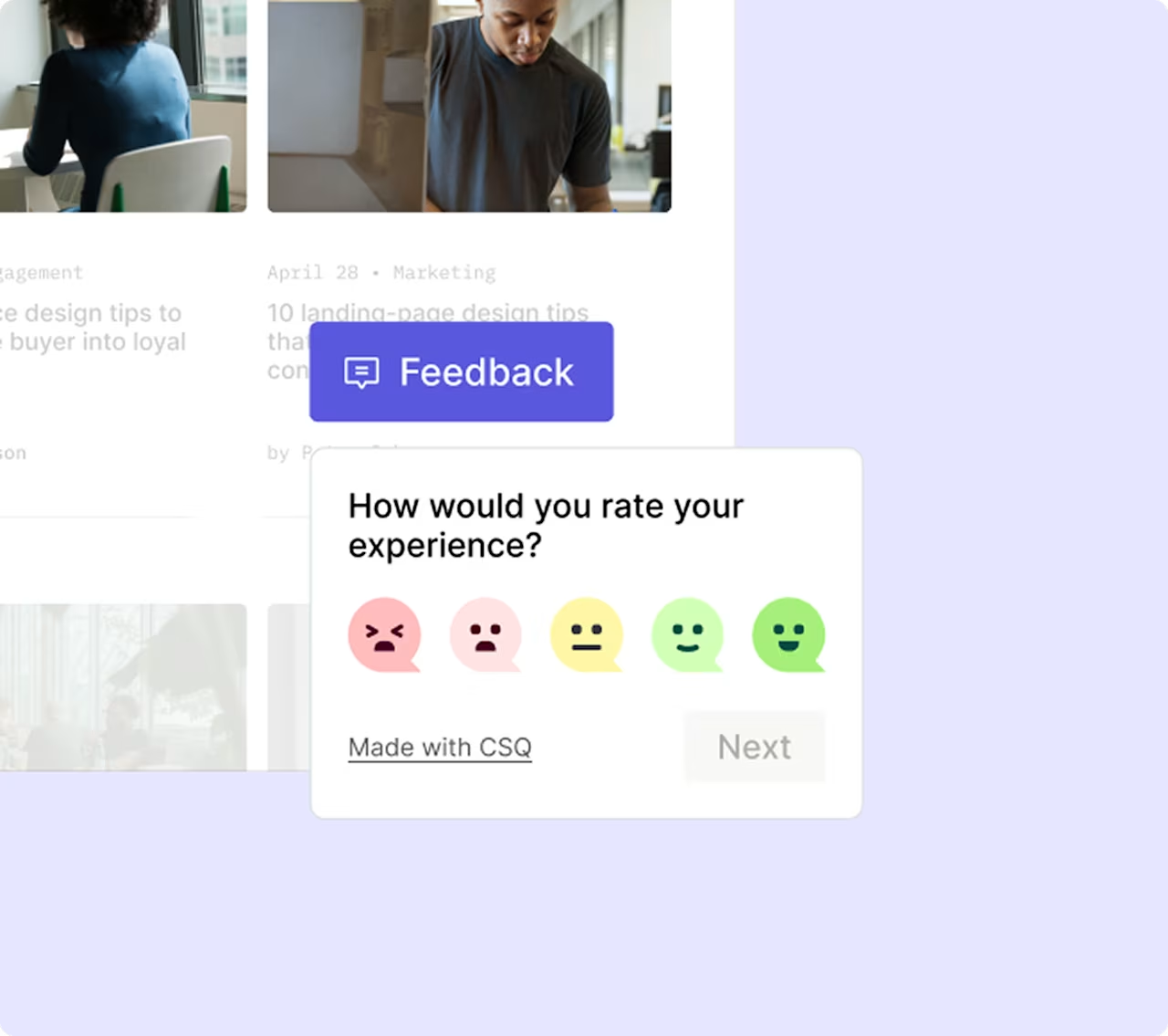
Feedback widgets work on any page you need a second (or third, or fourth) opinion on
Adapt the widget to suit your website interface and provide a seamless experience for your customers:
Place the widget in different sections of a given page
Change up the reaction style to your preferred choice of emoticon or star-rating
Adjust the color and positioning to match your style
Hide the Contentsquare branding so it fits right in
Even better? Our widget lets users highlight parts of your page to contextualize their feedback, leave comments, and provide their email addresses for follow-ups.
![[Visual] Capabilities - Surveys - Feature - Customization](http://images.ctfassets.net/gwbpo1m641r7/11lACJqVDlBUFvl06ofMGx/27c1880af0b428a98d7beba191d9d838/Easy_customization.png?w=1280&q=85&fit=scale&fm=avif)
2. On-site surveys
Catching feedback with quick-react polls or widgets is great for getting a user's immediate impression, but sometimes, you'll want more context.
On-site surveys appear within your website experience, triggered by specific actions or timing. They're ideal for gathering feedback while the experience is still fresh.
Tailor and adjust your surveys to a variety of different use cases: ask product-specific questions, get a rating of your performance, and gather a mix of both quantitative and qualitative feedback for a better-rounded impression of the overall user experience (UX).
Types of on-site surveys to consider:
Exit-intent surveys trigger when a user moves to leave your site, capturing why they're abandoning
Post-action surveys appear after key interactions like completing a purchase or signing up
Embedded surveys sit within page content for passive feedback collection
Pro tip: Contentsquare Surveys lets you build and deploy on-site surveys with a range of quick-build templates to capture feedback in almost any scenario.
Gathering responses from customers is simple and intuitive, no matter who they are or how they're interacting with your business.
Contentsquare Surveys has a variety of templates to help you get started in gathering your customer insights
3. Email surveys
Email surveys give customers time and space to provide thoughtful, detailed responses outside the pressure of an active browsing session.
Unlike on-site surveys that capture in-the-moment reactions, email surveys work well for:
Post-purchase feedback sent 3-7 days after delivery, when customers have had time to use your product
Onboarding follow-ups to understand how new users are finding their experience
Periodic check-ins with long-term customers to gauge ongoing satisfaction
The tradeoff is lower response rates compared to on-site methods. Keep email surveys short (under 5 questions) and clearly explain how you'll use the feedback to improve response rates.
![[Visual] Feedback Aer Lingus vs N26](http://images.ctfassets.net/gwbpo1m641r7/3r8XX4CtWHG3J7qZcdLMZY/5355fbe81e88881ffd5b477e55b12204/image3.jpg?w=946&q=85&fit=scale&fm=avif)
Aer Lingus' short and simple poll gathers on-the-spot feedback, while N26 sends email surveys to collect more detailed responses about their user experience
4. NPS®, CSAT, and CES surveys
3 standardized survey types have become industry standards for measuring customer satisfaction and loyalty. Each serves a different purpose:
Net Promoter Score® (NPS®) measures loyalty by asking "How likely are you to recommend us?" on a 0-10 scale. Use NPS® to track overall brand health over time.
Customer Satisfaction Score (CSAT) measures satisfaction with a specific interaction, typically on a 1-5 scale. Use CSAT immediately after support interactions, purchases, or feature usage.
Customer Effort Score (CES) measures how easy it was to complete a task. Use CES after checkout flows, support resolutions, or onboarding to identify friction points.
![[Visual] Surveys - Blue Scale - Grey Background](http://images.ctfassets.net/gwbpo1m641r7/EjdAhCg604qc4ALm2l04R/248d1dfcae429a59ad21ca5546bb7a52/Placeholder__5_.png?w=1280&q=85&fit=scale&fm=avif)
An example of a Contentsquare Customer Effort Score (CES) survey
When to use each:
Metric | Best timing | What it reveals |
|---|---|---|
NPS | Quarterly or after major milestones | Overall loyalty and likelihood to recommend |
CSAT | Immediately after specific interactions | Satisfaction with individual touchpoints |
CES | After task completion | Friction and usability issues |
5. User interviews and focus groups
When exploring your options for collecting user feedback, look for opportunities to get more personal with your customers. User research methods like focus groups or interviews are ideal for open conversation.
These methods are especially valuable for younger businesses seeking a deeper understanding of their customers as they develop their product and learn more about their market.
Choose interviews over surveys when:
You need to understand the "why" behind user behavior, not just the "what"
You're exploring a new problem space and don't yet know the right questions to ask
You want to observe emotional reactions and body language
You're testing early concepts that need real-time clarification
6. User testing
Conducting user testing at early stages of product development provides crucial insights. When testing a new update to your site, preemptively seek feedback before general release to the wider public to avoid time-consuming, expensive website errors, further down the line, and ensure the final product is the best it can be.
Moderated vs. unmoderated testing:
Moderated testing involves a facilitator guiding users through tasks in real-time. It's more resource-intensive but allows for follow-up questions and deeper exploration.
Unmoderated testing lets users complete tasks independently while recording their screen and voice. It's faster and cheaper but provides less depth.
Both approaches help you catch usability issues before they affect your broader user base.
💡 Pro tip: use Contentsquare Surveys' concept testing template to run preference tests before a single line of code gets written. Show users 2 design variants — a new homepage layout, a redesigned CTA, a different onboarding flow — and collect votes alongside open-ended responses explaining why. You get quantitative signal on which version wins and qualitative context on what's driving the preference, without the overhead of setting up a full moderated testing session.
![[Visual] concept-testing](http://images.ctfassets.net/gwbpo1m641r7/6TbcEemEBx5NSrBND4q3JO/27fbc078fee962c2a508c4c412b28dad/concept-testing.png?w=787&q=85&fit=scale&fm=avif)
Contentsquare's concept testing survey template lets users vote between design variants before launch — so the version that goes live is the one your audience actually prefers
7. Social media and review monitoring
Social media and review platforms remove the barrier between you and your customers, opening the door to honest interactions and spontaneous communication.
They're also a great source of social proof for new or potential customers looking to get a sense of who your brand is and whether you're worth their time and money.
Staying on top of your social media mentions and regularly checking on review collection platforms gives you a constant source of easily accessible feedback from a broad range of users:
Receive negative feedback or comments expressing an issue? Go straight to the source and find out how you can help.
Receive some positive feedback or find yourself tagged in a post praising your product? Let them know you're paying attention and appreciate their support.
The beauty of social media and review platforms is that they're low-effort, always-on sources of customer feedback. They rack up a broad range of responses, and offer a means to communicate with your customers on the spot.
![[Visual] Zapier on X](http://images.ctfassets.net/gwbpo1m641r7/6jHeOWwsUuddiSRIH4taO/eb5c420ddf698fd19c2aafe5626615ce/image6__1_.png?w=736&q=85&fit=scale&fm=avif)
Zapier interacts with customers on X
💡Pro tip: set up alerts for your brand name, product names, and common misspellings to catch mentions you might otherwise miss.
8. Customer support conversations
Your support team talks to customers every day, making them a goldmine of feedback insights. Support tickets, live chat transcripts, and call recordings reveal recurring pain points, feature requests, and usability issues.
To turn support conversations into actionable feedback:
Tag and categorize tickets by issue type to identify patterns
Track frequently asked questions to spot documentation or UX gaps
Review escalated issues to understand your most frustrated users
Share insights cross-functionally so product and design teams hear the voice of the customer
💡 Pro tip: Use Contentsquare's Conversation Intelligence to analyze support conversations at scale without manually tagging a single ticket. It automatically groups chat, email, and voice interactions by contact driver, topic, and sentiment — surfacing which issues are recurring, which are getting worse over time, and which customer segments are most affected. Instead of relying on your support team to flag patterns, Conversation Intelligence finds them for you and connects them to the behavioral data on your site.
![[Visual] CI Use Case - Reduce cost per contact](http://images.ctfassets.net/gwbpo1m641r7/5p0ARN0Umb9k6M69sRhHFz/4d3606d061ceca0f14083d40a023f104/CI_Use_Case_-_Reduce_cost_per_contact.avif?w=1280&q=85&fit=scale&fm=avif)
Contentsquare's Conversation Intelligence groups support interactions by contact driver and surfaces the most common questions automatically — no manual ticket tagging needed.
9. Behavioral analytics and session replay
Sometimes users can't articulate what's wrong, or they don't bother to tell you. Behavioral analytics and session replay tools let you see what users actually do, not just what they say.
These tools capture inferred feedback by revealing:
Where users hesitate, scroll back, or rage-click
Which form fields cause abandonment
How users navigate compared to your intended flow
Where errors or slow load times create friction
💡 Pro tip: use Contentsquare Session Replay filtered by frustration signals — rage clicks, dead clicks, or exit conditions — to go straight to the sessions where something went wrong, without watching hundreds of recordings. Then use Sense AI summaries to identify what those sessions have in common: same page, same element, same point in the journey. That combination turns behavioral analytics from an exploratory exercise into a targeted investigation. If your survey data flags a problem area, replays give you the visual evidence to confirm it and show stakeholders exactly what users are experiencing.
![[Visual] Predictive personalization - Sense frustration](http://images.ctfassets.net/gwbpo1m641r7/7CJd1Lbsu5D6mU1Eeyv9TH/f1127c713c342865da1d0ca606b620d9/Session_replays_event_stream.png?w=1280&q=85&fit=scale&fm=avif)
Contentsquare's Session Replay ranks sessions by frustration score while Sense identifies what went wrong — cutting the time between spotting a problem and understanding it
Where and when to collect feedback in the customer journey
Now that we've discussed how to go about gathering feedback, you're probably keen to dive into your own user feedback insights.
Here's how to get the most out of your user feedback tools of choice.
Determine your feedback goals
Before deciding on your tools and tactics, consider what you're trying to achieve. Different feedback collection methods yield different types of user feedback, so define what you want to know and use this to inform your approach.
For example:
Do you want a general pulse check of how people feel about your product?
Are you trying to uncover issues that stop customers from converting?
Would you like to understand which aspects of your website UX are hitting the mark for your visitors?
💡 Pro tip: when targeting new customers in the early stages of their relationship with your product, asking open-ended questions (questions that can't be answered with a 'yes' or 'no') via a website widget is a great way to get their first impressions.
Open questions you could ask at this point include:
"How are you finding your experience with us so far?"
"Is there anything we can improve about our website?"
"How can we help you find what you're looking for?"
![[Visual] Asking open-ended questions can give you greater insights into your customers’ experiences.](http://images.ctfassets.net/gwbpo1m641r7/5GsHfWozKsLuI8oWevVmgA/aa143ae54e08789edbfec451c9a8d8bc/unnamed__2_.png?w=512&q=85&fit=scale&fm=avif)
An example of a Contentsquare survey asking an open-ended question
Match feedback methods to journey stages
Depending on where your customer is in their journey, you'll want to take a different approach to how you seek their feedback:
Journey stage | Recommended methods | What you'll learn |
|---|---|---|
Awareness | Social monitoring, website widgets | First impressions, brand perception |
Consideration | On-site surveys, user testing | Content clarity, comparison factors |
Purchase | Exit-intent surveys, CES | Checkout friction, abandonment reasons |
Post-purchase | Email surveys, NPS, CSAT | Satisfaction, loyalty, improvement areas |
Retention | Interviews, support analysis | Long-term needs, churn risks |
Both perspectives are equally valid and important for understanding your customers' needs and frustrations.
Applying different tools and formats to the right circumstances also means you address a range of different users and are more likely to tap into your customers' feelings at the optimal time.
💡 Pro tip: use Contentsquare's Sense-powered Surveys to go from collecting feedback to understanding it without manual analysis. Once your surveys are running, Sense automatically summarizes responses, identifies recurring themes, and surfaces sentiment patterns across your respondents — so instead of reading through hundreds of open-ended answers, you see what your customers are feeling and what's driving it, grouped and ready to act on.
![[Visual] NPS rate your purchase experience](http://images.ctfassets.net/gwbpo1m641r7/4AVXabaOWff7xM1AmEQrrr/49f68f095628dd23e6afc50515f8e9f9/Screenshot_2024-11-04_at_22.01.07.png?w=1180&q=85&fit=scale&fm=avif)
Contentsquare's Sense tells you when your customers' mood shifts — and what to do about it — before you even think to check.
Some examples of how you might do this:
If a customer has just landed on your homepage, a widget is a simple, low-commitment way to gather first impressions and make sure new customers feel empowered to explore your website
If a customer abandons their cart, trigger a churn survey to find out whether your customer ran into an issue at this crucial point in their journey, be it pricing, a bug, or something else entirely
If a customer leaves your site, trigger a survey to ask why they're leaving, what could have made them stay, and how you can get them to return in the future
💡 Pro tip: if you want to incorporate a user feedback tool on your site, be sure to prioritize your users. People are more likely to interact with your business when sharing feedback feels like a natural, no-fuss part of the user experience.
![[Visual] template gallery](http://images.ctfassets.net/gwbpo1m641r7/2sqJUdR2i7BpzrmWLQPKuW/8c91deaea51d7d7e67233a219472f537/template_gallery.png?w=1280&q=85&fit=scale&fm=avif)
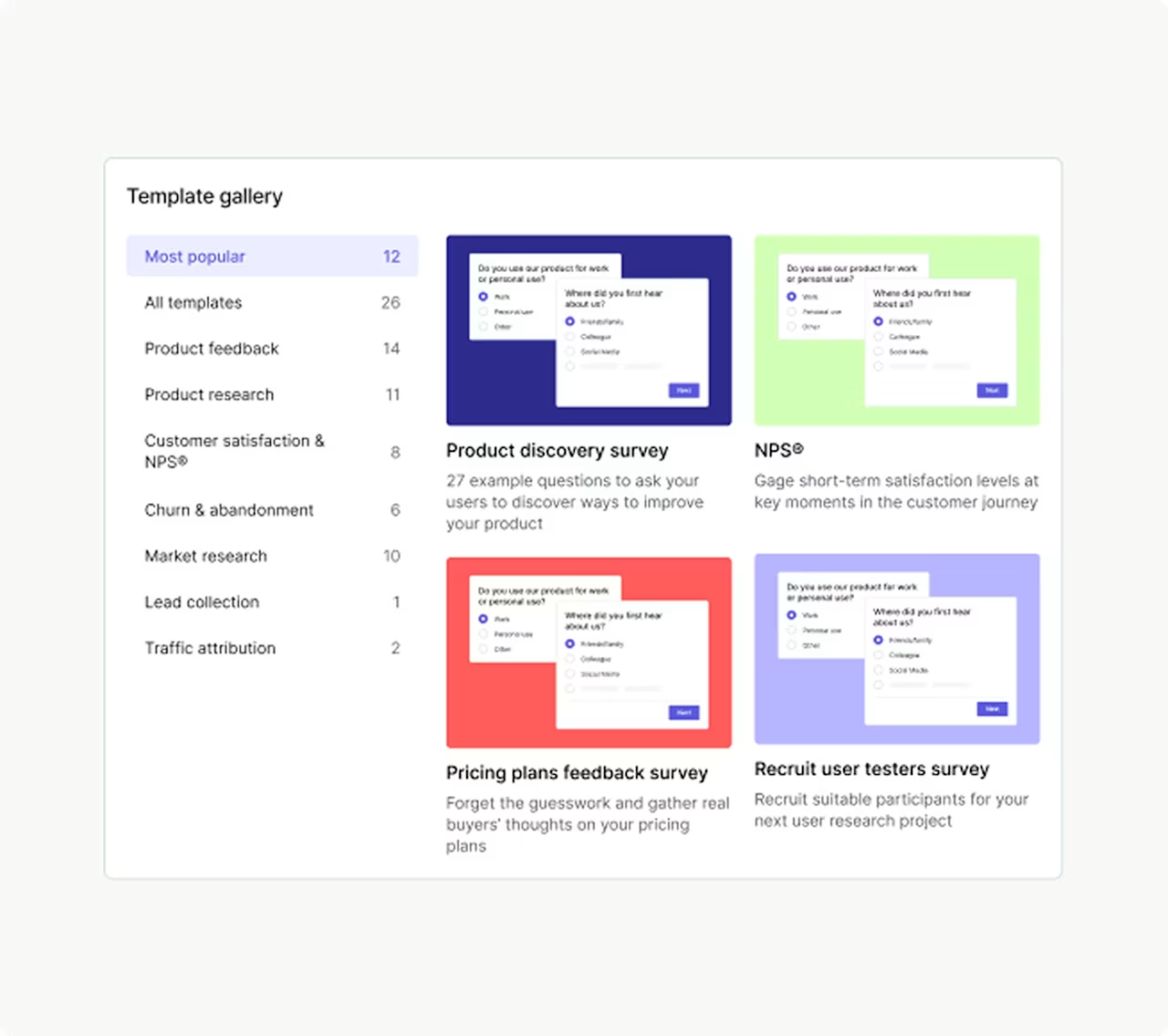
Contentsquare's template gallery has a ready-made post-purchase survey template so you can start collecting feedback from customers immediately
Top pages to prioritize for feedback collection
From initial arrival to your site right through to the point of conversion, and all the activity that happens in between, there are many opportunities to learn from and make a connection with your customers.
These are some of the most essential pages to collect feedback on:
Specific points in the flow: asking users for feedback on checkout or signup pages ensures you're not overlooking any blockers or pain points at these crucial points
New pages: getting users’ opinions on a brand-new or redesigned page is a great way to find out if there's any potential for further usability optimizations
High-traffic pages: the greater the number of people passing by, the better your opportunity to collect a wider range of insightful, actionable feedback
Poor-performing pages: adding feedback on the pages that get a little less love lets you spot bugs, uncover issues, and check in with your customers about website problems you might otherwise miss
Post-purchase: your customer has already converted at this point, which is great, but it's also the ideal time to learn what they enjoyed about their experience so you can recreate it for others
Customer service chats: seeking customer feedback when they're already interacting with you helps you catch your users in the moment and compel them to share their honest feedback
How eShopWorld used feedback to gather valuable conversion insights
Noelle Smith, head of customer experience at ecommerce company eShopWorld, relies on feedback widgets to gather quick insights from customers.
By installing the widget on their checkout page, the team spots fluctuations or changes in performance and immediately goes to the source of potential UX issues.
Noelle looks for patterns in the user feedback as a starting point for deeper investigation with supporting tools (like Google Analytics and session replay tools) to get a better understanding of what's happening.
Noelle and her team then analyze the performance of specific pages, get to the root of any frustrations their customers encounter, and apply their learnings to optimize conversions, all thanks to the humble widget.
Best practices for collecting user feedback
Follow these principles to maximize the value of your feedback program:
Keep it short: respect your users' time. Surveys under 5 questions get significantly higher completion rates.
Time it right: trigger feedback requests at moments when users can provide meaningful input, not when they're trying to complete a task.
Close the loop: let users know their feedback led to changes. This builds trust and encourages future participation.
Combine methods: use multiple feedback types to get the complete picture. Direct feedback tells you what users think; behavioral data shows you what they do.
Act on what you learn: feedback without action erodes trust. Prioritize quick wins to demonstrate responsiveness.
Segment your analysis: different user groups have different needs. Analyze feedback by customer type, journey stage, or behavior pattern.
Make it easy: remove friction from the feedback process. Pre-fill known information and offer multiple response formats.
Turn feedback into action
Your website or product has been created to serve real people, and nothing compares to the insights you'll receive from those very people. Cutting out the guesswork and building that direct communication with your customers offers a deeper human connection that's invaluable for any business.
Even better, using customer feedback tools to their full potential brings you an unlimited source of inspiration for needle-moving optimizations.
The most successful teams don't just collect feedback—they build systems to analyze it, prioritize it, and act on it. Start with one or 2 methods that match your current needs, then expand as you build your feedback muscle.-
FAQs about collecting user feedback
User feedback is feedback provided by your customers or users on your product, website, or overall customer experience.
![[Visual] Contentsquare's Content Team](http://images.ctfassets.net/gwbpo1m641r7/3IVEUbRzFIoC9mf5EJ2qHY/f25ccd2131dfd63f5c63b5b92cc4ba20/Copy_of_Copy_of_BLOG-icp-8117438.jpeg?w=946&q=85&fit=scale&fm=avif)
![[Guide] [Visual] [Usability testing] Questions](http://images.ctfassets.net/gwbpo1m641r7/7bFcu9tjIk4s4ls34lQego/e5ab4749d3a293d67093a40eff2c78c5/Copy_of_BLOG-icp-8117438.jpeg?w=624&q=85&fit=scale&fm=avif)